Message Queues Compared: Kafka vs RabbitMQ vs SQS vs Pulsar
I was in an architecture meeting last month when someone asked the question that always starts a debate: “So, which message queue should we…
Message Queues Compared: Kafka vs RabbitMQ vs SQS vs Pulsar

I was in an architecture meeting last month when someone asked the question that always starts a debate: “So, which message queue should we use?”
What followed was forty-five minutes of passionate opinions. The Kafka advocate talked about throughput and event streaming. The RabbitMQ defender emphasized flexibility and routing. Someone mentioned SQS because “we’re already on AWS.” And one engineer quietly suggested Pulsar, which nobody else had heard of.
By the end, we hadn’t decided anything — but I’d learned something important. These aren’t interchangeable tools. They’re built on fundamentally different philosophies, optimized for different problems. Choosing between them isn’t about which is “best.” It’s about which fits your actual needs.
Here’s what I’ve learned from watching teams make this decision — and sometimes regret it.
If you’re new to event-driven patterns, you might want to start with Event-Driven Architecture: When to Use It and When to Avoid It before diving into the messaging infrastructure choices.
First, Let’s Clear Up the Confusion
Before we compare anything, we need to acknowledge that “message queue” is a fuzzy term that covers very different things.
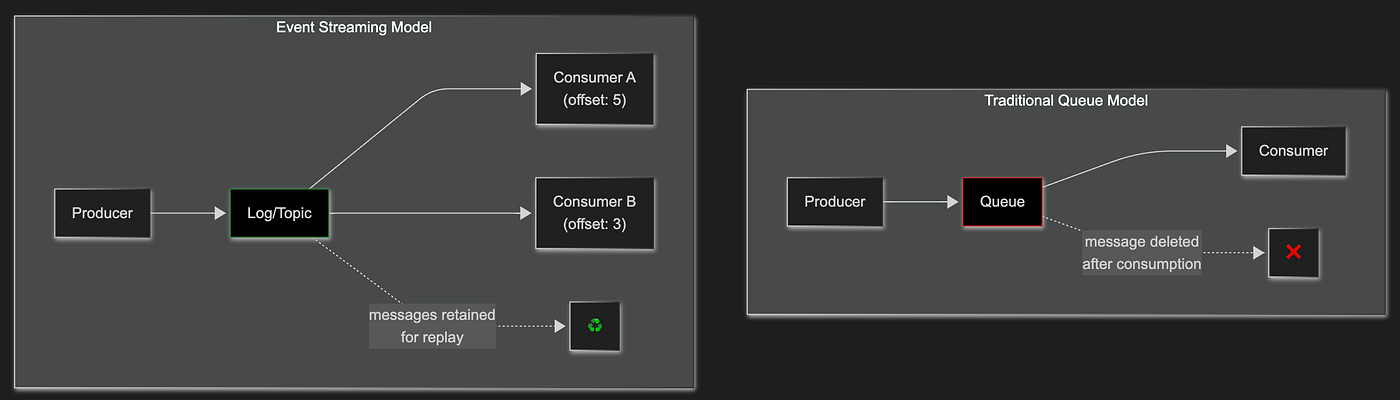
Traditional Message Queues (like RabbitMQ and SQS) are designed around the idea of work distribution. A producer sends a message, a consumer receives it, the message is deleted. It’s a queue in the classic computer science sense — first in, first out, with messages consumed and removed.
Event Streaming Platforms (like Kafka and Pulsar) are fundamentally different. They’re distributed commit logs where messages are persisted and can be read multiple times by multiple consumers. The message isn’t “consumed” — it’s read from a position in the log.
This distinction matters enormously. If you need traditional task queuing, Kafka is overkill. If you need event streaming with replay capability, RabbitMQ will fight you every step of the way.
Apache Kafka: The Event Streaming Giant
Kafka was born at LinkedIn to handle their massive data pipeline needs. It’s now the de facto standard for event streaming, used by companies processing trillions of messages daily.
What Kafka Actually Is
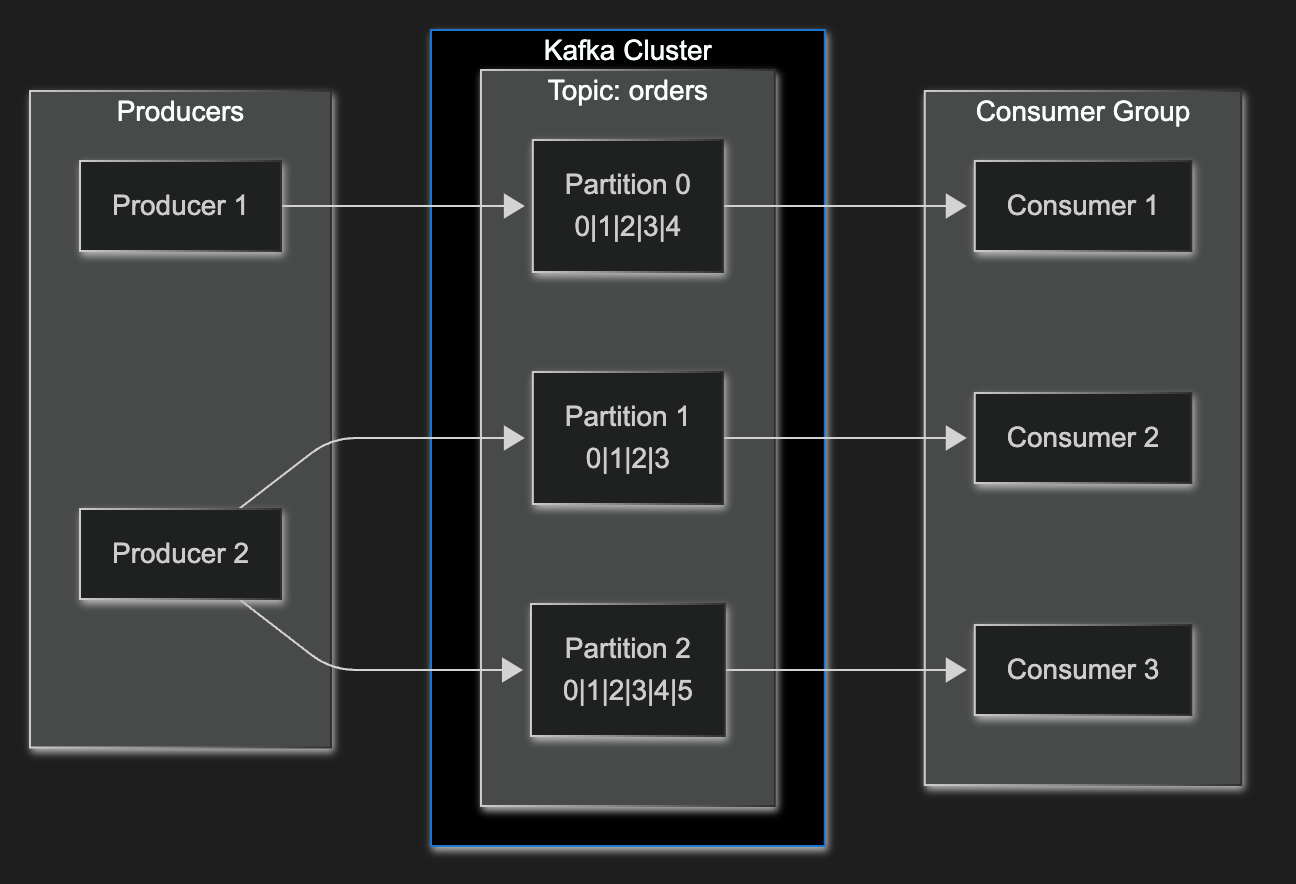
At its core, Kafka is a distributed commit log. Messages are written to partitioned topics and retained for a configurable period (or forever). Consumers read from these logs at their own pace, tracking their position with offsets.
The Apache Kafka documentation describes it as “a distributed streaming platform” with three key capabilities: publish-subscribe messaging, fault-tolerant storage, and stream processing.
Where Kafka Shines
High-throughput event streaming. Kafka can handle millions of messages per second with proper configuration. LinkedIn processes over 7 trillion messages per day through Kafka. If you’re building a system where throughput is measured in hundreds of thousands of messages per second, Kafka is built for this.
Event replay and reprocessing. Because Kafka retains messages, you can replay events. New consumers can read from the beginning. If you deploy a buggy consumer that corrupts data, you can fix the bug and reprocess. This is genuinely powerful for event-driven architectures.
Stream processing. Kafka Streams and ksqlDB let you process events in real-time — aggregations, joins, windowed computations. If you need to compute rolling averages or detect patterns across event streams, Kafka has native support.
Decoupling at scale. Multiple consumer groups can independently read the same topic. Your analytics pipeline, your search indexer, and your notification service can all consume the same events without coordination.
Where Kafka Struggles
Operational complexity. Kafka requires ZooKeeper (or the newer KRaft mode), careful partition planning, and significant operational expertise. I’ve seen teams spend weeks tuning Kafka clusters. The learning curve is steep.
Latency for simple use cases. Kafka optimizes for throughput, not latency. For simple request-response patterns or low-volume task queues, Kafka’s batching and replication add unnecessary overhead.
Message routing. Kafka’s routing is primitive — you can route to partitions within a topic, but complex routing logic (like RabbitMQ’s exchanges) doesn’t exist. If you need content-based routing, you’ll build it yourself.
Cost at small scale. Running a proper Kafka cluster (minimum 3 brokers, ZooKeeper ensemble) is expensive for small workloads. Managed services like Confluent Cloud or Amazon MSK help, but they’re not cheap.
When to Choose Kafka
- You’re processing hundreds of thousands of messages per second
- You need event replay and reprocessing capabilities
- You’re building event-driven microservices that share event streams
- You need real-time stream processing
- You have the operational expertise (or budget for managed services)
RabbitMQ: The Flexible Workhorse
RabbitMQ has been around since 2007 and remains one of the most popular message brokers. It implements AMQP (Advanced Message Queuing Protocol) and offers incredible flexibility in how messages are routed and consumed.
What RabbitMQ Actually Is
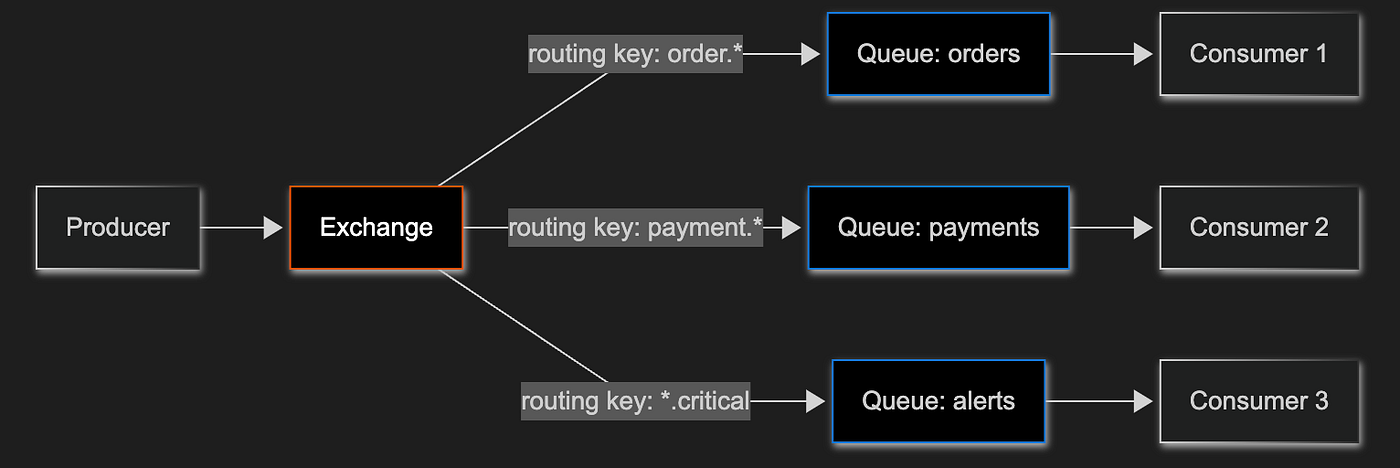
RabbitMQ is a traditional message broker with sophisticated routing capabilities. Messages flow from producers through exchanges, which route them to queues based on bindings and routing keys. Consumers pull from queues, and messages are typically deleted after acknowledgment.
The RabbitMQ documentation emphasizes its role as “the most widely deployed open source message broker” with support for multiple messaging protocols including AMQP 0–9–1, AMQP 1.0, MQTT, and STOMP.
Where RabbitMQ Shines
Flexible routing. RabbitMQ’s exchange types (direct, topic, fanout, headers) enable sophisticated message routing without custom code. Need to route messages based on content? Topic exchanges. Need to broadcast to all consumers? Fanout exchanges. This flexibility is unmatched.
Protocol support. RabbitMQ speaks AMQP, MQTT, STOMP, and HTTP. If you’re integrating with IoT devices (MQTT) or legacy systems (STOMP), RabbitMQ handles it natively.
Operational simplicity (relatively). Compared to Kafka, RabbitMQ is easier to set up and operate. A single node works fine for development and small production workloads. Clustering is straightforward.
Message acknowledgment patterns. RabbitMQ offers fine-grained control over acknowledgments — manual acks, automatic acks, negative acks for requeuing. For task queues where you need to ensure work isn’t lost, this control matters.
Low latency for small messages. For simple point-to-point messaging with low to moderate throughput, RabbitMQ delivers messages with minimal latency.
Where RabbitMQ Struggles
Throughput ceiling. RabbitMQ can handle tens of thousands of messages per second, but it won’t match Kafka’s millions. If you’re building a high-throughput data pipeline, RabbitMQ will become a bottleneck.
No native replay. Once a message is consumed and acknowledged, it’s gone. If you need to reprocess historical messages, you’ll need to build that capability yourself (or use the newer Streams feature, which is now production-ready but represents a different paradigm).
Clustering complexity at scale. While basic clustering is simple, RabbitMQ’s clustering model has limitations. Network partitions can cause split-brain scenarios. Scaling beyond a few nodes requires careful planning.
Memory pressure. RabbitMQ keeps messages in memory for performance. If consumers fall behind and queues grow, memory usage spikes. I’ve seen RabbitMQ nodes crash under memory pressure when queues backed up unexpectedly.
When to Choose RabbitMQ
- You need sophisticated message routing
- You’re building traditional task queues or work distribution systems
- You need protocol flexibility (MQTT, STOMP, AMQP)
- Your throughput is moderate (thousands to tens of thousands per second)
- You want operational simplicity over raw performance
Amazon SQS: The Managed Simplicity
SQS is AWS’s fully managed message queue service. It’s been around since 2006 — one of AWS’s original services — and it’s designed for one thing: reliable, scalable message queuing without operational overhead.
What SQS Actually Is
SQS is a pull-based message queue. Producers send messages, consumers poll for them. Messages are stored redundantly across multiple availability zones. After processing, consumers delete messages explicitly.
AWS describes SQS as offering “a secure, durable, and available hosted queue that lets you integrate and decouple distributed software systems and components.”
SQS comes in two flavors:
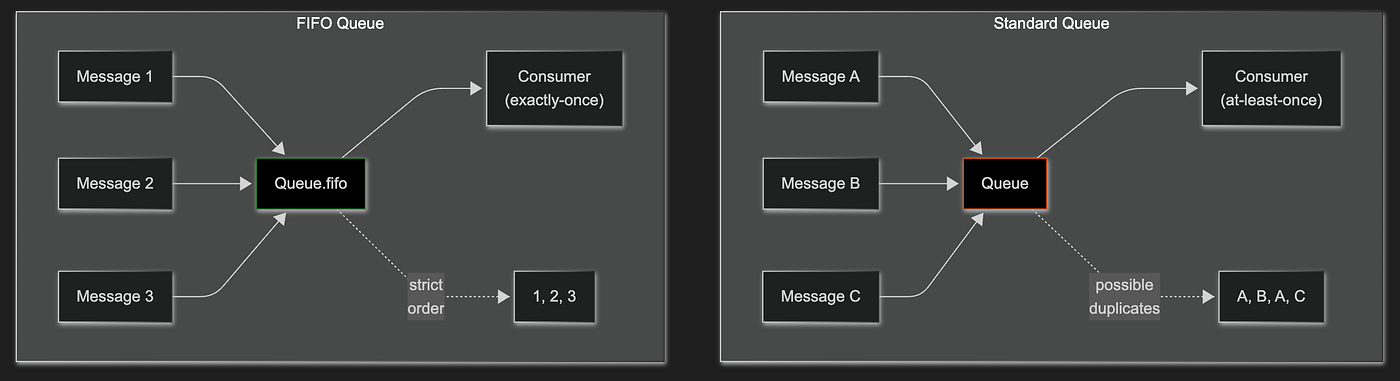
- Standard queues: Nearly unlimited throughput, at-least-once delivery, best-effort ordering
- FIFO queues: Exactly-once processing, strict ordering, with throughput that varies by mode — 3,000 messages per second in standard mode, or up to 70,000 transactions per second (700,000 messages/sec with batching) in high-throughput mode in supported regions
Where SQS Shines
Zero operational overhead. There’s nothing to manage. No clusters, no brokers, no ZooKeeper. You create a queue, send messages, receive messages. AWS handles everything else — scaling, replication, availability.
Virtually unlimited scale. Standard SQS queues scale automatically to handle any throughput. You don’t provision capacity or worry about partitions. It just works.
AWS integration. SQS integrates natively with Lambda, SNS, EventBridge, and other AWS services. Triggering Lambda functions from SQS messages is a few clicks. This integration is genuinely powerful for AWS-native architectures.
Cost-effective for variable workloads. You pay per request, not for provisioned capacity. For bursty workloads or applications with variable traffic, this model is economical.
Reliability. Messages are stored redundantly across multiple AZs. SQS has been running for nearly two decades with remarkable reliability.
Where SQS Struggles
No message replay. Like RabbitMQ, once a message is deleted, it’s gone. SQS is a queue, not a log.
Polling model. SQS requires consumers to poll for messages. Long polling helps, but it’s not as efficient as push-based delivery. For latency-sensitive applications, this adds overhead.
Limited routing. SQS queues are simple — messages go in, messages come out. There’s no exchange-style routing. For complex routing, you’ll combine SQS with SNS (fan-out) or build routing logic in your application.
Vendor lock-in. SQS is AWS-only. If multi-cloud or cloud portability matters, SQS ties you to AWS.
FIFO limitations. FIFO queues in standard mode are capped at 3,000 messages per second with batching (300 without). High-throughput mode raises this significantly — up to 70,000 TPS in some regions — but requires specific configuration and has regional availability limits.
When to Choose SQS
- You’re already on AWS and want minimal operational overhead
- You need reliable task queuing without managing infrastructure
- Your throughput is variable or unpredictable
- You’re building serverless architectures with Lambda
- You don’t need message replay or complex routing
Apache Pulsar: The Unified Platform
Pulsar is the newest entrant, developed at Yahoo and open-sourced in 2016. It attempts to combine the best of both worlds — Kafka’s event streaming with traditional queuing semantics — in a single platform.
What Pulsar Actually Is
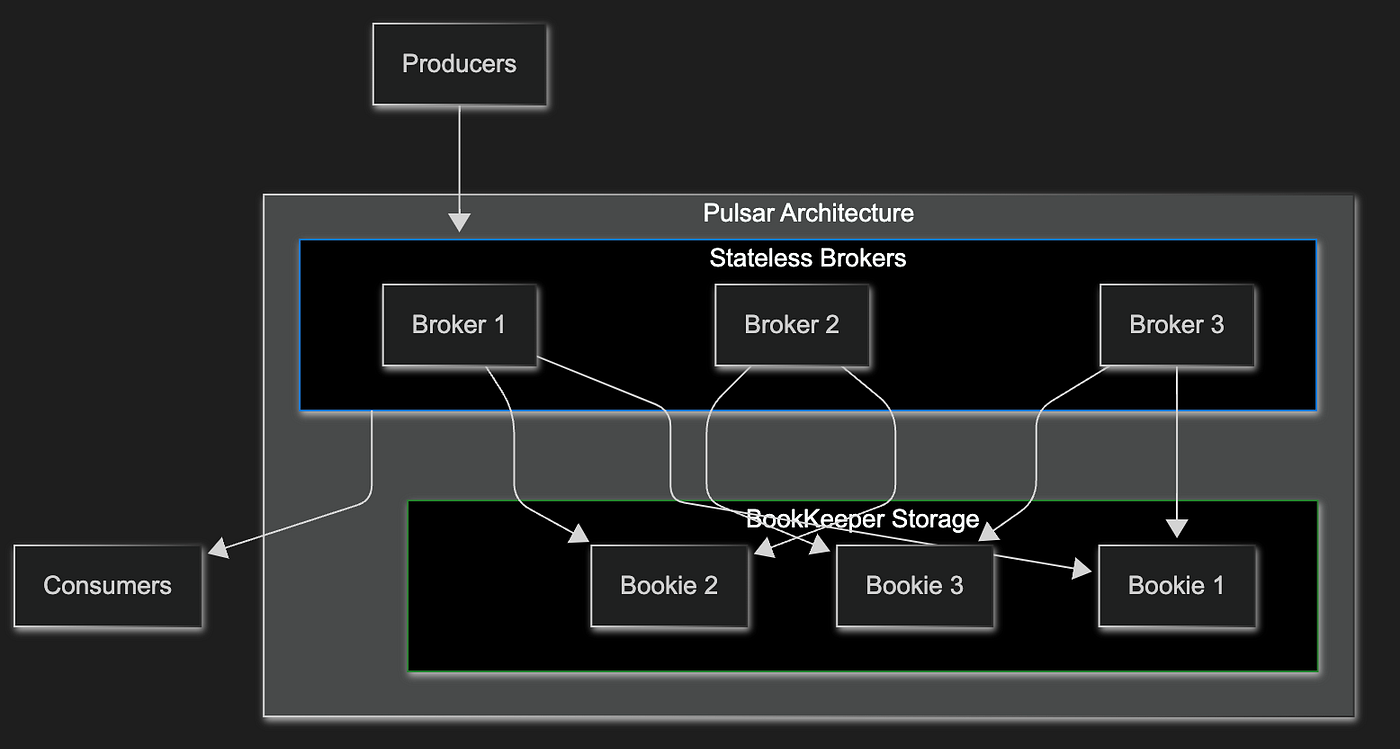
Pulsar separates compute (brokers) from storage (Apache BookKeeper). This architecture enables features that are difficult in Kafka: seamless scaling, multi-tenancy, and geo-replication.
The Pulsar documentation describes it as “a cloud-native, distributed messaging and streaming platform” that supports both queuing and streaming use cases.
Pulsar offers two consumption models:
- Streaming (Exclusive/Failover subscriptions): Kafka-like behavior with ordered consumption
- Queuing (Shared subscriptions): RabbitMQ-like behavior with competing consumers
Where Pulsar Shines
Unified messaging model. Pulsar supports both streaming (like Kafka) and queuing (like RabbitMQ) on the same platform. You can have exclusive subscriptions for ordered processing and shared subscriptions for work distribution — on the same topic.
Multi-tenancy. Pulsar was designed for multi-tenant environments from the start. Namespaces, quotas, and isolation are first-class concepts. For platform teams serving multiple applications, this matters.
Geo-replication. Built-in support for replicating data across data centers. Kafka can do this with MirrorMaker, but Pulsar’s geo-replication is more integrated and easier to configure.
Scalability architecture. Because brokers are stateless and storage is separate, you can scale them independently. Adding broker capacity doesn’t require rebalancing partitions like in Kafka.
Tiered storage. Pulsar can automatically offload older data to cheaper storage (S3, GCS) while keeping recent data on fast SSDs. For long retention periods, this significantly reduces costs.
Where Pulsar Struggles
Smaller ecosystem. Kafka has years of ecosystem development — connectors, tools, expertise. Pulsar’s ecosystem is growing but still smaller. Finding experienced Pulsar engineers is harder.
Operational complexity. Pulsar requires ZooKeeper (or alternatives) plus BookKeeper plus brokers. That’s more components to manage than Kafka (especially with KRaft) or RabbitMQ.
Maturity concerns. Pulsar is newer and less battle-tested at extreme scale. While companies like Splunk and Verizon use it in production, it doesn’t have Kafka’s track record of running at LinkedIn/Netflix/Uber scale.
Documentation and community. The documentation has improved but still has gaps. Stack Overflow answers and blog posts are less abundant than for Kafka or RabbitMQ.
When to Choose Pulsar
- You need both streaming and queuing semantics
- Multi-tenancy is a core requirement
- You need built-in geo-replication
- You want to avoid Kafka’s partition rebalancing complexity
- You’re willing to invest in a newer technology with a smaller ecosystem
The Comparison Matrix
Let me put this all together in a way that’s actually useful for decision-making:
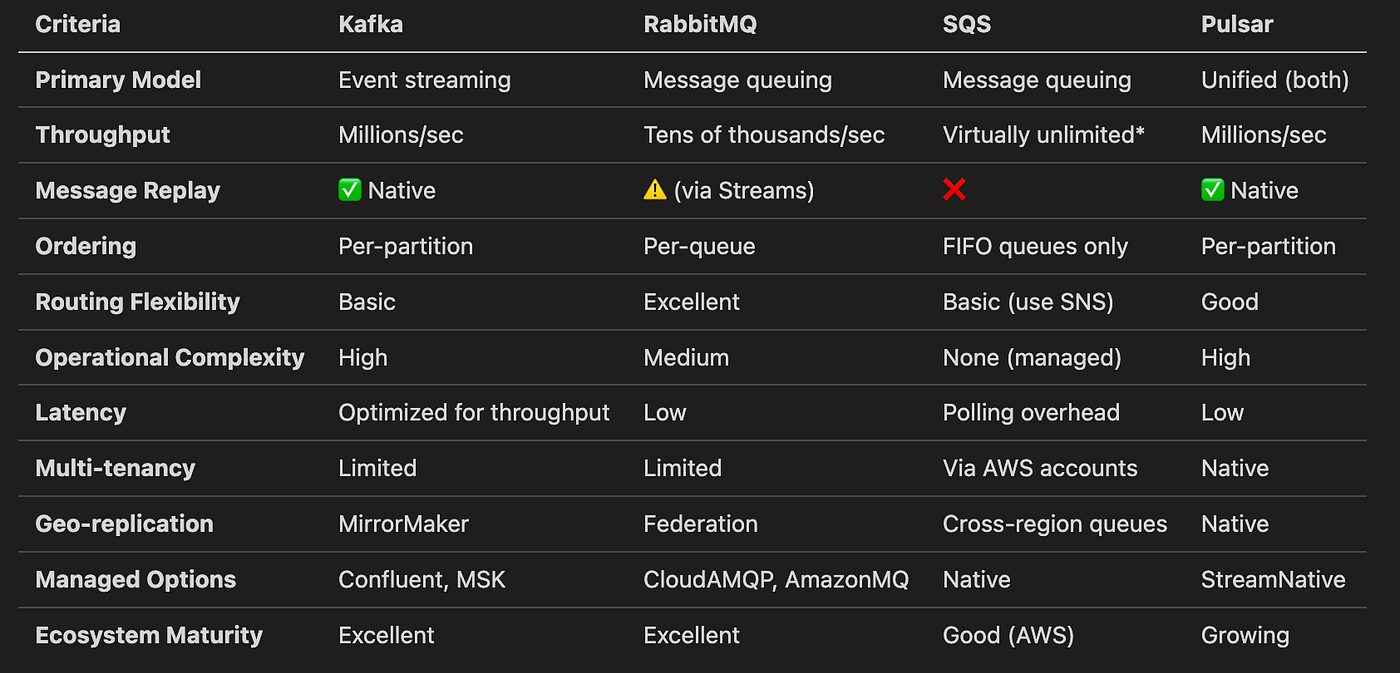
*Standard SQS; FIFO: 3,000 msg/sec default, up to 700K msg/sec in high-throughput mode
Decision Framework: Asking the Right Questions
Instead of asking “which is best?”, ask these questions:
1. Do you need message replay?
Yes → Kafka or Pulsar. If you need to reprocess events, rebuild state, or have multiple consumers read the same messages independently, you need a log-based system.
No → Any of them work. If messages are truly ephemeral tasks, traditional queues are simpler.
2. What’s your throughput requirement?
Millions per second → Kafka or Pulsar. These are built for extreme scale.
Tens of thousands per second → RabbitMQ works fine. Don’t over-engineer.
Variable/unpredictable → SQS. Pay for what you use, scale automatically.
3. How complex is your routing?
Content-based routing, multiple patterns → RabbitMQ. Its exchange model is unmatched.
Simple topic-based → Any of them.
Fan-out to multiple consumers → Kafka, Pulsar, or SNS+SQS.
4. What’s your operational capacity?
Minimal ops team → SQS. Zero infrastructure to manage.
Some ops capacity → RabbitMQ. Reasonable to operate.
Dedicated platform team → Kafka or Pulsar. They need care and feeding.
5. Are you already on AWS?
Yes, and staying there → SQS is compelling. Native integration, no ops overhead.
Multi-cloud or on-prem → Kafka, RabbitMQ, or Pulsar.
Real-World Patterns I’ve Observed
Pattern 1: The Hybrid Approach
Many teams I’ve watched don’t choose just one. They use:
- Kafka for event streaming between services (order events, user activity)
- SQS for task queues (email sending, report generation)
- RabbitMQ for legacy integration (MQTT devices, AMQP systems)
This isn’t architectural indecision — it’s using the right tool for each job.
Pattern 2: Start Simple, Evolve
Several successful teams started with SQS or RabbitMQ for simple task queuing. When they genuinely needed event streaming and replay, they added Kafka for those specific use cases. They didn’t rip out what was working.
Pattern 3: The Managed Service Preference
Teams with limited ops capacity increasingly choose managed services:
- Confluent Cloud or Amazon MSK for Kafka
- Amazon MQ or CloudAMQP for RabbitMQ
- SQS (already managed)
- StreamNative for Pulsar
The operational overhead of self-managed clusters is real. Managed services trade cost for sanity.
The Honest Assessment
After watching teams make this decision repeatedly, here’s my honest take:
Kafka is the right choice when you’re building event-driven architectures at scale and need replay capability. It’s overkill for simple task queues.
RabbitMQ is the right choice when you need flexible routing, protocol support, or traditional work queues. It’s not built for high-throughput event streaming.
SQS is the right choice when you’re on AWS, want zero ops overhead, and don’t need replay or complex routing. It’s not portable.
Pulsar is the right choice when you need unified streaming and queuing, multi-tenancy, or geo-replication. It’s newer and has a smaller ecosystem.
None of them is universally “best.” The teams that succeed are the ones who understand their actual requirements — not the ones who pick the most impressive-sounding technology.
Key Takeaways
- Kafka and Pulsar are event streaming platforms with log-based storage and replay; RabbitMQ and SQS are traditional message queues where messages are consumed and deleted
- Throughput requirements matter enormously — Kafka handles millions/sec, RabbitMQ handles tens of thousands, SQS scales automatically
- Message replay is a fundamental differentiator — if you need it, you need Kafka or Pulsar; if you don’t, simpler options work fine
- Operational complexity is real — SQS has none, RabbitMQ is moderate, Kafka and Pulsar require dedicated expertise
- Hybrid approaches are common and valid — using different tools for different use cases isn’t architectural failure, it’s pragmatism
References
- Apache Software Foundation. “Apache Kafka Documentation.” kafka.apache.org, 2025. https://kafka.apache.org/documentation/
- RabbitMQ Team. “RabbitMQ Documentation.” rabbitmq.com, 2025. https://www.rabbitmq.com/docs
- Amazon Web Services. “Amazon Simple Queue Service Developer Guide.” AWS Documentation, 2025. https://docs.aws.amazon.com/AWSSimpleQueueService/latest/SQSDeveloperGuide/welcome.html
- Apache Software Foundation. “Apache Pulsar Documentation.” pulsar.apache.org, 2025. https://pulsar.apache.org/docs/
- Kreps, J., Narkhede, N., & Rao, J. “Kafka: a Distributed Messaging System for Log Processing.” NetDB Workshop, 2011. https://www.microsoft.com/en-us/research/wp-content/uploads/2017/09/Kafka.pdf
- Kleppmann, M. Designing Data-Intensive Applications. O’Reilly Media, 2017.
- Stopford, B. Designing Event-Driven Systems. O’Reilly Media, 2018. https://www.confluent.io/designing-event-driven-systems/
- Richardson, C. “Pattern: Messaging.” microservices.io, 2023. https://microservices.io/patterns/communication-style/messaging.html
Until next time, keep observing, keep learning.
— The Architect’s Notebook
I’m a Software Engineer learning architecture by watching architects work. If these field notes help you understand architecture better, consider following for more observations every Week.
What message queue does your team use, and why? I’m especially curious about teams that switched from one to another — what drove that decision? The best insights come from comparing notes.
메타데이터
- post_id
- c3b7bed39381
- slug
- message-queues-compared-kafka-vs-rabbitmq-vs-sqs-vs-pulsar-c3b7bed39381
- url
- https://blog.stackademic.com/message-queues-compared-kafka-vs-rabbitmq-vs-sqs-vs-pulsar-c3b7bed39381
- canonical_url
- https://blog.stackademic.com/message-queues-compared-kafka-vs-rabbitmq-vs-sqs-vs-pulsar-c3b7bed39381
- author_url
- https://medium.com/@overthehead
- status
- ok
- fetched_at
- 2026-07-17 15:39:32