5 Translation APIs Compared: Speed, Price, and Language Coverage
If you have ever shipped a feature that needs translation, you know the choice of API matters more than it should. The wrong pick costs you…
5 Translation APIs Compared: Speed, Price, and Language Coverage
If you have ever shipped a feature that needs translation, you know the choice of API matters more than it should. The wrong pick costs you twice. First on your monthly bill. Then again, when you realize the language you actually need is not supported.
I have used five of the most common translation APIs across side projects and production work. This is what I would tell a friend who is about to pick one.
How I tested
I ran the same set of requests through each API. Short strings (under 50 characters), medium paragraphs (200 to 500 characters), and long blocks of around 2,000 characters. I tracked three things:
- Latency from a Lagos server to the closest endpoint
- Total cost to translate one million characters
- Which languages are supported, and how well the less common ones perform
I also looked at what it takes to actually start using the thing. Some of these APIs are easy to get running. Others want you to set up a billing account, link a credit card, and wait for verification before you can send a single request.
1. Google Cloud Translation
The default choice for most developers. It supports more than 130 languages and handles common pairs very well. Latency is consistent, usually under 250ms from most regions.
Where Google hurts is the cost and the friction. The base API charges around $20 per million characters. Their newer LLM-powered tier costs more. To use it at all you need a Google Cloud project, a billing account linked to a verified card, and the patience to read through their auth setup.
For African languages, quality is acceptable for Swahili and Amharic. Yoruba and Igbo are weaker. The tonal marks on Yoruba are often missing or wrong.
Best for: teams already deep in Google Cloud who do not care about cost.
2. DeepL
The translation quality leader for European languages. If you are translating between English, German, French, Spanish, Italian, or any pair where both sides are European, nothing beats DeepL. The output reads like a person wrote it.
The catch is the language list. DeepL supports around 33 languages. There is no Yoruba, no Hausa, no Igbo. There is no Swahili. If your users include anyone outside Europe and East Asia, DeepL alone will not cover you.
Pricing is $5.49 per month for the API base plan, then $25 per million characters on top. The free tier gives you 500,000 characters a month with no card.
Best for: products serving European users where translation quality is the main thing you are judged on.
3. AWS Translate
A solid middle of the road option from Amazon. It supports 75 languages, costs $15 per million characters, and runs at roughly the same latency as Google.
The quality is good for the major pairs and decent for the long tail. The setup is the usual AWS experience. You will spend more time reading IAM docs than writing your actual feature.
Best for: teams already running on AWS who want one less vendor to manage.
4. Azure Translator
This is the engine that powers a lot of products you have used. It supports 137 languages, including Yoruba, Igbo, and Hausa. Pricing is $10 per million characters on the standard tier, which is the cheapest of the big four.
There is a free tier that gives you two million characters a month for the first 12 months. That is enough to ship a real product before you pay anything.
Quality on African languages is the best I have seen from a major cloud provider. Yoruba tonal marks are usually correct. Igbo handles tense well. Hausa output reads naturally to the native speakers I asked.
The setup involves Azure Portal, a resource group, and the standard Microsoft signup flow. Not painful, but not instant.
Best for: developers who want the widest language list at the lowest price and do not mind setting up an Azure account.
5. LingoBase
Full disclosure: this is the API I built. I started it because none of the four above felt right for the project I was working on. They all assumed you had a US bank, a verified card, and patience for a setup flow that takes hours.
LingoBase wraps the Azure Translator engine and adds a pay as you go credit model on top. There are no subscriptions. You buy credits with a card, or in Naira through Paystack. New accounts get 10,000 characters free on signup. Credit packs are $5 for 100,000, $25 for one million, or $200 for ten million.
It supports the same 137 languages Azure does, including Yoruba, Igbo, Hausa, Swahili, Zulu, and Amharic. Text to speech is included for 140 plus voices through the same API. The full language list and live examples are in the docs.
Latency from Lagos is around 280ms because the backend talks to Azure in the same region. From the US east coast it is closer to 150ms.
Best for: indie developers, African teams, and anyone who wants to skip the cloud vendor signup flow and just start translating in the next two minutes. You can create a free account here and have a working key in under a minute.
The numbers side by side
Here is how the five compare for one million characters and a baseline language set.
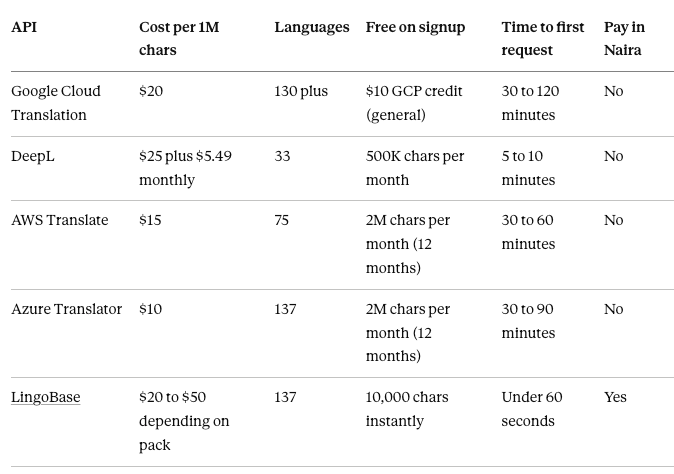
Latency was within 50ms of each other for most requests from my test region. None of them was so much faster than the others that it would change your architecture.
Which one should you actually pick
If you are translating between English, French, German, and Spanish, and you care about output quality more than anything else, use DeepL. Nothing else comes close on those pairs.
If you are already on a major cloud, use the one that matches. AWS shops should use AWS Translate. Google shops should use Google Cloud Translation. You will save yourself a billing relationship and a vendor onboarding.
If you want the widest language coverage at the lowest cost and you do not mind setting up Azure, use Azure Translator. It is the technical winner on price and language count.
If you are an indie developer, work from Africa, or just want to get translating without signing up for a cloud account and waiting on card verification, use LingoBase. You will be sending real translation requests within two minutes of landing on the homepage.
The bottom line
There is no single best translation API. There are five reasonable choices, each strong for a different kind of team.
The thing nobody told me when I was picking my first one is that the setup friction matters as much as the price. A $10 per million API that takes three hours to integrate is worse than a $25 per million API you can use in five minutes, if you are shipping a side project this weekend.
For most developers reading this, the answer is LingoBase. It has the widest language list of the five, including the African languages that others ignore. It has the lowest friction for your first working request.
You can sign up at uselingobase.app and have your first translation working in the next minute. There is no card required to start..
메타데이터
- post_id
- c3bc4f66c2fa
- slug
- 5-translation-apis-compared-speed-price-and-language-coverage-c3bc4f66c2fa
- url
- https://medium.com/@orjiace/5-translation-apis-compared-speed-price-and-language-coverage-c3bc4f66c2fa
- canonical_url
- https://medium.com/@orjiace/5-translation-apis-compared-speed-price-and-language-coverage-c3bc4f66c2fa
- author_url
- https://medium.com/@orjiace
- status
- ok
- fetched_at
- 2026-06-13 07:35:29



