IPhone 12 Mini Battery Replacement Tutorial
Are you experiencing battery issues on your iPhone 12 Mini? Is your phone’s battery life significantly shorter than when you first bought…
IPhone 12 Mini Battery Replacement Tutorial
Are you experiencing battery issues on your iPhone 12 Mini? Is your phone’s battery life significantly shorter than when you first bought it? If so, it may be time to replace the battery.
**PHONEFIX** We will provide you with a tutorial on replacing the iPhone 12 Mini battery. We will also introduce an innovative method using REFOX pre-programmed battery tag flex cables to make the process more efficient and convenient.
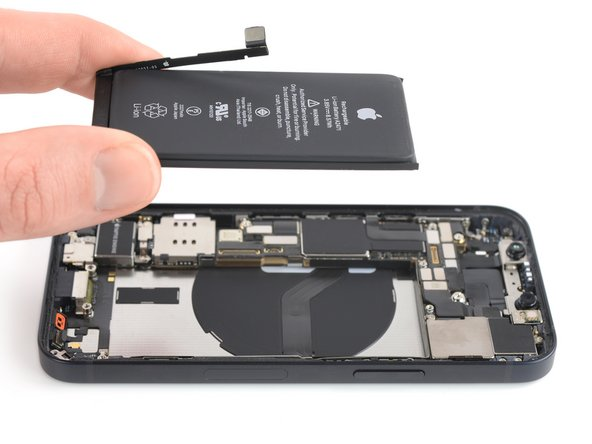
Why should you replace your iPhone battery?
iPhone batteries are designed to retain 80% of their capacity for up to 500 charge cycles, which typically lasts around 18–24 months for most users. However, over time, your phone’s battery can degrade, causing it to lose its ability to charge. This may result in reduced battery life and performance.
Replacing your iPhone battery can help restore its performance and extend its lifespan. With a new battery, your phone will be able to hold power longer and perform better.
Tools to follow this guide
When following a guide to repair your iPhone battery or display, it’s important to have the right tools on hand. We use many tools and repair parts in this guide to make our work more efficient and save time. Below is a list of resources we use.

Battery detection module and **REFOX RP30 battery tag cable iPhone Battery Replacement — Standard Capacity [Mobile phone battery welding jig](https://www.diyfixtool.com/products/mechanic-b-fix-battery-welding-fixture-for-iphone-x-12-pro-max?_pos=1&_sid=19a109ad7&_ss=r)** mobile phone screen holder Mobile phone battery welding jig ceramic scissors sharpen pen Spot welding With these and other tools, you can successfully and efficiently repair your iPhone battery. Additionally, all tools and parts can be found in the PHONEFIX store
Step 1: Remove the battery

The first step in this guide is to separate the old battery from your iPhone 12 Mini. To achieve this, we used the PHONEFIX phone screen holder. After removing the battery, be sure to peel off the protective tape and remove the stand. Step 2: Remove the battery BMS board The next step is to remove the battery BMS board. When separating the BMS board, carefully peel off the protective tape, remove the bracket, and use ceramic scissors to disconnect the positive and negative terminals.
Step 3: Grinding and Welding Now you need to polish the solder joints with a sanding pen. Place the battery core into the welding clamp and place the positive and negative leads under the BMS board. Make sure to align the anode and cathode leads separately. After aligning the battery leads, weld them with a spot welder. After soldering the leads, fold them up and place them on the protective bracket. Then, wrap another layer of protective tape on the outside. Attach the tab flex connector to the battery and fold it into the correct position as shown below.
Step 4: Install the new battery Put the new battery back into your iPhone 12 Mini and turn it on.
Step 5: Check battery health Click “Settings > Battery > Battery Health & Charging” and check the battery condition. You should see the maximum capacity as 100%.
Note: In order to start, the power cord must be connected or the same type of battery must be used
New Method
In the past, work through a programmer, battery detection module, and label flex board was required to restore battery health and cycle time. However, with the new REFOX pre-programmed battery tag flexibility, the process becomes even more efficient and convenient.
The new method of iPhone 12 Mini battery replacement battery data repair is similar to the previous method. The main purpose is to transplant the original battery BMS board to solve the pop-up message, so that the mobile phone can detect the same battery code as the original after replacing the battery.

Once the tag-on flex is connected, you can reboot directly using the REFOX pre-programmed battery tag-on flex. You no longer need to connect a power cord or use the same type of battery to start.
At Last
**PHONEFIX** I hope this article can help you. If you need other repair tools, you can also contact us.
메타데이터
- post_id
- c3ca1483797f
- slug
- iphone-12-mini-battery-replacement-tutorial-c3ca1483797f
- url
- https://medium.com/@diiyfixphone/iphone-12-mini-battery-replacement-tutorial-c3ca1483797f
- canonical_url
- https://medium.com/@diiyfixphone/iphone-12-mini-battery-replacement-tutorial-c3ca1483797f
- author_url
- https://medium.com/@diiyfixphone
- status
- ok
- fetched_at
- 2026-07-17 01:16:21
