Understanding Bluetooth LE Flow Control: Managing Data Like a Pro
Bluetooth Low Energy (LE) is the backbone of modern wireless communication — powering everything from fitness trackers and wearables to…
Understanding Bluetooth LE Flow Control: Managing Data Like a Pro
Bluetooth Low Energy (LE) is the backbone of modern wireless communication — powering everything from fitness trackers and wearables to industrial sensors. But behind the scenes, there’s a silent hero keeping this system stable and efficient: flow control.
In this article, we’ll explore Bluetooth LE flow control — why it’s needed, how it works, and how developers can leverage it to avoid dropped packets, conserve power, and improve performance.
🔧 What Is Flow Control in Bluetooth LE?
Flow control in BLE is a mechanism to regulate the rate of data transmission between two connected devices so that:
- The receiver is not overwhelmed with data.
- Buffers don’t overflow.
- Reliable communication is maintained even under resource constraints.
It works like a traffic light for packets — allowing the sender to know when and how much to send.
📦 Flow Control Applies To Which Layers?
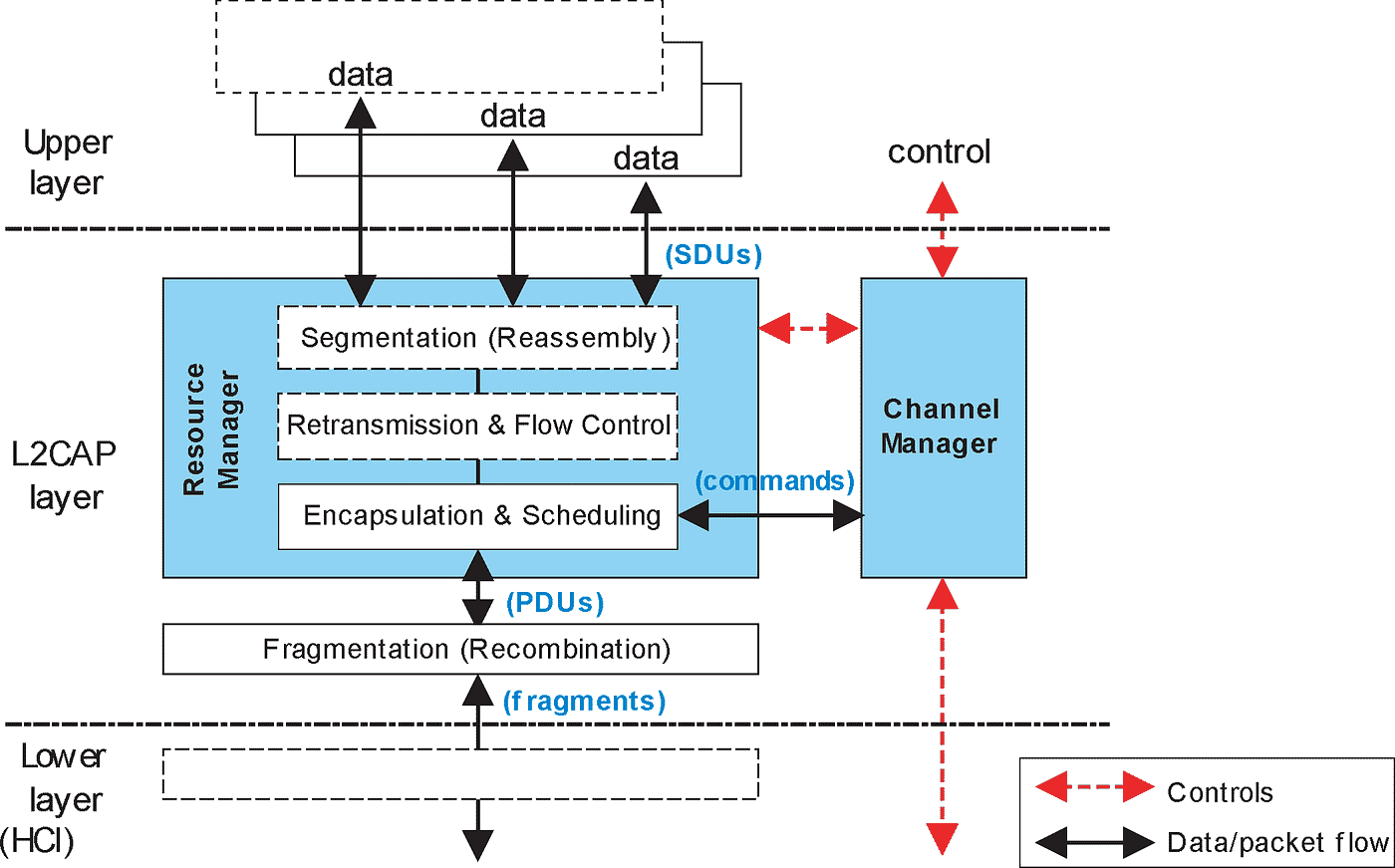
Flow control mechanisms exist at multiple layers in the Bluetooth stack:
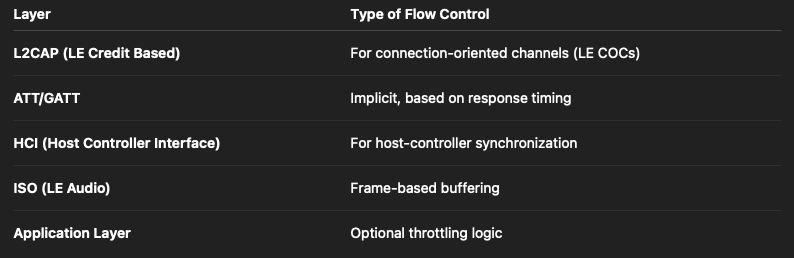
Let’s dive into the key ones.
1️⃣ LE Credit-Based Flow Control (L2CAP COC)
This is the most explicit and formal flow control mechanism in BLE.
- Used when two devices establish a LE Connection-Oriented Channel (COC) over L2CAP.
- The receiver advertises how many credits (think: packets) it can handle.
- The sender decrements credits as it sends SDUs (Service Data Units).
- The receiver replenishes credits once it processes incoming data.
📋 Example:
// Receiver provides 10 credits
credits = 10
// Sender sends 3 SDUs
credits -= 3// Receiver replenishes 5 after buffer processing
credits += 5This ensures lossless and efficient communication for data-heavy profiles like LE Audio or custom streaming services.
2️⃣ ATT/GATT Implicit Flow Control
For classic GATT (Generic Attribute Profile) operations like read, write, and notify, flow control is implicit:
- Each
Write Requestexpects aWrite Response. Notificationsdon’t require acknowledgment, but they should respect the connection interval and application buffer limits.- Apps can throttle notifications based on callbacks like
onCharacteristicWrite()or using timers.
In Android, for example:
if (bluetoothGattCharacteristic != null) {
    gattServer.notifyCharacteristicChanged(device, characteristic, false);
    // Add delay if necessary before sending next
}
3️⃣ HCI-Level Flow Control
Flow control also exists between the host and controller via HCI:
- The controller advertises how many ACL packets it can receive from the host.
- The host must obey this to prevent overrun.
- Events like
Number of Completed Packetsare used to track and free up buffer space.
This is often abstracted away from application developers but is vital in embedded BLE stacks.
🛠️ Why Does Flow Control Matter?
Without flow control:
- Receivers could crash due to buffer overflows.
- Data could be lost in transit.
- Power efficiency suffers due to retries.
- Devices violate spec timing requirements (e.g., connection interval + supervision timeout).
⚙️ How To Implement or Tune Flow Control
Depending on your stack (Zephyr, Android, BlueZ, Nordic SDK), here are practical tips:
✅ For LE COC:
- Set reasonable credit sizes (not too small, not too large).
- Monitor buffer usage and send
L2CAP_CREDITupdates promptly. - Use callbacks to process incoming data quickly.
✅ For GATT:
- Space out notifications or writes if needed.
- Implement retry logic for long writes.
- Avoid flooding slow devices.
✅ For Host-Controller HCI:
- Honor controller flow control flags.
- Use completed packet events to pace your host-side buffer queues.
🧪 Debugging Flow Control Issues
Common signs of flow control mismanagement:
BLE_HCI_CONNECTION_TIMEOUTerrors- Lost or duplicated notifications
- Stalls or unresponsiveness during streaming
- Logs showing full queues or missing
Number of Completed Packets
Use tools like Ellisys, Wireshark + BT USB capture, or nRF Sniffer to analyze packet flow and ACKs.
🚀 Final Thoughts
Bluetooth LE flow control isn’t glamorous — but it’s critical for stability, efficiency, and spec compliance. Whether you’re building a smartwatch, hearing aid, or a smart bulb, respecting flow control mechanisms can make or break the user experience.
So next time your BLE app misbehaves under load — don’t just look at bandwidth. Check the flow.
메타데이터
- post_id
- c3f122e8c8ea
- slug
- understanding-bluetooth-le-flow-control-managing-data-like-a-pro-c3f122e8c8ea
- url
- https://medium.com/bluetooth-demystified/understanding-bluetooth-le-flow-control-managing-data-like-a-pro-c3f122e8c8ea
- canonical_url
- https://medium.com/bluetooth-demystified/understanding-bluetooth-le-flow-control-managing-data-like-a-pro-c3f122e8c8ea
- author_url
- https://medium.com/@nikheelvs
- status
- ok
- fetched_at
- 2026-06-25 16:53:31