Pac-Man AI CPP — A Software Framework
A software framework to learn and test AI algorithms
Pac-Man AI CPP — A Software Framework
A software framework to learn and test AI algorithms
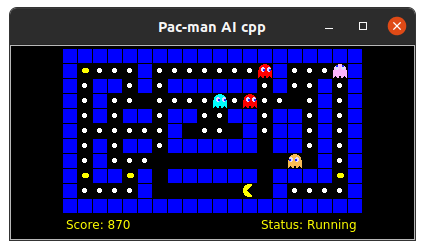
pacman-ai-cpp (image by author)
In my old articles, I talked about various AI Planning algorithms, such as search algorithms, Refinement Acting Engines, Hierarchical FSMs, and Behavior Trees. The articles use the Pac-Man game framework to implement the algorithm. Some of those articles are linked below:
Designing AI Agents’ Behaviors with Behavior Trees
I think it will be more useful for many people if I share the code (as open-source software), starting from the framework and then implementing the algorithm.
This article explains how the framework works, so readers can use it for their own purposes, such as writing algorithms for learning or evaluating algorithms. As mentioned above, it can be a search algorithm, a behavior tree, or reinforcement learning.
This framework is written in C++ but can be ported to other languages fairly easily.
High-Level Design
The framework consists of four main building blocks, plus one utility library and one main entry point.
Main
Program entry point.
Agent
The library that implements the AI agent algorithm. This includes Pac-Man and Ghosts.
Game
The library implements the rules of the Pac-man game. This is where the state of the game is changed; what happens after the agent moves? Does it change the game state, score, etc.? Those are defined in this library. It takes the actions requested by all agents and changes the state of the game based on them.
Simulation manager
This library builds the game, builds layouts, AI agents (Pac-Man and ghost), and starts the game.
Display
This library implements a graphical user interface — GUI, currently using Qt5 but can be extended to a different GUI framework or no display at all, for example, if you need to train machine learning models.
Utilities
This library provides some handy functions used throughout the framework, such as representing Grid, Point, Random Selector, etc.
Block diagrams
The following picture shows components and their dependency diagram. Arrows show which components depend on which components. For example, the simulation manager depends on all agent, game, and display components.
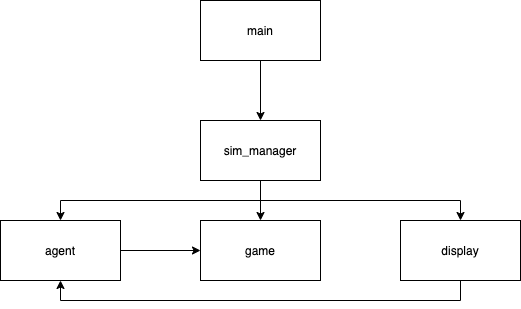
Dependency Diagram (image by the author)
Writing Pac-Man Algorithm
The main point of the framework is to allow people to write their own algorithms to achieve the highest score, given a Pac-Man problem or layout of the game. To write a new Pac-Man algorithm, one simply implements the AgentImpl interface. When calling the constructor of AgentImpl, you must pass true to indicate that this agent is a Pac-Man agent. A simple example is shown below:
[embed]
The most important part is the implementation of GetAction function. This function is called by the Game component to allow the agent to decide what action to take, given the current state of the game. This is where you implement your algorithm.
The code comes with an example of the random action Pac-Man algorithm. At each step, it takes the latest state of the game — get all possible actions/movements, and randomly chooses one of them if there is more than one possible action.
Get possible actions’ function checks all four directions and checks for walls. The direction coincides with the wall is impossible. Attempting to move to the wall has no effect; it is considered a Stop action.
Writing a Different Display
Another component that can be replaced is the display component. The code comes with a display implementation with Qt5, but you can implement your own if you prefer. I can see a need to implement a null display that does nothing. This can be used to train machine learning models, for example. This is something that could be added in the future.
Using a Container To Build and Run the App
One of the challenges of building and running applications written in C++ is resolving dependencies. Sometimes, you may have installed an incompatible version of a required library in your system.
The easiest way for you is to use a docker container. I’ve created a Dockerfile you can use. All you need to do is build the docker image and start the container whenever you want to build and run the application. All dependencies have been installed in the docker image.
For details, you can read the instructions in the README in the codebase.
Wrap Up
I hope this software framework is useful for writing and testing algorithms in C++. It can be used by students wanting to learn algorithms or hobbyists to test algorithms for AI agents.
The code is distributed freely here:
메타데이터
- post_id
- c44b2e2d293
- slug
- pac-man-ai-cpp-a-software-framework-c44b2e2d293
- url
- https://medium.com/better-programming/pac-man-ai-cpp-a-software-framework-c44b2e2d293
- canonical_url
- https://medium.com/better-programming/pac-man-ai-cpp-a-software-framework-c44b2e2d293
- author_url
- https://medium.com/@debby-nirwan
- status
- ok
- fetched_at
- 2026-08-06 08:54:36