*Most prompt lists are garbage.
CONTENT WRITING (4 Prompts) — — ### Prompt #1 — Write a Blog Post Outline in 60 Seconds Most freelancers stare at a blank page for 20…
Most prompt lists are garbage. Here’s what separates the ones that work. — — You’ve seen the lists. “100 ChatGPT prompts for freelancers!” — and then you try them, get a mediocre response, and go back to writing everything yourself. The problem isn’t ChatGPT. The problem is vague prompts get vague results. After months of testing, failing, and refining, I found the pattern behind prompts that actually produce usable output. The difference comes down to three things: role, context, and constraint. Every prompt below follows that formula. Copy them exactly. Fill in the brackets. Watch what happens. — — ##

CONTENT WRITING (4 Prompts) — — ### Prompt #1 — Write a Blog Post Outline in 60 Seconds Most freelancers stare at a blank page for 20 minutes before writing a single word. This ends that. > “Act as an expert content strategist. Create a detailed blog post outline for the title: ‘[Your Title Here]’. Structure it as: (1) a hook opening paragraph that starts with a bold claim or surprising statistic, (2) 5 main sections with 3 specific sub-points each, (3) a conclusion with a single clear call-to-action. The target reader is [describe your audience]. Make the tone [conversational / professional / bold].” Why it works: You’re giving ChatGPT a role (strategist), a structure (5 sections), a reader (your audience), and a tone. It has no choice but to give you something usable. Pro tip: Run this prompt, then ask: ”Now write Section 2 in full, using the outline above.” Build the article one section at a time — the quality stays consistent. — — ### Prompt #2 — Turn a Boring Paragraph Into Something People Actually Read You’ve written something that makes sense but puts you to sleep. This prompt fixes it in under 30 seconds. > “Rewrite this paragraph to be punchy, conversational, and impossible to skim past. Use short sentences. Cut every word that isn’t earning its place. Replace any passive voice with active. Remove all jargon and replace with plain English a 14-year-old could understand. Do NOT change the core meaning. Here is the paragraph: [paste your text]” Why it works: The “14-year-old” benchmark is the secret weapon here. It forces ChatGPT to strip away complexity without dumbing down the idea. Pro tip: Use this on your homepage copy, your Gumroad description, and every email you’re about to send to a client. It takes 10 seconds and the difference is dramatic. — — ### Prompt #3 — Generate a Month of Blog Ideas in One Go No more wasting Sunday nights trying to figure out what to write about next week. > “Act as a content strategist for a freelance [your niche]. Generate 12 blog post ideas that would attract potential clients searching for solutions online. For each idea: write the exact headline, describe the target reader’s pain point it solves, and rate the SEO potential as High / Medium / Low. Prioritize ideas that a beginner could implement immediately.” Why it works: You get headlines (not just topics), pain points (so you know what angle to take), and SEO ratings (so you know which to write first). Pro tip: Sort by “High” SEO potential and write those four first. Write the “Medium” ones for your newsletter. Save the opinionated ones for LinkedIn. — — ### Prompt #4 — Write a Hook That Stops the Scroll The first sentence of anything you write determines if anyone reads the second. This prompt gives you five options so you can pick the best one. > “Write 5 different opening sentences for a blog post about [topic]. Use one of each format: (1) a bold contrarian claim, (2) a specific surprising statistic, (3) a ‘you’ve been lied to’ opener, (4) a one-sentence story that drops the reader mid-scene, (5) a direct question that makes the reader feel seen. The target reader is a freelancer who [describe their specific frustration].”
Why it works: Five different psychological triggers, five different chances to land the hook. You’ll know immediately which one feels right. Pro tip: Screenshot the one you don’t use today. It’s perfect for a future social post or email subject line. — — ##

EMAIL & CLIENT COMMUNICATION (4 Prompts) — — ### Prompt #5 — Write a Cold Email That Doesn’t Sound Like a Cold Email The reason most cold emails fail: they open with “I” and spend three paragraphs talking about the sender. This prompt flips that completely. > “Write a cold outreach email to a [describe the prospect’s business, e.g., ‘small e-commerce brand selling handmade jewelry’]. I am a freelance [your role] who helps businesses like theirs [specific result you deliver, e.g., ‘write product descriptions that increase conversion rates’]. The email must: open with an observation about THEIR business (not a compliment, a specific insight), mention ONE relevant result I’ve achieved for a similar client, and close with a single low-commitment question — not ‘Are you interested?’ but something they can answer in one sentence. Keep the entire email under 110 words.” Why it works: The 110-word limit forces specificity. The “observation not compliment” rule makes you sound like a peer, not a vendor. Pro tip: Before sending, Google the prospect’s business for 3 minutes. Replace the observation ChatGPT writes with something genuinely specific to them. That 3-minute investment doubles your reply rate. — — ### Prompt #6 — Handle Scope Creep Without Losing the Client A client just asked for “one small thing” that’s actually two hours of extra work. Here’s how to respond professionally without feeling like you’re being difficult. > “Write a professional, warm email response to a client who has requested additional work outside our original agreed scope. The extra request is: [describe what they asked for]. I want to: acknowledge their request positively, reference our original scope briefly without sounding accusatory, offer to complete the additional work as a paid add-on with a clear price, and make it easy for them to say yes. The tone should feel collaborative, not defensive. Under 120 words.” Why it works: The “collaborative not defensive” constraint changes the entire tone of the output. ChatGPT won’t write anything that sounds like you’re pushing back — it sounds like you’re helping. Pro tip: Add your actual price in the bracket. Vague offers (“I can quote you separately”) get ignored. Specific ones (“I can add this for $150, turnaround 48 hours”) get decisions. — — ### Prompt #7 — Follow Up Without Sounding Desperate You sent a proposal five days ago. Silence. This is the follow-up that gets replies without making you sound like you’re chasing. > “Write a follow-up email to send 5 days after submitting a proposal, with no response received. Do NOT mention that I’m ‘just checking in’ — that phrase is banned. Instead: open with one new piece of value (a relevant insight, a quick tip, or a result from a recent project), briefly reference the proposal without summarizing it, and close with a different, softer CTA than the original email — something that makes it easy to reply even if they’re not ready to buy. Under 100 words. Tone: confident and warm, never needy.” Why it works: The “just checking in is banned” instruction alone transforms the output. Most follow-ups fail because they offer nothing new. This one leads with value. Pro tip: The “new piece of value” can be as simple as a relevant article you found, or a one-line result: ”Finished a similar project this week — client saw a 23% increase in open rates.” Specificity wins. — — ### Prompt #8 — Ask for a Testimonial Without Making It Awkward Most freelancers never ask for testimonials because it feels uncomfortable. This prompt makes it feel natural.
“Write a short, warm email asking a satisfied client for a written testimonial. I just delivered [describe the project] and the client expressed they were happy with the results. The email should: feel like it’s coming from a real human (not a template), make the process feel effortless by giving them two specific questions to answer instead of asking them to ‘write something’, and explain briefly where the testimonial will be used. Under 100 words. Do not use the phrase ‘I was wondering if’.” Why it works: Two specific questions (“What was your situation before working with me?” and “What changed after?”) produce testimonials that are actually persuasive — not generic five-star fluff. Pro tip: Send this email the same day you deliver the final project. That’s the peak of their excitement. Every day you wait, the enthusiasm fades. — — ##

SOCIAL MEDIA (4 Prompts) — — ### Prompt #9 — Write a LinkedIn Post That Gets Shared (Not Just Liked) Likes are vanity. Shares are reach. This prompt writes for shares. > “Write a LinkedIn post about [topic or lesson learned from a recent client project]. Structure it exactly like this: Line 1 = a bold, specific statement that makes someone stop scrolling (no questions, no ‘I’m excited to share’). Lines 2–4 = the story or context in short punchy sentences, one idea per line. Lines 5–7 = the practical takeaway broken into 3 numbered points. Final line = a genuine question that invites a comment. No hashtags in the post body. No emojis. Maximum 200 words. Write like a confident professional talking to a peer, not performing for an audience.” Why it works: “No questions in line 1” and “no performing for an audience” are constraints that eliminate 90% of what makes LinkedIn posts cringe-worthy. The structure is engineered for saves and shares. Pro tip: Post between 7:30–9am on Tuesday, Wednesday, or Thursday. That’s when LinkedIn engagement peaks. Respond to every comment in the first 60 minutes — it signals to the algorithm that your post is generating conversation. — — ### Prompt #10 — Turn One Blog Post Into a Week of Social Content Write once, publish everywhere. This is how you stay consistent without burning out. > “I wrote a blog post about [topic]. Here is the full text: [paste your post]. Now repurpose it into: (1) a Twitter/X thread of exactly 6 tweets — tweet 1 is the hook, tweets 2–5 are one insight each, tweet 6 is a summary + CTA, (2) an Instagram caption under 150 words with a scroll-stopping first line and 8 relevant hashtags at the end, (3) a LinkedIn post under 180 words using short paragraphs and a question at the end, (4) one email newsletter paragraph under 80 words that teases the blog post and links to it. Maintain the core message across all four but adapt the tone for each platform.” Why it works: One prompt, four pieces of content, 20 minutes. The “adapt tone for each platform” instruction means you don’t get the same text copy-pasted four times. Pro tip: Do this every time you publish. One blog post = 7–10 days of social content when you include stories, carousels, and comments. — — ### Prompt #11 — Write a Carousel Post That Gets Saved Saves on Instagram are the most valuable engagement metric. Carousels get 3x more saves than single images. This prompt writes one that earns them. > “Create a 7-slide Instagram carousel outline on the topic: ‘[topic]’. The target audience is [describe them]. Follow this exact structure: Slide 1 = title slide with a promise (‘How to [result] without [common frustration]’), Slides 2–6 = one actionable tip per slide written as a bold headline (max 8 words) + one supporting sentence (max 20 words), Slide 7 = CTA slide with the text ‘Save this for when you need it’ + one sentence about what I offer. Write all slide text now, ready to drop into Canva.” Why it works: “Save this for when you need it” is psychologically more effective than “Follow me for more.” It frames the content as a resource, not self-promotion.
Pro tip: Use Canva’s carousel template, keep the design simple (one font, two colors), and post on Friday afternoon when saves peak. — — ### Prompt #12 — Write a Viral-Worthy Hook for Any Platform The hook is 80% of the battle. This prompt gives you five to choose from, calibrated for different psychology triggers. > “Generate 5 opening hooks for a social media post about [topic]. Write one hook using each of these proven psychological triggers: (1) Pattern interrupt — something that contradicts common advice, (2) Specificity — a precise number or result that sounds almost too specific to be made up, (3) Relatability — a frustration your audience knows intimately, (4) Curiosity gap — a question that can’t be answered without reading on, (5) Social proof — a result or transformation that makes someone think ‘I want that.’ Each hook should be under 15 words. Do not use the words ‘game-changer’, ‘journey’, or ‘excited’.” Why it works: Banning overused words (“game-changer”, “excited”, “journey”) forces ChatGPT to be creative instead of defaulting to LinkedIn clichés. The five-trigger structure gives you options for different moods and platforms. Pro tip: Use the “Specificity” hook on Twitter. Use the “Relatability” hook on Instagram. Use the “Pattern interrupt” on LinkedIn. Each platform has a different psychological appetite. — — ##

PRODUCTIVITY & BUSINESS (3 Prompts) — — ### Prompt #13 — Calculate Your Real Freelance Rate (Most People Get This Wrong) Most freelancers pick a number that feels right. This prompt calculates a number that’s actually right. > “Help me calculate my freelance rate using real numbers. My target annual income is $[X]. I realistically have [Y] billable hours per week (not total working hours — billable only). I take [Z] weeks off per year. Calculate: (1) my minimum viable hourly rate, (2) my recommended project day rate with a 25% profit buffer included, (3) what a 3-month retainer should cost if a client takes 15 hours per month, (4) a ‘never go below this’ floor rate that accounts for taxes, expenses, and unpaid admin time. Show all calculations clearly. Then tell me what psychological pricing adjustment to make to each number (e.g., $97 vs $100).” Why it works: Most rate calculators forget unpaid admin time and taxes — this one accounts for both. The psychological pricing addition is a bonus most freelancers never think about. Pro tip: Run this calculation. Then add 20% to whatever number you get. You’re probably undercharging more than you think. — — ### Prompt #14 — Design Your Perfect Freelance Week Working all day and feeling like you got nothing done is a structure problem, not a willpower problem. > “Design a weekly schedule for a freelance [your role] who wants to work a maximum of [X] focused hours per day and earn $[monthly income goal]. I have [number] active clients right now. Build the schedule around these non-negotiables: deep creative work in the morning, client communication batched into one time block, at least 30 minutes of marketing or audience building daily, and one full admin day per week. Show the schedule as a day-by-day breakdown with time blocks. Include a rule for what happens when a client requests a meeting outside scheduled hours.” Why it works: The “rule for client meeting requests” is the detail most people forget. Without it, your entire schedule collapses the moment one client asks for a Tuesday 11am call. Pro tip: Share this schedule in your client onboarding email. It sets expectations, reduces interruptions, and makes you look like a professional who respects their own time — which makes clients respect it too. — — ### Prompt #15 — Turn Any Skill Into a Digital Product in 20 Minutes If you can do something well, you can package it and sell it. This prompt shows you exactly what to build.
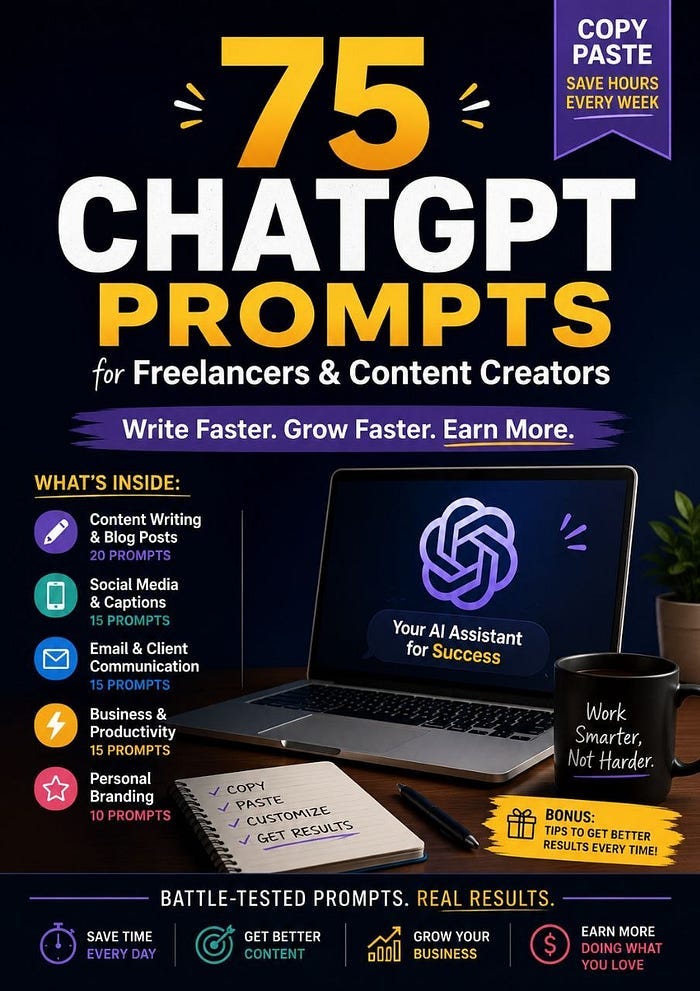
“I am a freelance [your role] with expertise in [your top skills]. Help me identify my best digital product opportunity. Analyze my skills and suggest: (1) the single most sellable digital product I could create in under 2 weeks, (2) who specifically would pay for it and why, (3) what price point makes sense and why, (4) a working title and one-sentence product description I could use on Gumroad today, (5) the three pieces of free content I should create on Medium or LinkedIn to drive traffic to it. Be specific — no vague suggestions.” Why it works: “Be specific — no vague suggestions” is the most important instruction in this prompt. Without it, you get generic advice. With it, you get an actual plan. Pro tip: Whatever product this prompt suggests — build the smallest version of it first. A 20-page PDF that solves one specific problem will outsell a 100-page guide that tries to solve everything. — — ## The Difference Between Prompts That Work and Prompts That Don’t Every prompt in this list follows the same formula: Role + Context + Constraint = Usable Output — Role → Tell ChatGPT who it’s being (“Act as a content strategist”) — Context → Give it your specific situation (your niche, your client, your goal) — Constraint → Set limits that force quality (“under 110 words”, “no jargon”, “ban these phrases”) Remove any one of those three, and the output gets generic. Keep all three, and you get something you can actually use. — — ## Want 60 More Like These? These 15 prompts are from a collection of 75 battle-tested ChatGPT prompts built specifically for freelancers and content creators. Every prompt in the full book follows the same formula above — role, context, constraint — across five categories: -

Content Writing & Blog Posts (20 prompts) -

Social Media & Captions (15 prompts) -

Email & Client Communication (15 prompts) -

Business & Productivity (15 prompts) -

Personal Branding (10 prompts) Each prompt comes with an example output and a pro tip so you know exactly how to get the most out of it. [Get the full book here →https://promptfuelos.gumroad.com/l/luqmj If the 15 above saved you even one hour this week, the full 75 will change how you work entirely. — — Found this useful? Share it with one freelancer friend who’s still writing everything from scratch.
Press enter or click to view image in full size
메타데이터
- post_id
- c47ebd0bdd58
- slug
- most-prompt-lists-are-garbage-c47ebd0bdd58
- url
- https://medium.com/@omarsalheen81/most-prompt-lists-are-garbage-c47ebd0bdd58
- canonical_url
- https://medium.com/@omarsalheen81/most-prompt-lists-are-garbage-c47ebd0bdd58
- author_url
- https://medium.com/@omarsalheen81
- status
- ok
- fetched_at
- 2026-07-11 05:04:50




