Hardware Abstraction in Zephyr: Single DTS and Overlays
How to model expandable hardware in Zephyr and why naive Devicetree approaches don’t scale.
Hardware Abstraction in Zephyr: Part 1 - Single DTS and Overlayes
Let’s imagine that you need to develop firmware for a device that consists of a main board, to which various daughter boards can be connected via a dedicated connector.
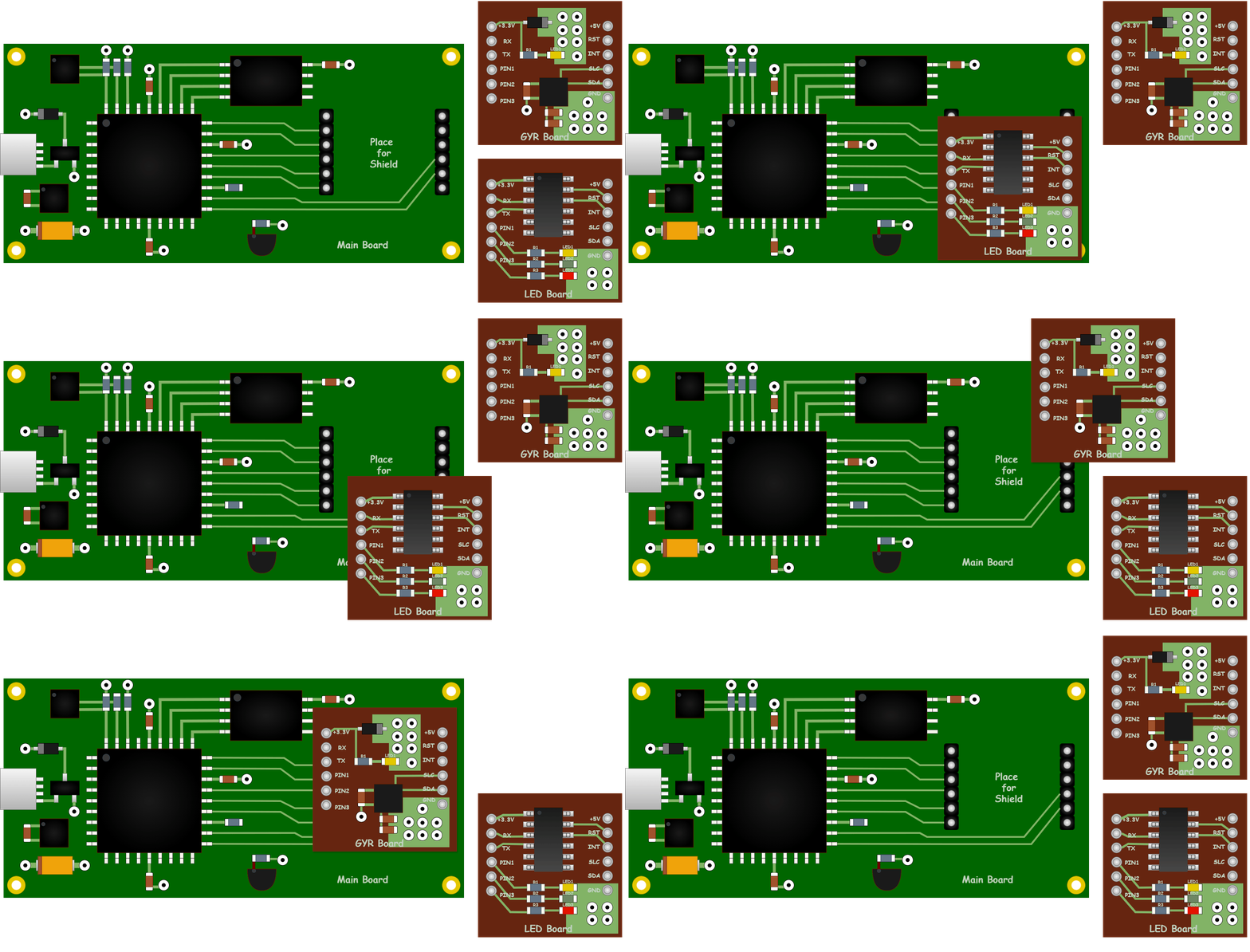
How can this problem be solved within the Zephyr ecosystem?
In this short series of articles, we will explore one of the possible approaches using mechanisms such as Devicetree Nexus Nodes and Zephyr Shields. We will go step by step from the most basic approach to a solution that provides near-complete hardware abstraction. This will help illustrate the limitations of simpler approaches and explain why additional abstraction mechanisms are needed.
Planned Parts:
- Part 2. Zephyr Shields. Separating Boards and Modules
- Part 3. Device Tree Nexus. Breaking the Pin Dependency
- Part 4. Putting It All Together. A Complete Design
Naive Approaches
To begin with, let’s look at how this problem might be solved without any knowledge of Devicetree Nexus Nodes or Zephyr Shields. In such a case, it is typically approached in one of the following ways:
- describe everything in a single devicetree file;
- use overlays.
Let’s examine both options.
Option 1. Everything in a Single File
The most obvious approach is to describe all nodes in a single .dts file. This file would contain both the nodes that belong to the main board and the nodes that represent the connected expansion board.
In simplified form, it could look like this:
/ {
 # Main Board Specific Nodes
 ...

 # LED Board Specific Nodes
 led_board {
  compatible = "my,led-board";
  rst-gpios = <&gpio0 20 GPIO_ACTIVE_HIGH>;
  pin1-gpios = <&gpio0 7 GPIO_ACTIVE_LOW>;
  pin2-gpios = <&gpio0 23 GPIO_ACTIVE_LOW>;
  pin3-gpios = <&gpio0 8 GPIO_ACTIVE_LOW>;
  uart = <&uart0>;
 };

 # GYR Board Specific Nodes
 gyr_board {
  compatible = "my,gyr-board";
  int-gpios = <&gpio0 24 GPIO_ACTIVE_HIGH>;
  i2c = <&i2c0>;
 };
};
As we can see, this immediately describes all resources for both expansion boards, even though the main board can only operate with one expansion board connected to the connector at a time. This does not look particularly good, and the situation only gets worse with each newly supported board, especially if some of them share the same resources of the main board.
Another issue is that each expansion board is tightly bound to the specific resources of the particular controller used on the main board.
In practice, this description completely loses the idea of a separate pluggable board: everything looks as if all components were physically located directly on the main board.

With this approach, adding support for each new expansion board becomes increasingly difficult. In practice, you either keep extending one large dts file indefinitely, or create a separate dts file for every combination of main board + expansion board.
If the project does not expect multiple different expansion boards connected to the same connector, this approach may still be acceptable because of its simplicity. However, if you are implementing an actual extensibility mechanism based on different boards connected to the same connector, then the next option worth considering is Overlay.
Option 2. Overlay
Devicetree supports an overlay mechanism, which allows us to avoid duplicating the entire base .dts file for each hardware configuration.
An overlay is an additional devicetree file that is applied on top of the base board description during the build process. It allows you to add new nodes, modify properties of existing nodes, and enable or disable peripherals without creating a separate .dts file for every hardware configuration.
In this approach, the base board is described separately, and each expansion board has its own overlay.
Base board main_board.dts:
/ {
    model = "Main Board";
    compatible = "my,main-board";
};

&uart0 {
    status = "disabled";
};

&i2c0 {
    status = "disabled";
};
Overlay for LED Board — led_board.overlay:
/ {
    led_board: led-board {
        compatible = "my,led-board";
        status = "okay";

        rst-gpios = <&gpio0 20 GPIO_ACTIVE_HIGH>;
        pin1-gpios = <&gpio0 7 GPIO_ACTIVE_LOW>;
        pin2-gpios = <&gpio0 23 GPIO_ACTIVE_LOW>;
        pin3-gpios = <&gpio0 8 GPIO_ACTIVE_LOW>;
    };
};

&uart0 {
    status = "okay";
    current-speed = <115200>;
};
Overlay for GYR Board - gyr_board.overlay:
/ {
    gyr_board: gyr-board {
        compatible = "my,gyr-board";
        status = "okay";

        int-gpios = <&gpio0 24 GPIO_ACTIVE_HIGH>;
    };
};

&i2c0 {
    status = "okay";
};
During the build, you can specify which overlays should be applied:
west build -b <board_name> \
  -- -DDTC_OVERLAY_FILE="overlay1.overlay;overlay2.overlay"
Alternatively, you can define the overlay in CMakeLists.txt:
set(DTC_OVERLAY_FILE ${CMAKE_CURRENT_SOURCE_DIR}/boards/my.overlay)With this approach, you effectively “patch” the base board description. It still looks as if all shield components are located directly on the main board, but instead of maintaining a single large .dts file or creating a separate variant for each combination of main board and expansion board, you extend the base configuration using overlays.
For example, to build a configuration with the LED Board, you would run:
west build -b main_board -- -DDTC_OVERLAY_FILE=led_board.overlayVisually, this can be represented as follows:

Advantages of this approach:
- no need to duplicate the entire base board description;
- different expansion boards can be enabled independently via overlays.
However, some limitations still remain:
- the overlay still references specific resources of the main board;
- the connector itself is not represented as a distinct hardware abstraction in the model.
Using overlays improves file organization, but does not solve the problem of hardware abstraction. This is where Zephyr Shields and Devicetree Nexus Nodes come into play.
In the next part, we will take a closer look at Zephyr Shields.

Thanks for the support — https://www.buymeacoffee.com/zamuhrishka
메타데이터
- post_id
- c4c2aca0ba80
- slug
- hardware-abstraction-in-zephyr-single-dts-and-overlays-c4c2aca0ba80
- url
- https://medium.com/@aliaksandr.kavalchuk/hardware-abstraction-in-zephyr-single-dts-and-overlays-c4c2aca0ba80
- canonical_url
- https://medium.com/@aliaksandr.kavalchuk/hardware-abstraction-in-zephyr-single-dts-and-overlays-c4c2aca0ba80
- author_url
- https://medium.com/@aliaksandr.kavalchuk
- status
- ok
- fetched_at
- 2026-07-16 00:55:23






