Sophia AI — April 2026 Updates
April has been a month of depth rather than breadth. Instead of adding new surface features, we focused on making the agent smarter about…
Sophia AI — April 2026 Updates
April has been a month of depth rather than breadth. Instead of adding new surface features, we focused on making the agent smarter about when and how it searches, cheaper to run at scale, and more resilient when the underlying infrastructure has problems. Here is what changed and why it matters.
What to try Sophia. SoftInstigate runs two public Sophia instances:
- RESTHeart documentation, plugin API, configuration guide at https://sophia.restheart.com/contexts/restheart
- RESTHeart Cloud managed service docs at https://sophia.restheart.com/contexts/cloud
You can also use it from Claude Code/Desktop and other AI clients as a MCP server: check it at https://restheart.org/docs/cloud/sophia/mcp
Smarter, Cheaper Retrieval with the Search Preamble
A fully agentic loop gives the model complete freedom over how it reasons and which tools it calls. That freedom has a cost: before the model can search the knowledge base, it must first decide to search, choose a query, evaluate the results, decide which documents to read, and so on. Each of those decisions burns tokens. On a typical question, a capable model ends up doing exactly what you would have predicted — a search and two or three document reads — but only after spending considerable reasoning budget getting there.
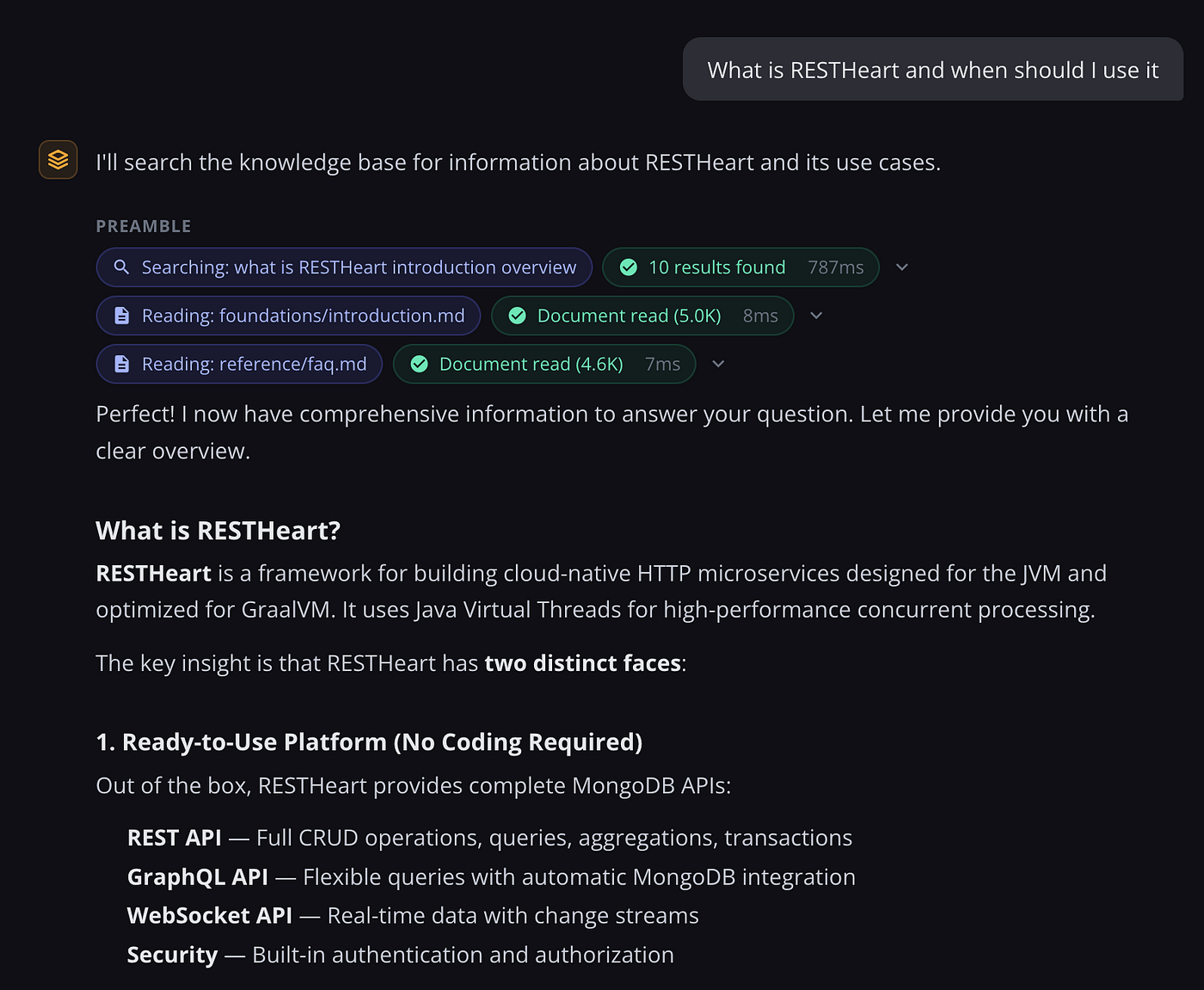
The search-and-fetch preamble short-circuits this. Before the agentic loop starts, Sophia deterministically runs a search and fetches the top two documents, injecting the results into the conversation as if the agent had already done that work. The agent receives the answer to “what should I read?” before it even begins thinking, and in most cases can synthesize a response in a single iteration rather than three or four. On a typical knowledge base question this reduces billed input tokens by around 76% compared to the full loop.
The challenge is that a blind pre-search does not always make sense. A follow-up like “can you elaborate on the last point?” does not need a knowledge base lookup at all — the relevant context is already in the conversation. Running a search anyway wastes time and money, and often retrieves irrelevant documents.
The new approach adds a lightweight planning call before the preamble. The model receives the full conversation and makes one decision: is a knowledge base search useful here, and if so, what is the right query? If the answer to the first question is no — because the user is asking a follow-up, a clarification, or something that can be answered from memory — the model responds directly and the interaction is complete. If a search is warranted, the model provides the query, the preamble runs with that query rather than a verbatim copy of the user’s message, and the main loop starts with the relevant documents already loaded.
Agent-Managed Memory as an Alternative to History
The standard way Sophia maintains continuity across turns is history propagation: the last N interactions are injected into every prompt so the model knows what was said before. This works, but it scales poorly. As a conversation grows, the history block grows with it — capped by a configurable parameter, but always consuming tokens proportional to how much has been said rather than how much actually matters.
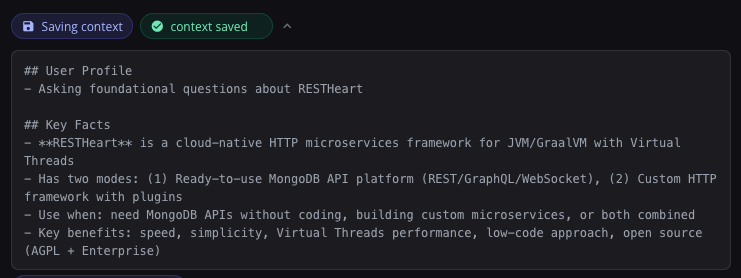
Agent invoking sophia_save_context tool with interaction summary
Agentic context management takes a different approach. Instead of the system injecting history, the agent manages its own memory via a set of tools: it can save a context document, append to it, or patch individual lines. At the start of each turn the saved context is pre-loaded — not the raw conversation transcript, but a distilled, agent-curated summary of what is worth carrying forward. History injection is disabled entirely in this mode.
The practical difference is significant for long-running sessions. A conversation that spans twenty turns does not grow more expensive with each turn: the context stays as large as the agent decides it needs to be, not as large as the accumulated transcript. The agent decides what to remember, how to structure it, and when to update it. The context document is stored in MongoDB and visible in the admin panel, where operators can inspect or edit it directly.
Prompt Caching, Now Done Properly
Sophia has supported prompt caching since March, but April brought the discipline to actually measure its impact and close the gaps where cache was being missed.
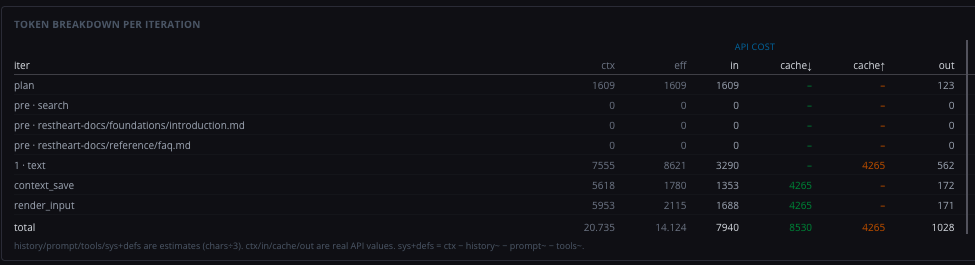
Token breakdown per iteration showing prompt caching in action
The system now caches the system prompt, tool definitions, and history prefix as a single contiguous block at the start of every request. On the second and subsequent iterations of the agentic loop — where the model re-reads everything it has already seen plus the new tool results — the cached portion costs roughly one tenth of its normal price. For a five-iteration session, this means the majority of input tokens are served from cache.
We added per-iteration token tracking to the admin panel — input, output, cache reads, and cache writes, all visible in a breakdown table for each interaction. This made it immediately clear where money was going and confirmed that the caching strategy was working as intended. It also revealed the render_input call had been writing a duplicate cache entry on cold starts, which was fixed.
Automatic Failover When Bedrock Has Problems
AWS Bedrock occasionally returns transient errors — 503 responses when a model is temporarily overloaded, 500s when something goes wrong internally. Until now these surfaced as failed interactions that the user had to retry manually.
Sophia now handles these automatically. When a retryable error occurs, the request is immediately retried with a fallback model. The fallback is strictly per-request: if it succeeds, the next request goes back to the primary model as normal. There is no persistent state, no circuit breaker window, no configuration beyond specifying the fallback chain in conf.yml.
When a retry happens, a step appears in the interaction timeline so the operator can see that it occurred and inspect the original error. For the user, the experience is transparent — they get their answer slightly delayed, with no visible failure.
A Much Richer Admin Panel
The admin panel grew substantially. The most useful addition is the chat sessions viewer: a searchable, filterable table of all interactions with per-session cost breakdowns, model attribution, and a drill-down into the per-iteration token economics of any individual interaction. Stacked bar charts make it easy to see at a glance where a conversation became expensive.
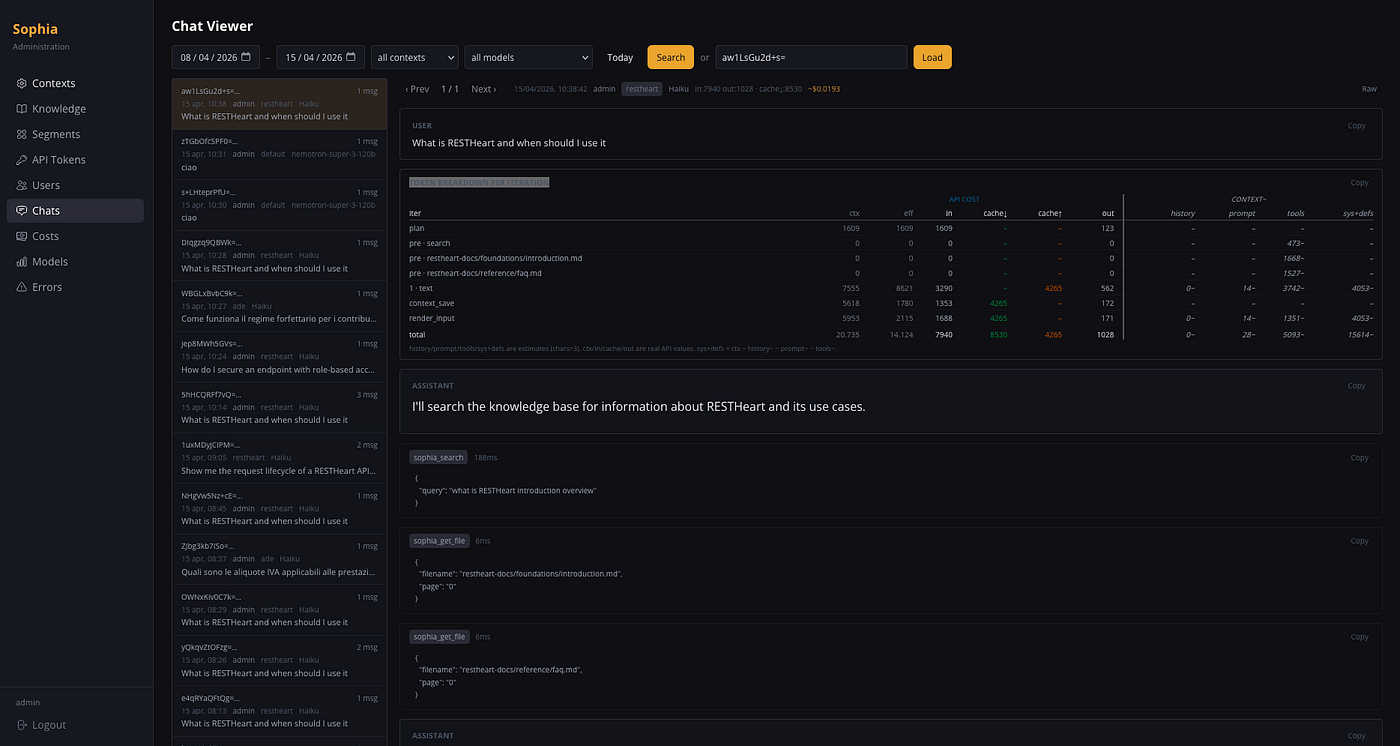
The Chats Viewer lets you review past interactions and debug your agent’s responses
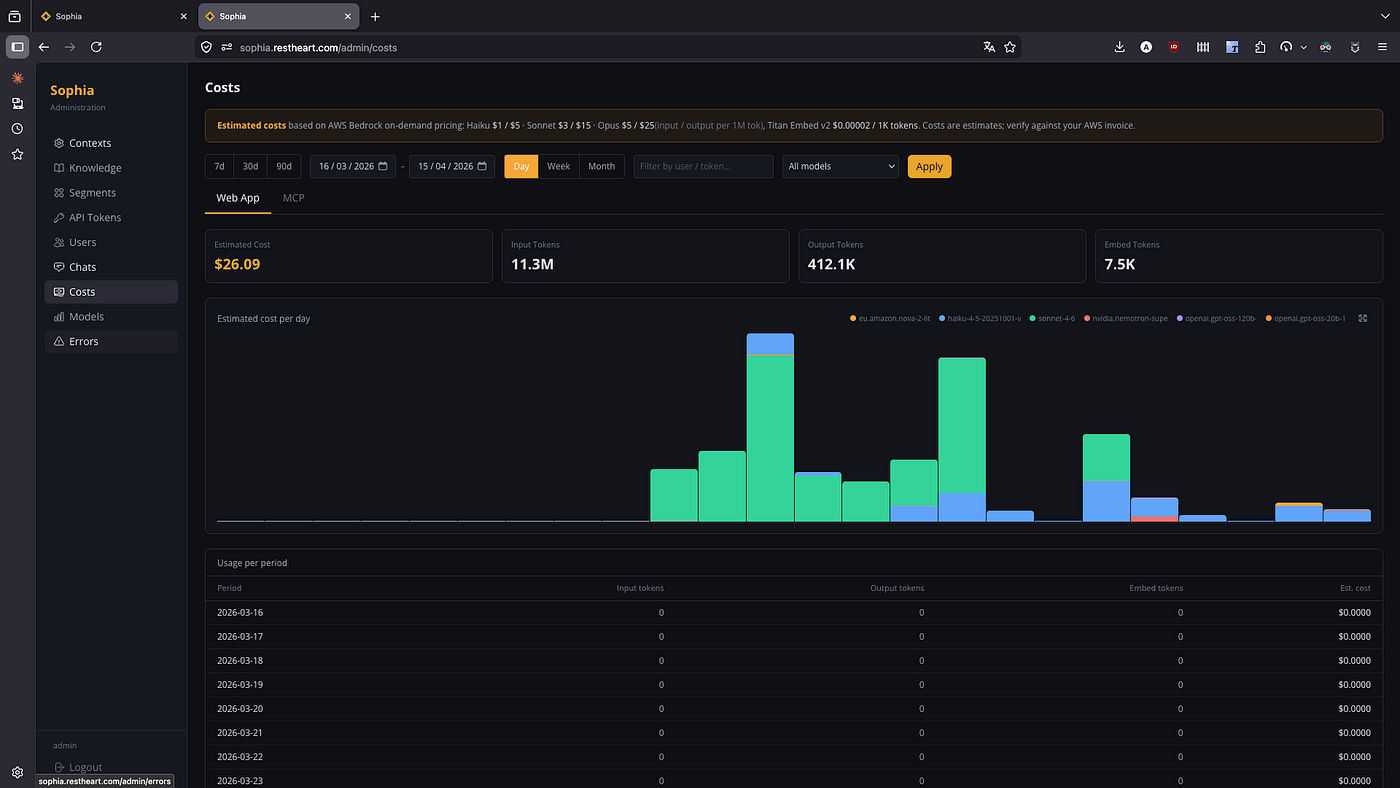
Costs explorer allow monitoring LLM costs
A dedicated error list surfaces all interactions that ended in a failure, with the error message and full context, making it straightforward to diagnose and reproduce problems.
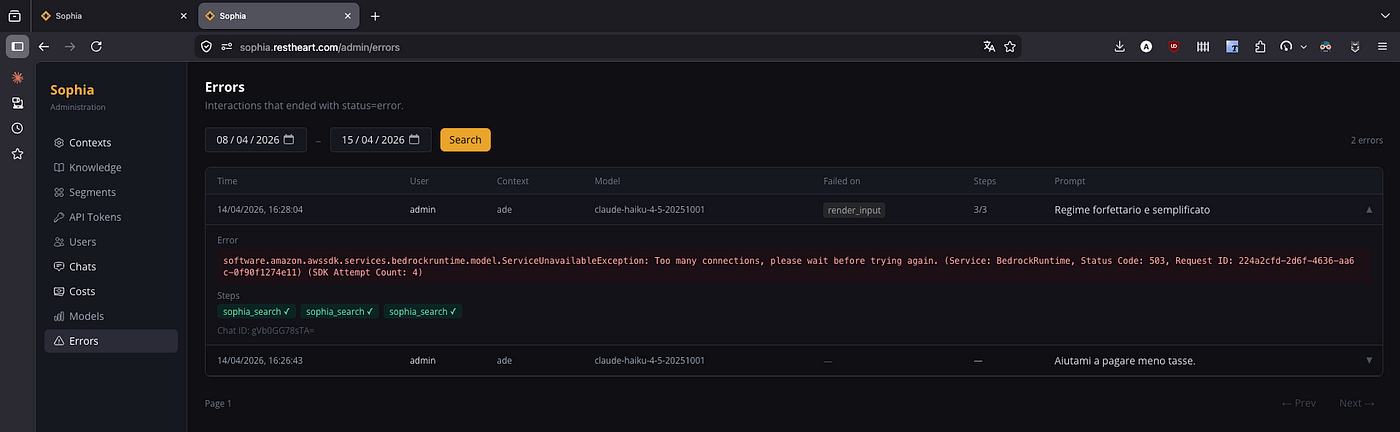
Error logs — every failed interaction, captured and inspectable
The new models admin page lists every configured Bedrock model with its pricing, measured throughput, quota limits, and a composite tool-use score that helps when choosing between models for a given context.
Artifact Share Links
Render_output artifacts can now be shared via a link that grants read-only access without requiring the recipient to authenticate. The share token is set by the interaction owner via a PATCH request; access control is enforced at the database level, so the server never exposes more than the artifact itself regardless of what the link contains.
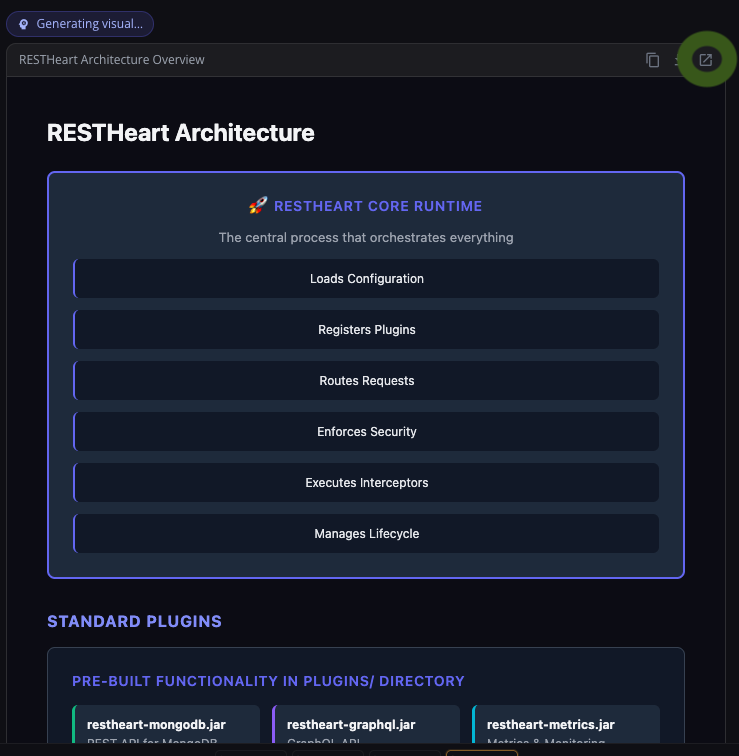
Visual artifacts generated by Sophia can be shared with a single link
Streaming Reliability
Long agentic responses occasionally left interactions stuck in a streaming state after a network interruption. A new watchdog detects stalled connections and triggers recovery automatically. If a message is still marked as streaming when the user reconnects, it is detected and re-fetched. The streaming timeout was extended to 30 seconds to accommodate longer responses without false positives.
메타데이터
- post_id
- c514e00a772d
- slug
- sophia-ai-april-2026-updates-c514e00a772d
- url
- https://medium.com/softinstigate-team/sophia-ai-april-2026-updates-c514e00a772d
- canonical_url
- https://medium.com/softinstigate-team/sophia-ai-april-2026-updates-c514e00a772d
- author_url
- https://medium.com/@andreadicesare
- status
- ok
- fetched_at
- 2026-06-14 11:28:49