OAC AI Agents—Your Data Can Now Answer Back, But First Know Who You’re Talking To
Oracle Analytics Cloud now ships with two AI superpowers. Here’s how to use them right-and what trips people up.
OAC AI Agents—Your Data Can Now Answer Back, But First Know Who You’re Talking To
Oracle Analytics Cloud now ships with two AI superpowers. Here’s how to use them right-and what trips people up.
Imagine opening your analytics dashboard and instead of clicking through 12 filters, you just type, "Show me top 5 regions by revenue this quarter.” Seconds later-a bar chart. That’s OAC AI Assistant in action.
Now imagine you work in HR. You want the AI to already know your fiscal calendar, your KPI definitions, and that “headcount” in your company means active permanent employees only. That’s where AI agents come in-a smarter, domain-trained layer built on top of AI assistants.
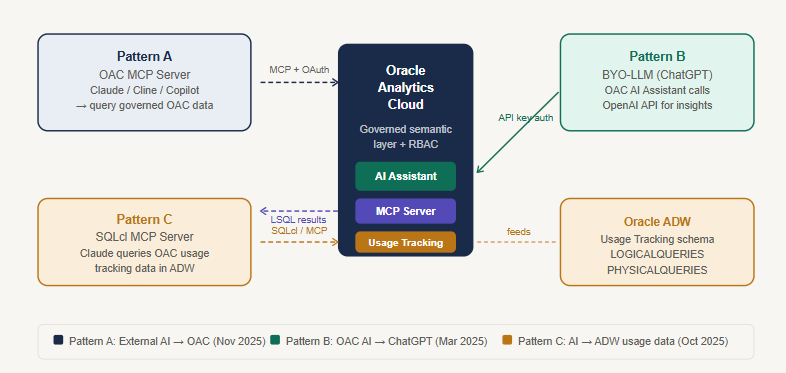
Both tools run on Oracle’s own OCI Gen AI. Your data never leaves your cloud region. No extra license cost. But they serve very different purposes — and confusing the two is the most common mistake teams make.
“AI Assistant answers questions. AI agents answer the right questions—because someone took the time to teach them your business context first.”
The key difference
An AI assistant is for everyone. Open a workbook, ask a question in plain English, get a chart. It works straight out of the box by indexing your subject area columns and their values. The catch: it only knows what it can see in the data model. Ask, “What is our attrition rate?” and it’ll try—but if your definition lives in someone’s head or a PDF, it won’t know.
AI agents fix that. An author configures the agent with a supplemental instruction—a structured prompt up to 6,000 characters—that teaches it your business rules, KPI formulas, fiscal calendar, and how to respond. Add up to 10 knowledge documents (think glossaries and SOP PDFs). Now the AI doesn’t just query data; it interprets it through your lens.
The Full Supplemental Instruction in RTCCOE Structure:
=== ROLE ===Care analytics expert, dataset, and audience.
=== TASK ===5-step reasoning sequence per query.
=== CONTEXT ===Apr-Mar FY, priority groupings (P1=Critical), issue category groups, 9 KPI formulas, aggregation rules, 5 report shortcuts.
=== CONSTRAINTS ===Default = today's walk-ins, Channel = Walk-In, never fabricate, AHT always in minutes.
=== OUTPUT ===Line for trends, donut for volume share, table for drill-downs, and KPI tile for spot queries.
=== EXAMPLES ===5 real query→response patterns covering volume, backlog, AHT trend, leaderboard, and SLA breach.

The real power unlocks when both work together—AI assistants for everyday exploration and agents for governed, role-specific analytics where consistency matters. Think finance teams who need attrition calculated the same way every single time.
Start small. Pick one subject area, add 10 synonyms, and write a 200-word supplemental instruction. See what your users actually ask. Iterate from there.
메타데이터
- post_id
- c6696b4f03e1
- slug
- your-data-can-now-answer-back-but-first-know-who-youre-talking-to-c6696b4f03e1
- url
- https://medium.com/@amish.osib/your-data-can-now-answer-back-but-first-know-who-youre-talking-to-c6696b4f03e1
- canonical_url
- https://medium.com/@amish.osib/your-data-can-now-answer-back-but-first-know-who-youre-talking-to-c6696b4f03e1
- author_url
- https://medium.com/@amish.osib
- status
- ok
- fetched_at
- 2026-06-12 18:14:10