Securing Flutter API Calls: A Robust Guide to Hardware-Backed Digital Signatures
In the world of mobile finance and high-stakes data exchange, standard HTTPS/TLS isn’t always enough. While TLS secures the “pipe,” it…
Securing Flutter API Calls: A Robust Guide to Hardware-Backed Digital Signatures
In the world of mobile finance and high-stakes data exchange, standard HTTPS/TLS isn’t always enough. While TLS secures the “pipe,” it doesn’t guarantee that the message inside wasn’t tampered with by a malicious actor on the device or that a valid request isn’t being “replayed” to drain an account.
To achieve bank-grade security, we must move toward Request Signing. In this article, I will show you how to implement digital signatures in Flutter, prioritizing hardware-backed security while providing a reliable software fallback.
The Core Concept: Digital Signatures
Instead of just sending a JSON body, the app generates a Signature based on the transaction data.
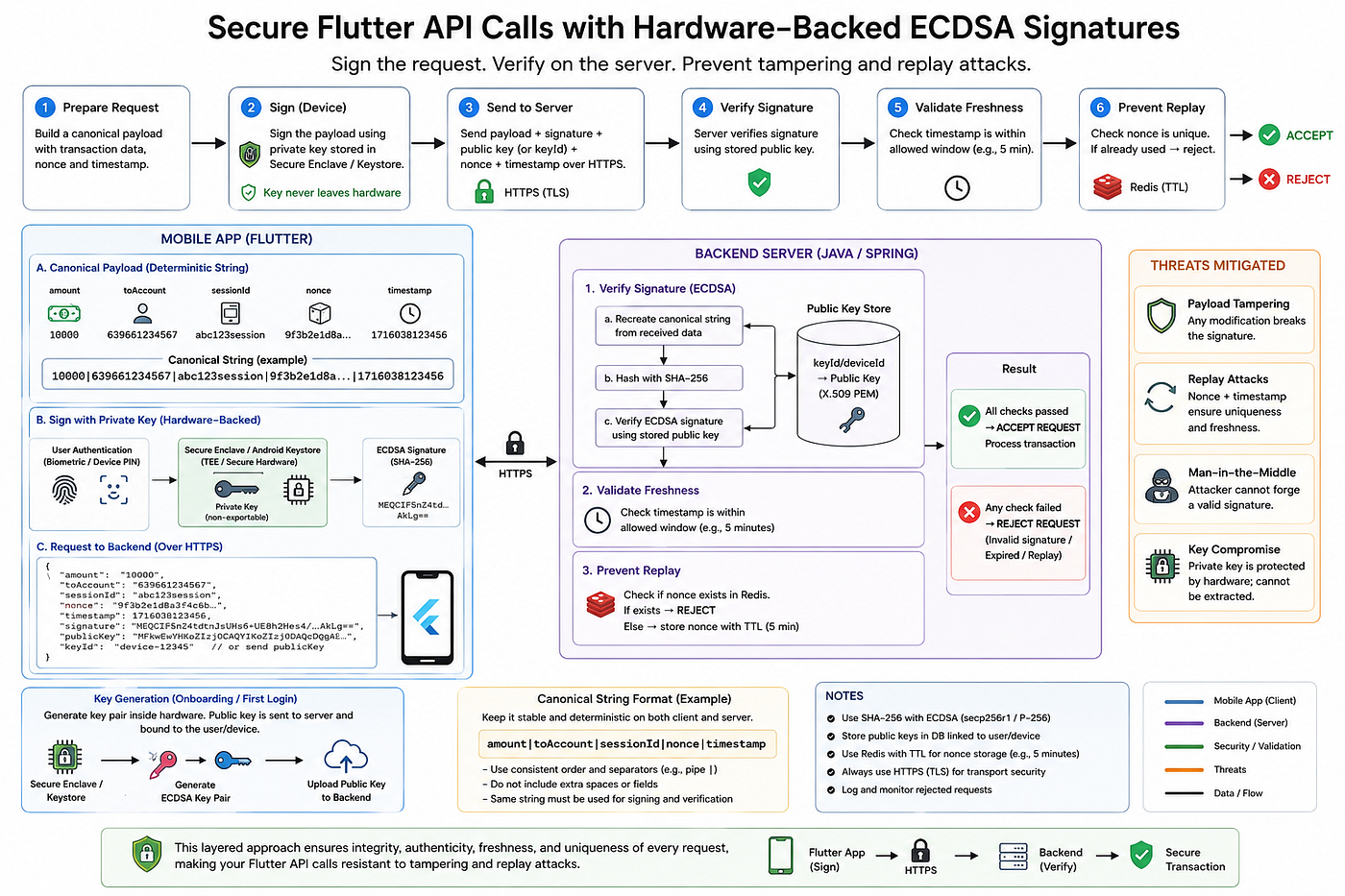
- Private Key: Stored securely on the device; signs the data.
- Public Key: Passed by mobile app to the backend; verifies the signature.
- Canonical String: A standardized string of your transaction data (Amount, Account, Nonce, Timestamp, etc.) that ensures both the app and the server are looking at the exact same data points.
Phase 1: The Gold Standard (Hardware-Backed)
Whenever possible, your business should prioritize hardware-based security. By using the device’s Trusted Execution Environment (TEE) or Secure Enclave, the private key is generated inside the hardware. It never leaves the chip, and even you, the developer, cannot “see” it.
1. Key Generation
We use the biometric_signature library from https://pub.dev/packages/biometric_signature to interface with the hardware. During the onboarding or OTP process, we check for a key pair.
Dart
Future<void> createHardwareKeys() async {
  final biometricSignature = BiometricSignature();
  String keyAlias = "MY_APP_SECURE_KEY";
final result = await biometricSignature.createKeys(
    keyAlias: keyAlias,
    keyFormat: KeyFormat.pem,
    promptMessage: 'Authenticate to secure your account',
    config: CreateKeysConfig(
      signatureType: SignatureType.ecdsa,
      enforceBiometric: false, // Set true for extra security
      useDeviceCredentials: true,
      failIfExists: true,
    ),
  );if (result.code == BiometricError.success) {
    // Send result.publicKey to your backend to bind it to the user profile
    await uploadPublicKey(result.publicKey);
  }
}
2. Signing the Transaction
When a user sends money, we create a canonical string, sign it, and attach a nonce (a random number used once) and a timestamp.
Dart
void sendTransaction() async {
  String nonce = DateTime.now().microsecondsSinceEpoch.toString();
  String timestamp = DateTime.now().millisecondsSinceEpoch.toString();

  // Create a predictable string format
  String payload = "10000|639661234567|$sessionId|$nonce|$timestamp";
final biometricSignature = BiometricSignature();
  final result = await biometricSignature.createSignature(
    payload: payload,
    keyAlias: "MY_APP_SECURE_KEY",
    promptMessage: 'Please authenticate to confirm transfer',
  );// Send payload + result (signature) + nonce + timestamp to API
}
Phase 2: The Alternative (Software-Based)
If your business requirements involve devices without biometric hardware or specific legacy support, you can use Secure Storage https://pub.dev/packages/flutter_secure_storage combined with the ecdsa package https://pub.dev/packages/ecdsa. While less secure than a TEE, it is still significantly better than plain API calls.
- Generate an Elliptic Curve (EC) key pair. You can use https://pub.dev/packages/elliptic
- Store the private key using
flutter_secure_storage. - Sign the payload using the
ecdsalibrary.
Note: In this flow, you are responsible for the cryptographic math. Ensure you use
sha256to hash your payload before signing.
Phase 3: Backend Verification (Java/Spring)
The backend is the ultimate gatekeeper. It retrieves the stored Public Key for the specific device_id and verifies the incoming signature.
The Verification Logic
The backend must perform three checks:
- Integrity: Does the signature match the payload?
- Freshness: Is the timestamp within a 5-minute window?
- Uniqueness: Has this nonce been used before? (Preventing Replay Attacks).
Java
import java.security.*;
import java.security.spec.*;
import java.util.Base64;
import java.nio.charset.StandardCharsets;

public static boolean verifySignatureWithTimestamp(
        String rawPemKey,
        String canonicalPayload,
        String signatureBase64,
        long timestamp,                    // Timestamp from request payload
        int maxAgeMinutes) {               // e.g. 5 minutes, based on redis TTL

    try {
        long now = System.currentTimeMillis();
        long ageMs = now - timestamp;

        System.out.println("Current Time      : " + now);
        System.out.println("Payload Timestamp : " + timestamp);
        System.out.println("Age               : " + (ageMs / 1000) + " seconds");

        // === 1. Timestamp Freshness Check ===
        if (timestamp > now + 60_000) { // 1 minute future tolerance
            System.out.println("Timestamp is in the future!");
            return false;
        }

        if (ageMs > (maxAgeMinutes * 60L * 1000)) {
            System.out.println("Request expired! (Older than " + maxAgeMinutes + " minutes)");
            return false;
        }

        System.out.println("✅ Timestamp is fresh");

        // === 2. Signature Verification ===
        // Clean PEM key
        String cleanKey = rawPemKey
                .replace("-----BEGIN PUBLIC KEY-----", "")
                .replace("-----END PUBLIC KEY-----", "")
                .replaceAll("\\s", "");

        byte[] publicBytes = Base64.getDecoder().decode(cleanKey);
        byte[] signatureBytes = Base64.getDecoder().decode(signatureBase64);

        // Reconstruct Public Key
        X509EncodedKeySpec keySpec = new X509EncodedKeySpec(publicBytes);
        KeyFactory keyFactory = KeyFactory.getInstance("EC");
        PublicKey publicKey = keyFactory.generatePublic(keySpec);

        // Verify Signature
        Signature ecdsaVerify = Signature.getInstance("SHA256withECDSA");
        ecdsaVerify.initVerify(publicKey);
        ecdsaVerify.update(canonicalPayload.getBytes(StandardCharsets.UTF_8));

        boolean isValid = ecdsaVerify.verify(signatureBytes);

        System.out.println("✅ Signature Verification: " + (isValid ? "VALID" : "INVALID"));
        return isValid;

    } catch (Exception e) {
        System.err.println("❌ Verification Error: " + e.getMessage());
        e.printStackTrace();
        return false;
    }
}
Full code demo
Helper functions
bool sampleVerifySignature(
  ec.PublicKey publicKey,
  String payload,
  Uint8List signatureBytes,
) {
  try {
    final payloadBytes = utf8.encode(payload);
    final hash = sha256.convert(payloadBytes).bytes;

    // Most signatures from Java backend will be in DER format
    final signature = ecdsa_sig.Signature.fromDER(signatureBytes);

    return ecdsa_sig.verify(publicKey, hash, signature);
  } catch (e) {
    print('❌ Verification Error: $e');
    return false;
  }
}

/// Converts elliptic PublicKey to X.509 SubjectPublicKeyInfo (Base64)
String publicKeyToX509Base64(ec.PublicKey publicKey) {
  final rawBytes = publicKeyToBytes(publicKey);           // 65 bytes
  final x509Bytes = _createX509PublicKey(rawBytes);
  return base64.encode(x509Bytes);
}

/// Returns full PEM format (recommended for Java)
String publicKeyToPEM(ec.PublicKey publicKey) {
  final base64Key = publicKeyToX509Base64(publicKey);
  return '''-----BEGIN PUBLIC KEY-----
$base64Key
-----END PUBLIC KEY-----''';
}

// Convert PublicKey to raw uncompressed bytes (0x04 + X + Y)
Uint8List publicKeyToBytes(ec.PublicKey pub) {
  final xBytes = _bigIntToBytes(pub.X, 32);
  final yBytes = _bigIntToBytes(pub.Y, 32);
  return Uint8List.fromList([0x04, ...xBytes, ...yBytes]);
}

Uint8List _bigIntToBytes(BigInt number, int byteLength) {
  String hex = number.toRadixString(16).padLeft(byteLength * 2, '0');
  final bytes = <int>[];
  for (int i = 0; i < hex.length; i += 2) {
    bytes.add(int.parse(hex.substring(i, i + 2), radix: 16));
  }
  return Uint8List.fromList(bytes);
}

// Fixed X.509 encoding
Uint8List _createX509PublicKey(Uint8List rawPubKey) {
  // Algorithm Identifier (ecPublicKey + secp256r1)
  final algId = Uint8List.fromList([
    0x30, 0x13,
    0x06, 0x07, 0x2A, 0x86, 0x48, 0xCE, 0x3D, 0x02, 0x01, // ecPublicKey
    0x06, 0x08, 0x2A, 0x86, 0x48, 0xCE, 0x3D, 0x03, 0x01, 0x07 // secp256r1
  ]);

  // BIT STRING: tag + length + unused bits + data
  final bitString = Uint8List(3 + rawPubKey.length);   // Fixed size
  bitString[0] = 0x03;                    // BIT STRING tag
  bitString[1] = (rawPubKey.length + 1);  // Length
  bitString[2] = 0x00;                    // No unused bits
  bitString.setAll(3, rawPubKey);         // Copy public key bytes

  // Final SEQUENCE
  final totalLength = algId.length + bitString.length;
  final result = Uint8List(2 + totalLength);
  result[0] = 0x30;                       // SEQUENCE
  result[1] = totalLength;
  result.setAll(2, algId);
  result.setAll(2 + algId.length, bitString);

  return result;
}

bool verifySignatureWithTimestamp({
  required ec.PublicKey publicKey,
  required String canonicalPayload, // full signed string
  required Uint8List signatureBytes,
  required int timestamp, // timestamp from payload
  int maxAgeMinutes = 5, // to be set in accordance to redis ttl
}) {
  try {
    // === 1. Timestamp Freshness Check ===
    final now = DateTime.now().millisecondsSinceEpoch;
    final ageMs = now - timestamp;
    final maxAgeMs = maxAgeMinutes * 60 * 1000;

    print("Current Time : $now");
    print("Payload Timestamp: $timestamp");
    print("Age (seconds) : ${ageMs ~/ 1000}s");

    if (ageMs < 0) {
      print("Timestamp is invalid!");
      return false;
    }

    if (ageMs > maxAgeMs) {
      print("Expired! (Older than $maxAgeMinutes minutes)");
      return false;
    }

    print("Timestamp okay pa");

    // signature verif here
    final payloadBytes = utf8.encode(canonicalPayload);
    final hash = sha256.convert(payloadBytes).bytes;

    final signature = ecdsa_sig.Signature.fromDER(signatureBytes);

    final isSignatureValid = ecdsa_sig.verify(publicKey, hash, signature);

    print(
        "Signature Verification: ${isSignatureValid ? "VALID" : "INVALID"}");

    return isSignatureValid;
  } catch (e) {
    print('Verification Error: $e');
    return false;
  }
}

String buildCanonicalPayload({
  required String amount,
  required String account,
  required String nonce,
  required int timestamp, // millisecondsSinceEpoch
  String? fromAccount,
}) =>
    [
      amount,
      account,
      nonce,
      timestamp.toString(),
    ].join('|');
Test run (dart)
void main() {

  final timestamp = DateTime.now().millisecondsSinceEpoch;
  final int oldTimestamp = 1478244641454; //used to test old timestamp
  String nonce = "12345"; //this should be random, for testing we use basic value

  //Part of your payload to be signed. Sign only the important details + nonce + timestamp
  String testPayload = buildCanonicalPayload(
      amount: "1000",
      account: "09664466316",
      nonce: nonce,
      timestamp: timestamp);

  //for testing purposes we use a predefined private key.
  //in your actual app, this should be should generated
  ec.PrivateKey mobilePrivate = convertStringToKey(
    '2d734ce1fce532ce5454f96691449fb1907e07b763c46c65c069573644af10aa',
    'private',
  );

  String signatureBase64 = signAndEncode(mobilePrivate, testPayload);
  print("Signature (Base64): $signatureBase64");
  print("pub key: ${mobilePrivate.publicKey}");
  print("payload: $testPayload");

  //First test
  bool isValid = verifySignatureWithTimestamp(
      publicKey: mobilePrivate.publicKey,
      canonicalPayload: testPayload,
      signatureBytes: base64.decode(signatureBase64),
      timestamp: timestamp);

  print("Test 1: Happy path. Signature status: $isValid");

  //Second test
  bool isValidUsingExpiredTimetamp = verifySignatureWithTimestamp(
      publicKey: mobilePrivate.publicKey,
      canonicalPayload: testPayload,
      signatureBytes: base64.decode(signatureBase64),
      timestamp: oldTimestamp);

  print("Test 2: Using expired timestamp. Signature status: $isValid");

  //for java use
  String x509Base64 = publicKeyToX509Base64(mobilePrivate.publicKey);
  print("X509 Base64: $x509Base64");
}
OUTPUT:
Signature (Base64): MEQCIF5nZ4tdtnJsUHs6+UE8h2Hes4/0jTuIWfJvlGz+XJ7hAiAjZ0rSQ3a1kDTD/KEv5Of3Q97T7lNpRLJV3jAktOAkLg==
pub key: 04d2f48e907257211b83ad856bf8fe74ab380e2d618fd207bce8d3a7beea5f085080f4932ee227c6c96a86c7ccfe23494f7abebf9a6d874aa3bcba033641c68105 payload: 1000|09664466316|12345|1778244792713
Current Time: 1778244792743 Payload Timestamp: 1778244792713 Age (seconds): 0s Timestamp is fresh Signature Verification: VALID
Test 1: Happy path. Signature status: true
Current Time : 1778244792751 Payload Timestamp: 1478244641454 Age (seconds) : 300000151s Request expired! (Older than 5 minutes)
Test 2: Using expired timestamp. Signature status: true
X509 Base64: MFkwEwYHKoZIzj0CAQYIKoZIzj0DAQcDQgAE0vSOkHJXIRuDrYVr+P50qzgOLWGP0ge86NOnvupfCFCA9JMu4ifGyWqGx8z+I0lPer6/mm2HSqO8ugM2QcaBBQ==
Test run (Java)
 public static void main(String[] args) {

        long now = System.currentTimeMillis();
        long old = 1478244792713L;
        String rawPemKey = "MFkwEwYHKoZIzj0CAQYIKoZIzj0DAQcDQgAE0vSOkHJXIRuDrYVr+P50qzgOLWGP0ge86NOnvupfCFCA9JMu4ifGyWqGx8z+I0lPer6/mm2HSqO8ugM2QcaBBQ==";
        String signatureBase64 = "MEQCIF5nZ4tdtnJsUHs6+UE8h2Hes4/0jTuIWfJvlGz+XJ7hAiAjZ0rSQ3a1kDTD/KEv5Of3Q97T7lNpRLJV3jAktOAkLg==";
        boolean x = verifySignatureWithTimestamp(rawPemKey, "1000|09664466316|12345|1778244792713", signatureBase64, now, 5);
        System.out.println("test 1: happy path. Is Valid transaction:"+x);

        boolean y = verifySignatureWithTimestamp(rawPemKey, "1000|09664466316|12345|1778244792713", signatureBase64, old, 5);
        System.out.println("test 2: expired time. Is Valid transaction: "+y);

    }
Results:
Success
Current Time      : 1778245993907
Payload Timestamp : 1778245993907
Age               : 0 seconds
✅ Timestamp is fresh
✅ Signature Verification: VALID
test 1: happy path. Is Valid transaction:true
Current Time      : 1778245993936
Payload Timestamp : 1478244792713
Age               : 300001201 seconds
Request expired! (Older than 5 minutes)
test 2: expired time. Is Valid transaction: false

Process finished with exit code 0
If payload is altered: “10000|09660066300|12345|1778244792713”
false
Process finished with exit code 0
If signatureBase64 is tampered
Verification Error: Last unit does not have enough valid bits
false

Process finished with exit code 0
if rawPemKey is tampered
Verification Error: Input byte array has incorrect ending byte at 124
false

Process finished with exit code 0
Preventing Replay Attacks
Even with a valid signature, an attacker could intercept a “Send Money” request and send it again. To stop this:
- Nonce Tracking: Store used nonces in a fast cache (like Redis) with a TTL matching your timestamp expiry (e.g., 5 minutes). If a nonce repeats, reject it.
- Preflight Approach: For ultra-secure environments, the backend can issue a one-time nonce via a separate API call. The transaction API then requires this specific nonce to function.
Conclusion
Securing API calls is about layers. By using Hardware-Backed Signatures, you ensure that even if a device is compromised, the “signing identity” remains safe inside the hardware enclave. This architecture makes payload tampering and replay attacks detectable and rejectable by the backend, even if requests pass through a compromised network or client environment.
Have you implemented request signing in your Flutter apps? Let’s discuss the challenges in the comments!
Tags: Flutter, ECC, ECDSA, App Security, Cryptography, Mobile Development, Java
메타데이터
- post_id
- c68b23ac02e5
- slug
- securing-flutter-api-calls-a-robust-guide-to-hardware-backed-digital-signatures-c68b23ac02e5
- url
- https://meetcyber.net/securing-flutter-api-calls-a-robust-guide-to-hardware-backed-digital-signatures-c68b23ac02e5
- canonical_url
- https://meetcyber.net/securing-flutter-api-calls-a-robust-guide-to-hardware-backed-digital-signatures-c68b23ac02e5
- author_url
- https://medium.com/@jamesreubengruta
- status
- ok
- fetched_at
- 2026-06-23 17:05:31