How to Copy Plugin Settings (Kintone Developer Program)
I was duplicating an experiment app with plugins and found it difficult that I had to set all the settings of the plugins again. This…
How to Copy Plugin Settings (Kintone Developer Program)
I was duplicating an experiment app with plugins and found it difficult that I had to set all the settings of the plugins again. This technique is useful if you want to copy settings quickly one time for one app.
Go to the plugin of the original app.
Open the console with CTRL+Shift+J on Chrome.
Copy the Plugin ID from the URL and paste it into the command:
kintone.plugin.app.getConfig(‘pluginID’)
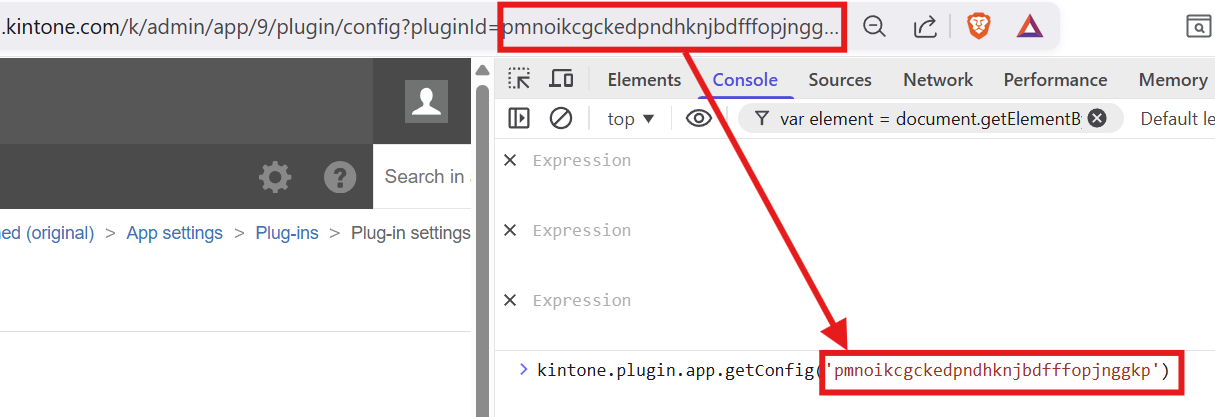
Copy the result.
Navigate to the new app plugin settings, open the console and type:
kintone.plugin.app.setConfig(<result>)
Paste the result inside the parentheses, hit enter.
Then update the app. That’s it!
메타데이터
- post_id
- c69b5f69da23
- slug
- how-to-copy-plugin-settings-kintone-developer-program-c69b5f69da23
- url
- https://medium.com/@eab5/how-to-copy-plugin-settings-kintone-developer-program-c69b5f69da23
- canonical_url
- https://medium.com/@eab5/how-to-copy-plugin-settings-kintone-developer-program-c69b5f69da23
- author_url
- https://medium.com/@eab5
- status
- ok
- fetched_at
- 2026-06-22 07:15:07




