Horde Setup: A Step-by-Step Guide (Part 1 — Local Installation)
Learn how to set up Horde locally with this comprehensive guide. Step-by-step instructions, tips, and troubleshooting to get you started…
Unreal Engine Horde Setup: Part 1 — Local Installation
Hello all! That’s my first article, so there’s not a lot of experience behind it. I tried to explain everything; maybe that’s more than needed, but let it be. Feel free to ask and share your opinion about anything. Thanks!
A bit about me:
I worked on different kinds of projects and companies, but the domain was pretty much the same — financial structures. In my last job, I dived into the gamedev industry. I suppose that’s not a big deal to switch, but really big :).
Why am I writing this article? There is no documentation about Horde. When I tried to set it up, there were issues, which I’m going to show to make your progress faster than mine. Also, I think if the community grows and more people want to use Horde, that’ll push Epic to release it faster. So, let’s do it.
I will describe basic things like how to set up an Agent, Server and Dashboard.
Important: I successfully run Horde, but there are things that I don’t completely understand, so I will update the article in the future to add new information. Things that are not clear will be described at the end.
You should have pushed Unreal Engine locally to build Horde. Repo: *Github. *If you have not worked with Epic before, you should get access to the repository (Link). Also, you need any IDE to build a .Net project and Node.JS to build a react project. I use Visual Studio 2021 Community version for .net projects and Visual Studio Code to edit something in a React project.
I highlighted the main components in the repository:
Horde folder structure
- Horde.Agent — .net console application, which will be set up on the build machine and used to build sources
- Horde.Server — .net backend server API for Dashboard
- HordeDashboard — react js frontend for Dashboard
- Samples.RemoteWorker — .net backend console application
Horde app structure
Run Horde.Server and Horde.Agent
Here, you should open the Horde solution in the IDE and build it. Horde.Agent and Horde.Server should have been configured with the right routes for each other, so you should check appsettings for each project.
//Horde.Server application.json
 "Horde": {
  "HttpPort": 5000, // By this port, you will be able to access Server
  "HttpsPort": 0,
  "Http2Port": 5002,
  "ConsoleLogLevel": "Debug",
  "DashboardUrl": "http://localhost:3000", // Here point on Dashboard Url, if it's not running do not touch it
  "DisableAuth": true,
  "CorsEnabled": true,
  "CorsOrigin": "http://localhost:5003;http://localhost:3000",
  "LogFileProviderType": "Local",
  "Storage": {
   "Url": "http://localhost:57001"
  },
  "RedisConnectionConfig": "localhost:6379", // Add Redis connection string (In case of running your own db service or dockerizing app)
  "DatabaseConnectionString": "mongodb://localhost:27017" // Same as with Redis
}- All components, like MongoDb, Redis, Storage will be run on the server by default, so you do not need to configure them manually on the local environment, but when you want to deploy them, they should be configured separately. Also, when you want to use your own database services, you should change appsetting.json for the server to provide the right connection strings.
Note: Be careful when you setup connections for the first time, the https protocol is used, but you should change it to the Http one if you want to run the app locally.
After that, you can run the Horde.Server app. Note: As you start the app for the first time, you will also see database initialization.

Horde.Serve console output. Now you can access you app by localhost:5000
After that, you can start the agent. If you put the right url for your server, you can see that it will connect and communicate with the server.
// Horde.Agent application.json
"ServerProfiles":
  [
   {
    "Name": "Local",
    "Environment": "dev",
    "Url": "http://localhost:5000", // Here you should point on Horde Server
    "Storage": {
     "Url": "http://localhost:57001" // Here just not touch
    }
   }
  ]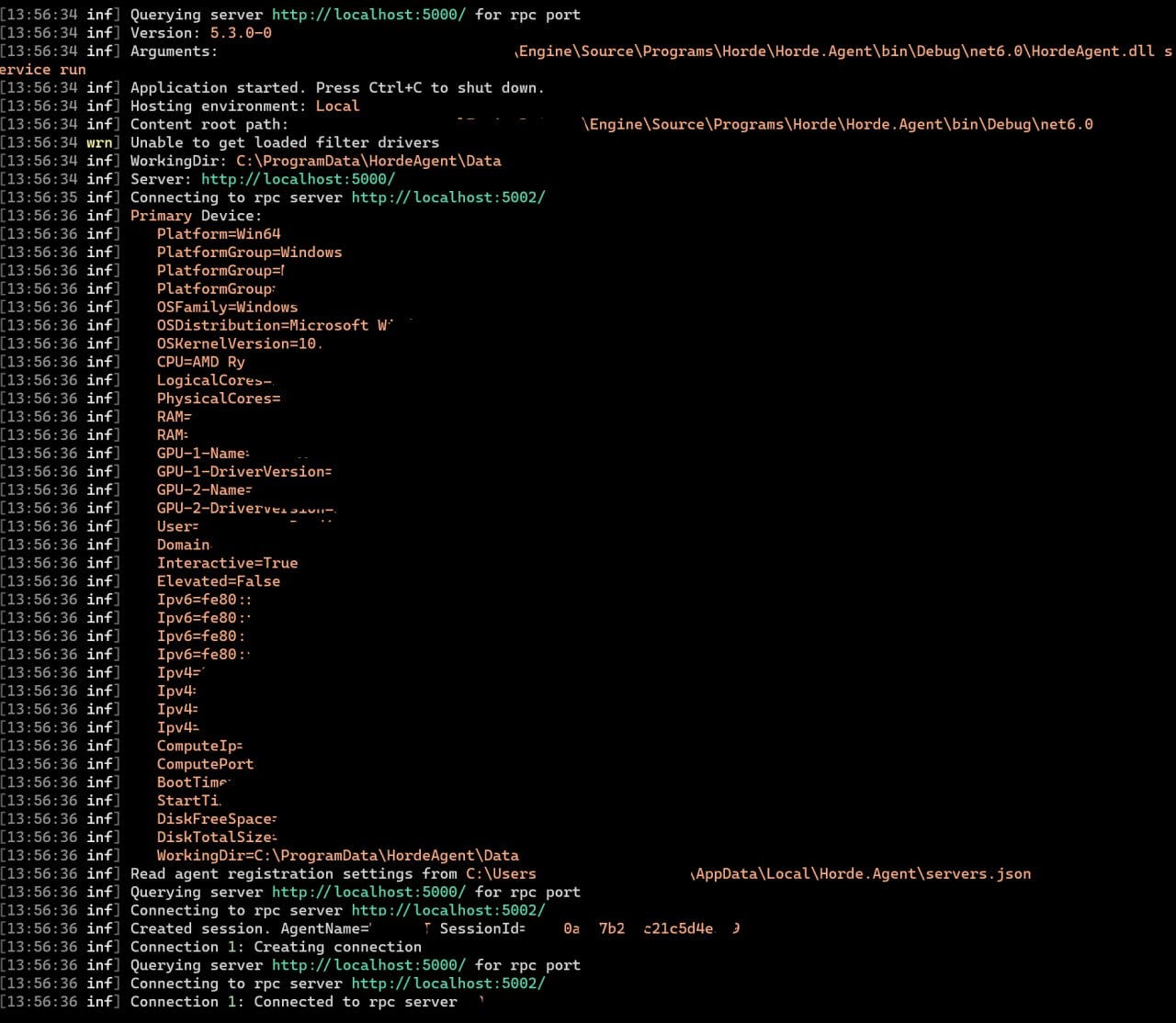
Horde.Agent console output
That’s all you need to run the server and agent.
After the agent connects to the server, you will see the following output:

Agent output, that it’s connected to server.

Server output, that’s some session was starter.
Run Horde Dashboard
Firstly, you need to have installed node.js and know how to run react app.
Steps to run it:
- Open the “root\Engine\Source\Programs\Horde\HordeDashboard” folder in some IDE and edit the package.json file and change the proxy; it should point to our running server. If you run the server locally, use your url; it should be “http://localhost:5000/”
- Open the “HordeDashboard.env” file, and you need to set the server url and token to use Dashboard. Tokens can be found on the server UI; there is a link for “Account Page”, It is possible to get different types of tokens; I use the bearer one. If you run the server locally, use your url; it should be localhost:5000
- After that you can run react app:
npm install
npm start
// Or when you need to specify some port:
npm start -- --port=3000
Note: sometimes it’s not started from the first time, so try a few more)

Dashboard console output.
If everything was successful, you will have access to Horde UI:
Horde Worker
That’s simple .net console application, but I’m not aware information how it should be used. If you know some details, share with me, I will add it to article. Thank you!
Questions:
- How should Horde Worker be used and what should it do?
- Where should Horde Worker be hosted?
Arcticle title and Horde app structure pictures I took from Horde presentation.
Useful links:
- Part 2: about dockerazing Horde services
- Unreal Github: (To gain access, you must submit an access request to Epic Games)
- Horde Presentaion
메타데이터
- post_id
- c6c14614f533
- slug
- horde-setup-a-step-by-step-guide-part-1-local-installation-c6c14614f533
- url
- https://medium.com/@VmpKalin/horde-setup-a-step-by-step-guide-part-1-local-installation-c6c14614f533
- canonical_url
- https://medium.com/@VmpKalin/horde-setup-a-step-by-step-guide-part-1-local-installation-c6c14614f533
- author_url
- https://medium.com/@VmpKalin
- status
- ok
- fetched_at
- 2026-07-25 04:20:42