WSO2 Identity Server: The Modern Interface for LDAP Organizational Units
Many enterprises rely on LDAP or Active Directory (AD) to manage user identities and organizational units (OUs). While these systems offer…
WSO2 Identity Server: The Modern Interface for LDAP Organizational Units
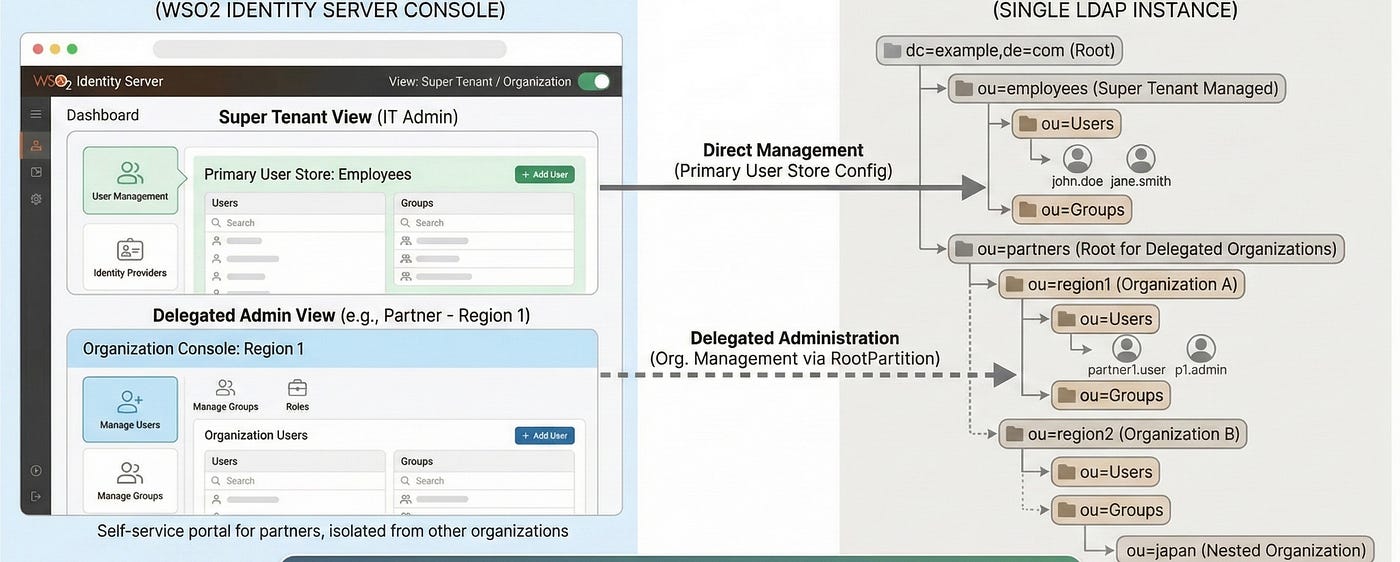
Many enterprises rely on LDAP or Active Directory (AD) to manage user identities and organizational units (OUs). While these systems offer a structured way to separate resources, they often lack modern user management features like access delegation, streamlined administration, and user-friendly interfaces.
**WSO2 Identity Server (WSO2 IS)** changes the game. It acts as a modern authorization and management layer on top of your existing LDAP structure. This allows you to maintain your legacy directory while providing a sleek, self-service console for delegated administration.
In this guide, we will set up a scenario where Employees are managed internally, but Partners are given their own isolated spaces to manage their users — all backed by a single LDAP instance.
1. The Setup: A Sample Use Case
To demonstrate this, we will simulate a real-world scenario with three distinct groups:
- Employees: Internal staff managed by the central IT team.
- Customers: End-users accessing services.
- Partners: External organizations (e.g., specific regions) that need to manage their own users.
Step 1: Run OpenLDAP with Docker
First, let’s spin up a fresh LDAP instance.
docker run \
  --name openldap \
  -p 389:389 \
  -p 636:636 \
  --env LDAP_ORGANISATION="Example.com Organization" \
  --env LDAP_DOMAIN="example.com" \
  --env LDAP_ADMIN_PASSWORD="admin" \
  --detach osixia/openldap:1.5.0
Step 2: Define the Directory Structure
Connect to your LDAP server (using Apache Directory Studio or similar) using cn=admin,dc=example,dc=com and the password admin.
Note: If you’re on macOS and encounter issues, refer to the build instructions under product/target/products/.
We will create a structure that separates internal resources from delegated ones:

dc=example,dc=com
├── ou=employees        <-- Managed by Super Tenant
│   ├── ou=Users
│   └── ou=Groups
├── ou=customers
│   └── ou=Users
└── ou=partners         <-- The Root for Delegated Organizations
    ├── ou=region1      <-- Organization A
    │   ├── ou=Users
    │   └── ou=Groups
    └── ou=region2      <-- Organization B
        ├── ou=Users
        └── ou=Groups
The Goal: The WSO2 IS Super Tenant will manage ou=employees. However, when we create a new "Organization" in WSO2 IS (e.g., "Region 1"), it should automatically map to ou=region1 in LDAP.
2. Configuring WSO2 Identity Server
Now, let’s configure WSO2 IS to interface with this directory.
Primary User Store Configuration
We need to tell WSO2 IS how to read users. Update your deployment.toml to point to the Employee branch by default.
[user_store]
type = "read_write_ldap_unique_id"
base_dn = "dc=example,dc=com"
connection_url = "ldap://localhost:389"
connection_name = "cn=admin,dc=example,dc=com"
connection_password = "admin"

# Mapping users specifically to the Employee OU
user_entry_object_class = "inetOrgPerson"
user_name_attribute = "cn"
user_search_base = "ou=Users,ou=employees,dc=example,dc=com"
user_name_search_filter = "(&(objectClass=inetOrgPerson)(cn=?))"
user_name_list_filter = "(objectClass=inetOrgPerson)"
user_id_attribute = "entryUUID"

# Group Configuration
read_groups = true
write_groups = true
group_entry_object_class = "groupOfNames"
group_name_attribute = "cn"
group_search_base = "ou=Groups,ou=employees,dc=example,dc=com"
group_name_search_filter = "(&(objectClass=groupOfNames)(cn=?))"
group_name_list_filter = "(objectClass=groupOfNames)"
membership_attribute = "member"

password_hash_method = "PLAIN_TEXT"
multi_attribute_separator = ","
immutable_attributes = "entryUUID,createTimestamp,modifyTimestamp"
timestamp_attributes = "createTimestamp,modifyTimestamp"
Claim Configuration
Also, update the claim-config.xml as below.
<Claim>
    <ClaimURI>http://wso2.org/claims/im</ClaimURI>
    <DisplayName>IM</DisplayName>
    <AttributeID>userWorkstations</AttributeID>
    <Description>IM</Description>
    <DisplayOrder>9</DisplayOrder>
    <SupportedByDefault />
</Claim>
<Claim>
    <ClaimURI>http://wso2.org/claims/username</ClaimURI>
    <DisplayName>Username</DisplayName>
    <AttributeID>cn</AttributeID>
    <Description>Username</Description>
</Claim>
<Claim>
    <ClaimURI>http://wso2.org/claims/resourceType</ClaimURI>
    <DisplayName>Resource Type</DisplayName>
    <AttributeID>description</AttributeID>
    <Description>Resource Type</Description>
</Claim>
<Claim>
    <ClaimURI>http://wso2.org/claims/location</ClaimURI>
    <DisplayName>Location</DisplayName>
    <AttributeID>streetAddress</AttributeID>
    <Description>Location</Description>
</Claim>
<Claim>
    <ClaimURI>http://wso2.org/claims/created</ClaimURI>
    <DisplayName>Created Time</DisplayName>
    <AttributeID>createTimestamp</AttributeID>
    <Description>Created timestamp of the user</Description>
    <ReadOnly/>
</Claim>
<Claim>
    <ClaimURI>http://wso2.org/claims/modified</ClaimURI>
    <DisplayName>Last Modified Time</DisplayName>
    <AttributeID>modifyTimestamp</AttributeID>
    <Description>Last Modified timestamp of the user</Description>
    <ReadOnly/>
</Claim>
<Claim>
    <ClaimURI>http://wso2.org/claims/userid</ClaimURI>
    <DisplayName>User ID</DisplayName>
    <AttributeID>entryUUID</AttributeID>
    <Description>Unique ID of the user</Description>
    <ReadOnly/>
</Claim>
3. The Power Move: Delegated Organization Management
This is where the magic happens. We want to utilize WSO2 IS’s Organization Management (B2B) features.
By default, WSO2 IS organization users are stored in separate user store. However, we want to force these organizations to live inside our ou=partners LDAP branch.
Add this configuration to deployment.toml:
[tenant_manager.ldap.properties]
RootPartition = "ou=partners,dc=example,dc=com"
What does this do? When you create an organization named “Region1” in the WSO2 Console, the server will look for (or create) the context ou=region1,ou=partners,dc=example,dc=com.
4. Seeing it in Action
- Start WSO2 Identity Server and login to the Console.
- Navigate to Organization Management.
- Create a new Organization named
region1.

Once created, switch to the Region1 organization console.
- As the organization creator: You have full visibility.
- As a Region Admin: You can create users, manage groups, and assign roles.

Behind the scenes, WSO2 IS is performing LDAP operations on ou=region1,ou=partners. You have successfully created an abstraction layer where partners can manage their own users without ever touching the raw LDAP server.
5. Advanced Scenario:
Handling Deep Hierarchies
Out of the box, WSO2 IS maps organizations directly under the defined root partition. But what if you have a nested hierarchy?
- LDAP Structure:
ou=japan,ou=region1,ou=partners...
Currently, WSO2 IS tenant manager supports only flat list of organizations under the root. If you need to map an organization to a nested LDAP OU (e.g., “japan” organization unit under “region1”), you need a custom approach.
You can manually update the Realm Configuration stored in the UM_TENANT table.
The Workaround: If you create an organization named “Japan”, it defaults to ou=japan,ou=partners. To move it under Region 1, you can execute the following SQL to update the User Store configuration blob:
UPDATE UM_TENANT
SET UM_USER_CONFIG = CONVERT(
        REPLACE(
            CONVERT(UM_USER_CONFIG, CLOB),
            'ou=japan,ou=partners,dc=example,dc=com',
            'ou=japan,ou=region1,ou=partners,dc=example,dc=com'
        ),
        BLOB
    )
WHERE UM_DOMAIN_NAME = 'japan';
The view from the WSO2 Identity server console.

Restructuring Organizational Units
Furthermore, real-world directory structures change over time. If you need to relocate an Organizational Unit within LDAP, you can reflect this change in WSO2 Identity Server by updating the parent-child relationships in the UM_ORG_HIERARCHY table and UM_ORGtable.
Although deep hierarchical nesting and restructuring are not provided out-of-the-box, these simple SQL-based workarounds allow you to fully utilize WSO2 Identity Server as a comprehensive management layer for complex LDAP environments
Conclusion
By integrating WSO2 Identity Server with your LDAP OUs, you get the best of both worlds:
- Modern Administration: You gain a powerful, web-based console for managing users and delegated organizations.
- Security: You no longer need to expose your LDAP server or share admin credentials with partners.
WSO2 Identity Server acts as the robust, secure user interface that LDAP has always needed.
메타데이터
- post_id
- c6d669fc206c
- slug
- wso2-identity-server-the-modern-interface-for-ldap-organizational-units-c6d669fc206c
- url
- https://medium.com/@sadilchamishka/wso2-identity-server-the-modern-interface-for-ldap-organizational-units-c6d669fc206c
- canonical_url
- https://medium.com/@sadilchamishka/wso2-identity-server-the-modern-interface-for-ldap-organizational-units-c6d669fc206c
- author_url
- https://medium.com/@sadilchamishka
- status
- ok
- fetched_at
- 2026-06-15 20:49:13




