Pipeline Design Patterns in Data Engineering -Full Refresh, Incremental Loads, Upserts & SCD in…
How data pipelines decide what to load, what to update, and how to handle change at scale.
Pipeline Design Patterns in Data Engineering -Full Refresh, Incremental Loads, Upserts & SCD in Practice
How data pipelines decide what to load, what to update, and how to handle change at scale.
Every data pipeline eventually faces the same question: Do we reload everything, or only what changed?
The answer defines how fast your pipeline runs, how much it costs, and how reliable it is.
In small systems, the choice doesn’t matter much. At scale, it becomes one of the most important design decisions.
The Real Problem
Let’s take a simple e-commerce system.
Orders, customers, and products are constantly changing:
- new orders are created
- customer details are updated
- product prices change
Now the warehouse needs to stay in sync.
The question is: How do we move this data efficiently without breaking consistency?
Full Refresh : The Simple Starting Point
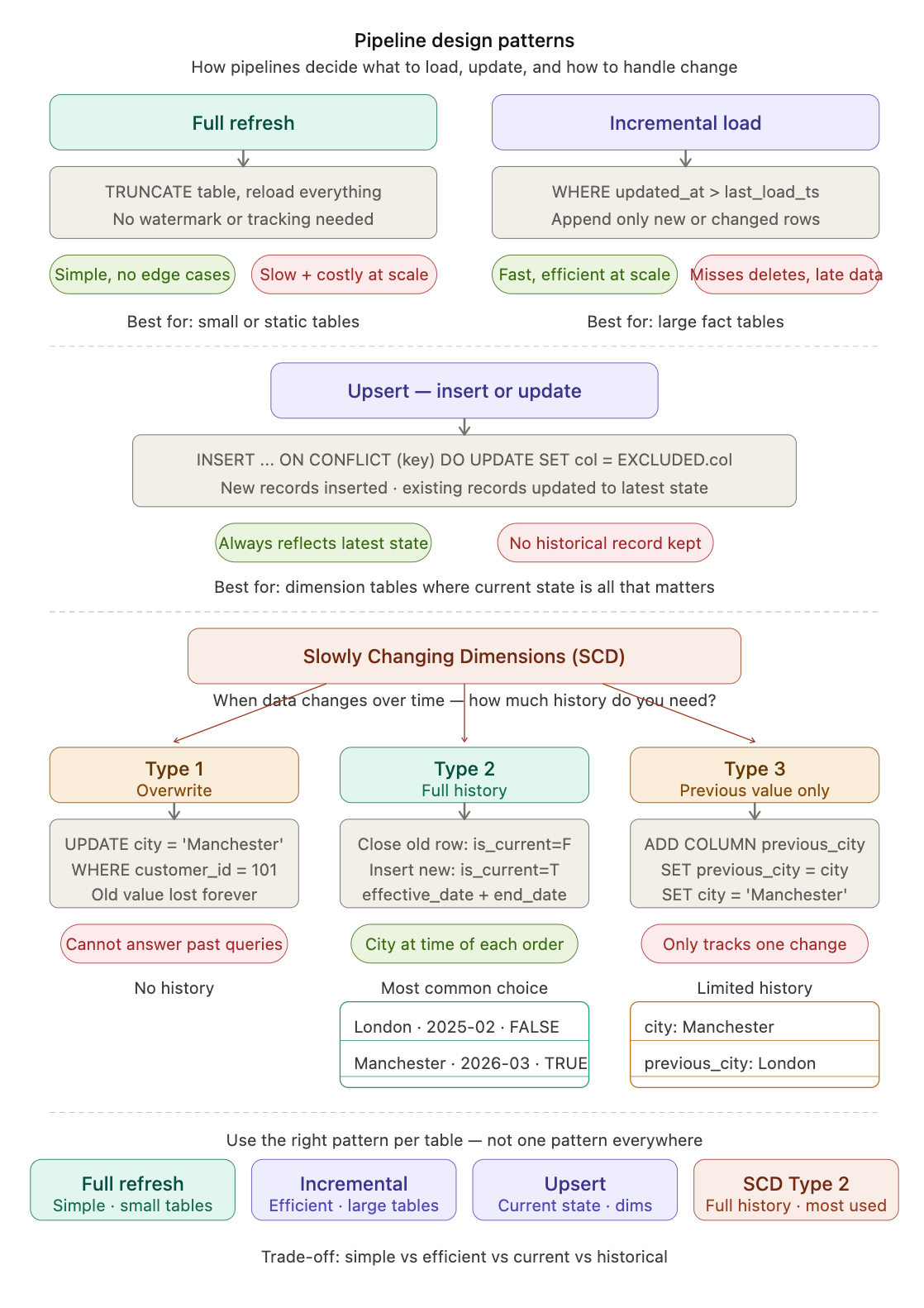
The most straightforward approach is to reload everything.
TRUNCATE TABLE orders;
INSERT INTO orders
SELECT * FROM source.orders;
This works because it is simple. No tracking, no logic, no edge cases.
But the problem appears quickly:
- you reload unchanged data
- processing time increases with data size
- pipelines become slow and expensive
In practice:
Full refresh works for small or static datasets, but breaks at scale.
Incremental Load : Only What Changed(delta)
Instead of reloading everything, pipelines usually load only new or updated data.
This is done using a watermark, typically a timestamp.
SELECT *
FROM source.orders
WHERE updated_at > 'last_load_timestamp';
Only the new rows are appended:
INSERT INTO orders
SELECT * FROM source.orders
WHERE updated_at > 'last_load_timestamp';
This reduces data movement significantly. But it introduces new challenges:
- Late-arriving data: Updates to older records may be missed if they fall outside the watermark window
- Deletes: Append-only pipelines do not capture deleted records unless explicitly tracked
- Source dependency: Requires reliable timestamps (e.g.,
created_at,updated_at) from the source system
In practice: Incremental loading is the standard for large datasets. It fits naturally with append-only patterns, especially for fact tables where historical data needs to be preserved.
Upsert : Update or Insert
Upsert handles scenarios where data changes over time and those changes need to be reflected in the warehouse.
Instead of simply appending new rows, it inserts new records and updates existing ones based on a defined key.
For some tables, appending is not enough.
Take customers:
- email changes
- address updates
- preferences evolve
For analytics, you often want the latest state. This is where upsert comes in.
INSERT INTO customer_dim (customer_id, name, email, updated_at)
VALUES (101, 'Tom', 'tom_new@email.com', CURRENT_DATE)
ON CONFLICT (customer_id)
DO UPDATE SET
  name = EXCLUDED.name,
  email = EXCLUDED.email,
  updated_at = EXCLUDED.updated_at;
What this does:
- inserts new customers
- updates existing ones
In practice:
Upsert is used for dimension tables where the latest state matters.
Slowly Changing Dimensions (SCD) : Tracking History
Sometimes, the latest state is not enough. You also need to preserve what was true in the past.
For example:
- a customer moves to another city
- a product changes category
- a business attribute is corrected later
Now the question is:
- Overwrite the old value? → SCD Type 1
- Preserve full history with versions? → SCD Type 2
- Store only the previous value? → SCD Type 3
What happens if we overwrite? (SCD Type 1)
Let’s say the customer currently lives in London:
SELECT customer_id, name, city
FROM customer_dim
WHERE customer_id = 101;

customer_id | name  | city
101         | Tom | London
Now the customer moves to Manchester, and we simply update the row:
UPDATE customer_dim
SET city = 'Manchester'
WHERE customer_id = 101;

-- After the update :
customer_id | name  | city
101         | Tom | Manchester
We lost history. We can no longer answer:
“Where the customer was when this order was placed last year?”
SCD Type 2 : Preserve Full History
Instead of updating the row, we close the old record and insert a new one.
UPDATE customer_dim
SET end_date = CURRENT_DATE,
    is_current = FALSE
WHERE customer_id = 101
  AND is_current = TRUE;

INSERT INTO customer_dim
(customer_id, name, city, effective_date, end_date, is_current)
VALUES
(101, 'Tom', 'Manchester', CURRENT_DATE, NULL, TRUE);

-- same table can now give the full history

customer_id | name  | city         | effective_date | end_date   | is_current
101         | Tom | London     | 2025-02-11     | 2026-03-19 | FALSE
101         | Tom | Manchester  | 2026-03-19     | NULL       | TRUE
Now we can answer:
- current state → Manchester
- past state → London
More importantly:
When joining with fact tables, we can get:
“city at the time of the order”
SCD Type 3 : Limited History
Sometimes, full history is not required. You only need to track the previous value.
Schema change
--Schema change
ALTER TABLE customer_dim
ADD COLUMN previous_city VARCHAR(50);

--Update logic
UPDATE customer_dim
SET previous_city = city,
    city = 'Manchester'
WHERE customer_id = 101;

--Result:
customer_id | name  | city         | previous_city
101         | Tom | Manchester  | London
What this gives you:
- current value → Manchester
- last value → London
Limitation:
- only tracks one change
- no full history
Final Insight
- Type 1 → simple, no history
- Type 2 → full history (most common)
- Type 3 → limited history
SCD is what makes dimensional modeling realistic — it allows analytics to reflect how data actually changed over time.
⚠️ Common Misconceptions
1. “Incremental is always better”
- Faster for large datasets
- But adds complexity (tracking, edge cases)
- Full refresh can be simpler for small datasets
2. “Upsert = Incremental”
- Incremental → append new data (history)
- Upsert → maintain latest state
Final Thought
Pipeline design is not about tools — it’s about trade-offs.
- full refresh → simple but expensive
- incremental → efficient but complex
- upsert → keeps data current
- SCD → preserves history
- Upsert → maintain latest state
A good data pipeline does not use one pattern everywhere, it uses the right pattern for each type of data.
메타데이터
- post_id
- c6f8a603bbdd
- slug
- pipeline-design-patterns-in-data-engineering-full-refresh-incremental-loads-upserts-scd-in-c6f8a603bbdd
- url
- https://medium.com/@manoj005jha/pipeline-design-patterns-in-data-engineering-full-refresh-incremental-loads-upserts-scd-in-c6f8a603bbdd
- canonical_url
- https://medium.com/@manoj005jha/pipeline-design-patterns-in-data-engineering-full-refresh-incremental-loads-upserts-scd-in-c6f8a603bbdd
- author_url
- https://medium.com/@manoj005jha
- status
- ok
- fetched_at
- 2026-07-15 07:31:03