Running OpenCode powered by OCI Generative AI
OpenCode is a terminal-based AI coding agent and OCI Generative AI is Oracle Cloud Infrastructure’s managed service for hosted large…
Running OpenCode powered by OCI Generative AI

OpenCode is a terminal-based AI coding agent and OCI Generative AI is Oracle Cloud Infrastructure’s managed service for hosted large language models, including OpenAI-compatible endpoints for models such as OpenAI gpt-oss.
That combination is useful if you want to run a OpenCode workflow while keeping model traffic, authentication and governance inside OCI.
In this guide, we will configure OpenCode as a custom provider that talks to OCI Generative AI through OCI’s OpenAI-compatible Chat Completions endpoint.
Model names, availability and regions changes so always check the OCI model page for your region before publishing this into a team runbook.
The short version
OpenCode can use custom providers through its provider config. For OpenAI-compatible APIs, OpenCode uses the @ai-sdk/openai-compatible provider package.
OCI Generative AI exposes an OpenAI-compatible base URL:
https://inference.generativeai.<region>.oci.oraclecloud.com/openai/v1OpenCode will append /chat/completions when using the OpenAI-compatible provider package, so the important parts are:
{
  "$schema": "https://opencode.ai/config.json",
  "provider": {
    "oci": {
      "npm": "@ai-sdk/openai-compatible",
      "name": "OCI Generative AI - GPT OSS",
      "options": {
        "baseURL": "https://inference.generativeai.eu-frankfurt-1.oci.oraclecloud.com/openai/v1",
        "apiKey": "{env:OCI_GENAI_API_KEY}"
      },
      "models": {
        "openai.gpt-oss-120b": {
          "name": "OCI gpt-oss-120b",
          "tool_call": true,
          "cost": {
            "input": 0.15,
            "output": 0.6,
            "cache_read": 0.15
          }
        },
        "openai.gpt-oss-20b": {
          "name": "OCI gpt-oss-20b",
          "tool_call": true,
          "cost": {
            "input": 0.07,
            "output": 0.3,
            "cache_read": 0.07
          }
        }
      }
    }
  }
}
Replace eu-frankfurt-1 with the OCI region where your model and Generative AI API key live.
Business benefits of using OCI-hosted models
The technical setup is small, but the business impact is big, you get a coding-agent workflow without having to build, secure and operate the model infrastructure yourself.
For most teams, the first benefit is speed. Developers can experiment with AI-assisted coding through OpenCode while the platform team keeps inference inside OCI. There is no GPU procurement cycle, no model-serving stack to patch and no separate vendor integration to negotiate before a proof of concept can start.
The second benefit is cost alignment. OCI Generative AI supports on-demand inferencing with a pay-as-you-go model for transactions/requests. That makes it easier to start with experiments, internal pilots or team-specific usage patterns before committing to dedicated capacity. Instead of buying infrastructure for expected peak usage, you can let real usage guide the next investment decision.
That pay-as-you-go approach is especially useful for coding agents because demand is often uneven. A team may use OpenCode heavily during migrations, release crunches, incident follow-ups or refactoring projects, then much less during quieter periods. On-demand inference lets the cost curve follow that pattern more naturally.
There are also governance benefits. OCI-hosted models can sit inside the same cloud operating model your business already uses: IAM policies, compartments, regional choices, tenancy-level controls, budgets and cost reporting. For enterprises already invested in OCI, that can make AI coding assistance easier to explain to security, finance and procurement teams.
Finally, this setup keeps your options open. You can start with on-demand hosted foundational models, compare model behavior across providers available in OCI, and later evaluate dedicated AI clusters if predictable capacity or fine-tuning becomes more important than pure usage-based flexibility.
The long version
To get started you need:
- An OCI tenancy with access to OCI Generative AI.
- A compartment where you can create or use Generative AI resources.
- A Generative AI API key, created in the same region as the model you want to call.
- A model available in that region, for example openai.gpt-oss-120b
- OpenCode installed locally.
One easy mistake, the Generative AI API key is not the same as the classic OCI IAM API signing key. The Generative AI key is a service-specific secret token, typically used as a Bearer token.
Step 1: Pick a region and model
Start with the model, not the config file.
In OCI, model availability is regional. The OpenAI-compatible endpoint also has regional URLs. If you choose us-chicago-1, your base URL becomes:
https://inference.generativeai.us-chicago-1.oci.oraclecloud.com/openai/v1For a coding-agent use case, openai.gpt-oss-120b is a good starting point where available. OCI documents it as a text-only, reasoning-capable model with function calling and a 128,000-token context length.
You can add other OCI model IDs later, such as:
"models": {
  "openai.gpt-oss-120b": {
    "name": "OCI gpt-oss-120b",
    "tool_call": true,
    "cost": {
      "input": 0.15,
      "output": 0.6,
      "cache_read": 0.15
    }
  },
  "openai.gpt-oss-20b": {
    "name": "OCI gpt-oss-20b",
    "tool_call": true,
    "cost": {
      "input": 0.07,
      "output": 0.3,
      "cache_read": 0.07
    }
  }
}
Keep this list honest. If the model is not available in your selected region, OpenCode will still display it, but the OCI API call will fail.
Step 3: Create a Generative AI API key
In the OCI Console, create a Generative AI API key in the same region as your model. In the console navigate to Analytics & AI > Generative AI > API keys.
Copy one of the generated key secrets immediately and store it securely. OCI only shows the secret when it is created or regenerated.
Then add an IAM policy that allows that API key to use Generative AI in the compartment accessing the model. In the console navigate to Identity & Security > Policies.
allow any-user to use generative-ai-family in compartment <compartment-name> where ALL {request.principal.type='generativeaiapikey', request.principal.id='<generative-ai-api-key-ocid>'}For production, tighten this policy with your cloud security team. The key point is that the request principal is the Generative AI API key OCID, not your user OCID.
Step 4: Install OpenCode
Install OpenCode using the install method you prefer, in this example we are using curl and bash:
curl -fsSL https://opencode.ai/install | bashThen confirm it runs:
opencode - versionStep 5: Set local environment variables
Do not put secrets directly into opencode.json use environment variables instead:
export OCI_GENAI_API_KEY="sk-…"For daily use, put these exports in your shell profile or, better, load them from your team’s approved secrets manager.
Step 7: Configure OpenCode
OpenCode supports a global config at:
~/.config/opencode/opencode.jsonYou can also place an opencode.json file in a project root if you want the OCI provider only for that repository.
Create or edit the config:
mkdir -p ~/.config/opencode
$EDITOR ~/.config/opencode/opencode.json
Add:
{
  "$schema": "https://opencode.ai/config.json",
  "provider": {
    "oci": {
      "npm": "@ai-sdk/openai-compatible",
      "name": "OCI Generative AI - GPT OSS",
      "options": {
        "baseURL": "https://inference.generativeai.eu-frankfurt-1.oci.oraclecloud.com/openai/v1",
        "apiKey": "{env:OCI_GENAI_API_KEY}"
      },
      "models": {
        "openai.gpt-oss-120b": {
          "name": "OCI gpt-oss-120b",
          "tool_call": true,
          "cost": {
            "input": 0.15,
            "output": 0.6,
            "cache_read": 0.15
          }
        },
        "openai.gpt-oss-20b": {
          "name": "OCI gpt-oss-20b",
          "tool_call": true,
          "cost": {
            "input": 0.07,
            "output": 0.3,
            "cache_read": 0.07
          }
        }
      }
    }
  }
}
If you are not using eu-frankfurt-1, then update the baseURL to your region.
The model value uses OpenCode’s provider_id/model_id format. In this example:
- oci is the provider ID we defined under provider.
- openai.gpt-oss-120b is the model ID OCI expects in the API request.
Step 8: Run OpenCode with OCI
List the configured models:
opencode models ociThen run a simple prompt:
opencode run -m oci/openai.gpt-oss-120b "Inspect this repository and summarize what it does."Or launch the TUI:
opencode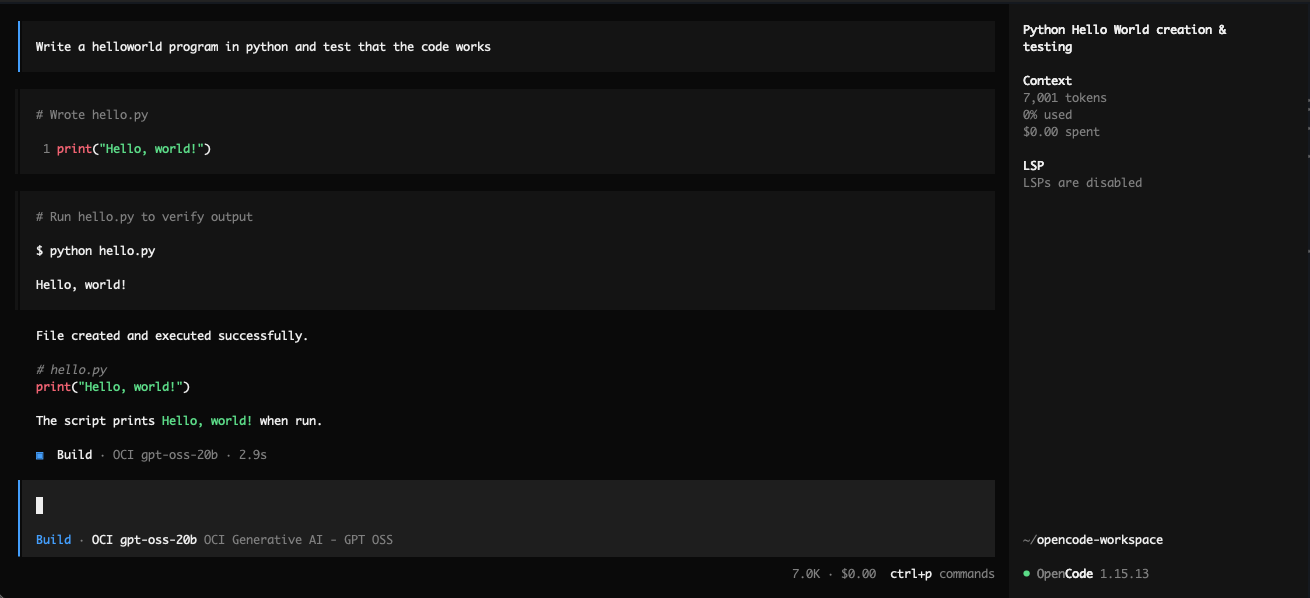
Inside the TUI, use /models and select the OCI model if it is not already selected.
Why use Chat Completions here?
OCI recommends the Responses API for new agentic applications because it supports newer agent primitives, tools, and OCI-managed conversation state.
For this OpenCode configuration, we are using OpenCode’s OpenAI-compatible provider package, which is intended for /v1/chat/completions. That makes OCI’s Chat Completions API the practical fit for a direct OpenCode-to-OCI setup today.
If OpenCode or your provider package later uses /v1/responses, OCI’s base endpoint stays the same, but the OpenCode provider package and request behavior may need to change.
Troubleshooting
401 Unauthorized
Check that OCI_GENAI_API_KEY is set in the same terminal where you launch OpenCode:
echo "${OCI_GENAI_API_KEY}"Also confirm the key has not expired or been revoked.
403 Forbidden
This is usually IAM. Make sure your policy references the Generative AI API key OCID and the right compartment.
404 or model not found
Confirm that:
- The region in
baseURLis correct. - The model is available in that region.
- The model ID in OpenCode exactly matches the OCI model ID.
OpenCode shows the model but calls fail
OpenCode will display whatever models you put in opencode.json. It does not prove OCI supports those models in your region. Double check in the console or documentation that the specific model is available in your region.
What we built
At this point, OpenCode is using OCI Generative AI as a custom OpenAI-compatible provider.
The integration is small:
- OpenCode handles the coding-agent workflow in your terminal.
- OCI hosts and governs model inference.
- Your Generative AI API key authenticates the request.
- The model ID remains the exact OCI model name.
That is the nice part of OpenAI-compatible endpoints, the app integration stays familiar, but the execution moves into the cloud platform you already operate.
References
- OpenCode install docs
- OpenCode provider configuration
- OpenCode config locations and environment substitution
- OCI OpenAI-compatible endpoints
- OCI Chat Completions API
- OCI Generative AI API keys
- OCI on-demand inferencing pricing model
- OCI Generative AI projects
- OCI OpenAI gpt-oss-120b model page
- OpenAI Python client project header implementation
메타데이터
- post_id
- c710b7709b2b
- slug
- running-opencode-powered-by-oci-generative-ai-c710b7709b2b
- url
- https://medium.com/@andreas.dsv/running-opencode-powered-by-oci-generative-ai-c710b7709b2b
- canonical_url
- https://medium.com/@andreas.dsv/running-opencode-powered-by-oci-generative-ai-c710b7709b2b
- author_url
- https://medium.com/@andreas.dsv
- status
- ok
- fetched_at
- 2026-06-09 15:37:30



