I Built a “Skill Yellow Pages” for AI Agents Using JSON‑LD — and Everything Clicked
Most AI agent frameworks treat skills as Markdown files. You write a SKILL.md, describe what it does, list the parameters, and call it a…
I Built a “Skill Yellow Pages” for AI Agents Using JSON‑LD — and Everything Clicked
Most AI agent frameworks treat skills as Markdown files. You write a SKILL.md, describe what it does, list the parameters, and call it a day. It’s simple, human‑friendly, and works for small prototypes.
But when you scale to dozens or hundreds of skills, Markdown breaks in three painful ways.
I went a different route. Instead of plain text, I built a skill knowledge graph using JSON‑LD. The result? Agents no longer guess which skill to use — they navigate a rich, connected map of capabilities.
Let me show you why this matters.
🚀 Your Job Search & Resume Builder in One App ✔ Find new job opportunities ✔ Create ATS-friendly CVs
1. The Three Hidden Problems with Markdown‑Based Skills
Problem #1: Name clashes
Alice writes a skill with a parameter called input_file. Bob calls his source_url. Carol uses data_path.
Technically, all three mean the same thing: “where the data comes from.” But the agent has to memorise everyone’s naming preferences. One mistake, and the pipeline breaks.
Problem #2: Skills are invisible
You have 50 skills. You need one that “can handle time‑series forecasting.” The agent can only guess from filenames and descriptions. Sometimes it gets lucky. Often, it gets lost.
Problem #3: No relationships between skills
Skill A depends on Skill B. Skill C and D are often used together. Skill E is a newer version of Skill F.
In Markdown, these relationships are written in natural language. Humans understand them. Agents and systems do not.
Markdown is great for human documentation. It is terrible for machine understanding.
2. How JSON‑LD Turns Skills into a Navigable Graph
I define every skill as a JSON‑LD node, then link those nodes together into a skill graph.
Here’s what a skill looks like (simplified):
{
  "@context": "https://agent-harness.os/",
  "@id": "skill:python-data-analysis",
  "@type": "skill:AtomicSkill",
  "skill:name": "Python Data Analysis",
  "skill:5W2H": {
    "what": "Data cleaning and statistical analysis using Pandas",
    "why": "Provide data insights for business decisions",
    "who": {"@id": "role:data-analyst"},
    "when": {"triggerCondition": "Task involves structured data analysis"},
    "where": {"targetStack": ["Python", "Pandas", "NumPy"]},
    "how": "Load → clean → explore → statistics → visualise",
    "howMuch": {"avgTokenCost": 3500, "avgDuration": "PT5M"}
  },
  "skill:links": [
    {"@type": "skill:PrerequisiteLink", "skill:target": "skill:python-sandbox"},
    {"@type": "skill:RelatedLink", "skill:target": "skill:data-visualization"},
    {"@type": "skill:AlternativeLink", "skill:target": "skill:r-analysis"}
  ]
}
This solves all three problems at once.
No more name clashes
The @context maps every variant to a single IRI. Whether you call it input_file, source_url, or data_path, the system knows they refer to the same semantic concept. It’s duck typing for skills.
Skills become discoverable
Every skill carries its own 5W2H metadata — what, why, who, when, where, how, how much. When the agent receives a task, its supervisor doesn’t guess. It matches the task’s 5W2H against the skill graph.
Skills have relationships
Six link types give skills a social life:
- PrerequisiteLink — A depends on B
- CompositionLink — A is made of B + C
- RelatedLink — often used together
- AlternativeLink — drop‑in replacement
- ExtensionLink — adds features to another skill
- SpecializationLink — a more specific version
The agent can now walk the graph: “I need JWT auth” → finds prerequisite (Rust basics) → finds related skill (middleware integration) → finds alternative (OAuth2). This isn’t calling a skill. It’s understanding a domain.
3. MOC: A Table of Contents for the Skill Graph
When you have hundreds of skills, you need a navigation layer. I use MOC (Map of Content) nodes.
text
MOC: Data Science
├── Data cleaning (5 skills)
├── Statistical analysis (8 skills)
├── Machine learning (12 skills)
└── Visualization (4 skills)
When a new task arrives, the supervisor scans the MOC first to find the relevant domain, then drills down into specific skills. Like a library index: find the “History” drawer, then pick a card.
4. Skill Graph + Knowledge Graph = Global Intelligence
The skill graph stores how to do things (processes). The knowledge graph stores what things are (concepts).
They are not isolated — they are bridged.
For example, the skill skill:rust-jwt-auth links to the knowledge graph entity entity:JWT. That entity, in turn, links to:
- A conversation memory block where JWT was discussed (
memory:session-042/block-017) - A past project that used JWT (
task:auth-project)
Result: When an agent calls a skill, it doesn’t just get a procedure. It pulls in all relevant historical experience, related concepts, and past tasks. It learns from the system’s collective memory.
5. Ecosystem Compatibility: Automatic Conversion
You might be thinking: “JSON‑LD sounds powerful, but the whole community writes skills in Markdown. Who will rewrite them?”
Fair question. The answer: no one.
I built a SkillCreator that takes any Markdown skill file, parses it with an LLM, extracts the 5W2H, identifies parameters, infers dependencies, and generates a standard JSON‑LD skill node.
MCP tools are also auto‑synced. The MCPIntegration module scans all connected MCP tools, wraps each as a skill node, and inserts it into the graph.
Keep writing Markdown if you prefer. The system upgrades it to JSON‑LD automatically.
6. Self‑Evolving Skills: The Graph Grows with Use
The system also includes a BootstrapEngine (self‑learning engine) that learns new skills from runtime experience.
Example: A Do Agent discovers an effective pattern while solving a task. During the Act phase, the decision agent extracts that pattern. The BootstrapEngine generates a new skill node, attaches it under the relevant MOC, and links it to the original skill that inspired it.
The skill graph is alive. The more the system runs, the richer and more precise the skills become.
7. Security and Conflict Detection
A skill graph is powerful, but it can also be dangerous. Three safeguards:
- Trust levels — Sandbox / Verified / Built‑in. Skills with lower trust have additional runtime restrictions.
- Digital signatures — Every skill definition is signed with Ed25519. Tampered skills are rejected immediately.
- Conflict detection — Six conflict types are detected: resource, dependency, permission, semantic, timing, and version. If you try to use both
skill:jwt-authandskill:session-authtogether, the system warns: “These architectures conflict – choose one.”
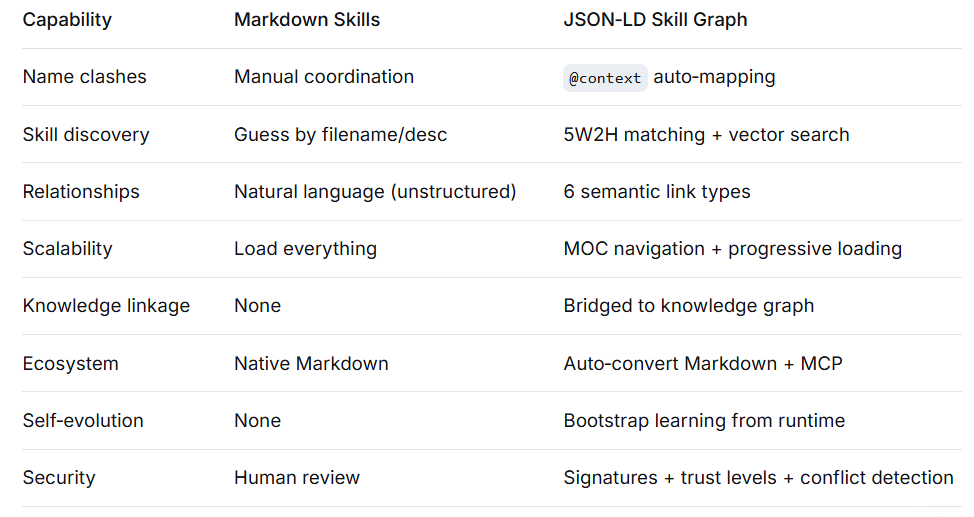
8. Summary: What You Gain
9. In Plain English
A Markdown skill is like a recipe book — you flip to “Kung Pao Chicken” and follow the instructions. But if the recipe says “add salt to taste,” the AI is lost.
A JSON‑LD skill graph upgrades the recipe book into a smart kitchen system — every dish has precise ingredient lists, step‑by‑step decomposition, recommended pairings, and even a history of past mistakes. The AI no longer reads the words; it truly understands the kitchen.
The entire system is open source at https://github.com/doiito/gliding_horse
Thank you for being a part of the community
Before you go:

👉 Be sure to clap and follow the writer ️👏️️
👉 Follow us: **Linkedin| [Medium](https://medium.com/codetodeploy)**
👉 CodeToDeploy Tech Community is live on Discord — **Join now!**
Disclosure: This post includes affiliate and partnership links.
메타데이터
- post_id
- c72a5e1ac40d
- slug
- i-built-a-skill-yellow-pages-for-ai-agents-using-json-ld-and-everything-clicked-c72a5e1ac40d
- url
- https://medium.com/codetodeploy/i-built-a-skill-yellow-pages-for-ai-agents-using-json-ld-and-everything-clicked-c72a5e1ac40d
- canonical_url
- https://medium.com/codetodeploy/i-built-a-skill-yellow-pages-for-ai-agents-using-json-ld-and-everything-clicked-c72a5e1ac40d
- author_url
- https://medium.com/@doiito-sun
- status
- ok
- fetched_at
- 2026-06-17 16:37:43







