Releasing Faction 2.0 at BlackHat Arsenal 2026🎉
I’m excited to announce that I’ll be returning to Black Hat Arsenal 2026 in Las Vegas and SecTor 2026 in Canada to demo OWASP Faction 2.0 —…
Releasing Faction 2.0 at BlackHat Arsenal 2026🎉

I’m excited to announce that I’ll be returning to Black Hat Arsenal 2026 in Las Vegas and SecTor 2026 in Canada to demo OWASP Faction 2.0 — the biggest update we’ve ever made to the platform!
Arsenal has always been my favorite part of Black Hat — it’s where you get to talk shop directly with the people building the tools you’ll use on your next engagement. If you haven’t made it over to the Arsenal area yet, you’re missing out. It’s casual, it’s collaborative, and you will leave with new ideas and new tools in your bag.
This year I’m bringing Faction 2.0 — a ground-up rewrite of the entire platform — modern frontend, modern backend, and a completely rethought approach to how security assessments should work.
And its fully Open Source as always!
What is OWASP Faction?
OWASP Faction is a pentesting automation and collaboration framework. It’s designed to help pentesters automate many of the mundane aspects of manual security assessments, such as generating assessment reports, keeping track of assessment workloads, communicating with stakeholders, and sharing information with their team.
Faction 2.0: What Changed and Why
The original Faction was built on Java with JSP/Struts and MongoDB — it’s been serving pentest teams well for years. But the security and technology landscape has fundamentally shifted. The advent of AI has changed how security assessments are performed, how findings are documented, and how reports are generated. Faction is adapting to this new world — not by bolting AI on as an afterthought, but by building a platform designed from the ground up for an agentic future.
So we rewrote the whole thing!:
- Frontend: React + TypeScript + Vite (no more JSP)
- Backend: Spring Boot 3 + Java 21
- Database: PostgreSQL / TimescaleDB
- APIs: Full REST API with Swagger documentation, JWT auth, and fine-grained permissions
Flexible AI Integrations

Factions AI Text Generation Features
We’ve added context-specific AI integrations to all the text editors! Faction has an MCP server built into every assessment, allowing you to ask it anything about the assessment and have it generate content based on your requirements.
Example: Let’s say you’ve found a new SQL injection issue and have just started jotting down the steps to reproduce it. You add those steps to the Details field of the vulnerability in Faction, then click the “Ask AI” button and enter a prompt like:
Take the details and write a 1 to 2 paragraph description of the vulnerability in terms the developer of the application can understand. Be brief but thorough. Search the web and add references after the description from places like OWASP, mitre cwe, NIST. IF no relevant links exist then its fine to leave this off DO NOT use headers. DO NOT include a recommendation.
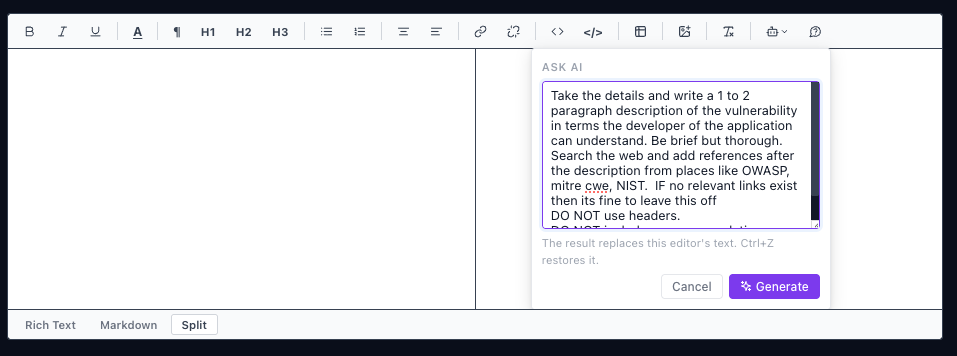
Click Generate, and Faction will take all of your steps to reproduce and turn them into a detailed description of the vulnerability, written in terms a developer can understand. It can even search the web for relevant references to reinforce the description.

That’s useful on its own, but a prompt like this might be one you use often — something you don’t want to rewrite every time and would like to share with your team. In that case, you can make it a global prompt.
Example: Navigate to the Faction AI configuration and create a global prompt called “Create Description from Details.” You can configure whether the prompt appears only in vulnerability text editors, whether it can make web requests, and which LLM it should use.
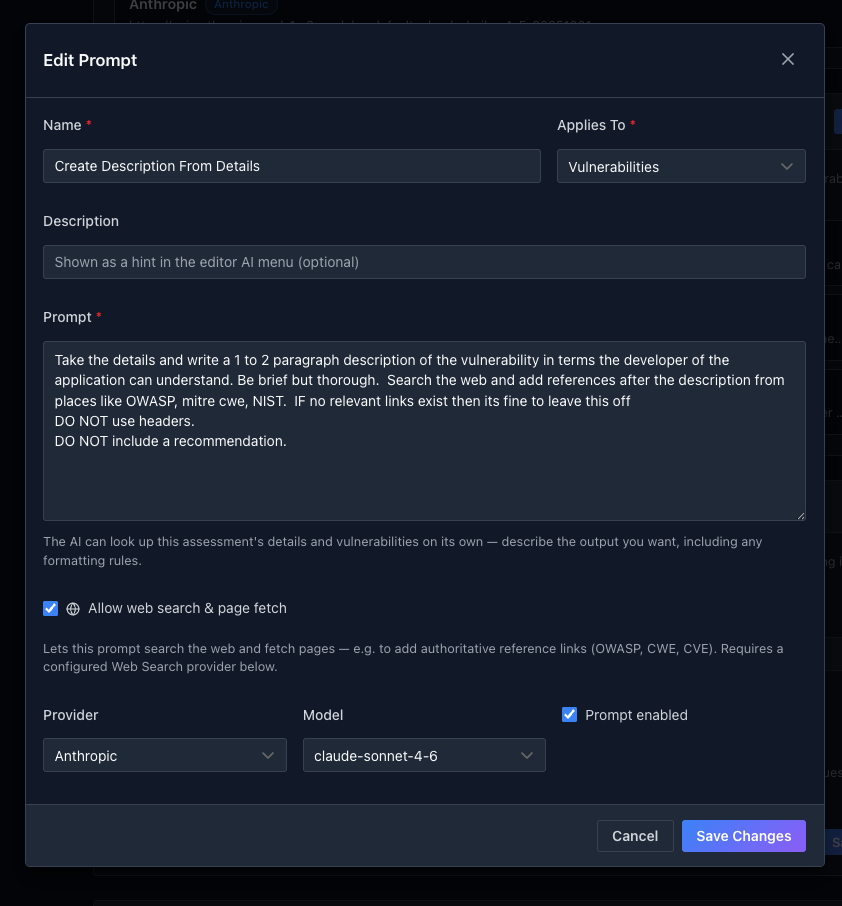
Once its saved and enabled it will be available to all users.
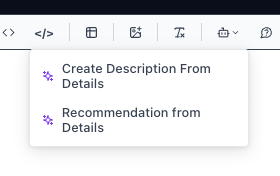
Faction MCP server
You can also download our MCP Server locally and connect it to any tools that support MCP like copilot, opencode, and claude code.

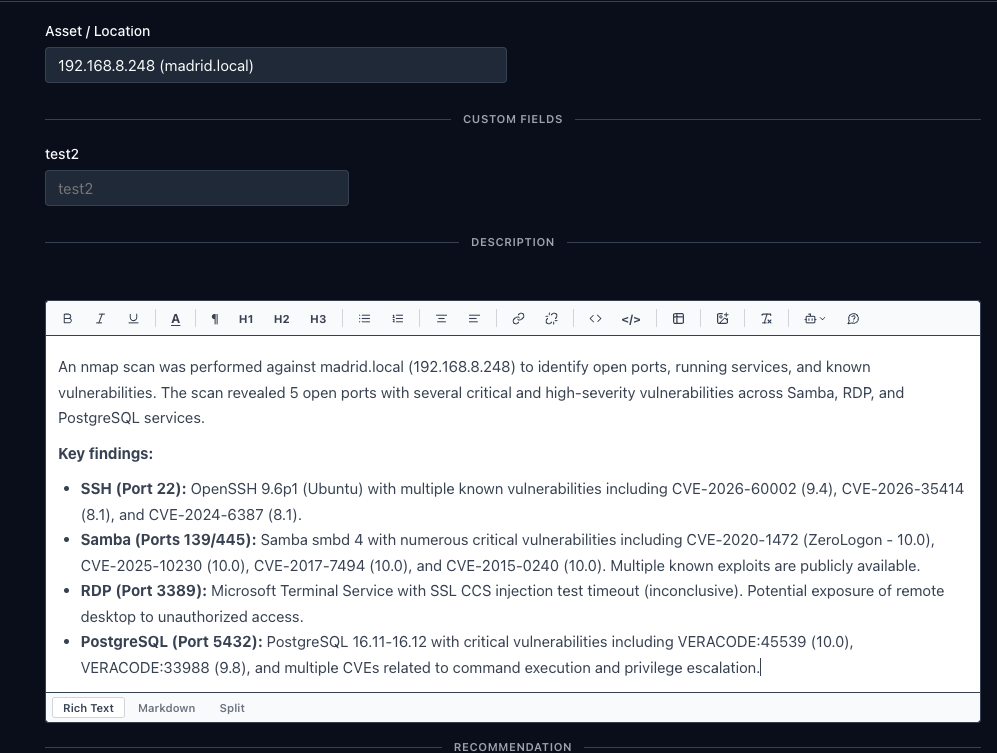
With this, you can ask about your current assessment workloads — but more importantly, it can act as a translator between your favorite security tools and Faction, creating findings based on any criteria you provide.
Below is an example of making a Informational Finding from an NMAP scan:

AI Security Features
Vulnerability information is sensitive, and you might not want to send all of these details to a third party like Anthropic.
- Tokenization: By default, Faction will tokenize sensitive data before sending it to an LLM provider. You can even define your own tokenization strategy.
- AI Logging: You can enable logging so that every user request is auditable, letting you confirm that tokenization is working as expected.
- Configurable Web Search: You can prevent LLMs from searching the web for data to enrich security prompts.
- Self Hosted LLMs: You can always self-host your LLMs so that your data never leaves your network.
Pen-testing Reporting Updates
Usually, you have a DOCX penetration testing template that you’ve been using for a while, with highlighted text that you have to find and replace with your findings on every assessment.
With Faction, to create a penetration testing report you don’t have to redesign it in a web editor or convert it to another format for Faction to use. You just take your existing DOCX report and replace those strings with Faction Variables or your own custom variables. Then you upload it to the Report Designer, where you finish configuring it to work with Faction.
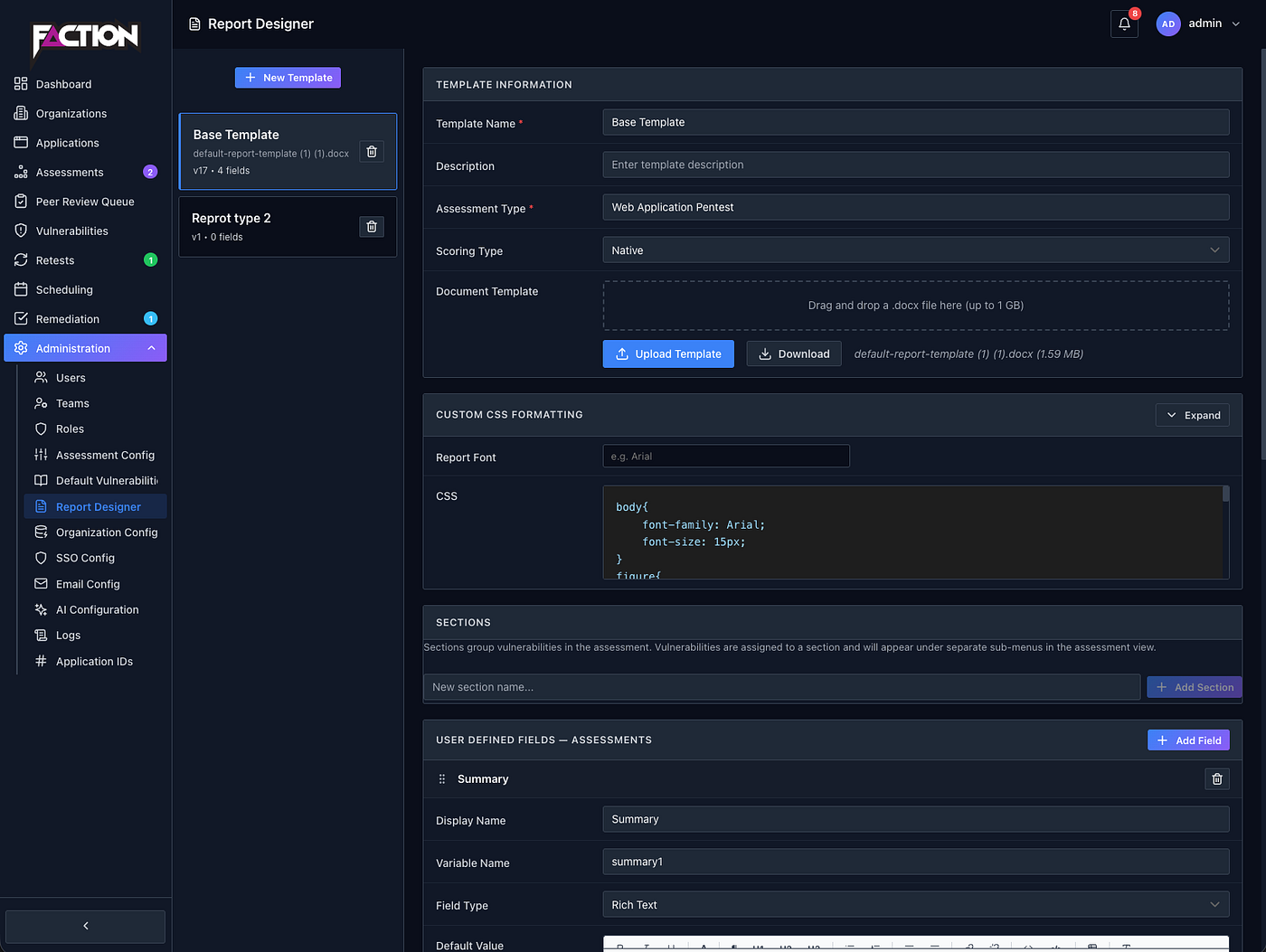
Let’s say you have a report template that needs an Executive Summary and a Scope section. You just create a new template in the Faction Report Designer and add two “User Defined Fields”.

This creates two Variables that you need to add to you DOCX template (${summary1} ${summary2}) as shown below:
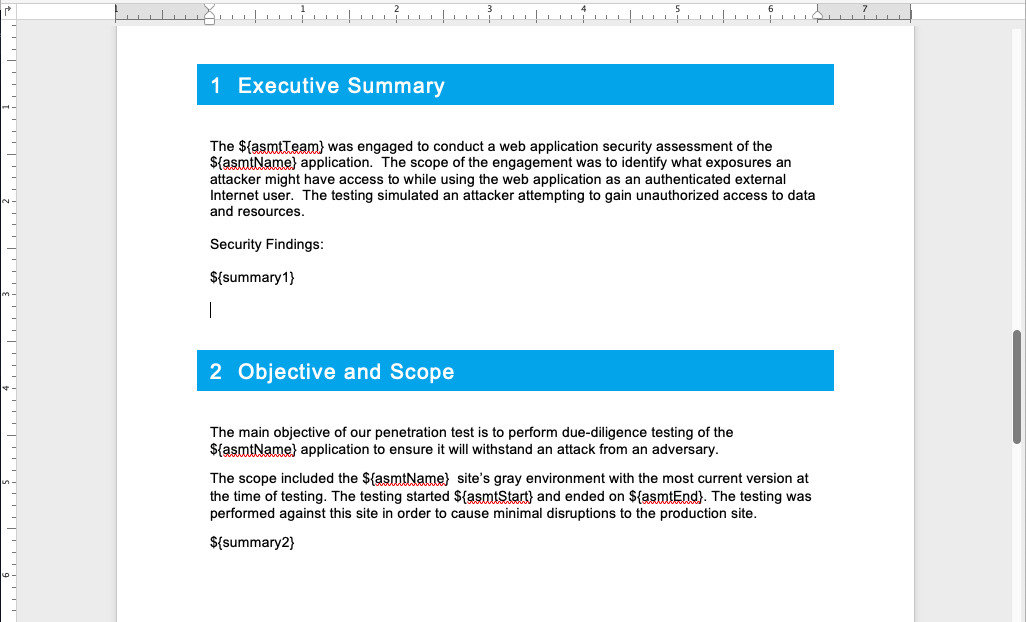
Now, when a new assessment is created using this template, these User Defined Fields will appear in the UI:

Application Inventory
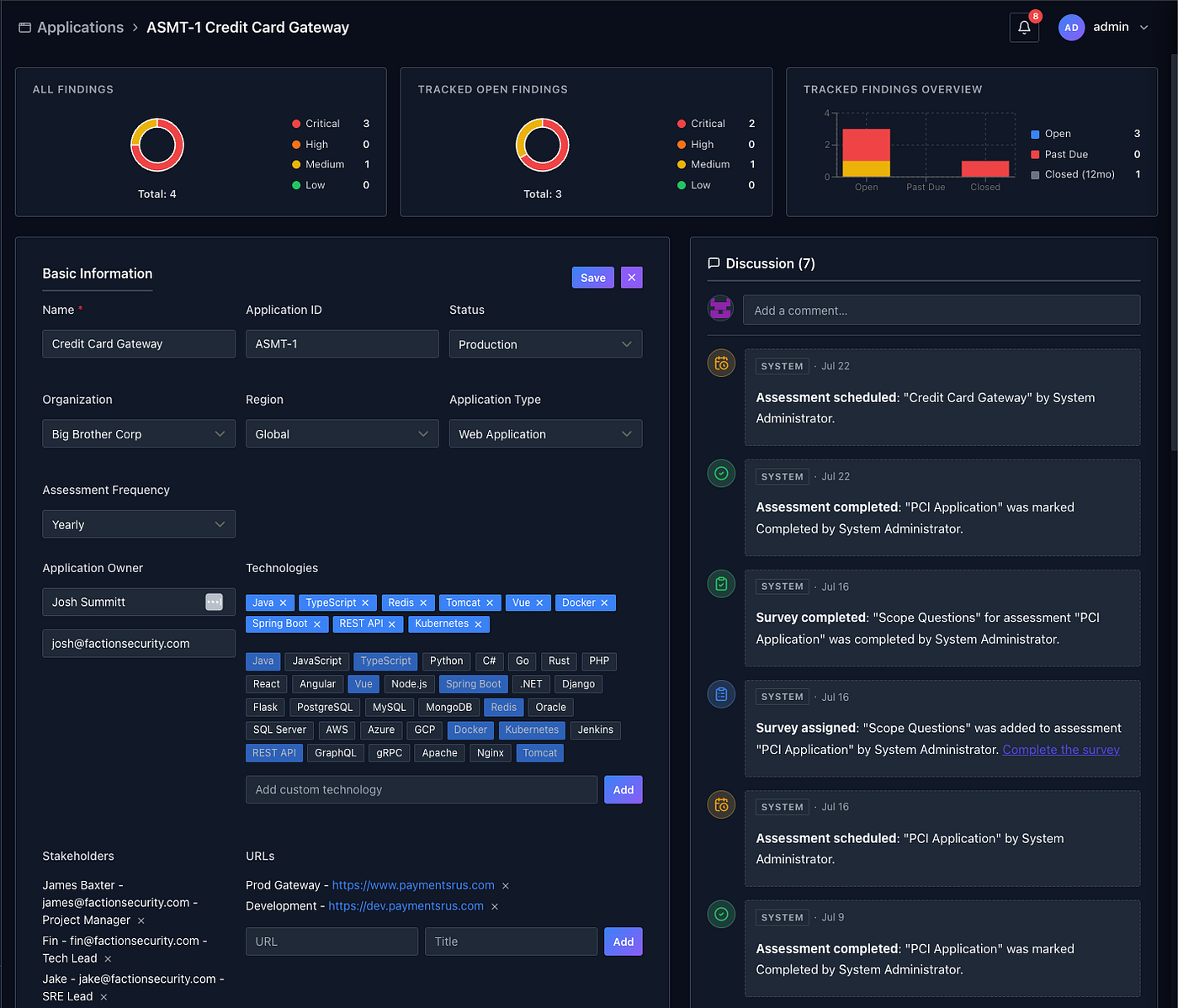
Faction 2.0 now has an application inventory system that grows organically as you perform assessments. For each application, this lets you track details such as:
- Application Owners
- Key StakeHolders
- Technology Stacks
- Production and Development URLS
- Applications Status (In development, In Production, Decommissioned, etc)
- Auto Scheduling Assessments
- Assessment History
- Vulnerability Tracking Per Assessment or Per Organization
Vulnerability Remediation Workflow
Older versions of Faction had a solid vulnerability remediation workflow, but we realized it could be more interactive and collaborative. It also didn’t allow Application Owners to join the same workflow. So it’s been completely overhauled!

From the perspective of the security team:
Clicking the “eye” icon on a vulnerability opens its details. From there you can download the original report, add comments about its status, change its status, and schedule a retest.
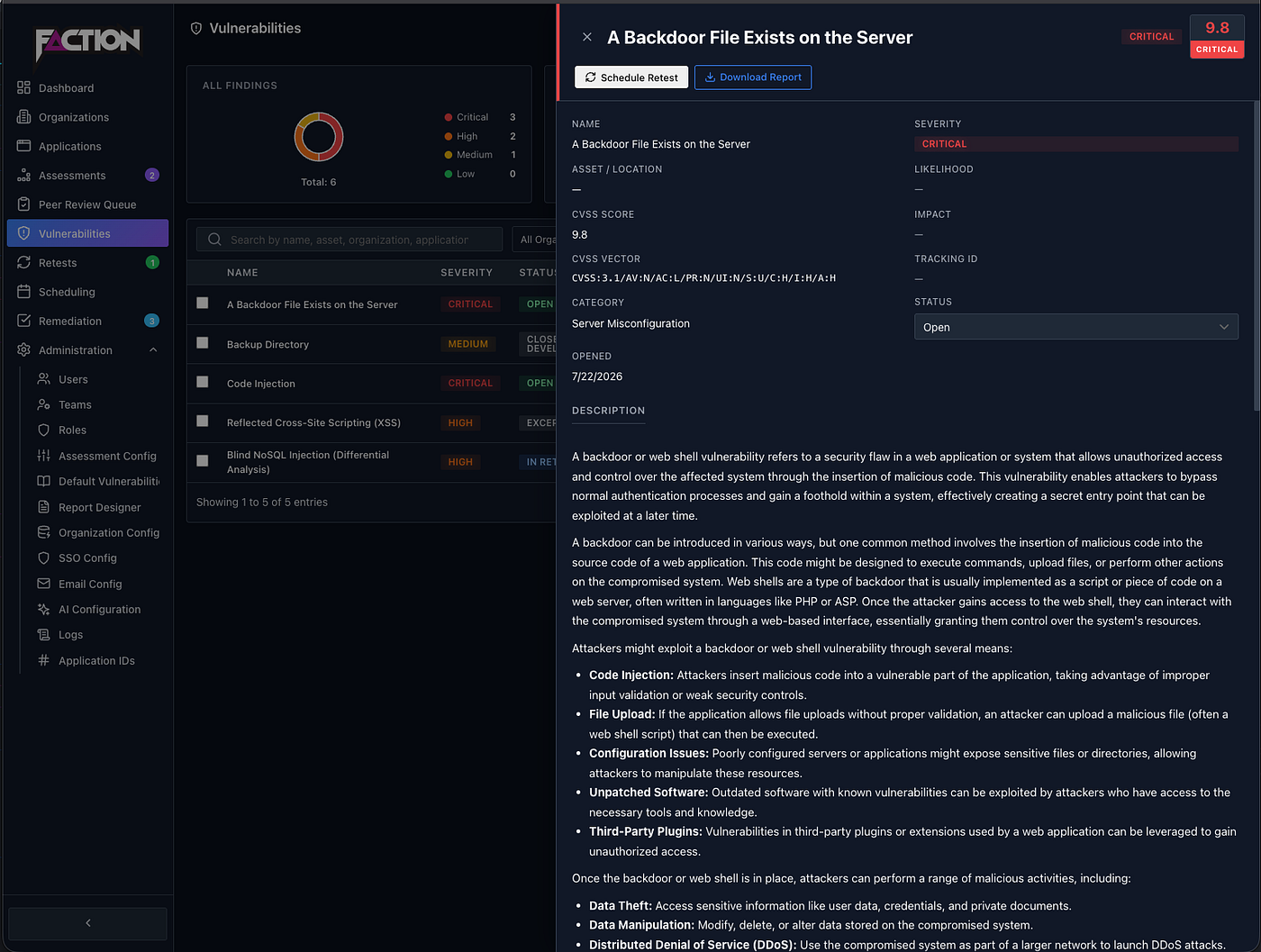
Schedule a retest opens a calendar where you can assign members of the pen-testing team to validate this issue is mitigated.

This will then put the Retest in the Pentesters Retest Queue where they can Pass/Fail and add comments:

From the perspective of the App Owner:
Application Owners can now see all assessments and vulnerabilities assigned to them. Customizable SLAs will alert them when a vulnerability’s due date is approaching. This lets security and development teams stay in sync on vulnerabilities and remediation dates, and discuss exceptions.
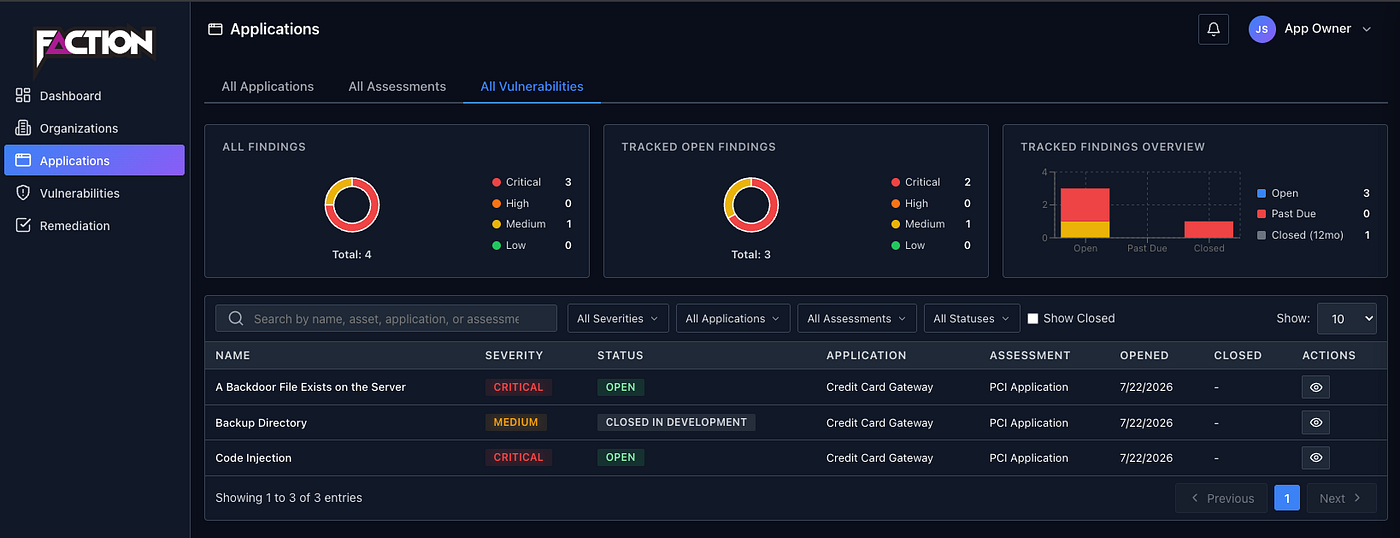
When the development team confirms they’ve mitigated a vulnerability, they can select it from their dashboard and click Request a Retest. This creates an alert on the security team’s dashboard letting them know the issue needs to be assigned to a pentester to verify whether the mitigation is sufficient.

Come See Us at Arsenal
If you’re going to be at Black Hat USA 2026 in Las Vegas or SecTor 2026 in Canada, come find me in the Arsenal area. I’ll have Faction 2.0 running live and ready to demo. I want to hear what features would make the biggest diffrence in your workflow — because the best ideas for Faction have always come from conversations at conferences like these.
For those who can’t make it you can find out more and download it when its released at the links below.
- GitHub: https://github.com/factionsecurity (https://github.com/factionsecurity)
- Website: https://www.factionsecurity.com (https://www.factionsecurity.com)
- Docs: https://docs.factionsecurity.com (https://docs.factionsecurity.com)
- OWASP: https://owasp.org/www-project-faction/ (https://owasp.org/www-project-faction/)
OWASP Faction is an open-source security assessment management platform designed for penetration testing teams who want to spend less time on reporting and more time finding vulnerabilities.
메타데이터
- post_id
- c7601986edc2
- slug
- releasing-faction-2-0-at-blackhat-arsenal-2026-c7601986edc2
- url
- https://medium.com/@we-are-faction/releasing-faction-2-0-at-blackhat-arsenal-2026-c7601986edc2
- canonical_url
- https://medium.com/@we-are-faction/releasing-faction-2-0-at-blackhat-arsenal-2026-c7601986edc2
- author_url
- https://medium.com/@we-are-faction
- status
- ok
- fetched_at
- 2026-07-27 05:29:19

