Virtual Environments in Databricks: Fix “Works on My Machine” Once and For All
How to align local development, Databricks Connect, CLI, and CI/CD for reproducible pipelines
Virtual Environments in Databricks: Fix “Works on My Machine” Once and For All
How to align local development, Databricks Connect, CLI, and CI/CD for reproducible pipelines
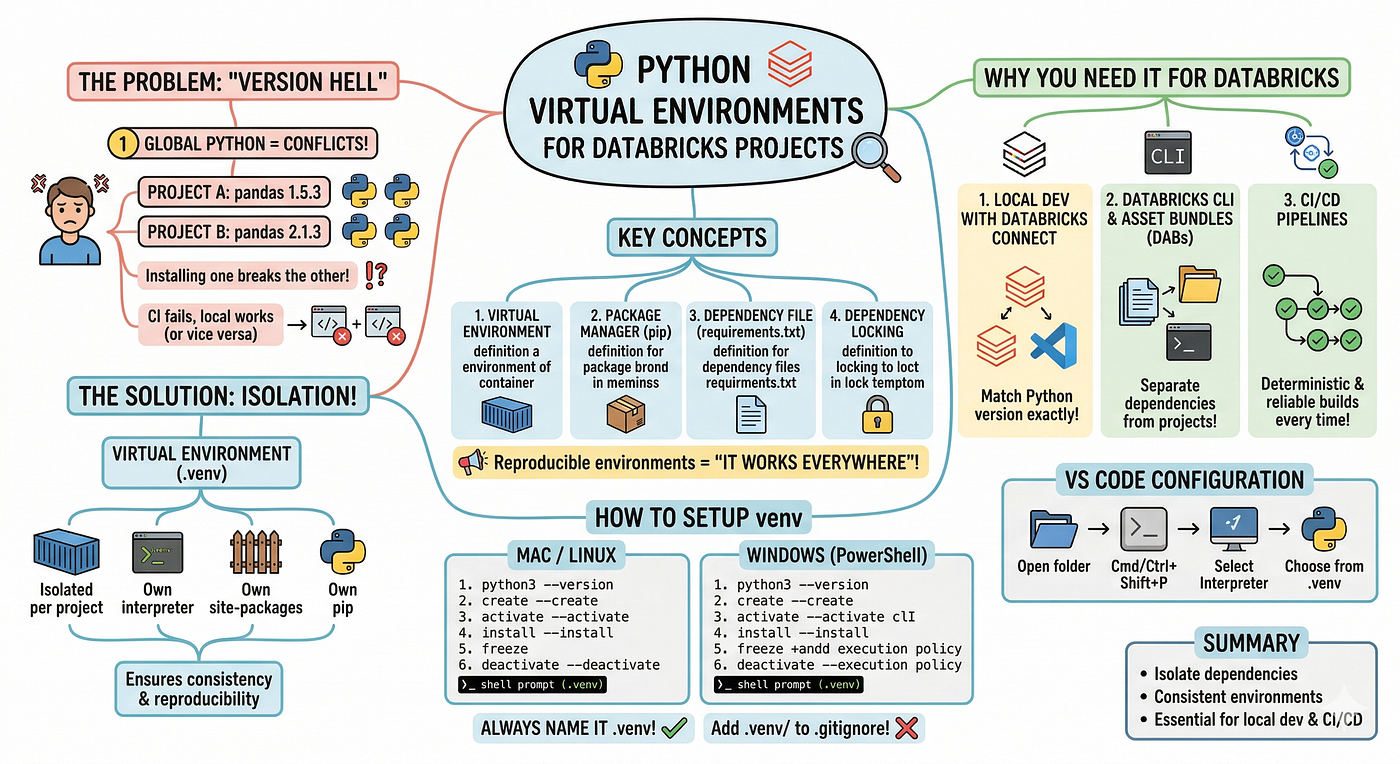
AI Generated Image To Explain The Concept
In my previous article, we covered how to install Python on your local machine. But once data engineers start building Databricks solutions, they quickly run into common issues — multiple Python versions on the same machine, code working locally but failing in CI, libraries installed for one project breaking another, or mismatches between the local Python version and the Databricks cluster runtime when using tools like VS Code. These are classic dependency and version conflicts, often referred to as “version hell.”
Virtual environments are designed to solve these problems by isolating dependencies and ensuring consistent environments across projects. In the Databricks ecosystem, they are not optional — they are foundational. This article explains why virtual environments are important, what they are, and how to set them up on both Mac and Windows using Python’s built-in venv.
🔀 Why Virtual Environments Exist (The Problem Worth Understanding)
When you install Python on your machine, it lives in one global location. Every package you install — pandas, pyspark, requests — goes into that same global pile.
Now imagine you’re working on two projects:
- Project A needs pandas==1.5.3
- Project B needs pandas==2.1.3

AI Generated Image To Explain The Concept
You can’t have multiple versions installed globally at the same time — installing one may break another project. This is version hell, and it gets worse as teams grow, CI pipelines are introduced, and you work across multiple Databricks clusters with different runtimes. A virtual environment solves this by creating an isolated Python environment per project, each with its own interpreter, site-packages, and pip. You can think of it as a lightweight container, but specifically for Python.
📝 The Key Concepts (Clear These Up First)
Before jumping into setup, let’s get the vocabulary straight. This confuses many people.
- Virtual environment → An isolated Python environment with its own interpreter and packages. It doesn’t install Python itself — it copies or links to an existing Python interpreter and creates an isolated site-packages directory.
- Package manager → A tool that installs packages. pip is the standard tool bundled with Python.
- Dependency file → A file that records what packages your project needs. requirements.txt is the standard format used with pip.
- Dependency locking → Pinning exact versions (including transitive dependencies) so that every machine, every CI run, gets the exact same environment. This is what makes builds reproducible.
📌 Reproducible environments are the difference between “it works on my machine” and “it works everywhere.”
🔄 Why You Need a Local Virtual Environment Even When Databricks Has Python
This is the most common question I get from data engineers moving to Databricks.
“Databricks clusters already run Python. Why do I need one locally?”
Three reasons:
1. Local development with Databricks Connect Databricks Connect lets you run PySpark code locally — your code runs on your machine but uses the cluster for execution. For this to work, your local Python version must match the cluster’s Databricks Runtime version exactly. A virtual environment lets you pin this.
2. Databricks CLI and Asset Bundles (DABs) The CLI and DABs run locally and need their own dependency set — the Databricks SDK, YAML parsers, and project-specific libraries. You don’t want these polluting your global Python or mixing across projects.
3. CI/CD pipelines Your Azure DevOps or GitHub Actions pipeline will create a fresh environment on every run. A virtual environment + locked dependencies is what makes your pipeline deterministic. Without it, a library update on PyPI can silently break your build.
🛠️ How Can We Setup Virtual Environment Using venv?
Make sure you have Python installed. Check with:
# Mac/Linux (POSIX)
python3 --version

# Windows
python --version
venv is built into Python — no installation needed.
Then follow below commands whether you are using MAC/Linux or Windows:
Mac/Linux
# Create a virtual environment called .venv in your project folder
python3 -m venv .venv

# Activate it
source .venv/bin/activate

# Your prompt changes - you'll see (.venv) at the start
# Now install your packages
pip install databricks-sdk databricks-connect==15.4.0

# Save your dependencies
pip freeze > requirements.txt

# Deactivate when done
deactivate
Windows (PowerShell)
# Create the environment
python -m venv .venv

# Activate it
.venv\Scripts\Activate.ps1

# If you hit an execution policy error:
Set-ExecutionPolicy -ExecutionPolicy RemoteSigned -Scope CurrentUser

# Install packages
pip install databricks-sdk databricks-connect==15.4.0

# Save dependencies
pip freeze > requirements.txt

# Deactivate
deactivate
📌 Always name your virtual environment .venv (with the dot). VS Code detects it automatically and offers to use it as your interpreter. Add .venv/ to your .gitignore — never commit the virtual environment itself.
🖥️ Configuring Your Virtual Environment in VS Code
For the best experience with Databricks development in VS Code:
- Open your project folder in VS Code
- Press Cmd+Shift+P (Mac) or Ctrl+Shift+P (Windows)
- Type “Python: Select Interpreter”
- Choose the interpreter from .venv — it usually appears automatically
If it doesn’t appear, point it manually to .venv/bin/python (Mac) or .venv\Scripts\python.exe (Windows).
For the Databricks extension in VS Code, make sure your virtual environment has the same Python version as your target cluster’s DBR. Check the DBR release notes for the exact Python version.
🚀 What’s Next?
This is where everything comes together. CI systems start from a clean machine on every run — no leftover state and no cached environments — so your virtual environment and requirements.txt ensure that the build is deterministic and reproducible.
📍Summary
Virtual environments isolate Python dependencies so each Databricks project runs with its own consistent environment. They are essential for local development, Databricks Connect, CLI tools, and CI/CD pipelines to ensure reproducible and reliable builds. Without them, dependency conflicts and runtime mismatches can easily break projects and deployments.
🎯 Thanks for reading all the way to the end! If you found value here, please consider giving a clap, leaving a comment, following me and subscribing to my articles. Your feedback and support mean a lot. 🚀
메타데이터
- post_id
- c7d4edb243e2
- slug
- virtual-environments-in-databricks-fix-works-on-my-machine-once-and-for-all-c7d4edb243e2
- url
- https://medium.com/@santosh_joshi_data/virtual-environments-in-databricks-fix-works-on-my-machine-once-and-for-all-c7d4edb243e2
- canonical_url
- https://medium.com/@santosh_joshi_data/virtual-environments-in-databricks-fix-works-on-my-machine-once-and-for-all-c7d4edb243e2
- author_url
- https://medium.com/@santosh_joshi_data
- status
- ok
- fetched_at
- 2026-06-21 22:26:41