Extending dnd-timeline: Adding Multi-Select and Group Dragging Support
When developing modern video editing software, timelines are a core UI component that users interact with constantly. Our team recently…
Extending dnd-timeline: Adding Multi-Select and Group Dragging Support
original dnd-timeline
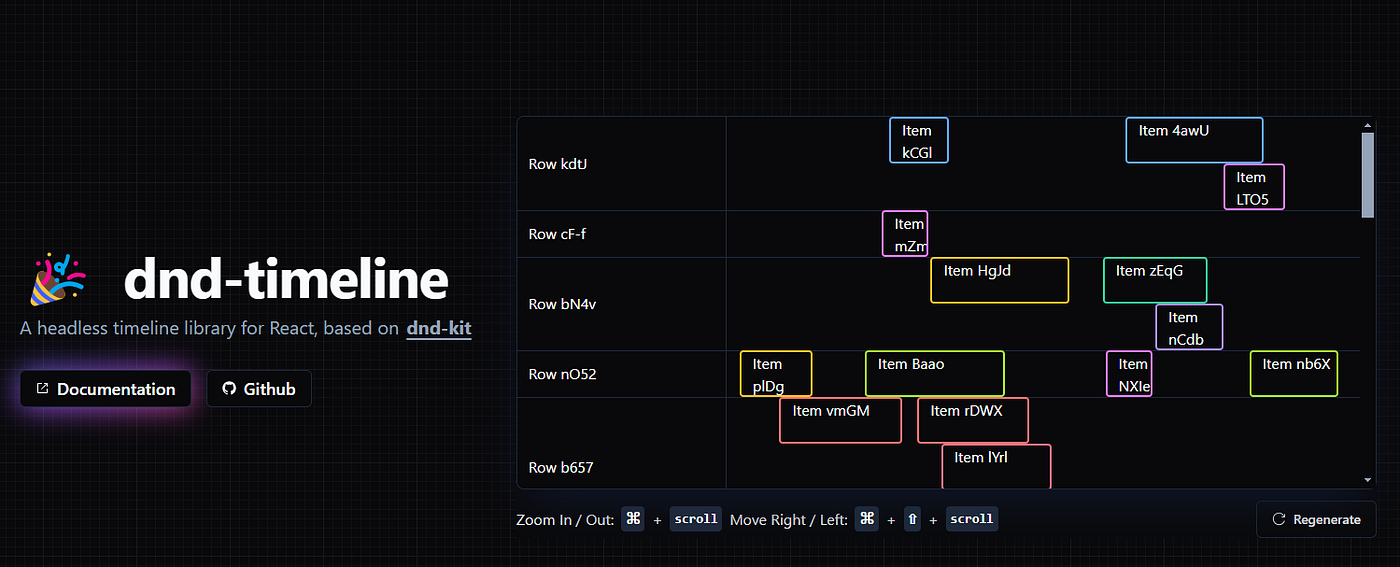
When developing modern video editing software, timelines are a core UI component that users interact with constantly. Our team recently implemented dnd-timeline — a headless React timeline library built on top of the powerful dnd-kit — into our product. While the library provided an excellent foundation, we quickly discovered a critical missing feature: the ability to multi-select and drag timeline elements together.
In this article, I’ll walk you through how we extended dnd-timeline to support multi-select and group dragging functionality, a feature that significantly improved our users’ workflow.
The Challenge
The dnd-timeline library is a brilliant headless timeline solution for React applications. Built on dnd-kit, it offers excellent performance, smooth animations, and customizable item rendering. However, it was designed for single-item selection and manipulation.
As feedback from our video editing customers grew, one request became increasingly common: the ability to select multiple elements and reposition them together on the timeline. This is a fundamental feature in professional video editing software, allowing editors to manipulate multiple clips simultaneously.
Our Solution Approach
To implement this feature, we needed to tackle two main challenges:
- Adding drag-to-select functionality for timeline elements
- Enabling synchronized movement of multiple selected elements
Let’s break down how we approached each part.
Implementing Drag Selection with react-selecto
For the first part, we needed a way to visually select multiple elements on the timeline by dragging. After exploring various options, we settled on react-selecto, a utility library that enables drag selection of DOM elements.
Here’s how we integrated it into our timeline component:
 <TimelineContext
      onDragStart={onDragStart}
      onDragEnd={onDragEnd}
      onResizeEnd={onResizeEnd}
      onRangeChanged={setRange}
      onDragMove={onDragMove}
      range={range}
    >
      {/* Add Selecto for drag selection */}
      <Selecto
        ref={selectoRef}
        dragContainer={scrollBarRef.current}
        selectableTargets={['[data-testid="item-wrapper"]']}
        hitRate={0}
        selectByClick={false}
        selectFromInside={false}
        toggleContinueSelect={["shift"]}
        ratio={0}
        onSelectStart={onSelectStart as any}
        onSelect={onSelectEnd}
        scrollOptions={{
          container: scrollBarRef.current,
          threshold: 30,
          throttleTime: 30,
        }}
        onDragStart={(e) => {
          // Cancel selection if clicking on specific elements
          const target = e.inputEvent.target;
          const itemcontent = target.closest(".unselectable");

          if (isDraggingRef.current || itemcontent) {
            e.stop();
          }
        }}
        // @ts-ignore
        style={{
          position: "fixed",
          zIndex: 999,
          border: "2px dashed #f76910",
          backgroundColor: "rgba(247, 105, 16, 0.1)",
          display: isDraggingRef.current ? "none" : "block",
        }}
      />

      <div
        style={{
          display: "flex",
          flexDirection: "column",
          width: "100%",
          height: "100%",
          position: "relative",
        }}
        className="dndtimelinex1"
        ref={containerRef}
      >
        {props.children}
      </div>
    </TimelineContext>
This code adds a Selecto component configured to target timeline items with the data-testid="item-wrapper" attribute. It creates a selection box with a dashed orange border and light orange background when users drag to select items.
To handle the selection state, we implemented two callback functions:
// Handle Selecto events
  const onSelectStart = useCallback((e: any) => {
    if (isDraggingRef.current) {
      if (selectoRef.current && selectoRef.current.stop) {
        selectoRef.current.stop();
      }
      return;
    }
    // If not extending selection (with Ctrl/Cmd), clear previous selection
    if (!e.ctrlKey && !e.metaKey) {
      clearMultiSelectElements();
    }
  }, []);

  // handle select end
  const onSelectEnd = useCallback(
    (e) => {
      const selectedElements = e.selected;
      if (selectedElements.length === 0) {
        return;
      }

      // Map the selected DOM elements to timeline items
      const selectedItemIds = selectedElements
        .map((el) => {
          const id = el.id;
          return items.find((item) => item.id === id)?.id;
        })
        .filter(Boolean);

      setItemsAtom((prev) =>
        prev.map((item) => {
          const isSelected = selectedItemIds.some(
            (itemId) => itemId === item.id
          );

          return {
            ...item,
            selected: isSelected,
          };
        })
      );
    },
    [items, setItems]
  );
These functions manage:
- Canceling selection during active dragging
- Supporting Ctrl/Cmd key for extending existing selections
- Mapping selected DOM elements to our timeline items data structure
- Updating the global state to mark items as selected
The Real Challenge: Group Dragging
Now for the more complex part — enabling synchronized dragging of multiple selected items. The core of dnd-timeline only supports moving one item at a time, so we needed to extend its functionality.
The key insight was to leverage the onDragMove event provided by dnd-kit. This event fires continuously during a drag operation and includes delta information about how far the element has moved.
Here’s our implementation approach:
const onDragMove = useCallback(
  (event) => {
    const { active } = event;
    const activeItem = items.find((item) => item.id === active.id);
    if (!activeItem) {
      return;
    }
  const updatedSpan =
      event.active.data.current.getSpanFromDragEvent?.(event);
    if (!updatedSpan) {
      return;
    }
    const { x: deltaX, y: deltaY } = event?.delta || {};
    if (!deltaX || !deltaY) {
      return;
    }
    const selectedItems = new Set(multiSelectItemIds.map((itemId) => itemId));
    // Handle group dragging
    if (selectedItems.has(active.id) && selectedItems.size > 1) {
      const activeStart = updatedSpan.start;
      const selectedItemPositions = [];
      selectedItems.forEach((itemId) => {
        const item = items.find((i) => i.id === itemId);
        if (item && itemId !== active.id) {
          const initialPosition = initialPositionsRef.current.get(itemId);
          if (initialPosition) {
            selectedItemPositions.push({
              id: itemId,
              span: {
                start: activeStart + initialPosition.relativeStart,
                end: activeStart + initialPosition.relativeEnd,
              },
              selected: item.selected,
              rowId: item.rowId,
              disabled: item.disabled,
            });
          }
        }
      });
      const positionsExceptActiveItem = selectedItemPositions.filter(
        (pos) => pos.id !== active.id
      );
      // Emit event for visualizing all moving items
      emitCustomEvent("UPDATE_GROUP_DRAG_POSITIONS", {
        positions: [...positionsExceptActiveItem],
      });
    }
  },
  [items, multiSelectItemIds]
);
Our strategy works as follows:
- When an item that’s part of a multi-selection group starts being dragged, we track its initial position
- As the item is moved, we calculate new positions for all selected items relative to the active item
- We use a custom event system to notify all selected items to update their visual positions
This gives users immediate visual feedback during dragging, making the experience feel natural and cohesive.
Finally, we needed to actually commit these changes when the drag ends:
const onDragEnd = useCallback(
  (event) => {
    const activeRowId = event.over?.id;
    const updatedSpan =
      event.active.data.current.getSpanFromDragEvent?.(event);
  if (!updatedSpan || !activeRowId) return;
    const activeItemId = event.active.id;
    setItems((prev) => {
      const selectedItems = new Set(
        multiSelectItemIds.map((itemId) => itemId)
      );
      if (selectedItems.has(activeItemId) && selectedItems.size > 1) {
        // Update all multi-selected items
        return prev.map((item) => {
          if (selectedItems.has(item.id)) {
            const initialPosition = initialPositionsRef.current.get(item.id);
            if (initialPosition) {
              return {
                ...item,
                rowId: activeRowId,
                span: {
                  start: updatedSpan.start + initialPosition.relativeStart,
                  end: updatedSpan.start + initialPosition.relativeEnd,
                },
              };
            }
          }
          return item;
        });
      } else {
        // Update only the active item
        return prev.map((item) => {
          if (item.id !== activeItemId) return item;
          return {
            ...item,
            rowId: activeRowId,
            span: updatedSpan,
          };
        });
      }
    });
  },
  [items, setItems, multiSelectItemIds]
);
This function finalizes the positions of all items in the selection, permanently updating their timeline positions when the drag operation completes.

multi drag support
The Result
With these modifications, we successfully implemented multi-select and group dragging in our dnd-timeline-based video editor. Users can now:
- Drag to select multiple timeline elements
- Use Shift/Ctrl/Cmd for additive selection
- Drag any selected element to move the entire group
- Preserve relative spacing between elements during group movement
This enhancement dramatically improved our users’ editing workflow, allowing them to quickly reorganize complex timelines with many elements.
Try It Yourself
The complete implementation is available on GitHub: dnd-kit-timeline-multiselect-draggable
You can also see it in action on this Stackblitz demo.
Final Thoughts
This project demonstrates how we can extend existing libraries to meet specific user needs. While dnd-timeline provides an excellent foundation for timeline interfaces, our extension adds critical functionality for professional video editing workflows.
A big thank you to Samuel Arbibe, the creator of dnd-timeline, for developing such a robust and flexible library. Our enhancement builds on his excellent work.
Have you extended other React libraries in similar ways? I’d love to hear about your experiences in the comments below!
References
메타데이터
- post_id
- c8a0eed1e0be
- slug
- extending-dnd-timeline-adding-multi-select-and-group-dragging-support-c8a0eed1e0be
- url
- https://medium.com/@khanzzirfan/extending-dnd-timeline-adding-multi-select-and-group-dragging-support-c8a0eed1e0be
- canonical_url
- https://medium.com/@khanzzirfan/extending-dnd-timeline-adding-multi-select-and-group-dragging-support-c8a0eed1e0be
- author_url
- https://medium.com/@khanzzirfan
- status
- ok
- fetched_at
- 2026-07-20 19:44:56