Understanding Lazy Evaluation and Key Expiration in Redis
Redis, a high-performance, in-memory key-value database, is a go-to solution for caching, real-time analytics, and many other use cases…
Understanding Lazy Evaluation and Key Expiration in Redis
Redis, a high-performance, in-memory key-value database, is a go-to solution for caching, real-time analytics, and many other use cases. While its speed and flexibility are well-known, understanding how Redis handles key expiration through lazy evaluation can be crucial for optimizing resource usage. In this blog post, we’ll delve into Redis’ lazy evaluation mechanism, explore how it impacts key expiration, and discuss strategies for managing storage effectively.
What is an expiring and lazy evaluation?
In caching, we aim for a high Cache Hit Rate, meaning we want to keep only the keys that are most likely to be accessed. To manage this, Redis offers a Time To Live (TTL) function to set key expiries. But how does Redis actually free up that space? It uses a lazy evaluation strategy in two flavors: active and passive.
- Passive: If you try to access an expired key, Redis checks its TTL and deletes it right there and then.
- Active: Ten times a second, Redis samples 20 random keys. If they’re expired, they get deleted. If more than 25% of this sample is expired, Redis repeats the process.
This dual approach keeps Redis performant while ensuring that storage is efficiently used. However, it’s worth noting that not all expired keys are immediately evicted, adding a layer of complexity when optimizing Redis for specific scenarios.
What happens if my storage runs full?
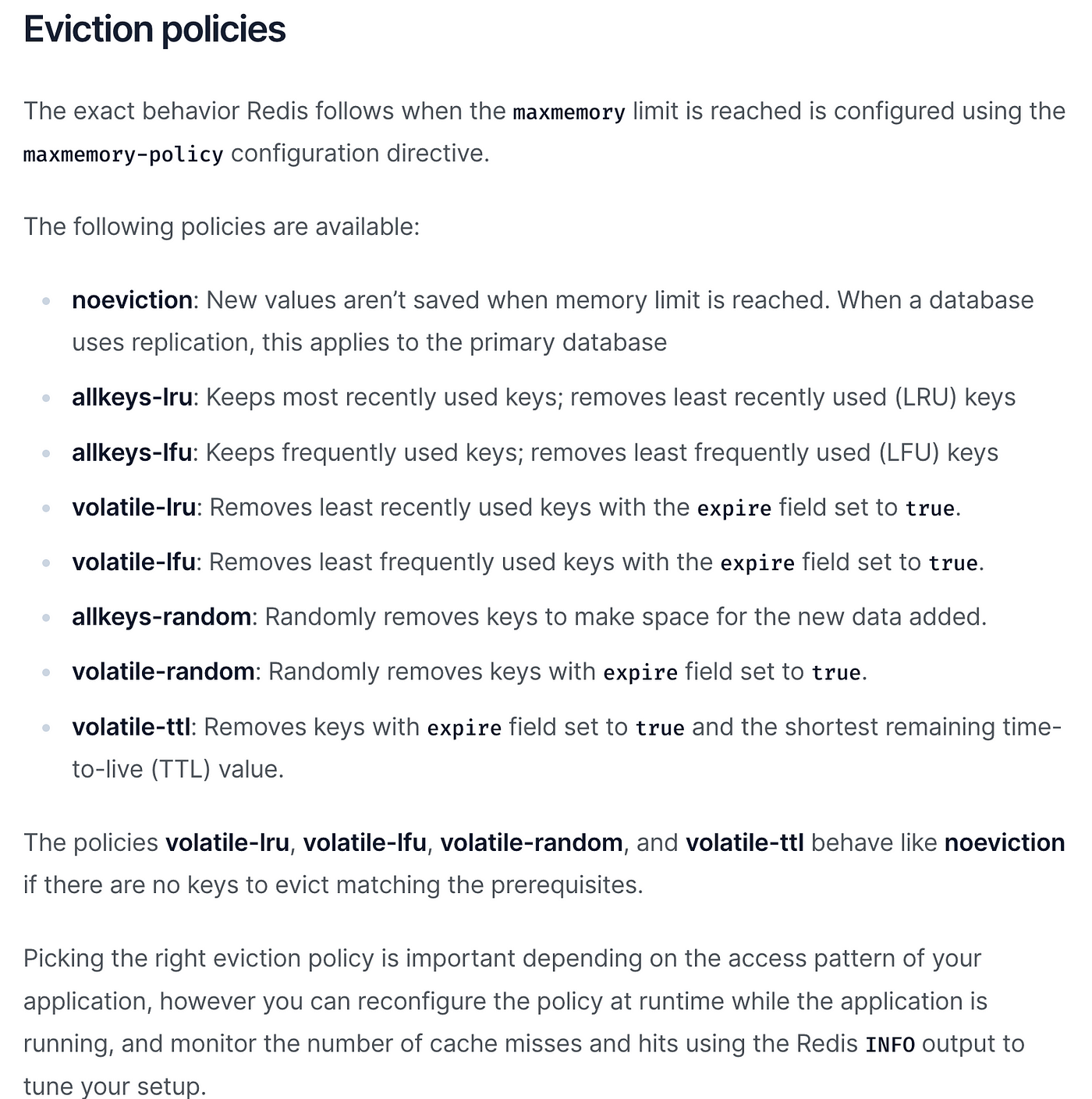
There is a configuration to set the behavior of how Redis should behave if the storage runs full.
In the redis.conf file or parameter group for Elasticache you can set the configuration for “maxmemory-policy” to define the behavior.
It's called Key Eviction and you can find the values again in the documentation. Here is an extract:
Can I free up the space on my own?
In case you want to know the real used storage size and want to get rid of expired keys, you can trigger a lazy evaluation by iterating over all keys. To also make it efficient we iterate over the keys in a batched manner. It seems just iterating is enough and we don't need to call functions like TTL to trigger the lazy evaluation check for expiry. (Short notice: Calling TTL or OBJECT IDLETIME is not resetting the idle time of the key).
However, since the Redis functionalities are taking care of evicting keys by the algorithm in a passive and active way + you can define the eviction policy, this is not a recommendation to use that script as it will require some resources and could harm the performance of your Redis Instance(s). But if you need to know which keys are evicted and how much storage you explicitly are using or if you see it beneficial for other reasons, my recommendation would be to run it at a time when fewer requests against your Redis instance(s) are expected.
from redis import Redis
import logging

ITER_STEP = 10000
BYTES_TO_MB = 1024 * 1024

logging.basicConfig(level=logging.INFO)

def get_used_memory(redis):
    info = redis.info('memory')
    return info['used_memory']

def cleanup_redis():
    host = '<YOUR_REDIS_HOST>'  # Replace with your Redis host
    port = 6379  # Replace with your Redis port if different
    redis = Redis(host, port)
    initial_memory = get_used_memory(redis)
    counter = 0

    for _ in redis.scan_iter("*", count=ITER_STEP):
        counter += 1
        if counter % ITER_STEP == 0:
          logging.info(f'Scanning over Keys. Currently At Index {counter}')

    final_memory = get_used_memory(redis)
    freed_up_memory = (initial_memory - final_memory) / BYTES_TO_MB
    logging.info(f"Memory freed: {freed_up_memory} MB")

if __name__ == "__main__":
    cleanup_redis()
Conclusion
Understanding Redis’ lazy evaluation mechanisms for key expiration is crucial for optimizing Cache performance and storage. While Redis offers both active and passive ways to manage expired keys, it’s essential to be aware of the limitations and trade-offs. Custom scripts to force key eviction should be used cautiously, considering the performance implications. For those looking to dive deeper into Redis’ inner workings, the official documentation is an excellent resource.
Hope you enjoyed it. Hasan, Expert Data Engineer @ Bonial
메타데이터
- post_id
- c8e2e36b0fd3
- slug
- understanding-lazy-evaluation-and-key-expiration-in-redis-c8e2e36b0fd3
- url
- https://blog.devgenius.io/understanding-lazy-evaluation-and-key-expiration-in-redis-c8e2e36b0fd3
- canonical_url
- https://blog.devgenius.io/understanding-lazy-evaluation-and-key-expiration-in-redis-c8e2e36b0fd3
- author_url
- https://medium.com/@hguercan
- status
- ok
- fetched_at
- 2026-07-25 02:51:09