Modern Android Security Architecture: A Complete Guide for Kotlin Developers
Secure Android apps end-to-end with Keystore, DataStore, TLS, and Play Integrity API best practices.
Modern Android Security Architecture: A Complete Guide for Kotlin Developers
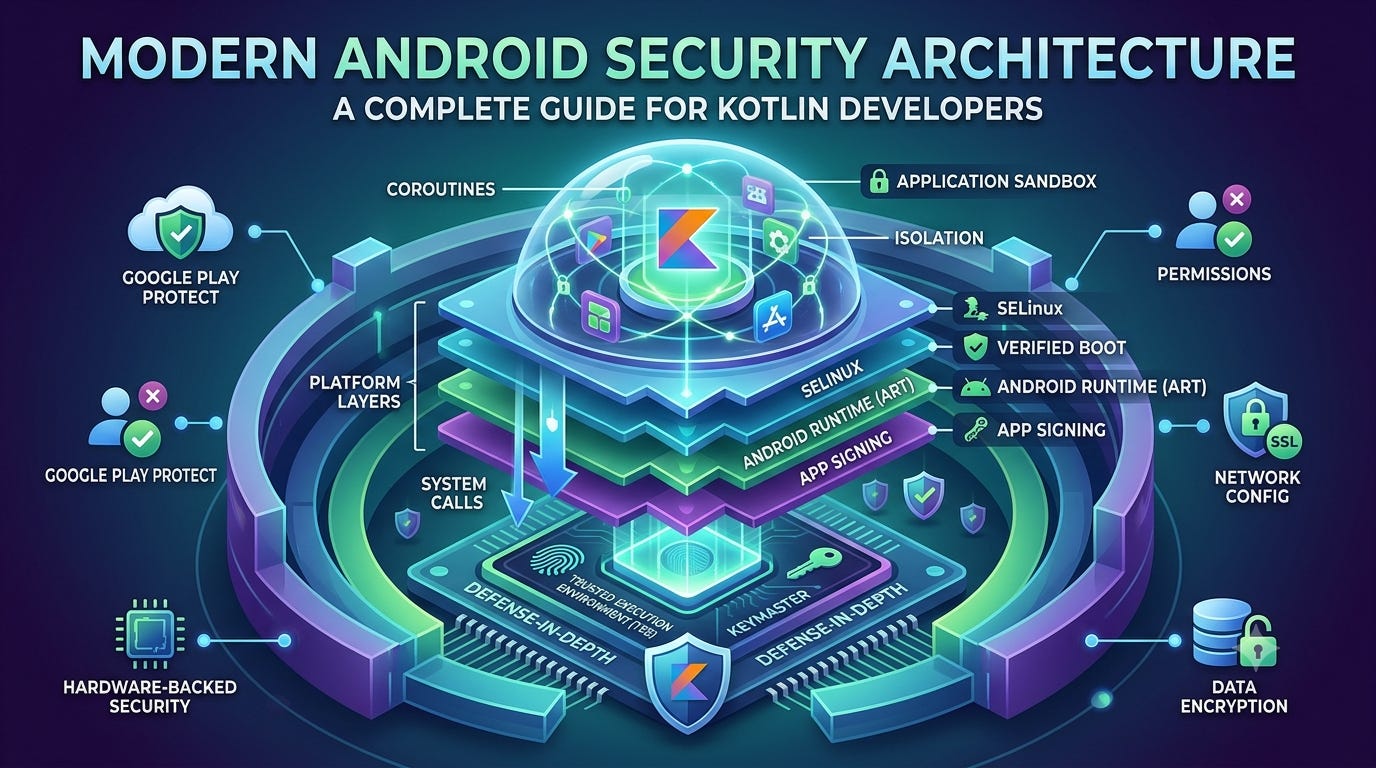
Modern Android Security Architecture: A Complete Guide for Kotlin Developers
Not a Medium Member? “Read For Free”
In mobile development, security is often treated like insurance: skipped to save costs until a catastrophic event occurs. For Android engineers, protecting user data requires a proactive, defense-in-depth approach. Security must be baked into your application from the initial High-Level Design (HLD) down to the low-level execution of your Kotlin code.
With the platform constantly evolving, security paradigms that were standard a few years ago are now deprecated. This guide outlines how to design, implement, and validate modern Secure Android App Development using the latest patterns.
1. Modern Data Security Stack
To visual how data layers stack up within a secure environment, review the structural data pipeline below. Every layer must act as a gatekeeper before information reaches physical storage or external APIs:

Modern Data Security Stack
2. Common Android Threats Developers Face
Before implementing defenses, you must understand your adversary. Designing an architecture without identifying threats leads to security theater — wasting development cycles on protections that don’t address real vulnerabilities.

Common Android Threats Developers Face
3. High-Level Design (HLD): The Strategic Blueprint
Security at the HLD level is about threat modeling, setting systemic boundaries, and establishing an architecture that compartmentalizes risk.
Identify and Classify Sensitive Data
Not all data is created equal. Categorize your application’s data footprint into distinct tiers to determine the appropriate cryptographic overhead:
- Highly Sensitive: Auth tokens, refresh tokens, passwords, payment details, and Personally Identifiable Information (PII) like SSNs or medical records.
- Moderately Sensitive: App configurations, user preferences, cached UI states, and non-anonymous analytics.
- Public: Static assets, localized string files, and public, unauthenticated API responses.
Enforce Least-Privilege Access
Your application should only demand the permissions it absolutely needs to achieve its immediate functional goal. If your application handles image uploads, leverage the modern Android Photo Picker instead of requesting broad storage permissions like READ_EXTERNAL_STORAGE. The Photo Picker runs out-of-process, meaning your app only receives access to the specific files selected by the user, drastically lowering your data liability.
Compliance Frameworks: OWASP MASVS
When building enterprise-grade applications, don’t guess your compliance requirements. Structure your design around the OWASP MASVS (Mobile Application Security Verification Standard). MASVS provides a strict testing framework covering storage, cryptography, authentication, and network communication, establishing uniform security baselines across your engineering organization.
4. Low-Level Design (LLD): Security Architecture & Components
Once the architectural boundaries are set, your LLD defines the software stacks, design patterns, and platform libraries executing the plan. A modern Android Security Architecture routes all data transactions through bounded, single-responsibility repositories before reaching disk or network layers:
       [User Interaction / UI Layer]
                     ↓
             [ViewModel Layer]
                     ↓
        [Data Layer / Repository Layer]
          ↙                         ↘
[Secure Crypto Engines]     [Network Infrastructure]
      ↓                               ↓
[Jetpack DataStore / Room]    [OkHttp / Retrofit Stack]
      ↓                               ↓
[Android Keystore]             [TLS 1.3/Network Config]
Android Keystore System Deep Dive
The Android Keystore system protects cryptographic keys from extraction. It ensures that while your application can use a key to encrypt or decrypt data, the underlying raw cryptographic material remains inaccessible to the application process itself.
Crucially, the Keystore leverages hardware-isolated modules when available:
- TEE (Trusted Execution Environment): A secure area of the main processor that runs an isolated OS, handling cryptographic operations away from the main Android kernel.
- StrongBox: A dedicated, physically distinct tamper-resistant hardware module (Secure Element) with its own CPU, storage, and true random number generator.
Secure DataStore Implementation (Replacing Deprecated Frameworks)
For new projects, prefer Jetpack DataStore over SharedPreferences. Note that EncryptedSharedPreferences has been deprecated in recent AndroidX Security releases, and new projects should evaluate Android Keystore–backed encryption strategies with DataStore or other modern storage patterns.
To safely secure local key-value or typed datasets, you should implement a custom Serializer for Jetpack DataStore that uses Android Keystore-backed authenticated encryption (AES-GCM) to process data streams before they write to the file system.
Encrypted Databases: SQLCipher with Room
When structured local storage is required, standard Room implementations write to standard SQLite files in plain text. Integrating SQLCipher ensures the entire database file is encrypted at rest.
However, a production-grade implementation must address these missing operational concerns:
- Secure Key Management: Never hardcode the database passphrase. Derive it dynamically at launch using keys generated within the hardware Keystore or pull it via short-lived in-memory distributions.
- Database Migration: When updating your data schemas, ensure your migration paths preserve the encrypted blocks; structural failures can result in database corruption and irreversible data loss.
- Backup Considerations: Explicitly configure your
AndroidManifest.xmlbackup rules (android:fullBackupContentorandroid:dataExtractionRules) to exclude encrypted databases to avoid leakage via unencrypted cloud synchronization.
5. Secure API Communication
Securing data in transit requires protecting connections from intercept and ensuring your token lifecycle minimizes the window of opportunity for an exploit.
Network Security Configuration
Avoid relying solely on runtime checks. Use the platform’s declarative Network Security Configuration XML file to globally disable cleartext traffic (HTTP) and enforce strict transport security policies.
Certificate Pinning: Pragmatism over Paranoia
Certificate pinning associates a host with its expected public key certificate, defending against compromised Certificate Authorities (CAs). While useful in high-security configurations, aggressive pinning introduces catastrophic operational risks. If your backend infrastructure performs an unscheduled certificate rotation due to a compromise or CA expiration, and your app expects an outdated pin, the client will block all connections, bricking the application until an emergency patch is approved and distributed via the Google Play Store. Use pinning only after a formal risk-benefit analysis, and always include backup pins.
Secure Token Handling (JWT Architecture)
When designing your authentication communication loop via Retrofit and OkHttp, your implementation should account for the following production concerns:
- Short-Lived Access Tokens: Minimize the validity window of access tokens to mitigate the impact of token interception.
- Concurrent Refresh Handling: Implement an OkHttp
Authenticatorthat cleanly handles thread synchronization. If multiple concurrent network requests fail due to an expired token, the app must fire exactly one refresh token API call, queueing the remaining requests until the new access token is derived. - Clock Skew Tolerances: Handle discrepancies between the device system clock and the server clock by validating token expirations using server-provided timestamps rather than relying entirely on
System.currentTimeMillis().
6. Biometric Authentication & Step-Up Security
For highly sensitive actions (e.g., executing a financial transaction, changing security credentials), you should introduce Step-Up Authentication using the BiometricPrompt API.
This ensures that even if a device is unlocked and in an active state, the physical user must re-verify their identity before a destructive or highly sensitive action can execute.
7. Runtime Integrity Verification: Google Play Integrity API
Local encryption is only as secure as the environment it runs on. If an application is running on a compromised or heavily modified device, runtime components could potentially be intercepted by advanced malware or memory injection tools.
To combat environment risks, integrate the Google Play Integrity API. This framework helps protect your apps and games from potentially risky and fraudulent interactions by evaluating environmental signals:
- Device Integrity: Device Integrity evaluates signals about the device environment and whether it meets Google’s integrity requirements. Depending on the verdict level, it may indicate modified devices, emulator environments, or other elevated-risk conditions.
- App Integrity: Validates whether the binary running on the device matches the official version signed and published by you on Google Play, mitigating modified or repackaged “modded” APK distributions.
- Account Integrity: Checks whether the current user account is licensed, active, and meeting basic risk indicators to prevent automated bot factory exploitation.
Your backend should request an integrity token from the client application, decode the payload server-side using Google’s infrastructure, and selectively gate access to critical APIs if the environment fails to pass safety thresholds.
8. Practical Kotlin Code Examples
Below are production-ready, compile-checked implementations of these security patterns.
A. Android Keystore Crypto Engine (AES-GCM with StrongBox Fallback)
This wrapper class manages key generation within hardware-isolated storage, automatically falling back to standard TEE isolation if a dedicated StrongBox chip is missing on the host device.
import android.os.Build
import android.security.keystore.KeyGenParameterSpec
import android.security.keystore.KeyProperties
import android.util.Log
import java.security.KeyStore
import java.security.ProviderException
import javax.crypto.Cipher
import javax.crypto.KeyGenerator
import javax.crypto.SecretKey
import javax.crypto.spec.GCMParameterSpec

class CryptoManager {

    private val keyStore = KeyStore.getInstance(ANDROID_KEY_STORE).apply { load(null) }

    private fun getKey(): SecretKey {
        val existingKey = keyStore.getEntry(KEY_ALIAS, null) as? KeyStore.SecretKeyEntry
        return existingKey?.secretKey ?: generateKey()
    }

    private fun generateKey(): SecretKey {
        return try {
            // Attempt to provision a StrongBox-backed hardware key (Android 9+)
            if (Build.VERSION.SDK_INT >= Build.VERSION_CODES.P) {
                createKeySpecification(createBuilder().setIsStrongBoxBacked(true).build())
            } else {
                createKeySpecification(createBuilder().build())
            }
        } catch (e: ProviderException) {
            Log.w("CryptoManager", "StrongBox unavailable. Falling back to standard TEE Keystore.", e)
            createKeySpecification(createBuilder().setIsStrongBoxBacked(false).build())
        }
    }

    private fun createBuilder(): KeyGenParameterSpec.Builder {
        return KeyGenParameterSpec.Builder(
            KEY_ALIAS,
            KeyProperties.PURPOSE_ENCRYPT or KeyProperties.PURPOSE_DECRYPT
        )
            .setBlockModes(KeyProperties.BLOCK_MODE_GCM)
            .setEncryptionPaddings(KeyProperties.ENCRYPTION_PADDING_NONE)
            .setKeySize(KEY_SIZE_BITS)
    }

    private fun createKeySpecification(spec: KeyGenParameterSpec): SecretKey {
        val keyGenerator = KeyGenerator.getInstance(KeyProperties.KEY_ALGORITHM_AES, ANDROID_KEY_STORE)
        keyGenerator.init(spec)
        return keyGenerator.generateKey()
    }

    fun encrypt(rawBytes: ByteArray): Pair<ByteArray, ByteArray> {
        val cipher = Cipher.getInstance(TRANSFORMATION)
        cipher.init(Cipher.ENCRYPT_MODE, getKey())
        return Pair(cipher.doFinal(rawBytes), cipher.iv)
    }

    fun decrypt(encryptedBytes: ByteArray, iv: ByteArray): ByteArray {
        val cipher = Cipher.getInstance(TRANSFORMATION)
        val spec = GCMParameterSpec(TAG_LENGTH_BITS, iv)
        cipher.init(Cipher.DECRYPT_MODE, getKey(), spec)
        return cipher.doFinal(encryptedBytes)
    }

    companion object {
        private const val ANDROID_KEY_STORE = "AndroidKeyStore"
        private const val KEY_ALIAS = "secure_app_encryption_key"
        private const val TRANSFORMATION = "AES/GCM/NoPadding"
        private const val KEY_SIZE_BITS = 256
        private const val TAG_LENGTH_BITS = 128
    }
}
B. Production Token-Refresh Wrapper (Thread Safe)
The following abstraction shows how to securely wrap an executive business action, verifying lifetime criteria, managing errors, and providing callback pathways for forced logouts.
import java.util.Date
import kotlinx.coroutines.sync.Mutex
import kotlinx.coroutines.sync.withLock

class AuthenticationRepository(
    private val cryptoManager: CryptoManager,
    private val authApiService: AuthApiService
) {
    private val refreshMutex = Mutex()
    private var cachedAccessToken: String? = null

    suspend fun <T> executeSecureOperation(
        tokenExpiry: Date,
        criticalAction: suspend (String) -> T,
        onReauthRequired: () -> Unit
    ): Result<T> {
        // Enforce safe local boundaries
        var currentToken = cachedAccessToken

        if (currentToken == null) {
            // In a real application, read and decrypt from your DataStore layer here
            currentToken = "decrypted_token_from_storage"
            cachedAccessToken = currentToken
        }

        // Handle token expiration safely with mutual exclusion lock
        if (tokenExpiry.before(Date())) {
            refreshMutex.withLock {
                // Re-verify expiration condition inside the lock to handle concurrent race entry
                if (tokenExpiry.before(Date())) {
                    val refreshedToken = runCatching { authApiService.refreshAccessToken() }.getOrNull()
                    if (refreshedToken != null) {
                        cachedAccessToken = refreshedToken
                        currentToken = refreshedToken
                        // Persist via cryptoManager.encrypt(refreshedToken.toByteArray())
                    } else {
                        onReauthRequired()
                        return Result.failure(Exception("Session permanently revoked. Re-authentication required."))
                    }
                }
            }
        }

        return try {
            Result.success(criticalAction(currentToken!!))
        } catch (e: Exception) {
            Result.failure(e)
        }
    }
}

// Stub interface to fulfill compile dependencies
interface AuthApiService {
    suspend fun refreshAccessToken(): String?
}
9. Real-World Security Mistakes
Mistake #1: Storing Plain-Text JWTs in SharedPreferences
- The Problem: Standard shared preference files write directly to internal app XML files as readable text. If a user roots their device or backs up their system state via ADB tools, their long-lived credentials can be extracted in seconds.
- The Fix: Never use standard preferences for tokens. Wrap storage streams using Keystore-backed AES-GCM encryption schemes.
Mistake #2: Logging Entire API Responses via Interceptors
- The Problem: Attaching raw
HttpLoggingInterceptorinstances withHttpLoggingInterceptor.Level.BODYconfigurations in production builds leaks user tokens, PII, and backend session data directly to system logs accessible viaLogcat. - The Fix: Configure your logging engines (like
Timber) along with explicit build variant configurations so sensitive statements are completely excluded from production release binaries.
10. Automated Security Testing Tools
To verify your security controls are actually working before shipping to production, incorporate these industry-standard testing utilities into your integration pipelines:
- MobSF (Mobile Security Framework): An automated, open-source mobile app security testing tool that performs static analysis (analyzing the manifest, looking for misconfigurations, hardcoded strings) and dynamic analysis on real devices.
- JADX: Decompile your own production builds regularly. Check whether your classes, packages, and network components are cleanly obfuscated, and verify that API keys or private endpoints are not exposed as plaintext strings.
- Burp Suite / OWASP ZAP: Configure proxy profiles on local network setups to intercept outgoing client packets. Verify that cleartext data is rejected, and test your certificate validation mechanisms against self-signed intercept certificates.
11. Comprehensive Android Security Checklist
Review this defensive checklist before every deployment to the Google Play Store:
- [ ] R8 Obfuscation Enabled: Confirm
isMinifyEnabled = trueis configured inside your production build variants. - [ ] Production Logging Cleaned: Ensure logger trees (e.g., Timber) are configured so debug logs are entirely excluded from release configurations.
- [ ] Cleartext Traffic Disabled: Verify your Network Security Configuration blocks all non-HTTPS channels.
- [ ] Input Constraints Enforced: Validate and constrain all incoming payloads from deep links, Inter-Process Communication (IPC) bundles, and user input fields.
- [ ] Keystore Keys Leveraged: Local encryption strategies must anchor their root keys within hardware-isolated Keystore elements (TEE/StrongBox).
- [ ] SQLCipher Hardening Active: Ensure database passphrases are derived dynamically and backup rules explicitly protect database locations from device extractions.
- [ ] Secrets Segregated: Public keys (like Google Maps) must be restricted via package names/SHA-1 fingerprints; secret backend credentials must never exist inside the client code.
- [ ] Play Integrity Verification Enabled: Critical backend APIs validate integrity verdicts from the Google Play Integrity API before serving or authorizing highly sensitive operations.
🙋 Frequently Asked Questions (FAQs)
For new projects, should we migrate away from SharedPreferences?
For new projects, prefer DataStore over SharedPreferences. If sensitive data must be stored, combine DataStore with Android Keystore–backed encryption. This is achieved by creating a custom DataStore Serializer that routes incoming data streams through an AES-GCM cipher before writing the bytes to disk.
What is the exact difference between a Public Client Key and a Secret Backend Credential?
Public Client Keys (like a Google Maps SDK key) are intended to be compiled into your client application to track resource consumption. These should be locked down using restriction policies inside their respective management consoles (e.g., restricting usage to your app’s specific SHA-1 signature). Secret Backend Credentials (like database passwords, Stripe secret keys, or global encryption salts) must never be shipped inside an APK under any circumstances, as compilation binaries can always be reverse-engineered.
Why shouldn’t I just block my app from running on all rooted devices?
Root detection tools are useful for assessing environment integrity, but they should be applied based on your risk profile. High-security banking or healthcare apps may block rooted environments entirely, but over-aggressive blocking can alienate advanced users or developers who root devices for accessibility modifications. Focus instead on securing your data in spite of a compromised host environment via strong local cryptography.
Why shouldn’t I just use standard certificate pinning for every network connection?
Aggressive certificate pinning can inadvertently brick your application if your backend infrastructure undergoes an unscheduled certificate rotation (e.g., due to a server compromise or CA revocation). If your app expects an exact pinned certificate and the server updates to a new one, the client will block the connection completely until an emergency app update is pushed through the Google Play Store.
Official Documentation & References
To stay completely aligned with current guidelines, verify your implementations against official platform resources:
- Core Practices: Android Security Documentation
- Cryptographic Keys: Android Keystore Documentation
- Compliance Foundations: OWASP MASVS Project
🔚 Conclusion
Modern Android security is not a single library or framework — it’s an architectural discipline. By combining threat modeling, Keystore-backed cryptography, secure network communication, least-privilege permissions, and continuous security testing, Android teams can dramatically reduce their attack surface while maintaining a strong user experience. Treating security as a core architectural tier ensures your application handles data safely on even the most hostile user environments.
💬 Over to You: What’s Your Take?
- Have you encountered architectural challenges or performance impacts when migrating your local repositories away from legacy components to custom-encrypted DataStore configurations?
- How does your engineering pipeline handle automated security verification or static analysis checks to catch exposed credentials or logging vulnerabilities before hitting production?
Drop your thoughts, edge-case experiences, and security strategies in the comments below!
📱 Go Beyond Using Jetpack Compose
If you’re building on Android, understanding what happens under the hood separates developers who use Compose from those who master it. I highly recommend “Mastering Jetpack Compose Internals”. It’s a deep, architecture-first walkthrough of the composition tree, the slot table, snapshot state, and the runtime that powers modern Android UI — capped off with a full case study building a real app called Mosaic.
- E-book: Available on Google Play
- Kindle Edition: Available on Amazon
- Also available in Paperback & Hardcover
메타데이터
- post_id
- c8fcd00771dd
- slug
- modern-android-security-architecture-a-complete-guide-for-kotlin-developers-c8fcd00771dd
- url
- https://blog.stackademic.com/modern-android-security-architecture-a-complete-guide-for-kotlin-developers-c8fcd00771dd
- canonical_url
- https://blog.stackademic.com/modern-android-security-architecture-a-complete-guide-for-kotlin-developers-c8fcd00771dd
- author_url
- https://medium.com/@sivavishnu0705
- status
- ok
- fetched_at
- 2026-08-03 14:04:03










