Change Data Capture (CDC): Real-Time Data Streaming Without Overloading Your System
Hi, I’m Aniket, a Full Stack Developer.
Change Data Capture (CDC): Real-Time Data Streaming Without Overloading Your System
Hi, I’m Aniket, a Full Stack Developer.
While working on a large-scale platform, I faced a real challenge — our dashboard needed live data, but our existing approach was slow and always a step behind. That’s what led me to Change Data Capture (CDC).
What I’m sharing here isn’t theoretical — it’s what I actually built in production.
How I built a production-grade CDC pipeline using Debezium Postgres, Kafka, Schema Registry, and ClickHouse — and why it replaced our cron jobs and webhooks forever.
What is CDC?
- Why CDC? Real-World Use Cases
- Architecture Overview
- How It Works — Step by Step
- Implementation Guide
- Step 1: Why Use
debezium/postgresImage? - Step 2: Full Docker Compose Setup
- Step 3: Register the Debezium Connector
- Step 4: Build the Consumer Service (NestJS)
- Step 5: Push Data to ClickHouse
-
CDC Event Payload — What It Looks Like
-
CDC vs Cron Jobs
-
CDC vs Webhooks
-
Conclusion
1. What is CDC? {#what-is-cdc}
Change Data Capture (CDC) is a design pattern that tracks and captures every change — INSERT, UPDATE, DELETE — that happens in your database, in real time, and streams those changes to other systems.
Think of it like this:
Instead of your application asking “what changed?” every few minutes, the database tells you the moment something changes.
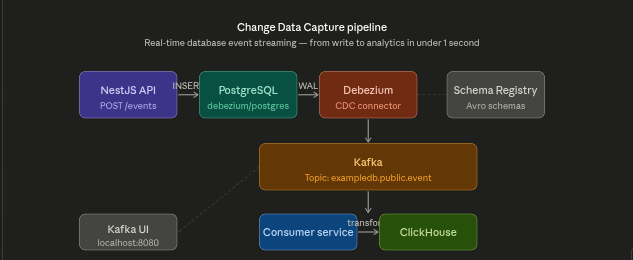
A typical CDC pipeline: Database → Debezium → Kafka → Consumer Services
CDC reads directly from the database’s internal Write-Ahead Log (WAL) — a low-level log that PostgreSQL writes before applying any change. This means:
- ✅ Zero impact on your database performance
- ✅ Every change is captured — nothing is missed
- ✅ Changes are streamed in real time
- ✅ No polling, no cron jobs, no extra queries
2. Why CDC? Real-World Use Cases {#why-cdc}
🔁 Replace Cron Jobs
The old way:
Every 5 minutes → Query DB for new records → Process → Repeat foreverProblems with cron jobs:
- Changes sit unprocessed for up to 5 minutes
- Every run queries the entire table or relies on fragile
updated_attricks - Wastes database resources even when nothing changed
- Misses changes if the job crashes mid-run
The CDC way:
Record inserted → WAL updated → Debezium captures → Kafka topic → Consumer processes instantlyEvent-driven CDC vs scheduled cron polling — latency difference is massive
🔔 Replace Webhooks
The old way:
Service A → HTTP POST → Service B (what if B is down?)Problems with webhooks:
- If the receiver is down, the event is lost forever
- Retries are complex and unreliable
- Tight coupling between services
- No replay capability
The CDC way:
Service A writes to DB → Debezium → Kafka → Service B consumes when readyKafka holds messages even if the consumer is offline — nothing is lost.
📊 Our Use Case — Real-Time Sync to ClickHouse
In our system, every user-triggered event inserted into PostgreSQL needs to be reflected in ClickHouse (our analytics database) instantly — without running heavy batch sync queries.
- Before CDC: Scheduled jobs synced data every hour. Analytics were always stale.
- After CDC: Every INSERT in PostgreSQL flows to ClickHouse in under a second.
3. Architecture Overview {#architecture}
Here is the full architecture of our CDC pipeline:
┌──────────────────────────────────────────────────────────────────────┐
│                          Your Application                            │
│                                                                      │
│    POST /events  ──────►  NestJS API  ──────►  debezium/postgres    │
└─────────────────────────────────────────────────────────┬────────────┘
                                                          │
                                               WAL (Write-Ahead Log)
                                                          │
                                                          ▼
                                              ┌───────────────────────┐
                                              │   Debezium Connect    │
                                              │  (Kafka Connect API)  │
                                              └──────────┬────────────┘
                                                         │
                                               ┌─────────▼──────────┐
                                               │   Schema Registry  │
                                               │  (Avro Schema)     │
                                               └─────────┬──────────┘
                                                         │
                                               ┌─────────▼──────────┐
                                               │    Kafka Broker    │
                                               │  Topic: mydb.      │
                                               │  public.event      │
                                               └─────────┬──────────┘
                                                         │
                                               ┌─────────▼──────────┐
                                               │  Consumer Service  │
                                               │  (NestJS/KafkaJS)  │
                                               └─────────┬──────────┘
                                                         │
                                                   Transform Data
                                                         │
                                               ┌─────────▼──────────┐
                                               │    ClickHouse      │
                                               │  (Analytics DB)    │
                                               └────────────────────┘
Components:
Component Image Used Role PostgreSQL debezium/postgres:13 Source DB with WAL pre-configured Zookeeper cp-zookeeper:5.5.3 Kafka cluster coordination Kafka cp-enterprise-kafka:5.5.3 Message broker Schema Registry cp-schema-registry:5.5.3 Avro schema management Debezium debezium/connect:1.4 CDC engine — reads WAL, publishes to Kafka ClickHouse clickhouse-server:latest Analytics database Kafka UI provectuslabs/kafka-ui Visual monitoring dashboard
4. How It Works — Step by Step {#how-it-works}
Debezium reads PostgreSQL WAL logs and publishes changes to Kafka topics
- A client hits
POST /eventson the NestJS API - NestJS inserts a record into the
eventtable in PostgreSQL - PostgreSQL writes this change to its WAL (Write-Ahead Log)
- Debezium continuously tails the WAL via a replication slot
- Debezium serializes the event using Avro and publishes to a Kafka topic
- The Schema Registry validates and stores the Avro schema
- The Consumer Service is subscribed to the Kafka topic
- It receives a message with
before,after, and operation type (op) - The consumer transforms the data and inserts it into ClickHouse
The entire flow from Step 1 → Step 9 happens in under 1 second.
5. Implementation Guide {#implementation-guide}
Step 1: Why Use debezium/postgres Image?
The standard postgres image requires manual configuration to enable logical replication:
# You'd need to manually set this in postgresql.conf
wal_level = logical
max_wal_senders = 4
max_replication_slots = 4
The **debezium/postgres image comes with all of this pre-configured out of the box**:
Feature postgres:16 debezium/postgres:13 wal_level = logical ❌ Must set manually ✅ Pre-configured Replication slots ❌ Must configure ✅ Ready to use pgoutput plugin ✅ Available ✅ Available decoderbufs plugin ❌ Not included ✅ Pre-installed Setup complexity High Minimal
This alone saves you from the most common Debezium setup error: wal_level is not logical.
Step 2: Full Docker Compose Setup
This is our complete stack — PostgreSQL (Debezium image), Zookeeper, Kafka, Schema Registry, Debezium Connect, ClickHouse, and Kafka UI:
version: "3.7"
services:
# =====================
# PostgreSQL (Debezium image — WAL pre-configured)
# =====================
postgres:
image: debezium/postgres:13
ports:
- 5432:5432
environment:
- POSTGRES_USER=docker
- POSTGRES_PASSWORD=docker
- POSTGRES_DB=exampledb # =====================
# Zookeeper
# =====================
zookeeper:
image: confluentinc/cp-zookeeper:5.5.3
environment:
ZOOKEEPER_CLIENT_PORT: 2181 # =====================
# Kafka
# =====================
kafka:
image: confluentinc/cp-enterprise-kafka:5.5.3
depends_on: [zookeeper]
environment:
KAFKA_BROKER_ID: 1
KAFKA_ZOOKEEPER_CONNECT: "zookeeper:2181"
KAFKA_LISTENER_SECURITY_PROTOCOL_MAP: PLAINTEXT:PLAINTEXT,PLAINTEXT_HOST:PLAINTEXT
KAFKA_ADVERTISED_LISTENERS: PLAINTEXT://kafka:29092,PLAINTEXT_HOST://localhost:9092
KAFKA_LISTENERS: PLAINTEXT://0.0.0.0:29092,PLAINTEXT_HOST://0.0.0.0:9092
KAFKA_INTER_BROKER_LISTENER_NAME: PLAINTEXT
KAFKA_OFFSETS_TOPIC_REPLICATION_FACTOR: 1
ports:
- 9092:9092
- 29092:29092 # =====================
# Schema Registry (Avro schema management)
# =====================
schema-registry:
image: confluentinc/cp-schema-registry:5.5.3
environment:
- SCHEMA_REGISTRY_KAFKASTORE_CONNECTION_URL=zookeeper:2181
- SCHEMA_REGISTRY_HOST_NAME=schema-registry
- SCHEMA_REGISTRY_LISTENERS=http://schema-registry:8081,http://localhost:8081
ports:
- 8081:8081
depends_on: [zookeeper, kafka] # =====================
# Debezium Connect
# =====================
debezium:
image: debezium/connect:1.4
environment:
BOOTSTRAP_SERVERS: kafka:29092
GROUP_ID: 1
CONFIG_STORAGE_TOPIC: connect_configs
OFFSET_STORAGE_TOPIC: connect_offsets
KEY_CONVERTER: io.confluent.connect.avro.AvroConverter
VALUE_CONVERTER: io.confluent.connect.avro.AvroConverter
CONNECT_KEY_CONVERTER_SCHEMA_REGISTRY_URL: http://schema-registry:8081
CONNECT_VALUE_CONVERTER_SCHEMA_REGISTRY_URL: http://schema-registry:8081
depends_on: [kafka]
ports:
- 8083:8083 # =====================
# ClickHouse (Analytics DB)
# =====================
clickhouse:
image: clickhouse/clickhouse-server:latest
ports:
- "8123:8123"
- "9000:9000"
environment:
CLICKHOUSE_DB: exampledb
CLICKHOUSE_USER: default
CLICKHOUSE_PASSWORD: password # =====================
# Kafka UI (Visual monitoring)
# =====================
kafka-ui:
image: provectuslabs/kafka-ui:latest
depends_on: [kafka, schema-registry, debezium]
ports:
- "8080:8080"
environment:
KAFKA_CLUSTERS_0_NAME: local
KAFKA_CLUSTERS_0_BOOTSTRAPSERVERS: kafka:29092
KAFKA_CLUSTERS_0_ZOOKEEPER: zookeeper:2181
KAFKA_CLUSTERS_0_SCHEMAREGISTRY: http://schema-registry:8081
KAFKA_CLUSTERS_0_KAFKACONNECT_0_NAME: debezium
KAFKA_CLUSTERS_0_KAFKACONNECT_0_ADDRESS: http://debezium:8083
DYNAMIC_CONFIG_ENABLED: "true"Start everything:
docker-compose up -d# Verify all 7 containers are running
docker psExpected output:
CONTAINER ID   IMAGE                                NAMES
xxxxxxxxxxxx   provectuslabs/kafka-ui:latest        kafka-ui
xxxxxxxxxxxx   debezium/connect:1.4                 debezium
xxxxxxxxxxxx   clickhouse/clickhouse-server:latest  clickhouse
xxxxxxxxxxxx   confluentinc/cp-schema-registry      schema-registry
xxxxxxxxxxxx   confluentinc/cp-enterprise-kafka     kafka
xxxxxxxxxxxx   confluentinc/cp-zookeeper:5.5.3      zookeeper
xxxxxxxxxxxx   debezium/postgres:13                 postgres
Step 3: Register the Debezium PostgreSQL Connector
Once all containers are healthy, register the connector via REST:
curl -X POST http://localhost:8083/connectors \
  -H "Content-Type: application/json" \
  -d '{
    "name": "exampledb-connector",
    "config": {
      "connector.class": "io.debezium.connector.postgresql.PostgresConnector",
      "database.hostname": "postgres",
      "database.port": "5432",
      "database.user": "docker",
      "database.password": "docker",
      "database.dbname": "exampledb",
      "database.server.name": "exampledb",
      "table.include.list": "public.event",
      "plugin.name": "pgoutput",
      "slot.name": "debezium_slot",
      "publication.name": "debezium_publication",
      "key.converter": "io.confluent.connect.avro.AvroConverter",
      "value.converter": "io.confluent.connect.avro.AvroConverter",
      "key.converter.schema.registry.url": "http://schema-registry:8081",
      "value.converter.schema.registry.url": "http://schema-registry:8081"
    }
  }'
Check connector status:
curl http://localhost:8083/connectors/exampledb-connector/status{
"name": "exampledb-connector",
"connector": { "state": "RUNNING" },
"tasks": [{ "state": "RUNNING" }]
}Now open **http://localhost:8080** to see the Kafka UI dashboard:
Kafka UI showing CDC topics and live messages flowing from PostgreSQL
Step 4: Build the Consumer Service (NestJS)
Install dependencies:
npm install kafkajs @clickhouse/client// kafka-consumer.service.ts
import { Injectable, OnModuleInit } from '@nestjs/common';
import { Kafka, Consumer } from 'kafkajs';
import { ClickHouseService } from './clickhouse.service';@Injectable()
export class KafkaConsumerService implements OnModuleInit {
private kafka = new Kafka({ brokers: ['localhost:9092'] });
private consumer: Consumer; constructor(private clickhouse: ClickHouseService) {} async onModuleInit() {
this.consumer = this.kafka.consumer({ groupId: 'cdc-consumer-group' }); await this.consumer.connect();
await this.consumer.subscribe({
topic: 'exampledb.public.event',
fromBeginning: false,
}); await this.consumer.run({
eachMessage: async ({ message }) => {
const payload = JSON.parse(message.value.toString());
await this.handleCDCEvent(payload);
},
});
} private async handleCDCEvent(payload: any) {
const { op, before, after } = payload.payload; switch (op) {
case 'c': // INSERT
console.log('➕ New record:', after);
await this.clickhouse.insertEvent(after);
break; case 'u': // UPDATE
console.log('✏️ Updated record:', { before, after });
await this.clickhouse.insertEvent(after);
break; case 'd': // DELETE
console.log('🗑️ Deleted record:', before);
break; case 'r': // Snapshot read
console.log('📸 Snapshot record:', after);
await this.clickhouse.insertEvent(after);
break;
}
}
}Step 5: Push Data to ClickHouse
// clickhouse.service.ts
import { Injectable } from '@nestjs/common';
import { createClient } from '@clickhouse/client';
@Injectable()
export class ClickHouseService {
private client = createClient({
host: 'http://localhost:8123',
username: 'default',
password: 'password',
database: 'exampledb',
}); async insertEvent(event: any) {
await this.client.insert({
table: 'events',
values: [{
id: event.id,
message: event.message,
channel: event.channel,
clickcount: event.clickcount,
created_at: event.created_at,
}],
format: 'JSONEachRow',
}); console.log('✅ Pushed to ClickHouse:', event.id);
}
}First, create the ClickHouse table:
CREATE TABLE IF NOT EXISTS exampledb.events (
  id          UInt64,
  message     String,
  channel     String,
  clickcount  UInt32,
  created_at  DateTime
) ENGINE = MergeTree()
ORDER BY (id, created_at);
6. CDC Event Payload — What It Looks Like {#event-payload}
Every message Debezium publishes to Kafka has this structure:
{
  "payload": {
    "op": "c",
    "before": null,
    "after": {
      "id": 1,
      "message": "Welcome Event",
      "channel": "email",
      "clickcount": 10,
      "created_at": 1716912000000,
      "updated_at": 1716912000000
    },
    "source": {
      "db": "exampledb",
      "table": "event",
      "ts_ms": 1716912000000
    },
    "ts_ms": 1716912005000
  }
}
Field Value Meaning op "c" CREATE — new row inserted op "u" UPDATE — row modified op "d" DELETE — row deleted op "r" READ — initial snapshot before null or object Row state before the change after object or null Row state after the change source.ts_ms timestamp When the change happened in the DB
7. CDC vs Cron Jobs {#cdc-vs-cron}
Feature Cron Job CDC Latency Minutes (depends on schedule) Milliseconds DB load High (repeated polling queries) Near zero (reads WAL) Missed events Possible if job crashes Never — Kafka guarantees delivery Scalability Hard (job becomes bottleneck) Easy — add more consumer instances Replay Not possible Yes — replay from any Kafka offset Ordering Not guaranteed Guaranteed per partition
Rule of thumb: If your cron job runs more frequently than every 15 minutes, replace it with CDC.
8. CDC vs Webhooks {#cdc-vs-webhooks}
Feature Webhook CDC Delivery guarantee None — fire and forget Guaranteed — Kafka retains messages Consumer downtime Event is lost Messages queued, consumer catches up Coupling Tight — knows the endpoint URL Loose — just reads from Kafka Multiple consumers Requires fan-out logic Native — multiple consumer groups Replay Not possible Yes Schema enforcement None Avro + Schema Registry
9. Conclusion {#conclusion}
CDC is one of those architectural patterns that once you implement, you wonder how you ever lived without it.
Here’s what we achieved with this pipeline:
- ✅ Real-time sync from PostgreSQL to ClickHouse in under 1 second
- ✅ Replaced cron jobs — no more stale analytics, no unnecessary polling
- ✅ Replaced webhooks — reliable, replayable, decoupled event delivery
- ✅ Zero additional load on the source database (WAL is written anyway)
- ✅ Full audit trail — every INSERT, UPDATE, DELETE captured in Kafka forever
- ✅ Schema safety via Avro + Schema Registry — no silent breaking changes
The initial setup takes an afternoon. The reliability gains last forever.
Full Tech Stack
Layer Technology API NestJS Source DB debezium/postgres:13 CDC Engine Debezium Connect 1.4 Message Broker Apache Kafka Schema Management Confluent Schema Registry Monitoring Kafka UI Analytics DB ClickHouse Containerization Docker Compose
Building something similar or have questions? Drop a comment below — happy to help.
메타데이터
- post_id
- c952efcfd7b9
- slug
- change-data-capture-cdc-real-time-data-streaming-without-overloading-your-system-c952efcfd7b9
- url
- https://medium.com/@aniketpatidar76/change-data-capture-cdc-real-time-data-streaming-without-overloading-your-system-c952efcfd7b9
- canonical_url
- https://medium.com/@aniketpatidar76/change-data-capture-cdc-real-time-data-streaming-without-overloading-your-system-c952efcfd7b9
- author_url
- https://medium.com/@aniketpatidar76
- status
- ok
- fetched_at
- 2026-06-12 18:14:10




