Wireless Security
Wireless technology enabled more accessible and convenient connectivity for individuals and organizations. Data now flows through…
Wireless Security
Wireless technology enabled more accessible and convenient connectivity for individuals and organizations. Data now flows through electromagnetic waves instead of expensive wires. However, more accessible connections also increase network infiltration and compromise vulnerabilities. Equipment must be appropriately installed and configured. Encryption and authentication are also pivotal for wireless security.
Wireless Authentication
Wireless authentication may happen in one of three ways: open, shared, and central authentication.
Open authentication is the most straightforward since it asks for no credentials. Open networks may not even use encryption for their communications. Those networks are often present in environments such as coffee shops, libraries, and airports. When connecting, the users are redirected to a webpage called a captive portal, where they are connected or may be asked to provide their identification.
Pre-shared keys (PSK) are the method for shared passwords. This is also a well-known procedure where the user inserts a password to connect to the network. Afterward, the password passes through a key-stretching algorithm (e.g., Password-based Key Derivation Function 2 [PBKDF2]), generating a cryptographic key to encrypt communications.
Even with the ubiquity of PSK in small LAN environments, it isn’t scalable enough for corporations. PSK authenticates without considering the user identification. When a person is no longer an employee, PSK demands a password change, which will, in turn, ask to change passwords across all connected devices.
Central authentication makes use of the client-server model. With client software, the user sends its credentials to an authentication server, which executes verification procedures. The 802.1X standard and the Extensible Authentication Protocol (EAP) provide the rules and mechanisms for central authentication.
EAP and Its Variations
EAP has an extensive list of open and secure implementations. For the objectives of this post, we’ll focus on only four secure variations: EAP-TLS, PEAP, EAP-TTLS, and EAP-FAST.
EAP-TLS authentication procedures happen through a TLS channel, demanding client- and server-side security certificates. This type of EAP provides mutual authentication, encryption method choice, and key determination. It has the highest security but is challenging to implement since it needs public-key infrastructure creation and management.
Protected EAP (PEAP) and EAP Tunneled TLS (EAP-TTLS) ask only for server-side certificates. EAP Flexible Authentication via Secure Tunneling (EAP-FAST), instead of certificates, uses the Protected Access Credential (PAC), which establishes a secure channel by a shared secret through which authentication can happen. The fact that EAP-FAST doesn’t rely on security certificates makes it ideal for companies that don’t intend to manage PKI. Those three are more accessible to implement but provide medium-level security than EAP-TLS.
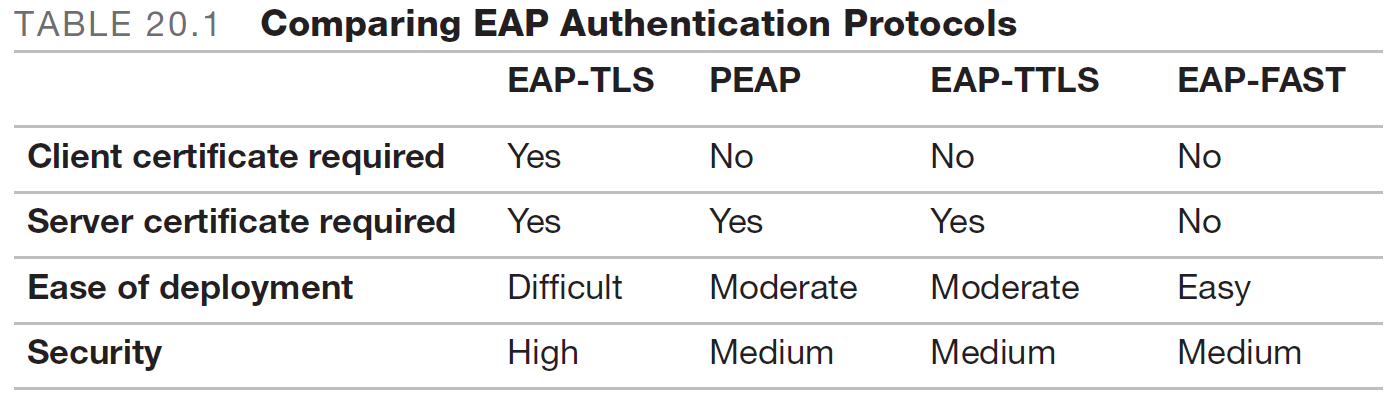
Table comparing the main EAP secure variations. Extracted from: Weiss, Martin M. CompTIA Security+ SY0–601 Exam Cram. Pearson IT Certification, 2020.
Wireless Encryption
When wireless technology was in its early days, convenience was the priority. Wi-Fi Protected Setup (WPS) provided fast connectivity: the user needed only to insert a PIN or to press a button on the wireless access point (AP). Researchers discovered that the PIN could be easily guessed through brute-force attacks and that WPS could still be exploited even if disabled. Those findings led to a quick WPS deprecation and the creation of more secure wireless protocols.
Wired Equivalent Privacy (WEP) was the first secured protocol implemented for wireless communications. In principle, it aimed to offer the same level of security as wired communications do. It has a fundamental flaw: it implements RC4 by repeatedly using the same encryption key, which makes it vulnerable to cryptanalytic attacks. Wi-Fi Protected Access (WPA) took its place.
The first version of WPA implemented encryption through the Temporal Key Integrity Protocol (TKIP), from which it creates a cryptographic key for each packet. After discovering security gaps in WPA processes, WPA2 emerged, using an AES-based method (Counter Mode Cipher Block Chaining Message Authentication Code Protocol [CCMP]) for longer cryptographic keys and overall better cryptography for confidentiality and authentication. While still considered secure, WPA2 will progressively be replaced by WPA3, which implements Simultaneous Authentication of Equals (SAE). This means robust encryption and authentication operations, protecting against offline password attacks.
WPA encryption has two possible modes of authentication: personal and enterprise. WPA-Personal uses PSK, whereas WPA-Enterprise (aka 802.1X mode) implements EAP central authentication with Remote Authentication Dial-In User Service (RADIUS) servers. Those servers may be federated, which makes seamless connecting with different networks from the same organization.

Diagram illustrating the role of a RADIUS server.
Wireless Installation
Antennas, Placement, Power, and Bandwidth
The wireless medium consists of electromagnetic waves, so frequency, interference, and generating power are fundamental issues with equipment installation. Antenna types, placement, and power guide proper wireless infrastructure management.
Wireless antennas can be directional or omnidirectional. The former emits a signal to a specific direction, while the latter projects waves in 360 degrees. Directional antennas like Yagis are ideal for connecting two nearby buildings. Omnidirectional ones apply to establishing the internal local area network’s (LAN) signal.

A Yagi antenna, at the left-superior corner, and its directional signal propagation. Extracted from: https://www.everythingrf.com/community/what-is-a-yagi-antenna.
Multiple-input multiple-output (MIMO) and multiuser MIMO (MU-MIMO) antennas are alternatives to standard omnidirectional APs. This equipment may minimize signal loss due to obstacles and reflections by using multipath signals from multiple receiving and transmitting antennas.

Diagram illustrating signal dissemination through MIMO equipment. Extracted from: https://www.gta.ufrj.br/ensino/eel879/trabalhos_vf_2014_2/rafaelreis/mimo.html.
Standard omnidirectional antenna placements are at the site’s center or each quadrant. Placing APs as near as possible to the central antenna is a good practice to avoid signal loss.
Equipment power is another issue. The greater the power, the stronger the signal. However, a stronger signal broadcasts the network to a broader area, which might lead to unnecessary exposure and, logically, to an easier infiltration since the attacker doesn’t need to be close to the signal’s source. On the other side of this problem is signal availability across the environment. Blind spots are a common problem for network distribution since signal loss can happen due to power and physical obstacles.
For such problems, site surveys analyze the signal distribution and determine better equipment placement and configuration. By this process, WLAN availability and security may reach the best equilibrium. Professionals use Wi-Fi analyzers that collect the necessary information and graphically display signal distribution for better visualization. The result is a site’s heat map.

A heat map illustration. Extracted from: https://www.ekahau.com/solutions/wi-fi-heatmaps/.
An essential conclusion regarding signal distribution is that placement, power, and antenna types can optimize network availability while minimizing security risks if followed correctly. But those parameters must not be considered primary security methods above encryption and authentication solutions. The section on SSID reaches the same conclusion.
Besides placement, power, and antenna types, equipment installation and configuration consider signal bandwidth distribution. Most Wi-Fi standards establish the frequencies of 2.4 GHz (802.1b/g) and 5GHz (802.11n/ac) as the reference bands for data transmission, dividing those into smaller intervals to facilitate transmission and avoid signal collision/interference. Today, standard 802.11ax also includes 6GHz. Companies such as Cisco offer band direction and selection functionalities for wireless controllers. This facilitates load distribution of connection requests and data transmission between 2.4GHz and 5GHz bands.
Centralized Access Controllers and APs
Equipment installation also encompasses which hardware the connections will be established by. A typical configuration involves APs and centralized access controllers (ACs). As the name suggests, ACs manage and control WLAN activity through their connected APs, much like a switch for a wired LAN. The AC’s role is mainly determined by the type of APs used:
- Fat APs contain all the programs necessary for WLAN access management, including ACLs and band steering, so much so that their other name is “intelligent access points.” Therefore, they don’t need ACs.
- Thin APs are on the other end of the spectrum. They only receive and forward communications to the AC and are managed by it. Their alternate name is “intelligent antennas”;
- Fit APs stay in the middle, having intermediary capabilities but ultimately demanding ACs to deal with control and management.
SSIDs and MAC Filtering
Service Set Identifier (SSID) is the name attributed to a network, typically broadcasted so that interested parties may identify it before trying to connect. SSID broadcasts may be blocked as a security measure. Only when the client machine has the SSID correctly configured can it try to connect to the network. This hinders wardriving and warflying efforts, previously discussed in another post.
Nevertheless, such practice must be considered a secondary security methodology compared to wireless encryption and access. This is because it doesn’t impede the establishment of a connection. Specific scanning programs, like Kismet, can discover hidden SSIDs, effectively rendering blocking SSIDs useless.
MAC filtering is a more robust security measure. It uses lists of authorized (whitelist) and unauthorized (blacklist) devices identified by their Media Access Control (MAC) addresses. It must be implemented alongside encryption and authentication protocols since MAC addresses can be easily spoofed. An attacker may only need to use tools such as Aircrack-ng and airodump-ng to find valid MAC addresses on the network and spoof them to infiltrate.
메타데이터
- post_id
- c9ce6fc6d46b
- slug
- wireless-security-c9ce6fc6d46b
- url
- https://medium.com/@anticitizenone/wireless-security-c9ce6fc6d46b
- canonical_url
- https://medium.com/@anticitizenone/wireless-security-c9ce6fc6d46b
- author_url
- https://medium.com/@anticitizenone
- status
- ok
- fetched_at
- 2026-07-15 14:44:23


