Switching from vDSL to Virgin Media with Ubiquiti Unifi
TL;DR
Switching from vDSL to Virgin Media with Ubiquiti Unifi
TL;DR
Plug in the Virgin Media Hub in to WLAN2 port on the USG. Create an Internet network in the settings of your Unifi Controller web interface (not mobile app) and use the default settings. Assign that network to the port you plugged the VM Hub in to and disconnect your old vDSL line.
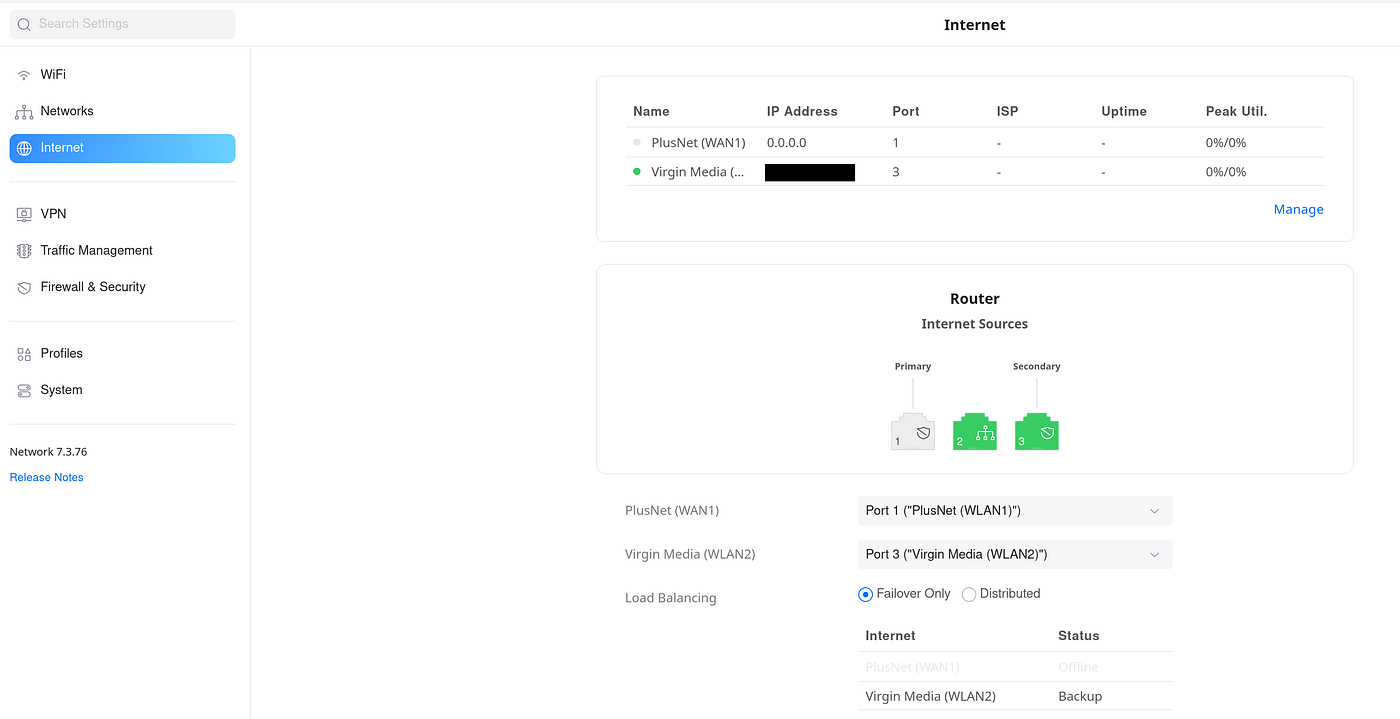
Unifi Controller dashboard showing both networks
The influencer version
I wanted to write on my journey from PlusNet vDSL to Virgin Media using my Ubiquiti Unifi network.
I use Ubiquiti hardware at home, and have done for a long time. I find the flexibility and control over the network both interesting and useful. My entire home network is a little complicated and not entirely relevant.

My home network setup, the bits that are relevant. There is a USG and a POE network switch that everything is connected to.
This is my network setup. There are bits that are worth noting that aren’t pictured.
- I have a Draytek vDSL modem that links from the USG labelled ‘Router’ in the picture and the phone line. This provides the internet to PlusNet and has an overly complex PPPoE authentication on it.
- My Unifi Controller is actually hosted in Scaleway, outside the network and rebuilds every 24 hours.
Switching to Virgin Media
I wanted the switch-over to be as seamless as possibly, because no one wants internet downtime, but also because my Unifi Controller is in the cloud and any unavailability would mean I am unable to configure the router to affect corrections. This meant I took great care to ensure every change I did was immediately reversible.
The first thing I did when I got the Virgin Media Hub 3.0 once I had set it up, was to plug it in to the WLAN2 port on the USG.
I had done some research and found that I needed to create a new network on the Unifi Controller. Looking in the mobile app did not provide anything that looked promising. The thing that was telling was that I couldn’t even find the network I had configured for the vDSL line. This lead me to believe that either Ubiquiti had massively watered down the capabilities of the Unifi Controller, or the mobile app.
Of course when I switched over to a laptop and logged in via the web portal all the options I was expecting were there waiting for me. The app is a useful stop gap but nowhere near as powerful as the web version of the Unifi Controller.
Looking up how to create a new Internet network for Virgin Media was not at all useful, this is why I’m writing this.
There were a few posts about setting the Hub to modem mode. That was easy enough to do. I don’t think it’s entirely necessary to do other than to turn off another WiFi radio interrupting the airwaves, but I figured I could hard reset the router to revert the setting. Although
The recommended way to revert the modem mode was to login via a laptop using an ethernet cable and toggle it back. This gave me a clue that there was a DHCP server still running on the Hub which meant presumably it was still acting as a NAT in some regard, which is good enough for my needs and gave me a clue as to how to tell the USG how to handle the network.
Back on the Unifi Controller I could then create the new Internet network from the settings. I left everything as default, which means DHCP. I then plugged in the VM Hub in to the USG WLAN2, or port 3, the fail-over port, which allowed me to then assign the newly created network configuration to that port.
The next bit was to disable the old vDSL line in a way that meant I could recover it if I wanted to. I had intended just to remove the cable, but then I saw the power button on the modem and hit that.
My phone and my laptop remained connected to the network but no internet. After 30 seconds I tried again and I had the internet back!
I actually had two tabs open in my browser on my laptop. Both of them were telling me what my IP was. One I loaded before doing the work. The other one I refreshed regularly. I would know it had worked when they had different IP addresses. And by this point they did!
It was as easy as I had hoped and not as hard as I had expected. Which is very rare for me when working with hardware these days. So I was so pleased as I had assigned myself several hours for debugging the problem and I was done in under one.
I guess I have a Draytek modem to stick on eBay now.
메타데이터
- post_id
- ca1a06e9ab76
- slug
- switching-from-vdsl-to-virgin-media-with-ubiquiti-unifi-ca1a06e9ab76
- url
- https://medium.com/@mattcopp_77295/switching-from-vdsl-to-virgin-media-with-ubiquiti-unifi-ca1a06e9ab76
- canonical_url
- https://medium.com/@mattcopp_77295/switching-from-vdsl-to-virgin-media-with-ubiquiti-unifi-ca1a06e9ab76
- author_url
- https://medium.com/@mattcopp_77295
- status
- ok
- fetched_at
- 2026-06-29 01:02:39




