Learning RTOS Part-10
FreeRTOS application are typically organized as the independent tasks that communicates with each other to provide system functionality…
Learning RTOS Part-10
FreeRTOS application are typically organized as the independent tasks that communicates with each other to provide system functionality. Task notification provides efficient mechanism allowing one task to directly notify another task.
In earlier blogs we discussed about the intermediately communication objects such are queues, event groups, and different types of semaphores. When a communication object is used, data or event do not directly communicated to the receiving task or receiving ISR, instead data/events are passed to communication objects and then receiving task/ISRs receives the data/event from the communication object. So no direct communication between the tasks to tasks or tasks to ISRs.
Task Notifications allows tasks to interact with other tasks, and to synchronize with other ISRs. Task Notification allows tasks or ISR to send events directly to the receiving tasks.
Task notification functionality is optional. To include task notification functionality set configUSE_TASK_NOTIFICATIONS to 1 in FreeRTOSConfig.h.
When configUSE_TASK_NOTIFICATIONS set to 1, then each task will have at least one ‘notification state’, that is either ‘pending’ or ‘Non-pending’ and notification value which is 32 bit unsigned integer. When task receive the notification then tasks state become ‘ pending’ when tasks reads its notification value then state changes to ‘non-pending’. Task can wait in blocked state with timeout for its state to become ‘pending’. If the configTASK_NOTIFICATION_ARRAY_ENTRIES is set to a value greater than 1 then there are multiple Notification states and values identified by index.
Using the Task Notification to send the events or data to a task is significantly faster than using the queue, semaphore or event group to perform the equivalent operation.
Likewise, using the Task Notification to send the events or data to a task require less RAM than using the queue, semaphore or event group to perform the equivalent operation. This is because we must create the communication object before we use it, whereas enabling the task notification have the fixed overhead. The RAM cost for task notifications is configTASK_NOTIFICATION_ARRAY_ENTRIES * 5 bytes per task. The default value for configTASK_NOTIFICATION_ARRAY_ENTRIESis 1 making the default size for task notifications is 5 bytes per task.
Task notifications is faster and requires less RAM than the communication objects, but is can’t be used in all scenario. Below is the list of scenario where task notification can’t be used:
- Task notification can’t be used to send the data or event from task to ISR, whereas communication objects can send data or events from task to ISRs and ISR to task.
- In communication object, any task or ISR that knows the object handle can access it, whereas in task notification the notification is directly send to task, only the receiving task can process the event/data.
- Task Notifications send data to task by updating the task’s notification value. A tasks notification value can only hold one value a t a time.
- An event group is the communication object that can be used to send events to multiple tasks at the same time. As task notification is send to task directly only receiving task can process it.
- If a task attempts to send the notification to a task that already have the notification pending, then it is not possible for the sending task to wait in blocked state for receiving task to reset its notification state.
**Using Notification Tasks:** Task notification can often be used in place of binary semaphore, counting semaphore, event group and sometimes in place of queue.
xTaskNotify() API function is used to send notification, xTaskNotifyWait() API function is used to receive the notification. However, in the majority of cases, the full flexibility provided by the xTaskNotify() and xTaskNotifyWait() API functions is not required, and simpler functions would suffice. Therefore, the xTaskNotifyGive() API function is provided as a simpler but less flexible alternative to xTaskNotify(), and the ulTaskNotifyTake() API function is provided as a simpler but less flexible alternative to xTaskNotifyWait().
The task notification is not limited to single notification event. The configuration parameter configTASK_NOTIFICATION_ARRAY_ENTRIESis set to 1 by default. If this parameter is greater then array of notifications are created inside the each task. This allows the notifications to be managed by index. Every task notification API have index version. And indexed version APIs are identified by suffice Indexed, so xTaskNotify() becomes xTaskNotifyIndexed(). Using the non-indexed version of the API results in accessing notification[0].
The‘FromISR’ functions do not exist for receiving notifications because a notification is always sent to a task and interrupts are not associated with any task.
The xTaskNotifyGive() API Functions:xTaskNotifyGive() sends notification directly to task, and it increments the receiving tasks notification value. xTaskNotifyGive() is used as the lighter weight and faster alternative to binary and counting semaphore. calling xTaskNotifyGive() will set the receiving tasks notification state to pending if it is not already pending. Below is the prototype of the xTaskNotifyGive() API function.
BaseType_t xTaskNotifyGive( TaskHandle_t xTaskToNotify );
BaseType_t xTaskNotifyGiveIndexed( TaskHandle_t xTaskToNotify,
UBaseType_t uxIndexToNotify ); xTaskNotify: A handle of the task to which notification is being sent.
uxIndexToNotify: Index into the array.
xTaskNotifyGive() is a macro that calls xTaskNotify(). The parameters passed into xTaskNotify() by the macro are set such that pdPASSis the only possible return value.
The vTaskNotifyGiveFromISR() API Function: vTaskNotifyGiveFromISR() is the interrupt safe version of xTaskNotifyGive(). Below is the prototype of the API:
void vTaskNotifyGiveFromISR( TaskHandle_t xTaskToNotify,
BaseType_t *pxHigherPriorityTaskWoken ); xTaskToNotify: A handle of the task to which notification is being sent.
pxHigherPriorityTaskWoken: If the task to which the notification is being sent is waiting in the blocked state for notification then sending the notification will cause the receiving task to leave the blocked state. If the priority of the unblocked receiving task is higher than the currently running task (task that is interrupted) then pxHigherPriorityTaskWokenis set to pdTRUE. If pxHigherPriorityTaskWokenis set to pdTRUE,then context switch must be performed before the interrupt exited. so that the highest priority task will be the task that will be executed after ISR exit. pxHigherPriorityTaskWokenmust be set to pdFALSE before use.
The ulTaskNotifyTake() API Function: ulTaskNotifyTake() allows task to wait in block state for its notification value to be greater than zero, and decrements or clear notification value to zero before it return. Below is the prototype of the API function:
uint32_t ulTaskNotifyTake( BaseType_t xClearCountOnExit,
TickType_t xTicksToWait ); xClearCountOnExit: If xClearCountOnExitset to pdTRUE, then calling tasks notification value will be cleared to zero before call to ulTaskNotifyTake() returns. if xClearCountOnExitset to pdFALSEand calling tasks notification value is greater than zero, then calling tasks notification value is decremented before call to ulTaskNotifyTake() returns, in this case notification count is the difference between number of events that have occurred and number of event that have been processed.
xTicksToWait: Maximum amount of time that calling task should remain in blocked state to wait for its notification value to become greater than zero.
Return Value: The returned value is the calling tasks notification value before it was cleared to zero or decremented by one as specified by xClearCountOnExit.
Below is the SEGGER System View Screenshot of analysis of the example to demonstrate the vTaskNotifyGiveFromISR() and ulTaskNotifyTake(). In Figure1, xClearCountOnExit is set to pdTRUEand in Figure2, xClearCountOnExitis set to pdFALSE. In example where I set xClearCountOnExitto pdFALSE, I called vTaskNotifyGiveFromISR() multiple times from ISR to demonstrate the concept.
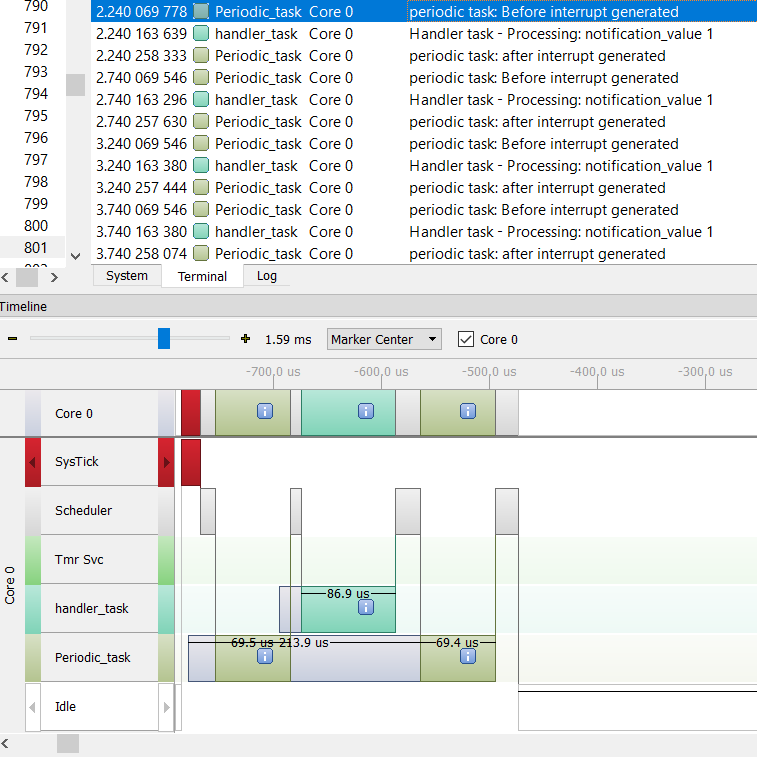
Figure1 — example with xClearCountOnExit set to pdTRUE

Figure2 — Example with xClearCountOnExit set to pdFALSE
The xTaskNotify() and xTaskNotifyFromISR() API Functions:
xTaskNotify() is the advanced version of xTaskNotifyGive() that can used to modify receiving tasks notification value in one of the following possible way:
- Increment the receiving tasks notification value, in this case it is equivalent to
xTaskNotifyGive(). - Set one or more bits in the receiving tasks notification value, this allows to use receiving tasks notification value as alternative to event group.
- Write completely new value to receiving tasks notification value only if receiving task has read the notification value since it was last updated. This allows receiving tasks notification value to provide the functionality of the queue with length 1.
- Write completely new value to receiving tasks notification value even if receiving task has not read its notification value since it was last updated. This allow receiving tasks notification value to provide the functionality of the mailbox.
xTaskNotifyFromISR() is the interrupt safe version of the xTaskNotify(). Calling xTaskNotify() will always set the receiving tasks notification state to pending if it was not already pending.
Below is the prototype of the API function:
BaseType_t xTaskNotify( TaskHandle_t xTaskToNotify,
                         uint32_t ulValue,
                         eNotifyAction eAction );

BaseType_t xTaskNotifyFromISR( TaskHandle_t xTaskToNotify,
                               uint32_t ulValue,
                               eNotifyAction eAction,
BaseType_t *pxHigherPriorityTaskWoken ); xTaskToNotify: Handle of the task to which the notification is being sent.
ulValue: How ulValue will be used is dependent on the eActionvalue.
eAction: Specifies how to update the receiving tasks notification value.
eAction parameter valid values and their effect on receiving tasks notification value:
eNoAction: The receiving tasks notification state is set to pending without its notification value being updated.ulValueparameter is not used. theeNoActionallows task notification to be used as the alternative to binary semaphore.eSetBits: The receiving tasks notification value is OR’ed with value passed toxTaskNotify()ulValue. For example if 0x01 is passed then 0th bit of the receiving tasks notification value will be set.eSetBitsallow the alternative for to the event group.eIncrement: The receiving tasks notification value is incremented.ulValueparameter is not used.eIncrementallows the use of task notification as alternative to binary semaphore or counting semaphore. This implementation is likexTaskNotifyGive()version.eSetValueWithoutOverwrite: If receiving task had a pending notification beforexTaskToNotify()was called, then receiving tasks notification value will not be updated andxTaskToNotify()will returnpdFAIL. If receiving task has no pending notification beforexTaskToNotify()was called, then receiving tasks notification value will be updated toulValueparameter.eSetValueWithOverwrite: The receiving tasks notification value is set to value passed toxTaskToNotify()ulValue, regardless of receiving task had notification pending before call toxTaskToNotify()was made or not.
The xTaskNotifyWait() API Function: xTaskNotifyWait() is advanced version of xTaskNotifyTake(). It allows task to wait with timeout option, for calling tasks notification state to become pending if it is not already pending. xTaskNotifyWait() provides options for bit to be cleared in calling tasks notification value both at the entry to the API function and at exit of API function. Below is the prototype of the function:
BaseType_t xTaskNotifyWait( uint32_t ulBitsToClearOnEntry,
                            uint32_t      ulBitsToClearOnExit,
                            uint32_t  *pulNotificationValue,
TickType_t xTicksToWait ); ulBitsToClearOnEntry: If calling task did not have a notification pending when xTaskNotifyWait() called, then bits set in ulBitsToClearOnEntry will be cleared in receiving tasks notification value on entry to the function.
ulBitsToClearOnExit: If the calling task exits the xTaskNotifyWait(), because it received the notification value or if tasks notification was pending when xTaskNotifyWait() was called, then any bits set in ulBitsToClearOnExit will be cleared on exit of xTaskNotifyWait() function. Bits are cleared after notification value stored to pulNotificationValue.
pulNotificationValue: Used to pass out the tasks notification value. The notification value stored in pulNotificationValue is before the bits cleared due to ulBitsToClearOnExit value. pulNotificationValue is an optional parameter and can be set to NULL if it is not required.
xTicksToWait: The maximum amount of time the calling task should wait in blocked state to become its notification state to become pending.
Return Value: there are two possible return value:
pdTRUE: This indicatesxTaskNotifyWait()returned because notification was received, or because calling task already had a notification pending whenxTaskNotifyWait()was called.pdFALSE: This indicates thatxTaskNotifyWait()returned without calling task receiving the notification value.
Below is the screenshot of the SEGGER System View analysis of example to demonstrate the xTaskNotifyFromISR() and xTaskNotifyWait().

Figure3 — example to demonstrate the xTaskNotify() and xTaskNotifyWait().
As can be seen in the Terminal window multiple call are made to xTaskNotify() with different option of eActionto demonstrate the concept.
That’s it for the Task Notification. I hope you enjoyed it! Below is the link to example code used to demonstrate the concepts.
Thank You!
메타데이터
- post_id
- ca4e684884e6
- slug
- learning-rtos-part-10-ca4e684884e6
- url
- https://medium.com/@prashantajabe09/learning-rtos-part-10-ca4e684884e6
- canonical_url
- https://medium.com/@prashantajabe09/learning-rtos-part-10-ca4e684884e6
- author_url
- https://medium.com/@prashantajabe09
- status
- ok
- fetched_at
- 2026-08-02 12:44:19






