Giving AI Coding Agents a Memory That Actually Lasts
How OpenCode Memory Uses a Local Vector Database to Preserve Project Context Across Sessions
Giving AI Coding Agents a Memory That Actually Lasts
How OpenCode Memory Uses a Local Vector Database to Preserve Project Context Across Sessions
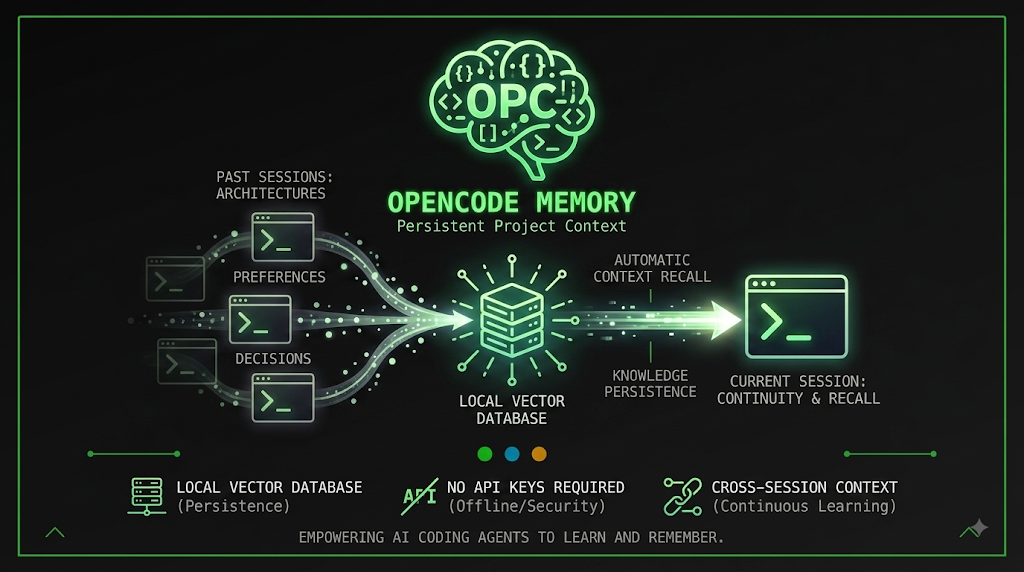
AI coding agents have become remarkably capable at writing code, debugging errors, and navigating large repositories within a single conversation. Yet once that conversation ends, most of what the agent learned disappears. Decisions made about architecture, approaches that were tried and abandoned, and preferences a developer expressed along the way all vanish the moment a new session begins. The agent starts from a blank slate every time, forcing developers to repeat context they have already provided, sometimes more than once.
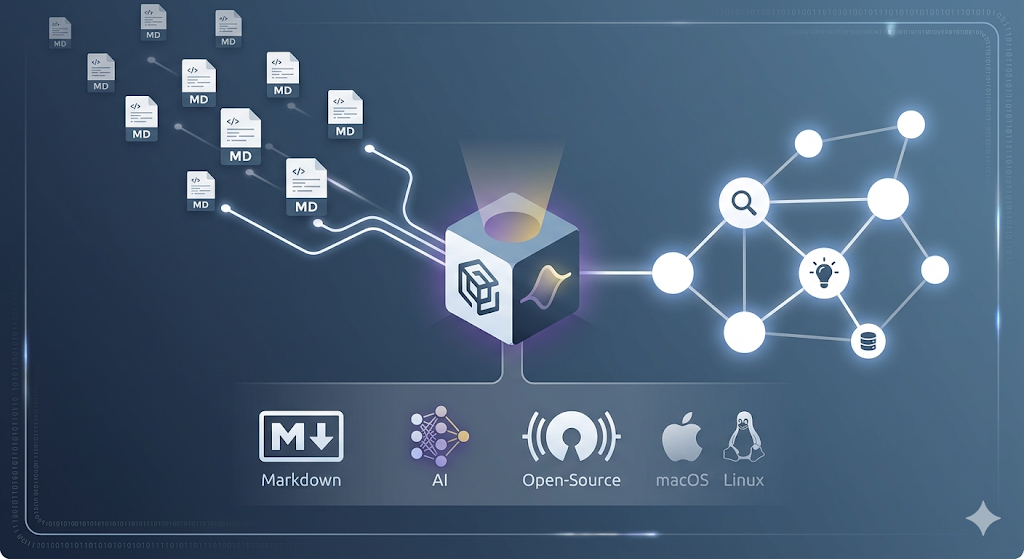
OpenCode Memory addresses this gap directly. It is a persistent memory system built for AI coding agents that retains long term context across sessions by relying on a local vector database. Rather than treating every conversation as an isolated event, it builds a growing record of project specific knowledge and personal working habits that can be recalled automatically whenever it becomes relevant again.
The Problem of Context Loss in AI Coding Sessions
Software projects accumulate a huge amount of implicit knowledge over time. A team might decide early on that a project follows a microservices architecture, or that a particular library was tried and rejected because it caused performance problems, or that a certain naming convention should always be followed. Human developers absorb this knowledge naturally through experience with the codebase. AI coding agents, on the other hand, typically only know what has been said within the current conversation window.
This creates a recurring inefficiency. Developers end up re explaining the same architectural decisions, re describing past failures, and re stating personal preferences every time a new session starts. Even well organized static documentation, such as a project instructions file, cannot fully solve this problem because it tends to capture stable, rarely changing rules rather than the fluid, evolving context that emerges from day to day work.
OpenCode Memory is designed to sit in that gap. Static documentation continues to hold permanent rules and conventions that rarely change, while OpenCode Memory captures the dynamic, evolving knowledge that accumulates through actual work: decisions, failed experiments, and personal habits discovered over time.
Core Architecture: Local Vector Search Without External Dependencies
At the center of OpenCode Memory is an embedded Turso and libSQL database that includes native vector search capabilities. This is a meaningful architectural choice because it means the system does not require a separate vector database service or a custom compiled version of SQLite to function. Vector embeddings, the numerical representations of text that allow semantic search to work, are stored and searched directly inside this embedded database.
Vector search itself is performed using libSQL’s DiskANN index through a function called vector_top_k, which performs approximate nearest neighbor search. In practical terms, this means that when a memory needs to be retrieved, the system compares the meaning of a query against stored memories rather than relying on exact keyword matches, allowing it to surface relevant context even when the wording differs from what was originally stored.
Because everything runs locally by default, developers get fast retrieval without needing to manage external infrastructure, and sensitive project information stays on the local machine unless a remote embedding provider is explicitly configured.
Automatic Memory Capture
One of the more distinctive aspects of OpenCode Memory is that it does not require developers to explicitly ask the system to remember something for it to work. With default settings enabled, memory builds up naturally as work happens.
This works through a feature referred to as auto capture. After a conversation goes idle, a background AI request analyzes the technical work that took place and extracts anything worth remembering, then stores it automatically. No special prompt or explicit instruction is required from the developer. In later sessions, memories that are relevant to the current context are automatically injected back into the conversation, meaning an agent can recall a prior decision or a previously failed approach without being told about it again.
Auto capture and a related feature called user profile learning both require an AI provider capable of returning structured or tool call output, since the summarization process depends on the model reliably producing usable structured data. Manual memory operations such as searching, adding, and listing memories continue to work even without this provider configured.
The User Profile: Learning How a Developer Works
Separate from project specific memories, OpenCode Memory maintains what is called a User Profile. This is a cross project summary that captures preferences and working habits rather than technical facts about a specific codebase. It updates on a configurable interval, expressed as a number of analyzed prompts, with a default setting of every ten analyzed prompts.
The User Profile can be viewed inside the system’s web interface or retrieved programmatically. Developers do not need to populate it manually under normal use; instead, it fills in gradually as the underlying provider analyzes patterns in how a developer tends to work across projects.
Deciding What Belongs in Memory Versus Static Documentation
A natural question when adopting a system like this is understanding what should be stored as memory versus what belongs in a static project instructions file. The general guidance offered by the system draws a fairly clear line.
Memory is well suited to project specific decisions, patterns discovered while debugging, notes about approaches that were tried and failed, and preferences that emerge from real sessions over time. These are things that grow naturally out of actual work and would otherwise be lost.
Static documentation remains the better home for stable rules and workflows that rarely change, along with always on coding conventions that every agent interacting with the project should be aware of regardless of whether a specific memory happens to surface. A simple rule of thumb applies here: lasting project instructions belong in static documentation, while context that grows organically from real work belongs in memory.
Manual Memory Operations
While automatic capture handles a large share of the work, OpenCode Memory also exposes a manual memory tool for situations where a developer wants something stored or retrieved immediately rather than waiting for automatic extraction. This tool supports several modes.
memory({ mode: "add", content: "Project uses microservices architecture" });
memory({ mode: "search", query: "architecture decisions" });
memory({ mode: "search", query: "architecture decisions", scope: "all-projects" });
memory({ mode: "profile" });
memory({ mode: "list", limit: 10 });
The add mode stores a new memory directly. The search mode retrieves memories relevant to a given query, and can optionally search across every project rather than being limited to the current one by passing an all projects scope. The profile mode retrieves the current User Profile, and the list mode returns recent memories up to a specified limit.
By default, searches and listings are scoped to the current project alone, which keeps results focused and relevant. Developers who need a broader view can explicitly request a cross project scope when appropriate.
Web Interface for Browsing and Management
OpenCode Memory includes a full featured web interface, available locally once the system is running. This interface presents a unified timeline that combines memories and prompts together, making it possible to see not just what was remembered but the context in which it was captured. It also allows developers to inspect individual captures directly and manage the User Profile visually rather than only through programmatic calls.
By default this web server binds only to the local loopback address, meaning it is reachable only from the same machine. Developers who intentionally want to reach the interface from other devices on a local network can configure it to bind more broadly, though doing so requires setting up an authentication token or username and password combination so the interface is not left open to anyone on the network. Credentials are compared using a constant time check to reduce the risk of timing based attacks, and unauthenticated responses are marked so that no intermediate cache stores or replays them.
Embedding Models and Flexibility
Since semantic search depends entirely on the quality of vector embeddings, OpenCode Memory supports a range of embedding options. By default, it uses a local model that runs through a JavaScript machine learning library backed by the ONNX runtime, which is downloaded automatically from Hugging Face the first time it is needed. Several alternative local models are available as well, offering different tradeoffs between speed, context length, and embedding quality. Smaller models process faster but capture less nuance, while larger models tend to produce richer semantic representations at some cost to speed.
For teams that prefer not to run embeddings locally, the system also supports connecting to a remote, OpenAI compatible embeddings endpoint by supplying an API URL and key. This flexibility allows the choice between fully local processing, which keeps everything on the developer’s own machine, and a remote provider, which may offer higher quality embeddings at the cost of sending data over the network.
Developers are generally encouraged to settle on one embedding model per project and stick with it, since changing models or their dimensionality can trigger a re embedding of all previously stored memories to keep everything consistent.
Multi Repository and Monorepo Support
By default, a project’s identity is tied to its enclosing git repository, meaning each physical repository gets its own isolated memory store. This default behavior works well for simple, single repository projects, but it becomes a limitation for workspaces that span multiple nested git repositories belonging to a single logical project, such as monorepos or trees managed by multi repository tools.
To handle this case, an empty marker file can be placed at the root of the overall workspace. Every session started anywhere beneath that marker then resolves to the same shared memory store, regardless of which specific sub repository the working directory happens to be in at the time. This marker takes precedence over the default git based identity detection, ensuring that a shared logical project is treated as a single memory space rather than being fragmented across its internal repositories.
Moving Projects Without Losing Memory
Because project memory is tied to project identity, moving a repository, whether due to an operating system migration, a change in directory structure, or switching from one type of file system mount to another, can orphan the old memory store while a fresh, empty one is created for the new location.
OpenCode Memory provides tools to prevent this from resulting in permanent data loss. A migration mode allows a developer working in the new project location to pull memories forward from a previously known path, with a dry run option available to preview exactly what will happen before any changes are made. When the original path no longer exists at all, a list shards mode can be used to discover orphaned memory stores by their internal identifiers rather than by path, since the original path can no longer be used to recompute the correct identity.
For moving memories between entirely different machines, an export and import workflow is also available, allowing a memory store to be serialized to a portable file and later restored on another machine. Exported files are careful to exclude vector embeddings themselves, since those get recomputed on import using whatever embedding model is configured at the destination, while fully private entries and full prompt history are intentionally left out of the exported document.
Choosing an AI Provider for Auto Capture
Because automatic capture depends on an AI provider capable of returning structured output, configuring this correctly matters for the feature to work reliably. The recommended approach is to use a provider that is already authenticated within the broader OpenCode environment, allowing the memory system to route requests through that existing session rather than managing its own separate authentication and token handling.
{
  "opencodeProvider": "anthropic",
  "opencodeModel": "claude-haiku-4-5-20251001"
}
Alternatively, for situations where this integrated approach is not preferred, a manual provider configuration can be supplied directly, pointing at a compatible API endpoint along with a corresponding key.
{
  "memoryProvider": "openai-chat",
  "memoryModel": "gpt-4o-mini",
  "memoryApiUrl": "https://api.openai.com/v1",
  "memoryApiKey": "env://OPENAI_API_KEY"
}
Several manual provider modes are supported, covering OpenAI style chat completion APIs, OpenAI’s alternative responses API format, Anthropic’s messages API with tool use, and a compatible endpoint for MiniMax models. Importantly, if automatic capture fails for any reason, such as a misconfigured provider, this does not prevent manual memory operations like adding or searching from continuing to function normally.
Practical Configuration Example
A trimmed configuration file illustrates how the major settings fit together in practice.
{
  "storagePath": "~/.opencode-mem/data",
  "embeddingModel": "Xenova/nomic-embed-text-v1",
  "memory": {
    "defaultScope": "project"
  },
  "webServerEnabled": true,
  "webServerPort": 4747,
  "autoCaptureEnabled": true,
  "opencodeProvider": "anthropic",
  "opencodeModel": "claude-haiku-4-5-20251001",
  "userProfileAnalysisInterval": 10,
  "maxMemories": 10
}
This configuration enables local storage under the user’s home directory, sets a default embedding model, enables the web interface on a specific port, turns on automatic capture, and specifies which provider and model should be used for the structured summarization requests that power that capture process.
Reliability Considerations
Given that memory storage involves an evolving database format, OpenCode Memory includes safeguards around migration and upgrades. When upgrading from older storage formats, existing data is automatically migrated to the native vector format, with each piece of the database backed up before any rewrite takes place. Progress is tracked so that an interrupted migration can resume safely on the next startup rather than leaving the system in a partially converted state. A locking mechanism also prevents multiple instances from attempting to migrate the same storage location simultaneously, which could otherwise corrupt the data.
Similar care is taken around changes to embedding dimensions. If a stored memory shard becomes incompatible with a newly configured embedding model, writes to that shard are blocked rather than silently corrupted, and the original data is left untouched until a verified replacement has been built.
Extensibility for Other Tools
Beyond its own functionality, OpenCode Memory exposes a small set of stable helper functions that other tools can import directly, allowing third party plugins to read from and write into the same underlying memory store using the same tagging conventions the system itself relies on internally. This is a meaningful detail for anyone building an ecosystem of tools around a shared coding agent, since it means memory does not need to be reinvented or duplicated by every individual plugin, and tags generated through these helpers are guaranteed to line up correctly with what the core statistics and retrieval endpoints expect.
Conclusion
AI coding agents have grown highly capable within the boundaries of a single session, but that capability has long been undermined by an inability to remember anything once the session ends. OpenCode Memory closes that gap by pairing automatic, low friction capture of technical context with a fast, fully local vector search engine, a cross project understanding of individual working habits, and practical tools for migrating, exporting, and safely managing memory as projects evolve over time.
For developers who are tired of repeating the same context to an AI agent every time a new session begins, a persistent memory layer like this represents a meaningful step toward agents that genuinely accumulate knowledge about a project rather than starting over each time.
The repository is available at: https://github.com/tickernelz/opencode-mem
메타데이터
- post_id
- ca71e79d8b4c
- slug
- giving-ai-coding-agents-a-memory-that-actually-lasts-ca71e79d8b4c
- url
- https://medium.com/open-intelligence/giving-ai-coding-agents-a-memory-that-actually-lasts-ca71e79d8b4c
- canonical_url
- https://medium.com/open-intelligence/giving-ai-coding-agents-a-memory-that-actually-lasts-ca71e79d8b4c
- author_url
- https://medium.com/@eng.fadishaar
- status
- ok
- fetched_at
- 2026-08-16 01:40:05