Automating Transaction Alerts with Power Automate Using On-Premises Data Gateway
In a hybrid data environment, where both on-premises and cloud data sources coexist, seamless data integration is critical for effective…
Automating Transaction Alerts with Power Automate Using On-Premises Data Gateway
In a hybrid data environment, where both on-premises and cloud data sources coexist, seamless data integration is critical for effective business operations. One of the best tools for managing this integration is the On-Premises Data Gateway, specifically in standard mode. It acts as a bridge, connecting on-premises data sources to cloud-based platforms, such as Power BI and Power Automate, allowing for secure data transfer. The standard mode ensures that the gateway can handle a wide range of data sources and supports various data transfer protocols, ensuring compatibility and flexibility.
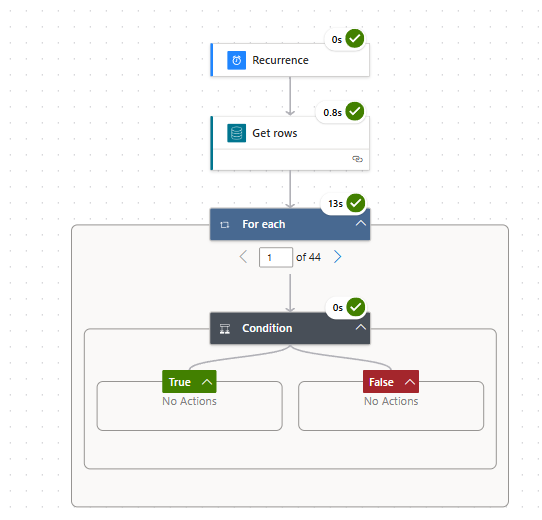
This blog will guide you through setting up an automated Power Automate workflow that interacts with an on-premises MySQL database, using this gateway, to trigger notifications based on transaction thresholds.
Use Case: Automating Notifications for High-Value Transactions
Let’s assume you’re storing transaction data, such as transaction ID, transaction date, customer ID, and sales amount, in your MySQL database. Using Power Automate in conjunction with the On-Premises Data Gateway, you can easily set up workflows to trigger notifications based on specific transaction conditions, such as when a sales amount exceeds a certain threshold.
Below is a step-by-step guide on how to create a workflow that sends an email notification for any transaction where the sales amount is greater than $1000
Step 1: Install and Configure the On-Premises Data Gateway
Install the Gateway:
- Download and install the On-Premises Data Gateway on a server within your network.
- Once installed, sign in with your Microsoft account that you’ll use for Power Automate.
Configure the Gateway:
- After installation, go to Power Automate and find the Gateways tab in the left-hand menu. If it’s not visible, click on More Options and locate the gateways from there.
- Add a new data connection to your on-premises MySQL database by providing the necessary credentials (server name, database, username, and password).
Step 2: Create a Power Automate Flow
Create a New Flow:
- Go to My Flows and click on New Flow.
- Choose a Scheduled Flow to query your MySQL database at regular intervals (e.g., every hour or every day).
- This frequency could be set to trigger every day at 8:00 AM or every hour, depending on your business needs.
Step 3: Query the Database for High-Value Transactions
Add a New Step:
- In your flow, click on New Step and search for MySQL.
- Choose the Get rows action.
Configure MySQL Action:
- Select your on-premises MySQL connection through the On-Premises Data Gateway.

- In the table name field, select sales.transactions

Add a Filter Condition:
- After fetching the rows, insert a Condition block.

- Select the SalesAmount field from dynamic content and set the condition to SalesAmount > 1000

Next, you can set the email connection through the email action, though this part is not included in detail in the blog, as the main focus is on demonstrating the use of the on-premises data gateway.
Automating workflows for on-premises data is critical because it ensures real-time decision-making, reduces manual effort, and integrates on-premises and cloud data smoothly, resulting in more efficient and effective business processes. For example, you can modify workflows to send a daily summary of transactions, create alerts for specific customers like VIPs, or generate weekly reports of high-value transactions.
By leveraging the On-Premises Data Gateway with Power Automate, you can automate business-critical workflows like real-time transaction monitoring and notifications. The gateway ensures secure data flow between on-premises databases and cloud services, offering a scalable solution for organizations that need to integrate multiple data sources. This approach not only streamlines operations but also provides real-time insights into business performance, ensuring that decision-makers are always informed when significant events occur.
메타데이터
- post_id
- cb259dd5e6cb
- slug
- automating-transaction-alerts-with-power-automate-using-on-premises-data-gateway-cb259dd5e6cb
- url
- https://medium.com/@cseprs_54978/automating-transaction-alerts-with-power-automate-using-on-premises-data-gateway-cb259dd5e6cb
- canonical_url
- https://medium.com/@cseprs_54978/automating-transaction-alerts-with-power-automate-using-on-premises-data-gateway-cb259dd5e6cb
- author_url
- https://medium.com/@cseprs_54978
- status
- ok
- fetched_at
- 2026-06-27 18:20:27