GitHub Contribution Card: Dynamic SVG Stats Card for Your GitHub Profile README
Most GitHub stats widgets tell you how active you are overall. GitHub Contribution Card goes further — it shows exactly which repositories…
GitHub Contribution Card: Dynamic SVG Stats Card for Your GitHub Profile README
Most GitHub stats widgets tell you how active you are overall. GitHub Contribution Card goes further — it shows exactly which repositories you contributed to, with stars, contribution counts, and a rank for each one, all rendered as a clean, auto-updating SVG card embedded with a single line of Markdown.
The project is free, open source, and requires zero setup on the reader’s end.
The Problem It Solves
A GitHub profile README is often the first thing a recruiter, collaborator, or fellow developer sees. Generic contribution graphs show activity, but they don’t tell the story of what you actually built or contributed to. GitHub Contribution Card fills that gap by surfacing per-repository stats in a visual, rankable format — making your open-source footprint immediately readable.
🎬 Demo
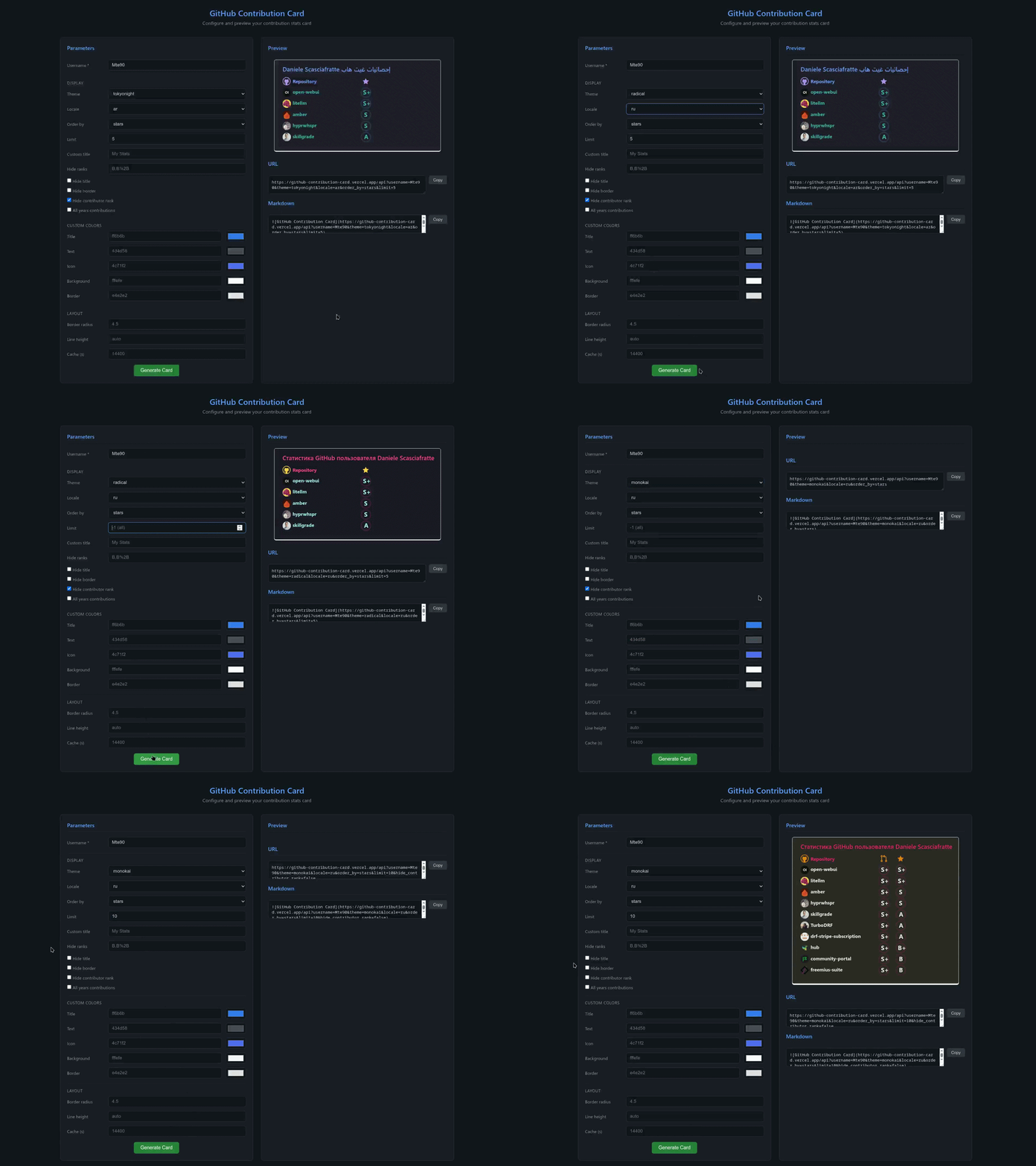
Getting Started in 30 Seconds
Paste this into any Markdown file — your GitHub profile README, a project page, a portfolio:
No token, no configuration. The hosted Vercel API handles everything on the server side.
What the Card Shows
Each card lists your top repositories ranked by stars or contributions. Every row includes the repository name, star count, contribution count, and a letter rank:
Star Ranks: S+ (10,000+) · S (1,000+) · A+ (500+) · A (100+) · B+ (50+) · B (1+) Contributor Ranks: S+ (90+) · S (80+) · A+ (70+) · A (60+) · B+ (50+) · B (1+)
You can filter by rank, limit the number of repos shown, toggle the contributor rank column, and sort by stars or contributions — all through URL parameters.
40+ Themes, Zero Configuration
One of the most immediately appealing features is the theme system. A single parameter switches the entire visual style:
If none of the 40+ built-in themes match your branding, individual colors can be overridden with &title_color=, &text_color=, &icon_color=, &bg_color=, and &border_color= (hex values, no # prefix).
Internationalization
The card title is fully translatable through the locale parameter, covering more than 20 languages including Italian, French, Spanish, German, Japanese, Portuguese, Korean, Arabic, and Chinese:
Full API Reference

When the Vercel API Is Not Enough
The hosted API is instant and works for the vast majority of profiles. However, for users with 15+ years of contributions and 300+ repositories — especially when combining combine_all_yearly_contributions=true with hide_contributor_rank=false — hundreds of sequential GitHub API calls can hit Vercel's serverless timeout.
The solution is the Docker-based GitHub Action, which runs in GitHub Actions infrastructure with no timeout constraints and built-in rate limiting:text
name: Update Contribution Card
on:
  schedule:
    - cron: '0 0 * * *' # Daily at midnight
  workflow_dispatch:

jobs:
  update-stats:
    runs-on: ubuntu-latest
    permissions:
      contents: write

    steps:
      - uses: actions/checkout@v4

      - name: Generate Contribution Card SVG
        uses: FrancoStino/github-contribution-card/action@main
        env:
          GITHUB_PERSONAL_ACCESS_TOKEN: ${{ secrets.GITHUB_PERSONAL_ACCESS_TOKEN }}
        with:
          username: YOUR_USERNAME
          output-file: github-contribution-card.svg
          combine-all-yearly-contributions: 'true'
          theme: default
          rate-limit-delay-ms: '100'

      - uses: actions4git/add-commit-push@v1
        continue-on-error: true
The Action generates an SVG file and commits it directly to your repository, keeping the card updated on a schedule without any manual intervention.
Self-Hosting on Vercel
Running your own instance takes about five minutes:
- Fork the repository
- Import it in Vercel
- Set
GITHUB_PERSONAL_ACCESS_TOKENin Settings → Environment Variables - Deploy — your personal API is live at
https://<project>.vercel.app/api
For local development:
yarn install
cp .env.example .env
# Add your GitHub PAT to .env
yarn build:prod
yarn start
# Server starts at http://localhost:9999
FAQ
Does it work with private repositories? No, it only surfaces public repository contributions.
Do I need a GitHub token to use the hosted API? No. Authentication is handled server-side. A token is only required if you self-host.
What’s the difference between the Vercel API and the GitHub Action? The Vercel API is instant and requires zero setup. The GitHub Action is designed for large profiles where timeout limits would be a problem, and it commits the SVG output directly to your repo.
Contributing
The project is open to contributions — new themes, locale additions, bug fixes, and feature requests are all welcome. Fork the repository on GitHub, open an issue, or submit a pull request.
If GitHub Contribution Card saved you time or improved your profile, consider dropping a ⭐ on the repo — it helps other developers find the project.
메타데이터
- post_id
- cb292fa14f6a
- slug
- github-contribution-card-dynamic-svg-stats-card-for-your-github-profile-readme-cb292fa14f6a
- url
- https://medium.com/@rawsar/github-contribution-card-dynamic-svg-stats-card-for-your-github-profile-readme-cb292fa14f6a
- canonical_url
- https://medium.com/@rawsar/github-contribution-card-dynamic-svg-stats-card-for-your-github-profile-readme-cb292fa14f6a
- author_url
- https://medium.com/@rawsar
- status
- ok
- fetched_at
- 2026-07-13 10:53:13



