Exploring & Transforming Data: Date and Time Handling in R
Welcome to the eleventh part of our “R Journey: From Beginner to Data Explorer” series! Dealing with temporal data is a crucial aspect of…
Exploring & Transforming Data: Date and Time Handling in R
Welcome to the eleventh part of our “R Journey: From Beginner to Data Explorer” series! Dealing with temporal data is a crucial aspect of data analysis, and R provides powerful tools and functions for working with dates, times, and time intervals. In this blog post, we will explore various techniques and functions for manipulating, formatting, and analyzing temporal data in R. Join us as we unravel the intricacies of date and time handling with practical examples and detailed explanations.
Understanding Date and Time in R:
Date and time data in R are represented using specialized classes such as Date, POSIXct, and POSIXlt. These classes offer flexible ways to store and manipulate temporal information, allowing users to perform calculations, extract components, and handle time zones with ease.
Exploring Key Concepts in Date and Time Handling:
Before diving into examples, let’s review some key concepts in date and time handling:
-
Date Class (
Date): Represents dates without time information, stored as the number of days since January 1, 1970. -
POSIXct and POSIXlt Classes: Represent dates and times with time zone information, stored as seconds since the UNIX epoch (January 1, 1970).
-
Date-Time Arithmetic: Performing arithmetic operations (e.g., addition, subtraction) on date and time objects to calculate durations, intervals, and offsets.
-
Formatting and Parsing: Converting between character strings and date-time objects, and specifying custom formats for displaying date and time information.
Here are some commonly used specifiers:
- **Year:
%Y: Four-digit year (e.g., 2024) -**%y: Two-digit year (e.g., 24 for 2024) - handle with caution due to century interpretation issues- **Month:
%m: Two-digit month (01-12) -%b: Abbreviated month name (Jan, Feb, etc.) -**%B: Full month name (January, February, etc.)- **Day:
%d: Two-digit day (01-31) -%a: Abbreviated weekday name (Sun, Mon, etc.) -**%A: Full weekday name (Sunday, Monday, etc.)- **Time:
%H: Hours (00-23) -%I: Hours (00–12) -%M: Minutes (00-59) -%S: Seconds (00-59) -**%p: 12 Hour Clock (am,pm)
An sample example format would be : %Y/%m/%d %I:%M:%S %p .
- Time Zones: Handling time zones and converting between different time zones using the
tzparameter and functions likeas.POSIXctandformat.POSIXlt.
Examples of Date and Time Handling in R:
Let’s explore practical examples showcasing date and time handling techniques:
1. Creating Date Objects:
# Create a Date object
date <- as.Date("2024/01/01", format = "%Y/%m/%d")
date
2. Converting to POSIXct:
# Convert to POSIXct class
datetime <- as.POSIXct("2024/03/01 12:00:00", tz = "UTC")
datetime;typeof(datetime)
3. Date-Time Arithmetic:
# Calculate difference between two dates
diff_days <- difftime(as.Date("2024/03/08"), as.Date("2024/01/05"), units = "days")
diff_days
4. Formatting Date and Time:
# Format date-time object
formatted_datetime <- format(datetime, format = "%y-%m-%d %H:%M:%S")
datetime;formatted_datetime
5. Parsing Date-Time Strings:
# Parse date-time string
parsed_datetime <- as.POSIXct("07/03/2024 16:00:00", format = "%d/%m/%Y %H:%M:%S", tz = "UTC")
parsed_datetime
6. Time Zone Conversion:
# Convert time zone
library(lubridate)

# Sample datetime with timezone (replace with your actual data)
datetime_utc <- ymd_hms("2024-03-08 12:00:00", tz = "UTC")

# Convert to a different timezone (e.g., Pacific Standard Time)
datetime_pst <- with_tz(datetime_utc, "US/Pacific")

datetime_utc
datetime_pst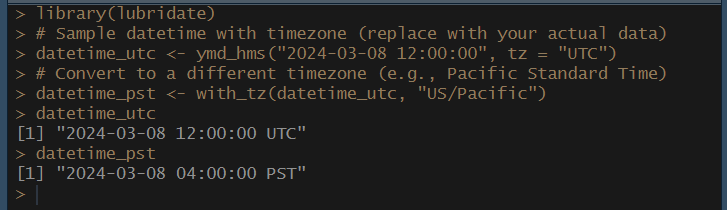
7. Extracting Components:
# Extract components (year, month, day)
year <- format(datetime, "%Y")
month <- format(datetime, "%m")
day <- format(datetime, "%d")

year;month;day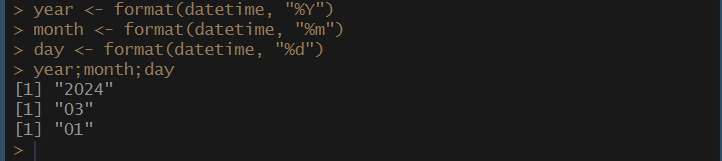
Conclusion:
In this guide, we explored key concepts and techniques for working with temporal data, including creating date objects, performing arithmetic operations, formatting and parsing date-time strings, handling time zones, and extracting components. By leveraging these techniques, data scientists and analysts can effectively manipulate, analyze, and visualize temporal data, unlocking valuable insights and patterns hidden within their datasets. As we continue our journey with R, remember to explore additional functions and packages tailored to your specific date and time handling needs. In the next installment, we will be learning about the advanced data manipulation techniques used for preparing the data for analysis. Happy Coding!
메타데이터
- post_id
- cba6b264bd9f
- slug
- exploring-transforming-data-date-and-time-handling-in-r-cba6b264bd9f
- url
- https://medium.com/@kuckianc/exploring-transforming-data-date-and-time-handling-in-r-cba6b264bd9f
- canonical_url
- https://medium.com/@kuckianc/exploring-transforming-data-date-and-time-handling-in-r-cba6b264bd9f
- author_url
- https://medium.com/@kuckianc
- status
- ok
- fetched_at
- 2026-07-24 07:01:26