I Compared 7 Fall Detection Devices for My Mom — Here’s What Nobody Tells You
The marketing is full of promises. The fine print tells a different story.
I Compared 7 Fall Detection Devices for My Mom — Here’s What Nobody Tells You
The marketing is full of promises. The fine print tells a different story.
My mom fell in the kitchen fourteen months ago. She was fine — bruised pride, bruised hip, nothing broken. But I live four states away, and the call I got was not from her. It was from her neighbor, who heard her yelling through the wall.
That was the moment I started researching fall detection devices. I spent the next three weekends reading reviews, watching YouTube comparisons, and collecting PDF spec sheets like they were rare coins. Then I made the mistake of actually buying several of them.
What follows is what I learned — including the things the comparison websites won’t say because most of them get a cut of whatever you buy.
The 7 Devices I Looked At (And Why I Almost Gave Up)
The field breaks down into two categories that nobody clearly labels: traditional medical alert systems and smartwatches with fall detection. They work differently, cost differently, and fail differently. Mixing them in a single comparison without explaining that distinction is the first way the industry misleads you.
The traditional systems I evaluated: Life Alert, MobileHelp, Bay Alarm Medical, Medical Guardian, and Lively Mobile Plus. The smartwatch options: Apple Watch and Omveo.
Here’s what I found on each one.
Life Alert: The Brand Everyone Knows, For Reasons That Aren’t All Good
Life Alert has been around since 1987. Their ads are inescapable. And their pricing is, genuinely, one of the most confusing things I’ve encountered as a consumer.
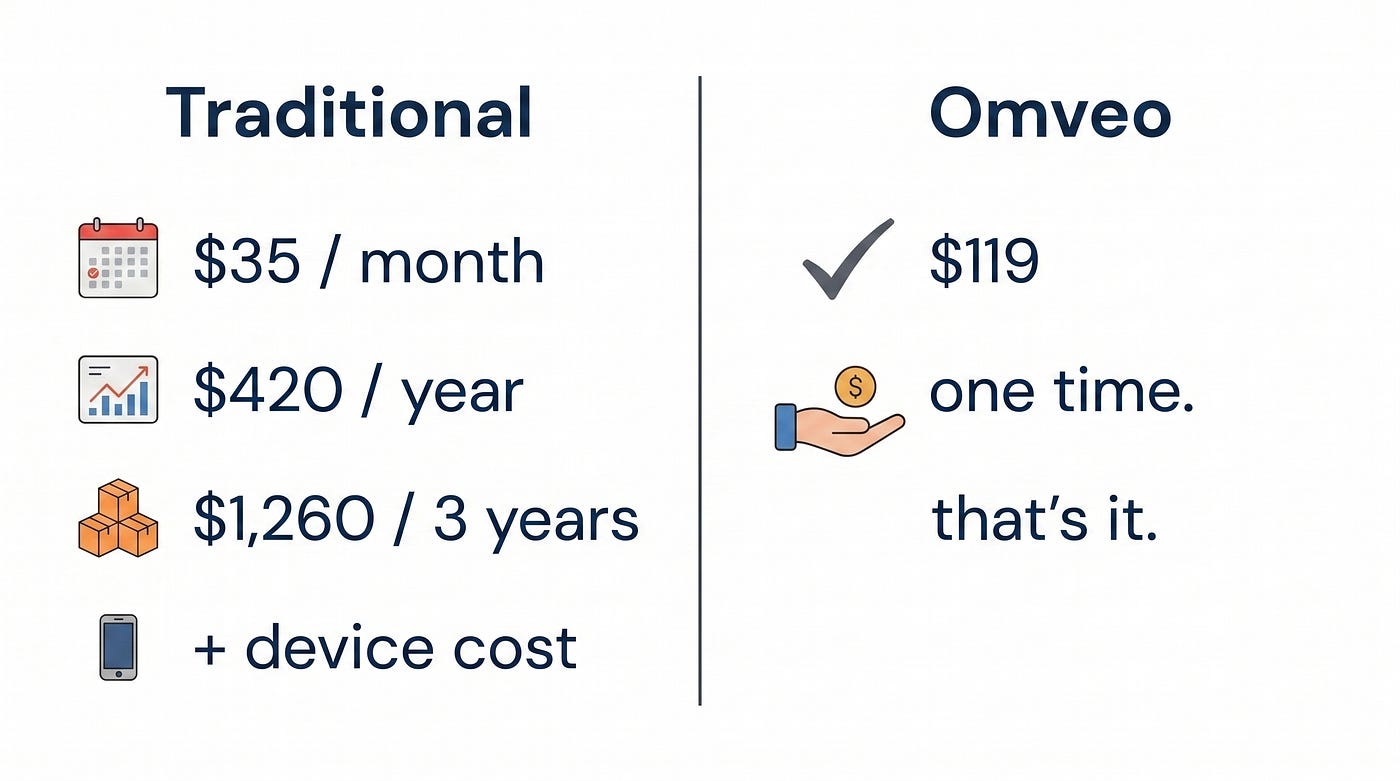
Getting an actual quote requires a phone call. The representative I spoke with was warm and persistent. The contract was three years. Monthly fees ran approximately $49 depending on which package you selected. If you do the math — and I did — that’s close to $1,764 over the contract term, not counting any setup fee.
The other thing nobody tells you about Life Alert: their traditional system requires the user to press a button. My mom has good days and bad days. On a bad day, remembering to press a button while she’s on the kitchen floor is not guaranteed. That’s not a knock on Life Alert specifically — it’s how traditional medical alert pendants work. But the marketing rarely leads with that.
MobileHelp: Affordable Entry, Inconsistent Follow-Through
MobileHelp’s pricing starts around $19.95/month, which makes it one of the more accessible options in the traditional category. The cellular coverage relies on AT&T, which is solid in most metros and spottier in rural areas.
What I kept reading in customer reviews — and what my own experience confirmed in the trial period — was inconsistency in response times and some confusion around which tier of service included what. The “fall detection” add-on was exactly that: an add-on, not standard. Read the tier descriptions carefully before you buy.
Bay Alarm Medical: The Most Trustworthy Traditional Option
I’ll say something positive without qualification: Bay Alarm has an A+ Better Business Bureau rating, has been independently operated since 1946, and their customer service answered my questions without a sales pitch. Pricing for their cellular device ran $39.95/month in my research.
The downside is the same structural issue as the others — monthly fees that compound over time, and a device that still depends on the user initiating contact in many fall scenarios. Their fall detection pendant exists, but it’s an add-on to a system that centers on a button press.
For families who want a US-based, established company and are comfortable with the ongoing cost, Bay Alarm is the most honest player in the traditional category.
Medical Guardian: Solid Option If You Want 24/7 Professional Monitoring
Medical Guardian’s differentiator is their 24/7 monitoring center — trained dispatchers who receive the alert and coordinate response. If that infrastructure matters to you (and it’s a legitimate reason to pay a monthly fee), Medical Guardian delivers it competently.
Fees range from roughly $29.95 to $54.95/month depending on device and plan. No EKG. No AFib detection. No health monitoring beyond the alert function itself. For families whose primary concern is emergency response and nothing else, it works. For families who also want to monitor a parent’s health trends, it leaves a gap.
Lively Mobile Plus: Good Device, Complicated Pricing
Lively (formerly GreatCall) benefits from Best Buy distribution and T-Mobile infrastructure, both of which add consumer trust. The device itself is genuinely portable. But the pricing structure confused me more than any other product I evaluated.
The base device costs $49.99. Then there’s a plan fee. Then there’s “Urgent Response,” which is the feature that actually connects you to a dispatcher — and it’s an additional charge on top of the plan fee. By the time I added up what I actually wanted, the monthly cost was comparable to competitors I’d initially dismissed as expensive.
If you’re already in the GreatCall ecosystem and understand the plan structure, Lively is fine. If you’re starting fresh, read every line before you commit.
Apple Watch: Genuinely Impressive Tech, Wrong Tool for This Job
I’m an Apple person. I own one. I wanted the Apple Watch to be the answer because it would have simplified everything.
Here’s the honest breakdown.
Apple Watch fall detection works. It detects hard falls followed by a period of stillness, then gives the user a chance to dismiss the alert. If the user doesn’t respond, it calls emergency services. For an active, tech-comfortable senior who wears the watch consistently, it’s a real safety feature.
The problems start accumulating from there.
Battery life is 18 hours. For fall detection to work, the watch has to be worn. Requiring an elderly person to charge a device every night — and to remember to put it back on every morning — is a real compliance barrier that the reviews mostly skip past. My mom already forgets her blood pressure medication twice a week. A daily charging ritual is not a safe assumption.
Apple Watch’s ECG is FDA-cleared (Series 4 and later). That’s legitimately better than what most competitors offer, and I’m not going to pretend otherwise.
But here’s the piece that stopped me: if my mom falls and needs to place a voice call for help, the Apple Watch routes that call through her iPhone. If her iPhone is in the other room — which it usually is — that capability disappears. The watch alone cannot make a cellular call without the paired phone nearby. For a device marketed as an independent safety tool, that’s a significant architectural limitation.
Price is $299 and up, requires daily charging, and requires an iPhone to function as described. For what it’s designed to be — a full smartwatch for active users — it’s excellent. For fall detection as a primary use case, it has real gaps.
Omveo: The One I Actually Bought for My Mom, and Why
I’ll be direct about my bias: I ended up buying Omveo. That’s not because it’s perfect. It’s because it solved the specific problems that kept disqualifying everything else.
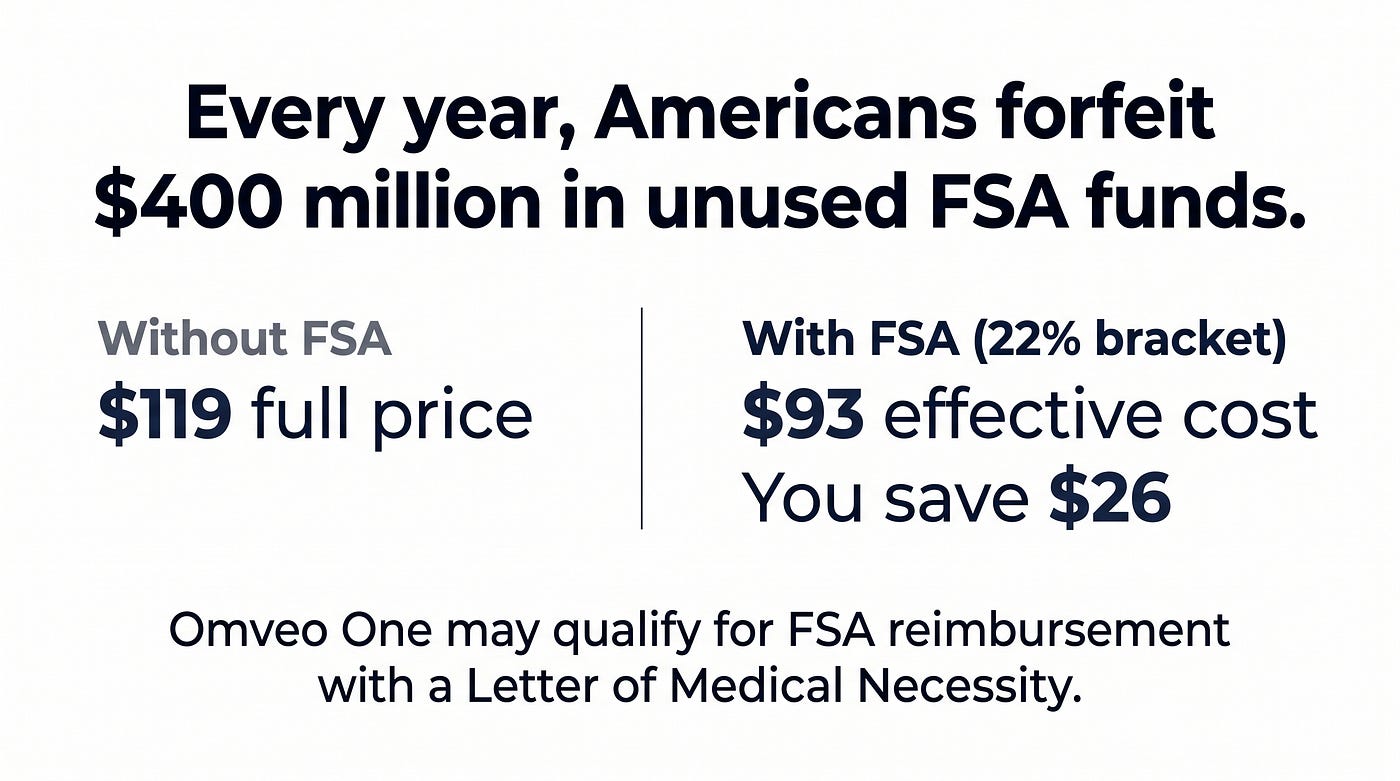
The price math: $119, one time. No monthly fee. Life Alert over three years costs roughly fifteen times that. Even Medical Guardian at $30/month costs more than Omveo within four months.
The battery: Five days. This is the number that changed everything for me. My mom wears it, charges it over the weekend when her caregiver visits, and that’s it. The compliance problem that killed the Apple Watch option doesn’t exist here.
The fall detection: Omveo automatically detects hard falls followed by 30 seconds of stillness, then sends alerts to up to three emergency contacts. There’s a 30-second cancellation window for false alarms. I’ll tell you what the device cannot do, because I’d rather you hear it from me than discover it later: soft trips and slow falls are not automatically detected by Omveo. They’re not automatically detected by any device currently available — that’s a technology limitation across the entire industry, not an Omveo-specific gap. For those scenarios, the 2-way voice feature lets my mom initiate a call directly from the watch. That’s a real safety layer, just not an automatic one.
The health monitoring: Heart rate, blood oxygen, EKG, AFib early detection, blood pressure, sleep tracking, stress monitoring, body temperature. All on the same $119 device. Apple Watch charges $399 for a comparable feature set — and Omveo’s EKG is not FDA-cleared, which I’ll say clearly and Apple Watch’s is. For clinical ECG validation, Apple Watch is the better choice. For a general health monitoring wearable with fall detection at a one-time cost, Omveo is in a different category.
The health check button: This is the feature I didn’t expect to matter and now consider non-negotiable. Hold the side button for a few seconds and the watch runs a quick health check — heart rate, oxygen levels, a summary. No app required, no phone required. My mom uses it every morning. Her cardiologist has found it useful in follow-up conversations.
What Omveo is not: It’s not a 24/7 monitored system with professional dispatchers. Alerts go to family contacts, and 911 can be configured as an option. If professional dispatch monitoring is a requirement for your situation, Medical Guardian is the better fit. I’m not going to tell you otherwise.
The Three Things Reviews Get Wrong
After reading dozens of comparison articles, here’s what they consistently miss:
Battery life in real use. A device with 18-hour battery requires daily charging compliance. In practice, for many elderly users, that’s a failure mode. Ask the review site what happens when the watch is left on the charger.
False alarm rate and cancellation. A device that calls 911 every time your parent bends to pick something up is a device your parent will stop wearing. The 30-second cancellation window standard exists for good reason. Understand it before you buy.
Who actually makes the call. In most traditional alert systems, fall detection is an add-on, and the base system still relies on the user pressing a button. That distinction matters enormously for parents with cognitive changes, arthritis, or moments of confusion.
Where I Landed
One of our earliest users has been wearing Omveo for six months. She charges it on Sundays. She uses the health check button most mornings. Her daughter reported two false alarm alerts — both from her falling asleep on the couch with the watch at an odd angle — and both were cancelled within the window. One real alert, when she slipped on the back porch. Her daughter got the notification before she’d made it back inside.
That’s the honest report.
Not sure which type of fall detection is right for your situation? The Omveo Fall Risk Assessment takes about two minutes and helps match you to the right level of protection based on your parent’s specific risk factors. No email required to see your results.
Sources: CDC fall injury data (cdc.gov/falls); National Council on Aging fall statistics; company pricing verified via direct inquiry and published rate cards, April 2026.
메타데이터
- post_id
- cbb09db396fb
- slug
- i-compared-7-fall-detection-devices-for-my-mom-heres-what-nobody-tells-you-cbb09db396fb
- url
- https://medium.com/@veysern03/i-compared-7-fall-detection-devices-for-my-mom-heres-what-nobody-tells-you-cbb09db396fb
- canonical_url
- https://medium.com/@veysern03/i-compared-7-fall-detection-devices-for-my-mom-heres-what-nobody-tells-you-cbb09db396fb
- author_url
- https://medium.com/@veysern03
- status
- ok
- fetched_at
- 2026-06-09 14:34:10