DHCP in the world of IPv6
Dynamic/Autoconfiguration of IPV6 is way different from IPV4, This allows stateless and state-full allocation of IP Address. This has been…
DHCP in the world of IPv6
Dynamic/Autoconfiguration of IPV6 is way different from IPV4, This allows stateless and state-full allocation of IP Address. This has been evolved from DHCPv4 in many ways as it tries to simplify IP Address allocation to mobile devices and to effectively use the IP Address Space.
There are 3 modes of automatic configuration possible in IPV6 (all decided upon the flags in RA (Route Advertisement messages)): 1. Stateless (SLAAC) [A Flag in RA] 2. SLAAC with stateless DHCPv6 server [O Flag in RA] 3. Statefull DHCPv6 (on similar lines to IPV4 DHCP method) [M flag in RA]
Router Advertisement:
This primer on RA will help us in understanding DHCPv6 IP Allocation better. ICMPv6 RAs are intended to help facilitate bootstrapping the connectivity of an IPv6 node on a network. They tell the hosts on the network how they should go about acquiring their global unicast IPv6 address and become productive members of the network. The RA also provides information about the default gateway. This is documented in RFC4861
Below diagram shows the RA Advertisement flags in ICMPv6 message.
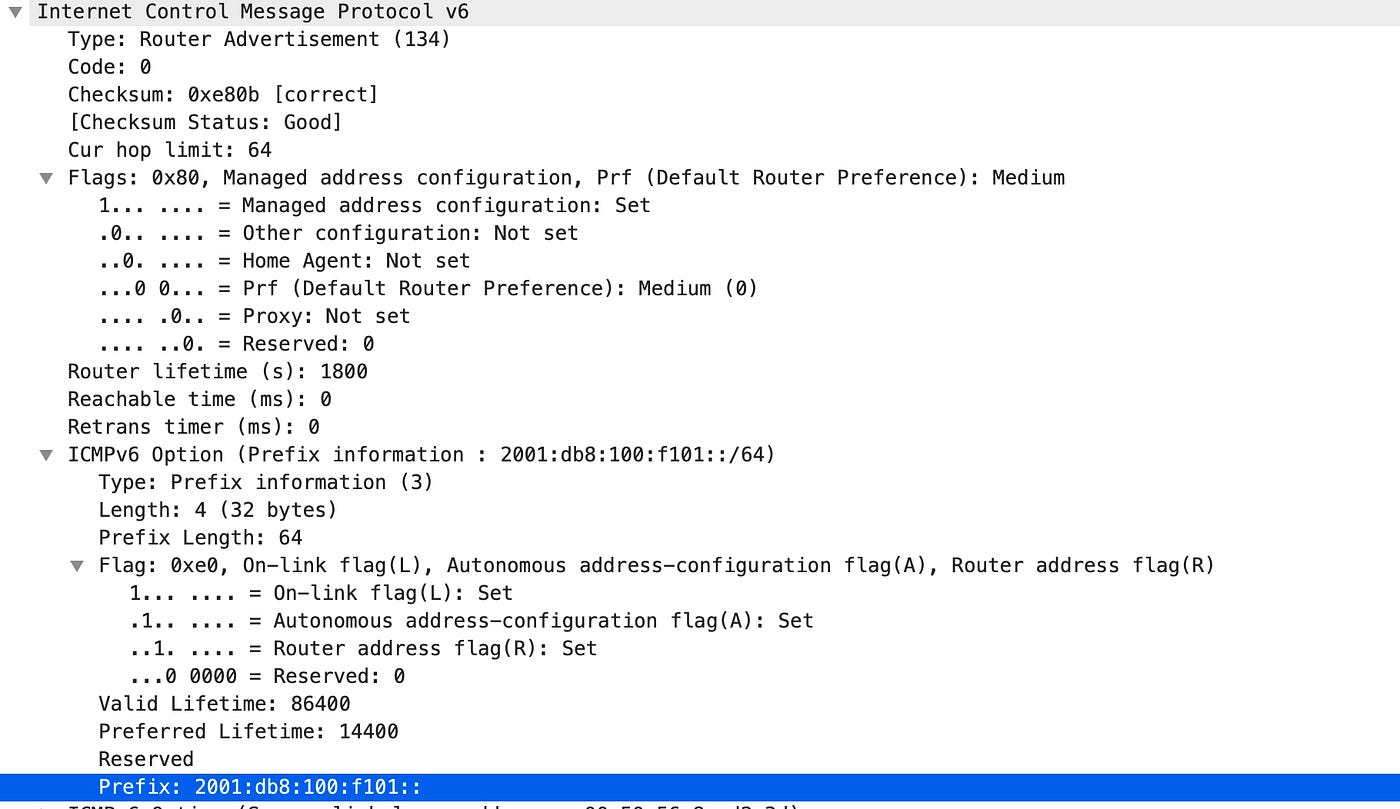
Currently, the NDP Router Advertisement message contains the following one-bit flags mentioned in [RFC5175]:
Here is the meaning of certain flags:
- Managed (M flag) = set to 1 means the address is provided by stateful DHCPv6.
- Other (O flag) = set to 1 means that the address is provided by Stateless DHCPv6.
- Autonomous address-configuration (A flag) = set to 1 means that it suggests the host creates its own IPv6 address using SLAAC.
- Router lifetime = anything other than a ‘0’ value means the source sending the RA will be the default gateway.
Automatic IP Address allocation methods explained in below sections will further delve into how each flag is used in each use-case.
Stateless Address Auto-Configuration (SLAAC):
The Stateless Address Auto-Configuration enables hosts to generate a unique routable IPv6 address on their own without manual configuration of hosts. It is designed with principle that Manual configuration of individual machines before connecting them to the network should not be required. The router is configured to follow the IPv6 SLAAC protocol and sends out a Router Advertisement(RA) periodically. Message flow is as follow:
- Nodes begin the auto-configuration process by generating a link-local address for the interface, it sends a Neighbor Solicitation message with tentative address.
- If another node has same targeted address it replies with Neighbor Advertisement saying so otherwise node sending solicitation message gets the link-local address. This process is termed as duplicate address detection
- Node will send an Router Solicitation message to get an IPv6 address or it can receive periodically transmitted Router Advertisement (RA) message
- Router has A flag enabled, SLAAC (by configuring A flag to 1), then the RA is sent from the link-local address of the router. Devices can use this address as their default gateway address.
- By default, the A flag is set to 1, and the O and M flags are set to 0. This suggests to the device that it use the prefix in the RA to create its global unicast address and no other information is available using DHCPv6.
- Node after receiving RA uses prefix 2001:1234:A:B::/64 plus the EUI-64 Interface ID to create one or more globally unique addresses.
- after this Node has globally unique IPv6 Address and default gateway.
SLAAC with stateless DHCPv6 server:
Route Advertisement Configuration is as below:
The A-flag (Address Autoconfiguration) is set to 1. This tells all neighboring nodes that they can use SLAAC for address allocation
The O-flag (Other Configuration) is set to 1. This tells all neighboring nodes that they can use Stateless DHCPv6 server to obtain other information such as DNS and Domain name etc.
The M-flag (Managed Address Configuration) is set to 0. This indicates that Stateful DHCPv6 is not needed.
Message flow is as follow:
- Nodes begin the auto-configuration process by generating a link-local address for the interface, it sends a Neighbor Solicitation message with tentative address.
- If another node has same targeted address it replies with Neighbor Advertisement saying so otherwise node sending solicitation message gets the link-local address. This process is termed as duplicate address detection
- Node will send an Router Solicitation message to get an IPv6 address or it can receive periodically transmitted Router Advertisement (RA) message
- Router has A flag enabled, SLAAC (by configuring A flag to 1), then the RA is sent from the link-local address of the router. Devices can use this address as their default gateway address.
- By default, the A flag is set to 1, and the O and M flags are set to 0. This suggests to the device that it use the prefix in the RA to create its global unicast address and no other information is available using DHCPv6.
- Node after receiving RA uses prefix 2001:1234:A:B::/64 plus the EUI-64 Interface ID to create one or more globally unique addresses.
- after this Node has globally unique IPv6 Address and default gateway.
- Host sends out a DHCPv6 SOLICIT message to ff02::1:2, the all-DHCPv6 servers multicast address to obtain other link parameters, such as the MTU, on-link prefix, DNS server list or a domain name etc.
Stateful DHCPv6:
The M-flag (Managed Address Configuration) is set to 1. This indicates that Stateful DHCPv6 is enabled.
The O-flag (Other Configuration) is set to 1 or 0(X). this doesn’t matter if M flag is set to 1 which means all the information will be received from DHCPv6 Server.
Message flow is as follow:
- Nodes begin the auto-configuration process by generating a link-local address for the interface, it sends a Neighbor Solicitation message with tentative address.
- Node will send an Router Solicitation message or Router Advertisement (RA) message with M flag set to 1 which indicates to node that it should receive IPv6 information from DHCPv6 server.
- Node will assign a default gateway address to its elf and starts DHCPv6 message negotioation
- Node sends out a DHCPv6 SOLICIT message to ff02::1:2, the all-DHCPv6 servers multicast address to obtain Ipv6 Infromation.
- Upon hearing the solicit message, the server responds with a DHCPv6 ADVERTISE message to unicast link-local address of the Node. This provides addressing information to the Node
- Node then sends out a REQUEST packet asking for addressing information Confirmation.
- Upon receiving the REQUEST, the server responds with a DHCPv6 REPLY message that contains the global unicast address and all other information that is available for assignment.
메타데이터
- post_id
- cbb26f5d851a
- slug
- dhcp-in-the-world-of-ipv6-cbb26f5d851a
- url
- https://medium.com/@amolkavitkar/dhcp-in-the-world-of-ipv6-cbb26f5d851a
- canonical_url
- https://medium.com/@amolkavitkar/dhcp-in-the-world-of-ipv6-cbb26f5d851a
- author_url
- https://medium.com/@amolkavitkar
- status
- ok
- fetched_at
- 2026-07-24 20:11:08
