AI image generators that help writers and content creators create visuals without design skills
I don’t mind spending hours writing, but I can’t say the same about graphic design.
AI image generators that help writers and content creators create visuals without design skills
Photo by Jackson Sophat on Unsplash
I don’t mind spending hours writing, but I can’t say the same about graphic design.
Somehow, I’m not blessed with artistic talent. While I find delight in colors, they don’t blend well with my skills.
Still, my work occasionally requires me to create images for blogs, social media, and other marketing collateral. Like it or not, I had to reinvent myself.
But instead of signing up for graphic design classes, I started experimenting with AI image generators. After all, I heard how they can turn even the wildest imagination into professional-grade visuals.
So, what is the best image AI image generator for beginners?
Tough question. But after trying more than a handful of AI image generation tools, I found 4 that truly help. If you’re a writer who needs a quick fix for image design woes, read on.
(Note: As a content creator, I value both AI and human creativity. I use these tools to amplify my ideas, not to replace them) .
MidJourney — Detailed, realistic images for social media posts
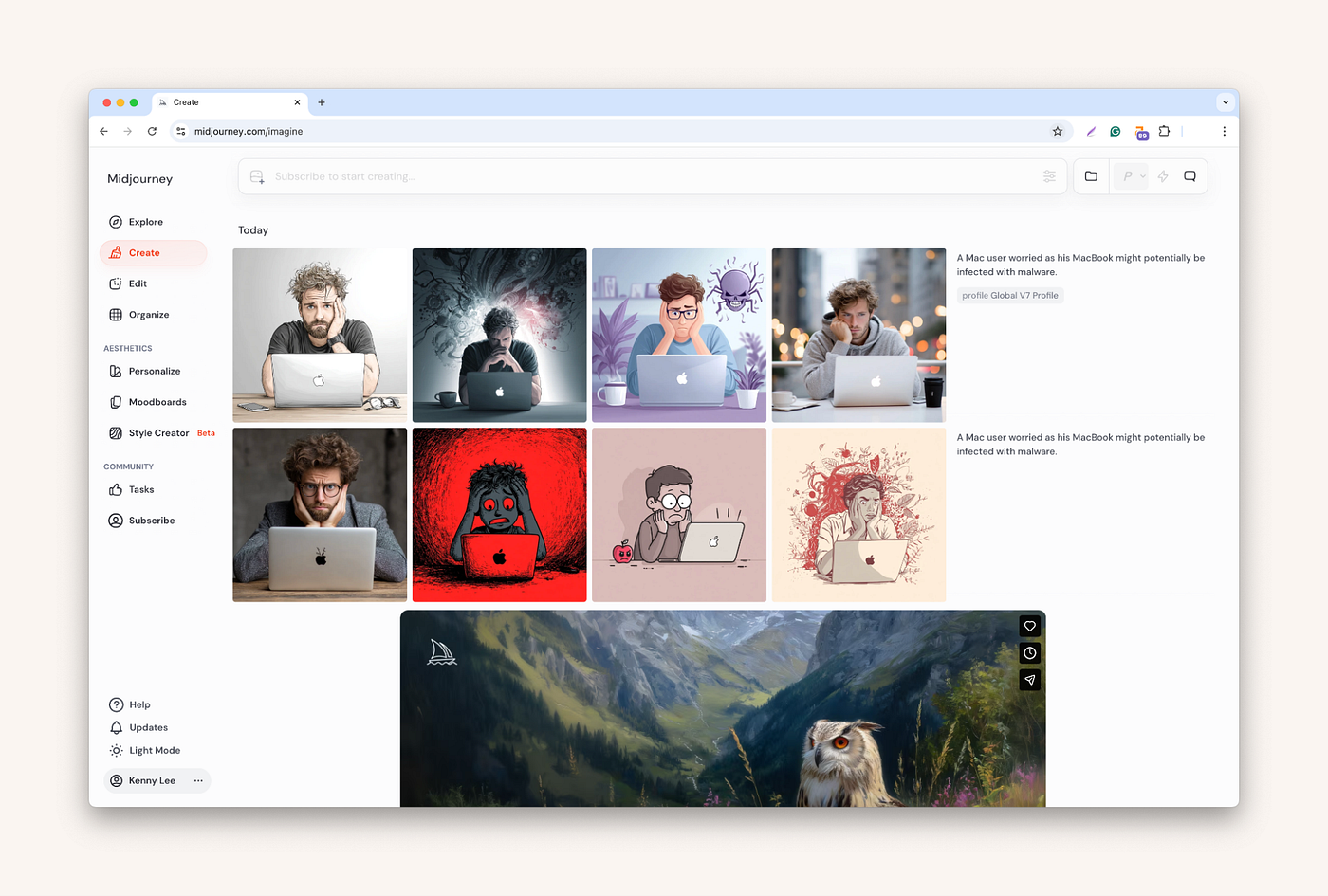
I first tried MidJourney when it was newly launched. Back then, generative AI was still in its infancy. And MidJourney was quite technical and required basic commands to use.
Now, it has turned into a sleek AI app that precisely captures my prompts. Like fellow Redditors, I’m impressed by MidJourney’s stylistic expression.
All I need to do is describe the image I want to create, or upload a sample to start creating. Plus, it lets me personalize my creation by uploading images as guidance.
(Don’t expect MidJourney to be perfect. Like all AI image generators, it might make mistakes. For example, it got the Apple logo wrong in one of the variations.)
Best for: Creating detailed and stylish images for engaging social media posts.
Leonardo — Colorful, great storyboard drafter

Leonardo AI is an AI generator for Mac that offers a lot of features without overwhelming content creators.
After trying the AI image generator across different visual types, I found it helpful for drafting storyboards or guides.
While it struggles to use the exact words in the image, the tool creates professional-grade layouts with the right colors and tones.
After creating the draft, I can edit it manually in Canva or by prompting models like Nano Banana within the app.
Bottom line — Leonardo is pretty powerful. But again, don’t expect perfection.
Best for: Drafting storyboards that you or pro designers can manually edit.
Claude — Creates technically precise infographics

Claude might seem like a surprise entry as it’s more of a generative AI built for technical professionals.
But for exactly that reason, I found that Claude excels at creating publish-ready web infographics.
Instead of merely creating an image, Claude can generate HTML code that I can copy and paste directly into the web page.
Claude also excels at capturing details I specify in the prompt. And if I make mistakes or am not satisfied with the image, I can have Claude modify it.
Best for: Creating technically precise infographics without manually specifying the details.
ChatGPT — Surprisingly fast and detailed

Honestly, I wouldn’t recommend ChatGPT if it’s still running with the GPT-4o model. But with the latest GPT-5.4, it more than deserves a spot in the list.
While ChatGPT excels at text generation, image creation hasn’t always been its strong suit. In previous models, I recalled waiting for minutes before the image was ready.
And if I need edits? Several minutes more.
The GPT5.4 definitely brings more than a simple upgrade to image creation. Not only is it fast, but I find the image very realistic.
My only concern is the lack of privacy with these AI platforms. Therefore, I’m using TypingMind to access AI like ChatGPT and Claude. It’s an intermediary tool that stores the chats locally on my Mac instead of sending them to the AI providers.
Best for: Designing realistic product mockups.
How to use AI Image to create professional-looking images
The AI image generators I share do make a writer’s life easier. But creating professional-looking images, especially those that meet your requirements, requires some prompting technique.
- Be descriptive. “Create an image of a frustrated man using a MacBook” is better than ‘Create an image of a Mac user”.
- Set the theme. If there’s a specific vibe you want to project, describe it with words like calm, vibrant, dark, or exciting.
- Use reference images. Many image creation tools that are powered by AI let you upload an image as a guideline.
Which AI image generation app caught your attention? Did I miss out on any that you found useful? Let me know in the comments.
메타데이터
- post_id
- cbbfc58fe20c
- slug
- ai-image-generators-help-writers-and-content-creators-cbbfc58fe20c
- url
- https://medium.com/@yulia.savliuk/ai-image-generators-help-writers-and-content-creators-cbbfc58fe20c
- canonical_url
- https://medium.com/@yulia.savliuk/ai-image-generators-help-writers-and-content-creators-cbbfc58fe20c
- author_url
- https://medium.com/@yulia.savliuk
- status
- ok
- fetched_at
- 2026-06-09 15:37:30




