Real-Time Pump.fun, four.meme, Bags App and Pump Tires Tweet Alerts with SocialGram Twitter API
Crypto Twitter/X activities moves fast.
Real-Time Pump.fun, four.meme, Bags App and Pump Tires Tweet Alerts with SocialGram Twitter API
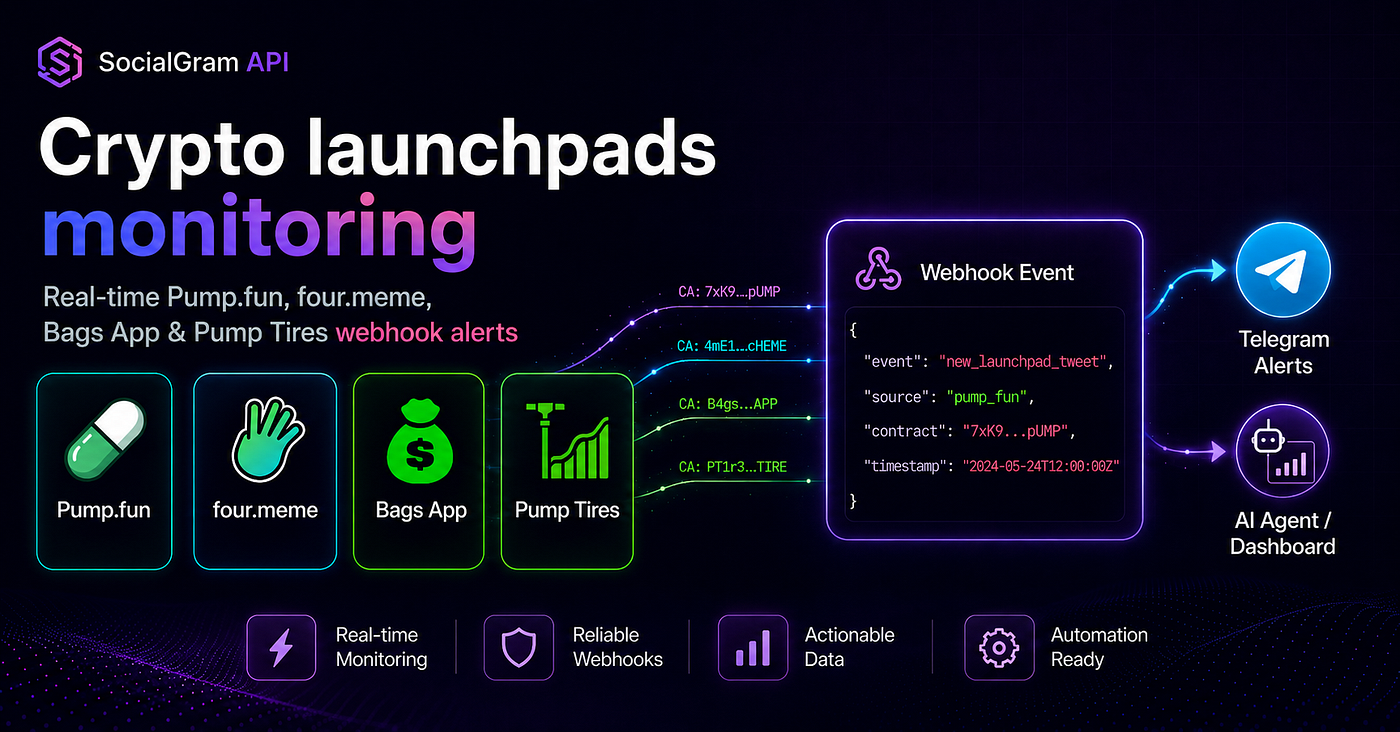
Build real-time Pump.fun, four.meme, Bags App, and Pump Tires alerts with SocialGram API webhooks, new_launchpad_tweet events, and meta.crypto launchpad metadata.
Crypto Twitter/X activities moves fast.
A Key Opinion Leader posts a new tweet bearing a token contract addresses from leading launchpad. A community starts reacting. A Telegram group wants an alert. A trading-signal team wants the event in a queue. A data team wants the same signal stored in a dashboard for review and trading.
Manual monitoring does not scale for that workflow.
Refreshing timelines, scraping pages, or running a polling loop every few seconds creates delay, duplicate work, and fragile infrastructure. It also pushes the hardest parts of real-time monitoring into your own app: scheduling, dedupe, retries, parsing, routing, and downstream delivery.
SocialGram API is built as webhook-first infrastructure for this kind of workflow. Instead of repeatedly asking whether something happened, you create a launchpad monitor and receive a webhook event when SocialGram detects matching launchpad activity.
For crypto builders, that means you can build Twitter alerts and trading bots, dashboards, agent workflows, contract feeds, and internal signal queues on top of structured events instead of trying to stitch together a launchpad watcher from scratch.
Create your SocialGram API key in Telegram bot:
https://t.me/SocialGramAPI_bot
This is infrastructure content, not financial advice.
What is crypto launchpad monitoring?
A crypto Twitter launchpad monitoring API is an API that watches launchpad-related public posts on Twitter/X and delivers structured events when new tweets bearing token contract addresses from leading launchpads are detected such as Pump.Fun, Bags, four.meme and others.
For builders, the goal is not “buy this token” or “this will be profitable.”
The goal is cleaner infrastructure.
A launchpad monitoring workflow usually needs to answer practical engineering questions:
- Which launchpad produced the signal?
- Which tweet or social event triggered it?
- Was a token address or launchpad URL matched?
- Which webhook destination should receive it?
- Has this event already been processed?
- Should it go to Telegram, Discord, a queue, a database, a dashboard, or an agent?
- What additional validation should happen before anyone acts on it?
That is where our webhook-first launchpad monitoring API is useful.
Instead of building your own timeline scraper or polling search endpoint, you can treat launchpad activity as an event stream:
Launchpad activity
        ↓
SocialGram launchpad monitor
        ↓
new_launchpad_tweet webhook
        ↓
Your receiver
        ↓
Filters, validation, routing, alerts, dashboards, agents
SocialGram handles the real-time input layer. Your product handles the business logic.
Supported launchpad streams
SocialGram API supports dedicated launchpad monitor endpoints for:
The launchpad monitor endpoints are:
POST /monitors/stream-pump-fun
POST /monitors/stream-fourdotmeme
POST /monitors/stream-bags-app
POST /monitors/stream-pump-tires
Each stream can deliver launchpad-aware webhook events to your HTTPS receiver.
A practical setup can start with one launchpad stream, then expand into a normalized multi-launchpad feed using the same downstream handler.
Start with one launchpad stream, then route all events into your own webhook receiver.
https://t.me/SocialGramAPI_bot
How SocialGram launchpad webhooks work
SocialGram webhook payloads use a simple top-level envelope:
{
  "event": "new_launchpad_tweet",
  "data": {},
  "meta": {}
}
For launchpad monitors, the event name is:
new_launchpad_tweetThe tweet object lives in:
dataLaunchpad-specific metadata lives in:
meta.cryptoThat distinction matters.
Your app can use data to format the tweet, link to the source, deduplicate by tweet ID, inspect the author, and store the event.
Your app can use meta.crypto to inspect launchpad-specific context such as launchpad_id, match_kind, matched token addresses, expanded URLs, and author history when present.
In other words:
data = the tweet object
meta.crypto = the launchpad context
That makes the event useful for several downstream routes:
- Send a formatted Telegram alert.
- Post into a Discord launchpad channel.
- Push a normalized event into Kafka, Redis, SQS, or another queue.
- Store the event in Postgres for review.
- Send the tweet and launchpad metadata to an AI agent.
- Route token-address matches into your own validation system.
- Update a no-code sheet or internal dashboard.
SocialGram should be treated as the real-time input layer. Your system should still own filtering, validation, scoring, risk checks, compliance checks, and execution logic.
Architecture: one webhook receiver, many downstream workflows
A good launchpad monitoring architecture does not need a separate app for every launchpad.
You can send Pump.fun, four.meme, Bags App, and Pump Tires events into the same webhook receiver, then normalize them internally.
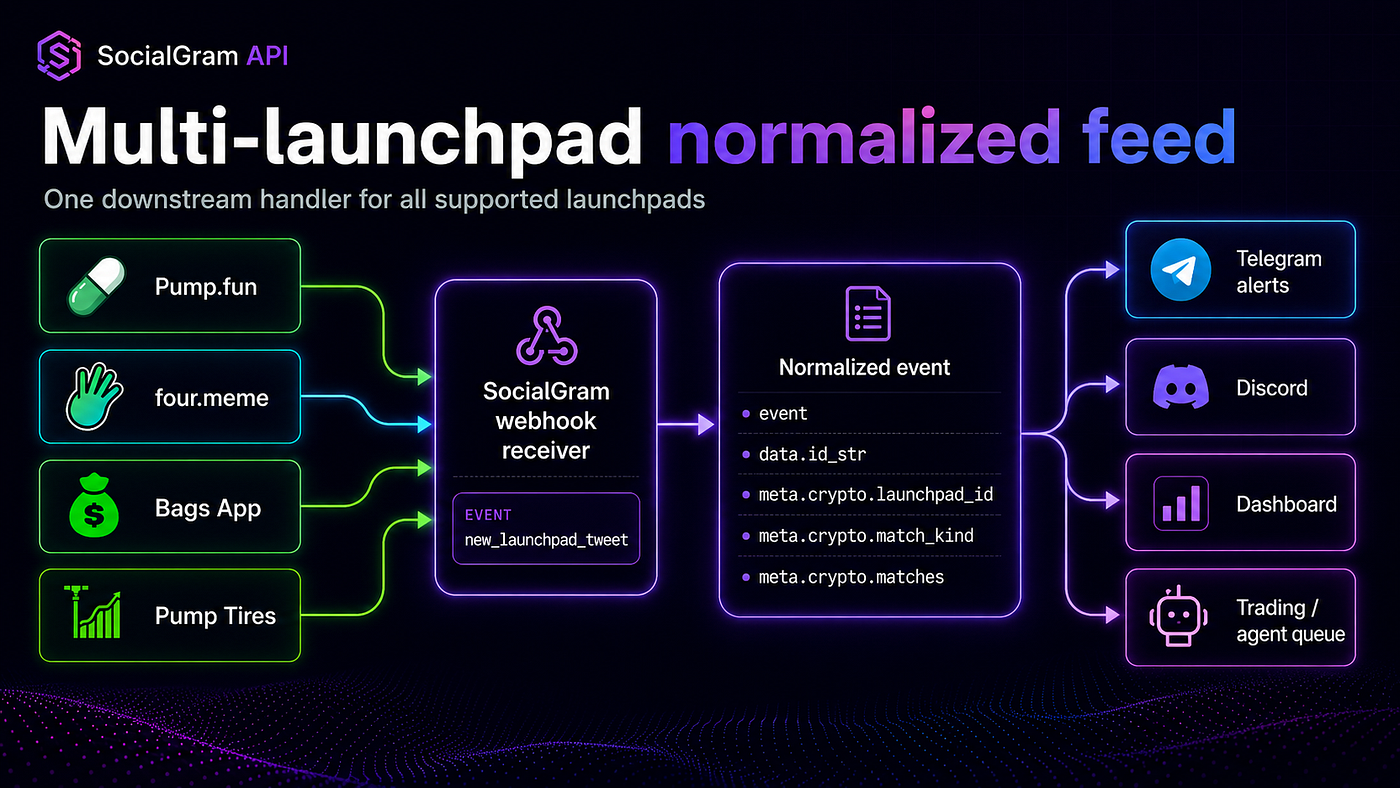
Four launchpad monitors can feed one webhook receiver. Your downstream app normalizes events by launchpad_id, match_kind, matches, token_address, author_history, and data.id_str.
A typical architecture looks like this:
Pump.fun monitor
four.meme monitor
Bags App monitor
Pump Tires monitor
        ↓
SocialGram webhook delivery
        ↓
Your HTTPS receiver
        ↓
Fast 200 OK
        ↓
Queue or background worker
        ↓
Dedupe, validation, risk filters, routing
        ↓
Telegram, Discord, dashboard, database, agent, or internal signal queue
The most important production rule is simple:
Return 200 OK quickly, then do heavy work asynchronously.
Do not block the webhook response on Telegram sends, database-heavy writes, trading logic, AI inference, RPC checks, or long validation chains.
Example setup: create a Pump.fun launchpad monitor
Before you create a monitor, you need:
YOUR_BASE_URL
YOUR_API_KEY
An HTTPS webhook receiver URL
A positive SocialGram balance
Your API key comes from the SocialGram Telegram bot:
https://t.me/SocialGramAPI_botUse the API key as a Bearer token:
export SOCIALGRAM_BASE_URL="YOUR_BASE_URL"
export SOCIALGRAM_API_KEY="YOUR_API_KEY"
export LAUNCHPAD_WEBHOOK_URL="https://example.com/launchpad-webhook"
Create a Pump.fun launchpad monitor:
curl -sS -X POST "$SOCIALGRAM_BASE_URL/monitors/stream-pump-fun" \
  -H "Authorization: Bearer $SOCIALGRAM_API_KEY" \
  -H "Content-Type: application/json" \
  -d '{
    "destinations": [
      {
        "customer_id": "tg_example_customer",
        "url": "https://example.com/launchpad-webhook"
      }
    ]
  }'
Replace:
https://example.com/launchpad-webhookwith your own HTTPS receiver.
This monitor delivers new_launchpad_tweet events to your destination.
Example setup: create multiple launchpad monitors with one destination
A common production pattern is to send every launchpad stream into the same webhook receiver.
That gives you one place to dedupe, normalize, filter, and route.
curl -sS -X POST "$SOCIALGRAM_BASE_URL/monitors/stream-pump-fun" \
  -H "Authorization: Bearer $SOCIALGRAM_API_KEY" \
  -H "Content-Type: application/json" \
  -d '{
    "destinations": [
      {
        "customer_id": "tg_example_customer",
        "url": "https://example.com/launchpad-webhook"
      }
    ]
  }'
curl -sS -X POST "$SOCIALGRAM_BASE_URL/monitors/stream-fourdotmeme" \
-H "Authorization: Bearer $SOCIALGRAM_API_KEY" \
-H "Content-Type: application/json" \
-d '{
"destinations": [
{
"customer_id": "tg_example_customer",
"url": "https://example.com/launchpad-webhook"
}
]
}'curl -sS -X POST "$SOCIALGRAM_BASE_URL/monitors/stream-bags-app" \
-H "Authorization: Bearer $SOCIALGRAM_API_KEY" \
-H "Content-Type: application/json" \
-d '{
"destinations": [
{
"customer_id": "tg_example_customer",
"url": "https://example.com/launchpad-webhook"
}
]
}'curl -sS -X POST "$SOCIALGRAM_BASE_URL/monitors/stream-pump-tires" \
-H "Authorization: Bearer $SOCIALGRAM_API_KEY" \
-H "Content-Type: application/json" \
-d '{
"destinations": [
{
"customer_id": "tg_example_customer",
"url": "https://example.com/launchpad-webhook"
}
]
}'After that, your receiver can branch by:
payload.event
payload.meta.crypto.launchpad_id
payload.meta.crypto.match_kind
payload.meta.crypto.matches
payload.data.user.screen_name
payload.data.id_str
Use SocialGram as the real-time input layer; keep your own filters, validation, and execution logic downstream.
https://t.me/SocialGramAPI_bot
Example new_launchpad_tweet payload
Here is a simplified payload shape for a launchpad event.
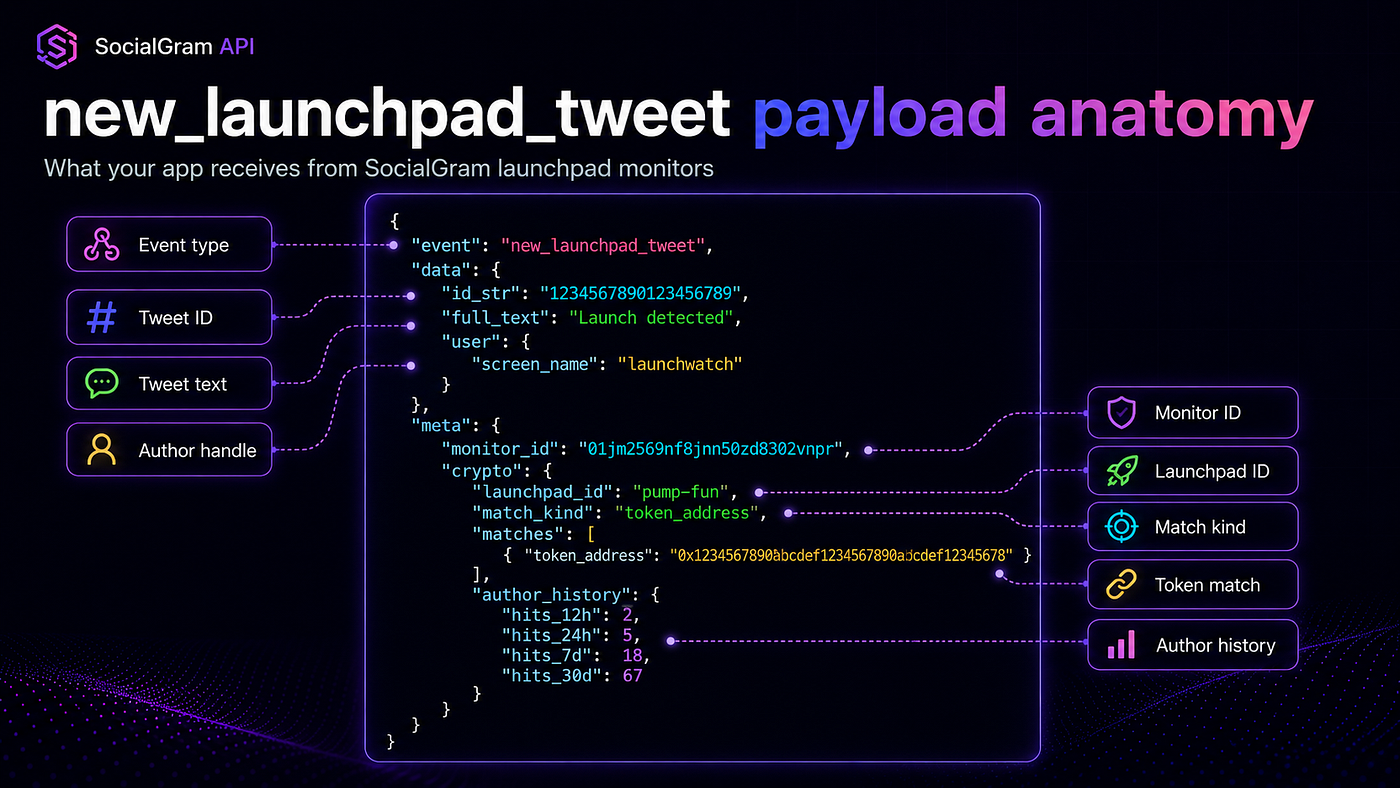
The tweet object lives in data. Launchpad metadata lives in meta.crypto.
{
  "event": "new_launchpad_tweet",
  "data": {
    "id_str": "1234567890123456789",
    "full_text": "Launch detected",
    "user": {
      "id_str": "44196397",
      "screen_name": "launchwatch",
      "name": "Launch Watch"
    }
  },
  "meta": {
    "monitor_id": "01jm2569nf8jnn50zd8302vnpr",
    "monitor_type": "search_tweets",
    "monitored_id_str": "launchpad-01",
    "crypto": {
      "launchpad_id": "pump-fun",
      "match_kind": "token_address",
      "matches": [
        {
          "token_address": "0x1234567890abcdef1234567890abcdef12345678",
          "expanded_url": "https://example.com/token/0x1234567890abcdef1234567890abcdef12345678"
        }
      ],
      "author_history": {
        "hits_12h": 2,
        "hits_24h": 5,
        "hits_7d": 18,
        "hits_30d": 67
      }
    }
  }
}
The fields your app will usually care about first are:
event
data.id_str
data.full_text
data.user.screen_name
meta.monitor_id
meta.crypto.launchpad_id
meta.crypto.match_kind
meta.crypto.matches
meta.crypto.matches[].token_address
meta.crypto.matches[].expanded_url
meta.crypto.author_history
Store data.id_str as a string. Tweet IDs are large numeric identifiers, and JavaScript or TypeScript apps can lose precision if they treat them as regular numbers.
Example FastAPI receiver for launchpad events
Here is a simple receiver that accepts new_launchpad_tweet, deduplicates by event and tweet ID, and enqueues work in the background.
This is not a trading bot. It is the safe receiver pattern you can build on.
from fastapi import BackgroundTasks, FastAPI, Request, Responseapp = FastAPI()seen: set[str] = set()
async def process_launchpad_event(payload: dict) -> None:
    data = payload.get("data") or {}
    meta = payload.get("meta") or {}
    crypto = meta.get("crypto") or {}
tweet_id = str(data.get("id_str") or "")
author = (data.get("user") or {}).get("screen_name")
launchpad_id = crypto.get("launchpad_id")
match_kind = crypto.get("match_kind")
matches = crypto.get("matches") or [] normalized_event = {
"tweet_id": tweet_id,
"author": author,
"launchpad_id": launchpad_id,
"match_kind": match_kind,
"matches": matches,
"monitor_id": meta.get("monitor_id"),
} print("launchpad_event", normalized_event) # Add your product logic here:
# - publish to a queue
# - store in Postgres
# - send to Telegram
# - post to Discord
# - call an AI agent
# - run contract validation
# - update an internal dashboard
@app.post("/launchpad-webhook")
async def receive_launchpad_webhook(
    request: Request,
    background_tasks: BackgroundTasks,
) -> Response:
    payload = await request.json()
if payload.get("event") != "new_launchpad_tweet":
return Response(status_code=200) data = payload.get("data") or {}
tweet_id = str(data.get("id_str") or "") if not tweet_id:
return Response(status_code=200) dedupe_key = f"new_launchpad_tweet:{tweet_id}" if dedupe_key in seen:
return Response(status_code=200) seen.add(dedupe_key) background_tasks.add_task(process_launchpad_event, payload) return Response(status_code=200)For production, replace the in-memory seen set with Redis, Postgres, DynamoDB, or another durable idempotency store.
A better production dedupe key is usually:
{event}:{data.id_str}For a launchpad-only receiver, that becomes:
new_launchpad_tweet:1234567890123456789Example Telegram alert bot workflow
The Telegram bot should not be inside the webhook response path.
The webhook receiver should acknowledge quickly, then a worker should format and send the message.
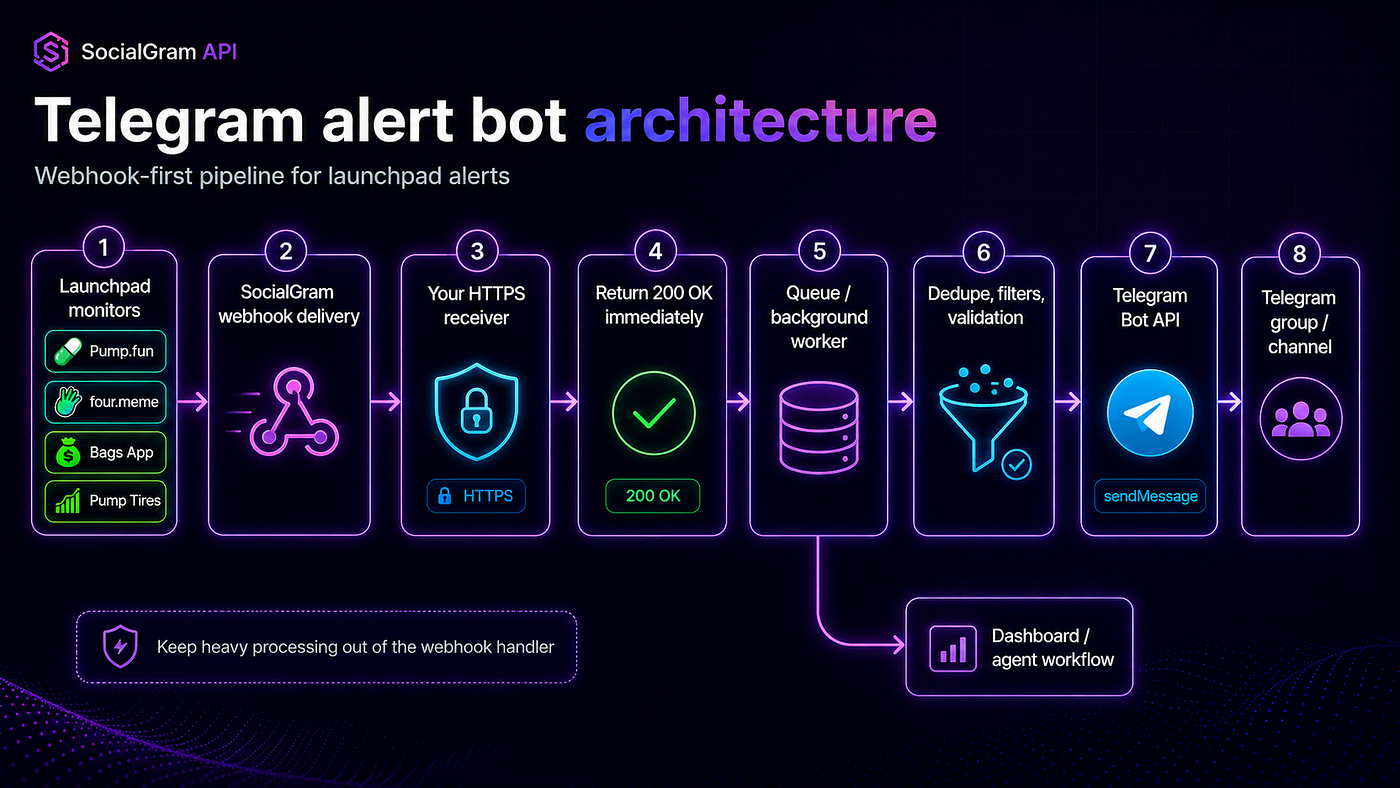
A Telegram launchpad alert bot should keep webhook acknowledgment separate from message delivery, filtering, and validation.
A minimal Telegram formatting function might look like this:
def format_telegram_alert(payload: dict) -> str:
    data = payload.get("data") or {}
    meta = payload.get("meta") or {}
    crypto = meta.get("crypto") or {}
user = data.get("user") or {}
handle = user.get("screen_name", "unknown")
tweet_id = str(data.get("id_str") or "")
tweet_text = data.get("full_text") or data.get("text") or "" launchpad_id = crypto.get("launchpad_id", "unknown")
match_kind = crypto.get("match_kind", "unknown")
matches = crypto.get("matches") or [] token_addresses = [
match.get("token_address")
for match in matches
if match.get("token_address")
] tweet_url = (
f"https://twitter.com/{handle}/status/{tweet_id}"
if handle != "unknown" and tweet_id
else ""
) token_block = "\n".join(token_addresses) if token_addresses else "No token address in payload" return (
f"New launchpad alert\n\n"
f"Launchpad: {launchpad_id}\n"
f"Author: @{handle}\n"
f"Match: {match_kind}\n"
f"Token(s):\n{token_block}\n\n"
f"Tweet:\n{tweet_text[:500]}\n\n"
f"{tweet_url}"
)Then your worker can send the message to Telegram, Discord, Slack, a dashboard, or an internal queue.
The important thing is that SocialGram is the input layer. Your product remains responsible for final filtering, validation, alert formatting, user permissions, channel routing, and execution gating.
What builders can create with launchpad webhooks
SocialGram launchpad streams are useful when you want infrastructure, not a fixed retail alert product.
That distinction matters.
Many crypto alert products sell a finished feed or a finished bot. That can be useful, but it is often hard to customize. Builder teams usually want control over filters, formatting, downstream routing, user permissions, validation, and storage.
SocialGram is better understood as infrastructure for those teams.
You can build:
Telegram launchpad alert bot
Receive new_launchpad_tweet, format the source tweet and token metadata, then send alerts into a private Telegram group, public channel, or customer-specific chat.
Discord launchpad channel
Route Pump.fun, four.meme, Bags App, and Pump Tires alerts into separate Discord channels or one normalized feed.
Internal trading signal queue
Push launchpad events into your own queue for validation, scoring, research, or review.
Do not treat the webhook event as a trade instruction. Treat it as an input signal that your system can validate.
Token due-diligence dashboard
Store data, meta.crypto, matched addresses, author fields, timestamps, and validation results in a dashboard for analysts.
Multi-launchpad contract feed
Normalize all supported launchpad monitors into a single contract-address feed for downstream products.
AI-agent workflow
Send new_launchpad_tweet events into an agent that summarizes the tweet, extracts context, checks internal rules, and routes the event to a human reviewer.
No-code webhook-to-sheet workflow
Send launchpad events into a webhook automation tool, then append rows into a spreadsheet for lightweight monitoring.
Production considerations for launchpad alert systems
Real-time launchpad monitoring is an infrastructure workflow. Treat it like one.
Here are the production rules I would follow before putting it behind customers or internal trading operations.
Deduplicate on data.id_str
Use data.id_str as the canonical tweet ID.
For dedupe, include the event name:
new_launchpad_tweet:{data.id_str}Store IDs as strings
Tweet IDs and user IDs are large. Store them as strings in your app and database.
This is especially important in JavaScript and TypeScript systems.
Return 200 OK fast
Your webhook handler should parse the JSON, do minimal validation, optionally write a dedupe marker, enqueue work, and return 200 OK.
Do not block the response on external calls.
Queue heavy processing
Send non-trivial work to a queue or background worker.
That includes Telegram sends, Discord sends, database writes, RPC calls, AI inference, and long validation chains.
Validate contract addresses downstream
A token address in a webhook payload should still go through your own downstream checks.
For example, you may want to validate chain, contract format, liquidity, source URL, deployment context, metadata, reputation, or internal risk rules.
Add your own risk filters
SocialGram provides real-time structured inputs. It does not replace your own risk logic.
Add filters for:
- duplicate tokens
- suspicious author patterns
- chain-specific validation
- liquidity or contract checks
- customer-specific routing rules
- manual review requirements
Log meta.monitor_id
Store meta.monitor_id so you can trace which monitor produced an event.
This is especially useful when multiple launchpad streams share one webhook receiver.
Normalize meta.crypto
For multi-launchpad systems, normalize the fields you need into your own internal model.
A basic internal model might be:
{
  "source": "socialgram",
  "event": "new_launchpad_tweet",
  "tweet_id": "1234567890123456789",
  "launchpad_id": "pump-fun",
  "match_kind": "token_address",
  "token_addresses": ["0x1234567890abcdef1234567890abcdef12345678"],
  "author_screen_name": "launchwatch",
  "monitor_id": "01jm2569nf8jnn50zd8302vnpr"
}
Once you have that internal model, it becomes easier to route events across Telegram, Discord, dashboards, queues, and agent workflows.
Pricing: launchpad monitor hourly pricing
SocialGram uses pay-as-you-go billing for monitor hours and REST API usage.
For launchpad monitor endpoints, the supported stream routes use the same flat hourly rate:
POST /monitors/stream-pump-fun
POST /monitors/stream-fourdotmeme
POST /monitors/stream-bags-app
POST /monitors/stream-pump-tires
Launchpad monitor pricing:
$0.034/hr per launchpad monitor
Approximately $24.82/mo per launchpad monitor
The value is infrastructure: real-time webhook delivery, structured launchpad metadata, and the ability to build your own Telegram bot, Discord alert workflow, dashboard, signal queue, or agent pipeline on top.
FAQ
How do I get Pump.fun tweet alerts in Telegram?
Create a SocialGram API key, create a Pump.fun launchpad monitor with
POST /monitors/stream-pump-fun, send webhook events to your receiver, and have your background worker formatnew_launchpad_tweetevents into Telegram messages.
Your webhook receiver should return
200 OKquickly and send the Telegram message outside the request path.
Start here:
https://t.me/SocialGramAPI_botCan I monitor crypto launchpads with webhooks?
Yes. SocialGram API supports launchpad monitor endpoints for Pump.fun, four.meme, Bags App, and Pump Tires.
The launchpad streams deliver
new_launchpad_tweetwebhook events with the tweet object indataand launchpad metadata inmeta.crypto.
Does SocialGram support four.meme?
Yes. The four.meme launchpad monitor endpoint is:
POST /monitors/stream-fourdotmeme
You can route four.meme events into the same webhook receiver you use for Pump.fun, Bags App, and Pump Tires.
What is new_launchpad_tweet?
new_launchpad_tweetis the SocialGram webhook event for launchpad monitor deliveries.
It includes the tweet object in
dataand launchpad metadata undermeta.crypto.
Use it when building Pump.fun alerts, four.meme alerts, Bags App alerts, Pump Tires alerts, contract-address feeds, crypto Telegram alert bots, or launchpad dashboards.
What is meta.crypto?
meta.cryptois the launchpad metadata object included withnew_launchpad_tweetevents.
It can contain fields such as
launchpad_id,match_kind,matches,token_address, expanded URLs, and author history when present.
Your app can use
meta.cryptoto route, filter, normalize, and validate launchpad events downstream.
Can I route alerts into my trading bot?
You can route webhook events into your own downstream system, including internal queues or validation pipelines.
Treat SocialGram as the real-time input layer, not as execution logic.
Your own system should handle validation, risk controls, compliance, chain checks, and any execution gating.
This is infrastructure content, not financial advice.
How do I create an API key?
Create your SocialGram API key in Telegram:
Then use it with:
Authorization: Bearer YOUR_API_KEY
on customer API endpoints.
Final thoughts
Crypto launchpad monitoring is not just an alerting problem.
It is an input-layer problem.
If your team is building a Telegram bot, Discord feed, due-diligence dashboard, AI-agent workflow, internal signal queue, or multi-launchpad contract feed, you need reliable real-time events that your own system can filter and validate.
SocialGram API gives you launchpad-specific webhook streams for Pump.fun, four.meme, Bags App, and Pump Tires, delivered as new_launchpad_tweet events with launchpad metadata under meta.crypto.
Start with one stream. Route it into your receiver. Return 200 OK fast. Dedupe on data.id_str. Add your own validation and risk filters downstream. Then expand into a normalized multi-launchpad pipeline.
Create your SocialGram API key in Telegram bot:
https://t.me/SocialGramAPI_bot
메타데이터
- post_id
- ccbc2cb09a73
- slug
- real-time-pump-fun-four-meme-bags-app-and-pump-tires-tweet-alerts-with-socialgram-twitter-api-ccbc2cb09a73
- url
- https://medium.com/@socialgramapi/real-time-pump-fun-four-meme-bags-app-and-pump-tires-tweet-alerts-with-socialgram-twitter-api-ccbc2cb09a73
- canonical_url
- https://medium.com/@socialgramapi/real-time-pump-fun-four-meme-bags-app-and-pump-tires-tweet-alerts-with-socialgram-twitter-api-ccbc2cb09a73
- author_url
- https://medium.com/@socialgramapi
- status
- ok
- fetched_at
- 2026-06-17 08:27:05