Why Proxmox VMs Lose Network After Installing RKE2 on the Host
I was setting up new VMs on my Proxmox homelab. Standard stuff, bridged networking on vmbr0, DHCP enabled, expected an IP in seconds…
Why Proxmox VMs Lose Network After Installing RKE2 on the Host

When Your Proxmox VM Gets No IP and Kubernetes Is the Culprit
I was setting up new VMs on my Proxmox homelab. Standard stuff, bridged networking on vmbr0, DHCP enabled, expected an IP in seconds. Instead, nothing. Just a link-local IPv6 address and eth0 with no IPv4.
The culprit in both cases was Calico, the CNI running inside my RKE2 cluster on the same Proxmox host. The two VMs hit the same root cause but through different network paths, which made the second one slightly more interesting to debug.
On a free medium plan? Read here for free
Here is the full story of both.
My Setup
I run RKE2 directly on my Proxmox host (AMD Ryzen 9 9950X, 64GB RAM). The cluster hosts my SUSE AI stack, Open WebUI, Milvus, Ollama, using the RTX 5060 Ti on the host for GPU inference. The Proxmox host also runs regular KVM VMs bridged via vmbr0.
The bridge config in /etc/network/interfaces looks like this:
iface nic0 inet manual
auto vmbr0
iface vmbr0 inet static
    address 192.168.90.100/23
    gateway 192.168.90.1
    bridge-ports nic0
    bridge-stp off
    bridge-fd 0
Clean setup. Has worked fine for other VMs.
The Symptom
New Ubuntu VM, VM ID 111. Interface eth0 is UP, link-local IPv6 present, but no IPv4:
2: eth0: <BROADCAST,MULTICAST,UP,LOWER_UP> mtu 1500 qdisc fq_codel state UP
    link/ether bc:24:11:be:d5:fc brd ff:ff:ff:ff:ff:ff
    inet6 fe80::be24:11ff:febe:d5fc/64 scope link proto kernel_ll
Netplan config inside the VM was correct:
network:
  version: 2
  ethernets:
    eth0:
      match:
        macaddress: "bc:24:11:be:d5:fc"
      dhcp4: true
      set-name: "eth0"
Running sudo netplan apply completed without errors. Still no IP.
Debugging Step by Step
Step 1: Verify the bridge is healthy
On the Proxmox host:
root@proxmox-1:~# brctl show vmbr0
bridge name    bridge id          STP enabled    interfaces
vmbr0          8000.10ffe0e6f45d  no             nic0
                                                 tap111i0
Both nic0 (physical NIC) and tap111i0 (VM's tap interface) are members. Bridge looks fine.
root@proxmox-1:~# bridge link show
2: nic0: <BROADCAST,MULTICAST,UP,LOWER_UP> mtu 1500 master vmbr0 state forwarding priority 32 cost 5
96: tap111i0: <BROADCAST,MULTICAST,UP,LOWER_UP> mtu 1500 master vmbr0 state forwarding priority 32 cost 2
Both ports in forwarding state. No STP blocking. Bridge is healthy.
Step 2: Check if DHCP packets leave the VM
On the Proxmox host, capture on vmbr0 while triggering a DHCP renew from inside the VM:
root@proxmox-1:~# tcpdump -i vmbr0 port 67 or port 68 -n
18:05:42.075608 IP 0.0.0.0.bootpc > 255.255.255.255.bootps: BOOTP/DHCP, Request from bc:24:11:be:d5:fc, length 297
18:05:42.116068 IP 0.0.0.0.bootpc > 255.255.255.255.bootps: BOOTP/DHCP, Request from bc:24:11:be:d5:fc, length 297
DHCP Discover is leaving the VM and hitting vmbr0. Good. Now check if it crosses to the physical NIC:
root@proxmox-1:~# tcpdump -i nic0 port 67 or port 68 -n
(no output)
Nothing on nic0. The DHCP Discover is not crossing from the bridge to the physical NIC.
Step 3: Capture on all interfaces
root@proxmox-1:~# tcpdump -i any port 67 or port 68 -n
18:13:16.886262 tap111i0 B   IP 0.0.0.0.68 > 255.255.255.255.67: BOOTP/DHCP, Request from bc:24:11:be:d5:fc, length 297
18:13:16.886285 vmbr0    B   IP 0.0.0.0.68 > 255.255.255.255.67: BOOTP/DHCP, Request from bc:24:11:be:d5:fc, length 297
18:13:57.198943 nic0     B   IP 192.168.90.1.67 > 255.255.255.255.68: BOOTP/DHCP, Reply, length 548
18:13:57.198959 vmbr0    B   IP 192.168.90.1.67 > 255.255.255.255.68: BOOTP/DHCP, Reply, length 548
The DHCP Discover goes out on tap111i0 and vmbr0 but never reaches nic0. Meanwhile the router IS sending a DHCP Offer back, which arrives on nic0 and vmbr0 but never reaches tap111i0 (the VM).
Traffic is getting stuck at the bridge in both directions.
Step 4: Check iptables
root@proxmox-1:~# cat /proc/sys/net/bridge/bridge-nf-call-iptables
1
Bridge traffic is going through iptables. Now check the FORWARD chain:
root@proxmox-1:~# iptables -L FORWARD -n -v --line-numbers
Chain FORWARD (policy DROP 1045 packets, 243K bytes)
num   pkts bytes target     prot opt in     out     source               destination
1     609K  210M cali-FORWARD  all  --  *      *       0.0.0.0/0            0.0.0.0/0  /* cali:wUHhoiAYhphO9Mso */
2    88822 8686K KUBE-PROXY-FIREWALL  all  --  *      *       0.0.0.0/0            0.0.0.0/0
3    88822 8686K KUBE-FORWARD  all  --  *      *       0.0.0.0/0            0.0.0.0/0
...
8    87160 8384K ACCEPT     all  --  *      *       0.0.0.0/0            0.0.0.0/0  mark match 0x10000/0x10000
9     1041  243K MARK       all  --  *      *       0.0.0.0/0            0.0.0.0/0  MARK or 0x10000
Two things stand out:
Chain FORWARD (policy DROP)default policy is DROP- 1045 packets dropped by the default policy
- Calico’s
cali-FORWARDchain is at the top, followed by Kubernetes rules
Those 1045 dropped packets are the VM’s DHCP traffic. Calico controls the FORWARD chain. Traffic it doesn’t recognise as Kubernetes workload traffic falls through to the default DROP.
The VM’s bridge traffic is not Kubernetes traffic. Calico has no rule for it. It gets dropped.
Root Cause
bridge-nf-call-iptables = 1 means the Linux kernel sends bridged frames through iptables.
But it’s a catch-all. Every frame crossing vmbr0 including DHCP packets from regular KVM VMs goes through iptables FORWARD. Calico's chain only ACCEPTs traffic it marks with 0x10000. Everything else hits the default DROP policy.
The VM’s DHCP packets have no Calico mark. They get dropped silently.
The Fix
Add explicit ACCEPT rules for bridge traffic before Calico gets to evaluate it:
iptables -I FORWARD 1 -i vmbr0 -j ACCEPT
iptables -I FORWARD 1 -o vmbr0 -j ACCEPT
After adding these, the VM got an IP immediately.
Make it persistent across reboots:
apt install iptables-persistent
netfilter-persistent save
Why RKE2 + Calico Does This
RKE2 uses Calico as its default CNI. Calico sets bridge-nf-call-iptables = 1 and installs a FORWARD chain with default DROP policy to enforce Kubernetes NetworkPolicy. This is correct and expected behaviour for a Kubernetes cluster.
The problem is when you run that cluster directly on a Proxmox hypervisor host that also manages KVM VMs with bridged networking. Calico does not know about your VMs. It only knows about pods.
Every frame crossing vmbr0 gets evaluated by Calico's iptables rules. VM traffic has no Calico mark, so it falls to DROP.
Watch Out After Cluster Restarts
The two ACCEPT rules sit at position 1 and 2 in the FORWARD chain. When Calico restarts, after a node reboot, an RKE2 upgrade, or a Calico pod crash, it flushes and rewrites its iptables rules. Your custom rules may get pushed down or removed entirely.
Check rule order after any cluster restart:
iptables -L FORWARD -n --line-numbers | head -5Your vmbr0 ACCEPT rules should be at positions 1 and 2. If they are not, re-add them and save again with netfilter-persistent save.
A more robust long-term solution is to use a systemd service or an iptables restore hook that re-applies these rules on boot, independent of what RKE2 or Calico does.
Case 2: VM with Proxmox Firewall Enabled
A second VM : TrueNAS, VM ID 111, had the same symptom. Same host, same RKE2 cluster, same Calico. But this time the tcpdump output looked different:
18:50:33.707510 tap111i0  B   IP 0.0.0.0.68 > 255.255.255.255.67: BOOTP/DHCP, Request from bc:24:11:1b:08:57, length 300
18:50:33.707535 fwbr111i0 B   IP 0.0.0.0.68 > 255.255.255.255.67: BOOTP/DHCP, Request from bc:24:11:1b:08:57, length 300
Traffic was on tap111i0 and fwbr111i0but never reaching vmbr0. A new interface appeared: fwbr111i0. This is a Proxmox firewall bridge, created automatically when firewall=1 is set on the VM's network interface.
Checking the VM config confirmed it:
net0: virtio=BC:24:11:1B:08:57,bridge=vmbr0,firewall=1And the bridge layout:
root@proxmox-1:~# brctl show fwbr111i0
bridge name    bridge id          STP enabled    interfaces
fwbr111i0      8000.82b41856672d  no             fwln111i0
                                                 tap111i0
root@proxmox-1:~# brctl show vmbr0
bridge name    bridge id          STP enabled    interfaces
vmbr0          8000.10ffe0e6f45d  no             fwpr111p0
                                                 nic0
When Proxmox firewall is enabled on a VM, the traffic path changes:
tap111i0 → fwbr111i0 → fwln111i0 ↔ fwpr111p0 → vmbr0 → nic0The fwbr+ ↔ vmbr0 crossing goes through iptables FORWARD just like before. The ACCEPT rules we added earlier were scoped to vmbr0 but fwbr111i0 is a separate bridge. Traffic hits Calico's DROP before ever reaching vmbr0.
Fix for firewall-enabled VMs
Adding per-VM rules works:
iptables -I FORWARD 1 -i fwbr111i0 -j ACCEPT
iptables -I FORWARD 1 -o fwbr111i0 -j ACCEPT
But every new VM with firewall=1 creates its own fwbr<vmid>i0. Managing per-VM rules does not scale. Use a wildcard instead:
iptables -I FORWARD 1 -i fwbr+ -j ACCEPT
iptables -I FORWARD 1 -o fwbr+ -j ACCEPT
The fwbr+ prefix matches all Proxmox firewall bridge interfaces regardless of VM ID. Save once:
netfilter-persistent saveComplete Fix
If you are running RKE2 with Calico on a Proxmox host, apply all three rule pairs to cover every VM network path:
# Plain bridged VMs (no firewall)
iptables -I FORWARD 1 -i vmbr0 -j ACCEPT
iptables -I FORWARD 1 -o vmbr0 -j ACCEPT

# Firewall-enabled VMs
iptables -I FORWARD 1 -i fwbr+ -j ACCEPT
iptables -I FORWARD 1 -o fwbr+ -j ACCEPT
# Save
netfilter-persistent save
Verify rule order:
iptables -L FORWARD -n --line-numbers | head -8Your ACCEPT rules must appear before cali-FORWARD at position 1.
Summary
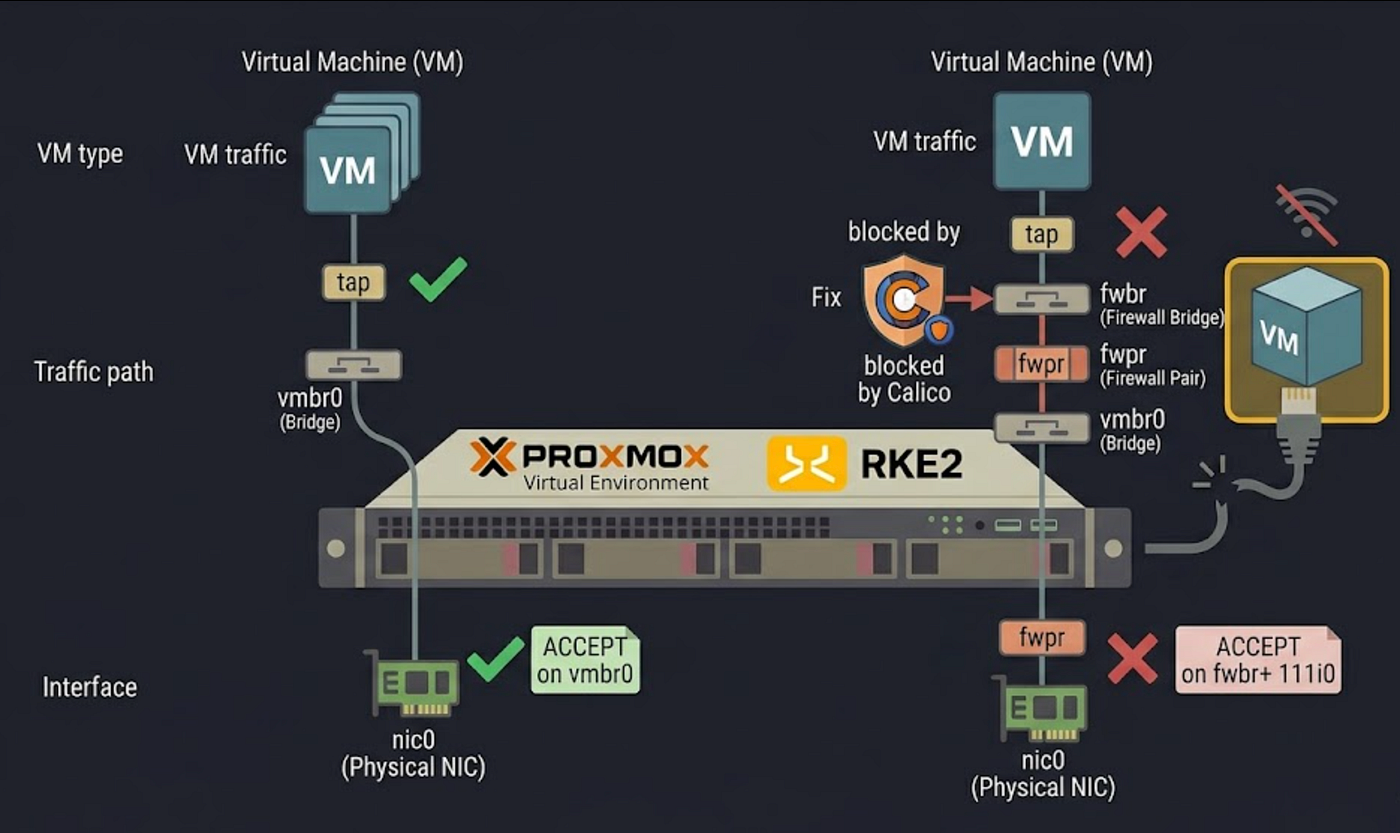
Both cases share the same root cause: bridge-nf-call-iptables = 1 combined with Calico's default DROP policy on the FORWARD chain. The only difference is which bridge interface the traffic gets dropped on.
If you run Kubernetes directly on a Proxmox host and also use KVM VMs with bridged networking, this will bite you. The fix is simple once you know where to look.
Connect & Continue Learning 🚀
Enjoyed this article? Clap until your fingers hurt (or just 50 times, whichever comes first)!
**Read my other articles — **because one tech rabbit hole deserves another!
**Connect with me on LinkedIn** for more tech insights.
Have a suggestion for my next post? Drop a comment below! I read them all.
P.S. Let me know what topics you’d like me to cover next!
메타데이터
- post_id
- ccdbd1434690
- slug
- why-proxmox-vms-lose-network-after-installing-rke2-on-the-host-ccdbd1434690
- url
- https://medium.com/@rk90229/why-proxmox-vms-lose-network-after-installing-rke2-on-the-host-ccdbd1434690
- canonical_url
- https://medium.com/@rk90229/why-proxmox-vms-lose-network-after-installing-rke2-on-the-host-ccdbd1434690
- author_url
- https://medium.com/@rk90229
- status
- ok
- fetched_at
- 2026-06-22 12:55:45