MobileHackingLab “Strings” Lab Writeup
While most people in offensive security are busy with web, network, and now AI-related engagements, I wanted to spend time on a field I’ve…
MobileHackingLab “Strings” Lab Writeup
While most people in offensive security are busy with web, network, and now AI-related engagements, I wanted to spend time on a field I’ve barely touched: mobile security, specifically mobile pentesting.
Mobile security covers a different attack surface from what I’m used to. Instead of endpoints, requests, and server-side logic, you’re dealing with compiled binaries, native libraries, inter-process communication (IPC) between app components, and logic that only reveals itself at runtime.
In this writeup, I’ll be solving one of the labs from MobileHackingLab, as part of my entry to this field.

Overview
In this lab, we look at the Strings challenge wherein the goal is to retrieve the flag ( MHL{...} ) by reverse engineering the APK to locate an exported activity, crafting the correct intent to invoke it, and use Frida for runtime instrumentation and memory scanning to pull the flag out at runtime rather than statically reversing the obfuscated native library.
1. Reconnaissance / Attack Surface
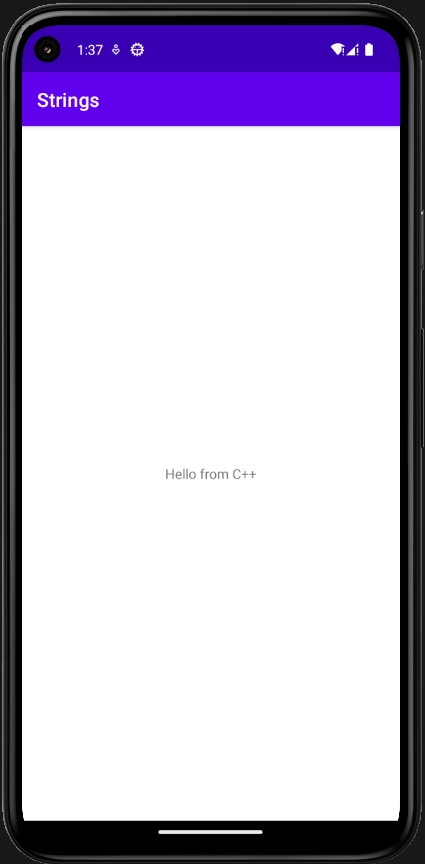
To start off, we installed the APK file on the mobile device to have an initial view on how the mobile application works. As you can see, the Strings mobile application simply displays the text “Hello from C++” with no other functionalities or UI features available.
After identifying that there is nothing much to check with the mobile application, we decompiled the APK file using JADX (or any tool for decompiling APKs).
During the analysis of the AndroidManifest.xml file, it immediately narrows the attack surface: com.mobilehackinglab.challenge.Activity2 has its exported attribute set to true.
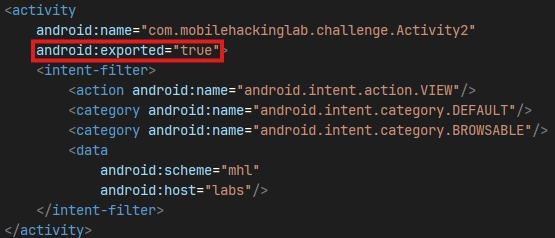
Further review shows that there is a registered URI scheme ( mhl://labs ) together with the android.intent.action.VIEW intent action, which means this activity is reachable from any other installed app, or from a web page firing the scheme with no permissions required.
2. Static Analysis
We now proceed by reviewing the source code of Activity2 with the following significant details:
Activity2.onCreate() — Three conditions must be satisfied before the flag is produced:
- (1) The intent action must be
android.intent.action.VIEW
boolean isActionView = Intrinsics.areEqual(getIntent().getAction(), "android.intent.action.VIEW");- (2) The current date cd() method (current date, dd/MM/yyyy) must be equal to the value stored at key
UUU0133in SharedPreferences fileDAD4
SharedPreferences sharedPreferences = getSharedPreferences("DAD4", 0);
String u_1 = sharedPreferences.getString("UUU0133", null);
boolean isU1Matching = Intrinsics.areEqual(u_1, cd());- (3) The URI check, scheme must be
mhl, host must belabs, and the last path segment, once base64-decoded, must equal the plaintext obtained by decrypting a hardcoded ciphertext (bqGrDKdQ8zo26HflRsGvVA==).
If all three pass, the app loads a native library named flag and calls getflag() , surfacing the result in a Toast. If any fail, it immediately closes the current Activity:
if (str.equals(ds)) { // Native library is loaded and retrieves the flag
    System.loadLibrary("flag");
    String s = getflag();
    Toast.makeText(getApplicationContext(), s, 1).show();
    return;
} else { // Close the Activity
    finishAffinity();
    finish();
    System.exit(0);
    return;
}
Hardcoded Key Material
Back in onCreate(), the comparison value for Condition 3 is built entirely from constants baked into the DEX:
byte[] bytes = "your_secret_key_1234567890123456".getBytes(Charsets.UTF_8);
Intrinsics.checkNotNullExpressionValue(bytes, "this as java.lang.String).getBytes(charset)");
String str = decrypt("AES/CBC/PKCS5Padding", "bqGrDKdQ8zo26HflRsGvVA==", new SecretKeySpec(bytes, "AES"));
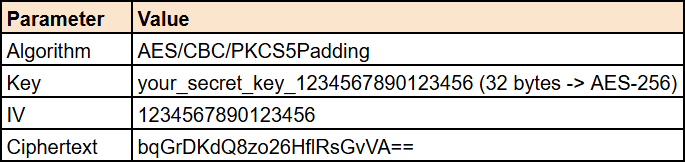
The parameters are all inline literals:
- Algorithm: AES/CBC/PKCS5Padding
- Key: your_secret_key_1234567890123456
- Ciphertext: bqGrDKdQ8zo26HflRsGvVA==
decrypt() — It base64-decodes the ciphertext, initializes the cipher in DECRYPT_MODE with a caller-supplied key and a fixed IV read from Activity2Kt.fixedIV , then returns the UTF-8 plaintext.
cd() — It returns the current date, freshly computed on every call.
SimpleDateFormat sdf = new SimpleDateFormat("dd/MM/yyyy", Locale.getDefault());
String str = sdf.format(new Date());
Intrinsics.checkNotNullExpressionValue(str, "format(...)");
Activity2Kt.cu_d = str;
String str2 = Activity2Kt.cu_d;

if (str2 != null) {
    return str2;
}
Activity2Kt.fixedIV
Navigating to Activity2Kt shows a hardcoded, static IV used for cryptographic operations, which will be used later.
public static final String fixedIV = "1234567890123456";
MainActivity.KLOW()
Pivoting to MainActivity, we find that KLOW() is the only method in the application that writes the preference Activity2 reads:
SharedPreferences sharedPreferences = getSharedPreferences("DAD4", 0);
SimpleDateFormat sdf = new SimpleDateFormat("dd/MM/yyyy", Locale.getDefault());
String cu_d = sdf.format(new Date());
editor.putString("UUU0133", cu_d);
editor.apply();
It uses an identical format string and locale to cd(), so the stored value matches by construction, the date check is designed to pass immediately after KLOW() runs.
The problem is that KLOW() is never invoked anywhere in the normal application flow.
3. The Vulnerability
As identified earlier, the KLOW() is never called from any lifecycle callback, button handler, or menu item and is considered as a dead code that was left compiled into the APK.
The consequence:
- On a fresh install
shared_prefs/DAD4.xmlis never created getString("UUU0133", null)returns the defaultu_1resolves tonullIntrinsics.areEqual(u_1, cd())then comparesnullagainst a valid date string, returningfalse- The check simply fails and
Activity2exits on every launch
No sequence of user actions can satisfy the date check, so the app ships with no working path to the flag at all.
Even though it is unreachable from the UI, the KLOW() method is still compiled into the DEX and still callable against a live instance at runtime. That gap is the vulnerability.
4. Recovering the URI Payload
Using the parameters recovered above, we decrypted the ciphertext:
CyberChef
From Base64 -> AES Decrypt with Key and IV both set to UTF8, Mode CBC, Input Raw, Output Raw:
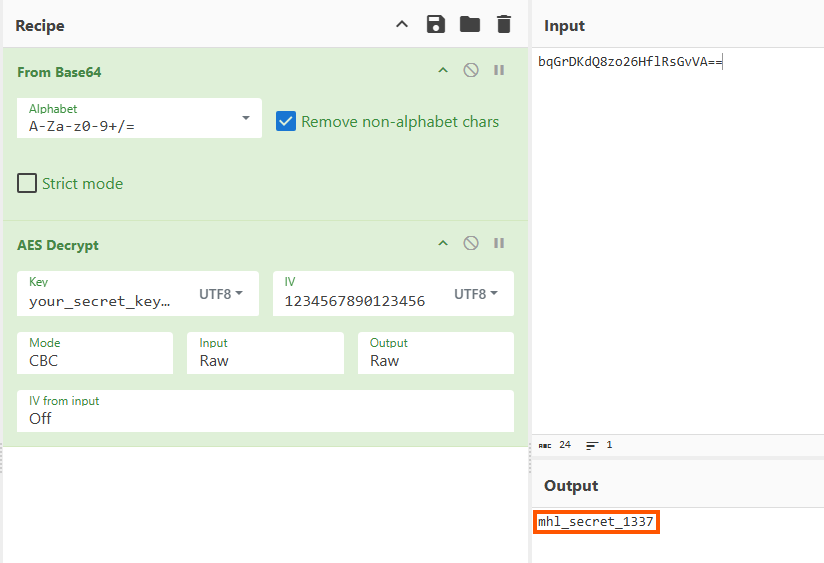
Or in Python:

from Crypto.Cipher import AES
from Crypto.Util.Padding import unpad
from base64 import b64decode

cipher = AES.new(b"your_secret_key_1234567890123456", AES.MODE_CBC, b"1234567890123456")
print(unpad(cipher.decrypt(b64decode("bqGrDKdQ8zo26HflRsGvVA==")), AES.block_size).decode())Result:
mhl_secret_1337The application decodes the path segment before comparing, so the value has to be re-encoded to base64 before it goes in the URI:
mhl_secret_1337 → bWhsX3NlY3JldF8xMzM3Final URI:
mhl://labs/bWhsX3NlY3JldF8xMzM3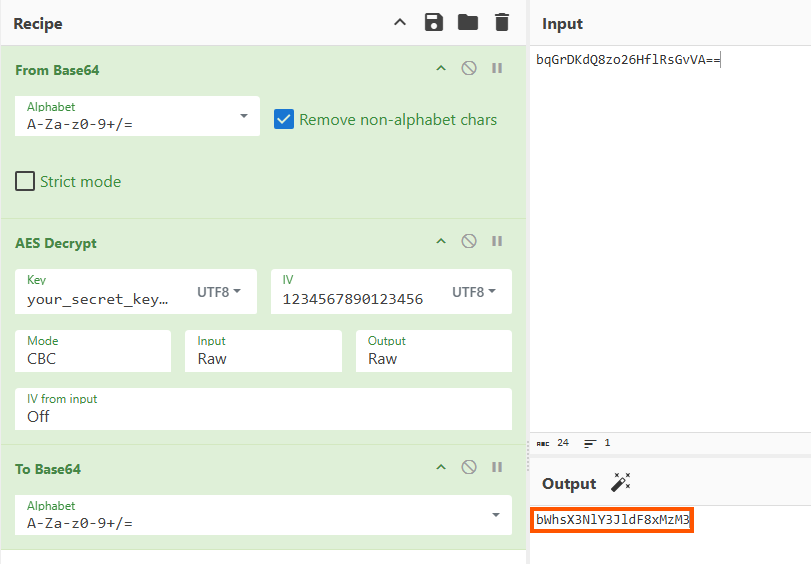
5. Exploitation
We used Frida to remotely invoke the KLOW() method in MainActivity, forcing the write that the application itself never performs.
Invoking the KLOW() method
Java.choose scans the ART heap for live instances of a class. The KLOW() needs a Context to reach SharedPreferences, so a class handle from Java.use isn’t enough, an actual initialized MainActivity object is required.
const PKG = "com.mobilehackinglab.challenge";

Java.perform(function () {
    setTimeout(function () {
        Java.choose(PKG + ".MainActivity", {
            onMatch: function (instance) {
                instance.KLOW();
                console.log("[+] KLOW() invoked - shared preferences set");
                return "stop";
            },
            onComplete: function () {
                console.log("[*] MainActivity enumeration complete");
            }
        });
    }, 5000);
});
Breakdown of the script:
- A 5-second delay allows the app to instantiate
MainActivitybefore the heap scan runs.Java.choosereturns nothing if the object doesn’t yet exist.onMatchfires for the live instance,KLOW()executes, andreturn "stop"halts enumeration since only one instance is needed.onCompletethen logs that the scan finished. - Note that
onCompletefires whether or not a match was found, so an enumeration complete message with no[+]line above means the scan ran too early rather than the call failed.
Spawn the app with the script attached:
# This assumes a rooted emulator with frida-server already running
frida -U -f com.mobilehackinglab.challenge -l klowmethod.js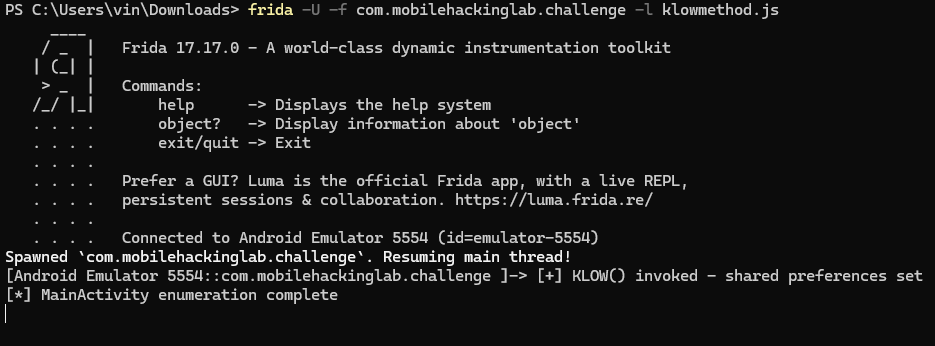
Confirm that DAD4.xml was created and located at /data/data/com.mobilehackinglab.challenge/shared_prefs
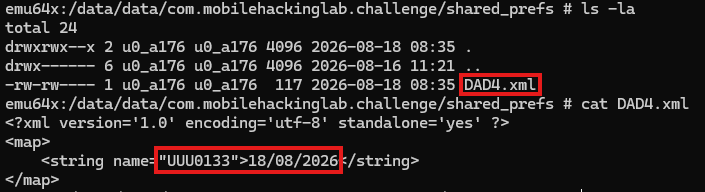
The file now exists and holds today’s date. Condition 2 is satisfied.
Firing the intent
adb shell am start -W -a android.intent.action.VIEW -d "mhl://labs/bWhsX3NlY3JldF8xMzM3" -n com.mobilehackinglab.challenge/.Activity2Each option maps to a requirement:
-asets the intent action (Condition 1)-dsupplies the data URI carrying the base64-encoded secret (Condition 3)-ntargets the component explicitly-Wblocks until launch completes so the result is actually visible
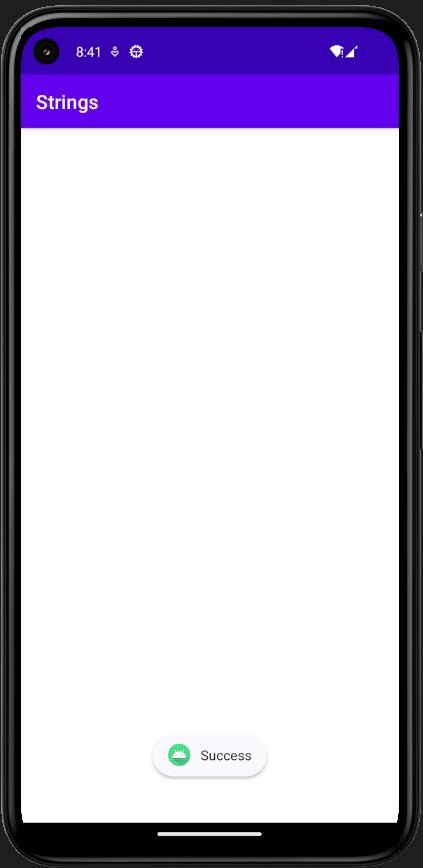
All three conditions now hold. Activity2 calls System.loadLibrary(“flag”), invokes the native getflag(), and passes the returned string to a Toast. Reaching the success path proves the checks were bypassed, but the flag itself is never rendered to the UI. It exists only as a string resident in the loaded native library’s memory.
6. Extracting the Flag from Memory
Since getflag() is a native method implemented in libflag.so, the value is never written to a file, a log, or a preference, and Activity2 calls System.exit(0) immediately after the Toast. The flag exists only in process memory, briefly.
To extract the flag, we dumped the live process using Fridump:
python fridump.py -U -s StringsAnd since we’re using PowerShell, we grepped the dump for the MHL pattern
Select-String -Path .\dump\strings.txt -Pattern "MHL"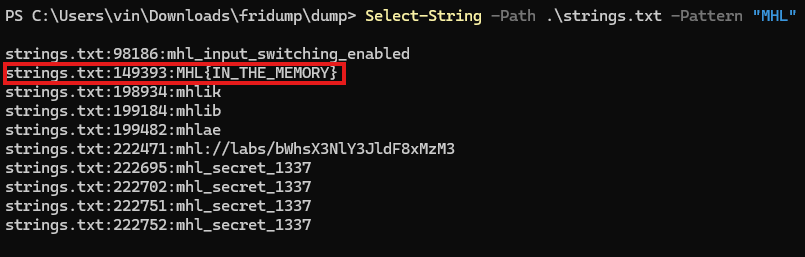
Final Thoughts
The Strings lab is a fun and challenging exercise from MobileHackingLab, it tests your ability to reverse engineer an APK, analyze source code for patterns and discrepancies, and apply Frida at runtime, and builds a working understanding of how application security applies in the Android environment.
메타데이터
- post_id
- ccdbef021e47
- slug
- mobilehackinglab-strings-lab-writeup-ccdbef021e47
- url
- https://medium.com/@ghostwirez/mobilehackinglab-strings-lab-writeup-ccdbef021e47
- canonical_url
- https://medium.com/@ghostwirez/mobilehackinglab-strings-lab-writeup-ccdbef021e47
- author_url
- https://medium.com/@ghostwirez
- status
- ok
- fetched_at
- 2026-08-21 01:45:42