HTTP Request Methods: A Complete Guide
GET, POST, PUT, PATCH, DELETE, HEAD, OPTIONS, and TRACE
HTTP Request Methods: A Complete Guide
GET, POST, PUT, PATCH, DELETE, HEAD, OPTIONS, and TRACE
GET
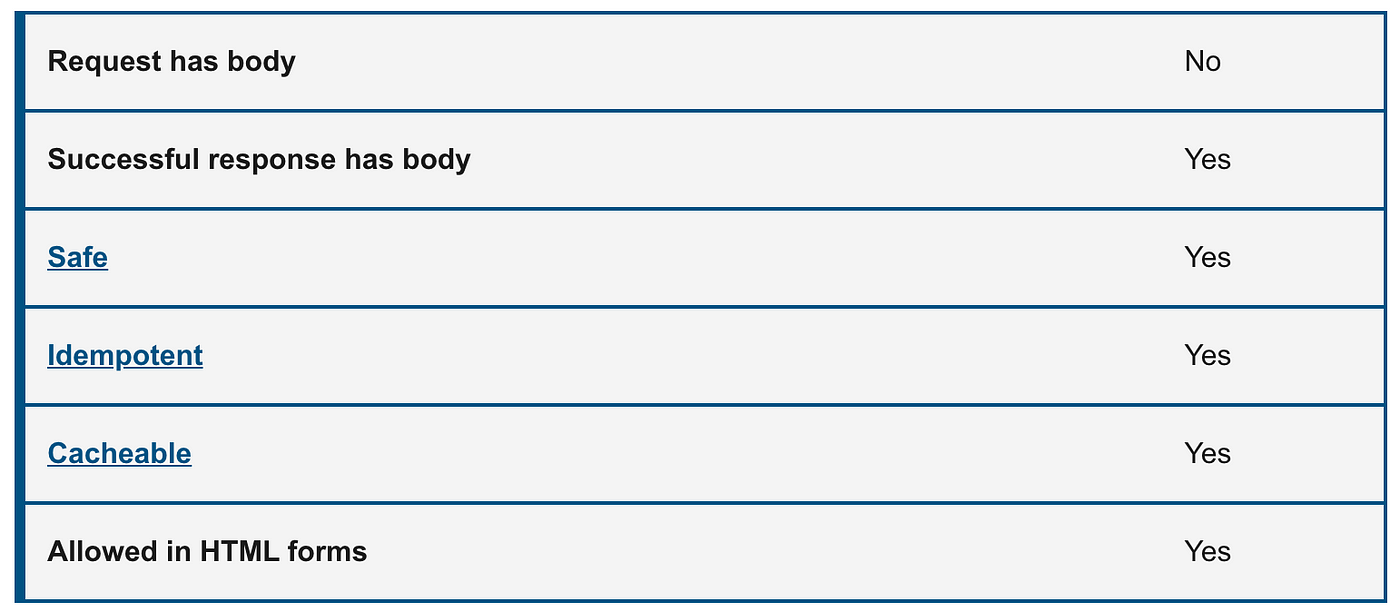
GETrequests are the most common and widely used methods in APIs and websites. Simply put, the GET method is used to retrieve data from a server at the specified resource. For example, say you have an API with a/usersendpoint. Making a GET request to that endpoint should return a list of all available users.- Since a GET request is only requesting data and not modifying any resources, it’s considered a safe and idempotent method.
[embed]
POST
- In web services,
POSTrequests are used to send data to the API server to create or update a resource. The data sent to the server is stored in the request body of the HTTP request. - When a new resource is POSTed to the server, the API service will automatically associate the new resource by assigning it an ID (new resource URI). In short, this method is used to create a new data entry.
- The simplest example is a contact form on a website. When you fill out the inputs in a form and hit Send, that data is put in the response body of the request and sent to the server. This may be JSON, XML, or query parameters (there’s plenty of other formats, but these are the most common).
- It’s worth noting that a
POSTrequest is non-idempotent. It mutates data on the backend server (by creating or updating a resource), as opposed to aGETrequest which does not change any data.

[embed]

Comparison between GET and POST
PUT
- Similar to POST,
PUTrequests are used to send data to the API to update or create a resource. The difference is that PUT requests are idempotent. That is, calling the same PUT request multiple times will always produce the same result. In contrast, calling a POST request repeatedly make have side effects of creating the same resource multiple times. - Generally, when a
PUTrequest creates a resource the server will respond with a201(Created), and if the request modifies existing resource the server will return a200(OK) or204(No Content).

[embed]

Comparison between PUT and POST
PATCH
- A
PATCHrequest is one of the lesser-known HTTP methods, but it is similar to POST and PUT. The difference withPATCHis that you only apply partial modifications to the resource. - The difference between PATCH and PUT, is that a PATCH request is non-idempotent (like a POST request).
- To expand on partial modification, say you’re API has a
/users/{{userid}}endpoint, and a user has a username. With a PATCH request, you may only need to send the updated username in the request body - as opposed to POST and PUT which require the full user entity.

[embed]
As you can see here, the request is very similar to the PUT request, but the body of the request contains only the property of the resource that needs to be changed
DELETE
- The
DELETEmethod is exactly as it sounds: delete the resource at the specified URL. This method is one of the more common in RESTful APIs so it's good to know how it works. - If a new user is created with a POST request to
/users, and it can be retrieved with aGETrequest to/users/{{userid}}, then making aDELETErequest to/users/{{userid}}will completely remove that user.

[embed]
HEAD
- The
HEADmethod is almost identical toGET, except without the response body. In other words, ifGET /usersreturns a list of users, thenHEAD /userswill make the same request but won't get back the list of users. - HEAD requests are useful for checking what a GET request will return before actually making a GET request. For example, if a URL might produce a large download, a
HEADrequest could read its[Content-Length](https://developer.mozilla.org/en-US/docs/Web/HTTP/Headers/Content-Length) header to check the filesize without actually downloading the file.

The following example demonstrates sending an HTTP HEAD request to the query about the users:
HEAD /users HTTP 1.1
User-Agent: Mozilla/4.0 (compatible; MSIE5.01; Windows NT)
Host: medium.com
Accept-Language: en-us
Accept-Encoding: gzip, deflate
Connection: Keep-Alive
The response contains the same as the GET method.
HTTP/1.1 200 OK
Date: Mon, 23 Sept 2021 12:28:53 GMT
Server: Apache/2.2.14 (Win32)
Last-Modified: Wed, 22 Jul 2021 19:15:56 GMT
ETag: "34aa387-d-1568eb00"
Vary: Authorization,Accept
Accept-Ranges: bytes
Content-Length: 88
Content-Type: application/json
Connection: Closed
OPTIONS
- The HTTP
OPTIONSmethod requests permitted communication options for a given URL or server. A client can specify a URL with this method, or an asterisk (*) to refer to the entire server. The OPTIONS request should return data describing what other methods and operations the server supports at the given URL. - OPTIONS requests are more loosely defined and used than the others, making them a good candidate to test for fatal API errors. If an API isn’t expecting an OPTIONS request, it’s good to put a test case in place that verifies failing behavior.
- In CORS, a preflight request is sent with the
OPTIONSmethod so that the server can respond if it is acceptable to send the request.

The following example requests a list of methods supported by a web server running on medium.com:
OPTIONS * HTTP/1.1
Host: medium.com
Origin: https://medium.com/
And the server response:
HTTP/1.1 200 OK
Allow: GET,POST,PUT,PATCH,DELETE,HEAD,OPTIONS
Access-Control-Allow-Origin: https://medium.com/
Access-Control-Allow-Methods: GET,POST,PUT,PATCH,DELETE,HEAD,OPTIONS
Access-Control-Allow-Headers: Content-Type
TRACE
- The HTTP
TRACEmethod is designed for diagnostic purposes. It performs a message loop-back test along the path to the target resource, providing a useful debugging mechanism. - The final recipient of the request should reflect the message received, excluding some fields described below, back to the client as the message body of a
[200](https://developer.mozilla.org/en-US/docs/Web/HTTP/Status/200) (OK) response with a[Content-Type](https://developer.mozilla.org/en-US/docs/Web/HTTP/Headers/Content-Type) ofmessage/http. The final recipient is either the origin server or the first server to receive a[Max-Forwards](https://developer.mozilla.org/en-US/docs/Web/HTTP/Headers/Max-Forwards) value of 0 in the request.
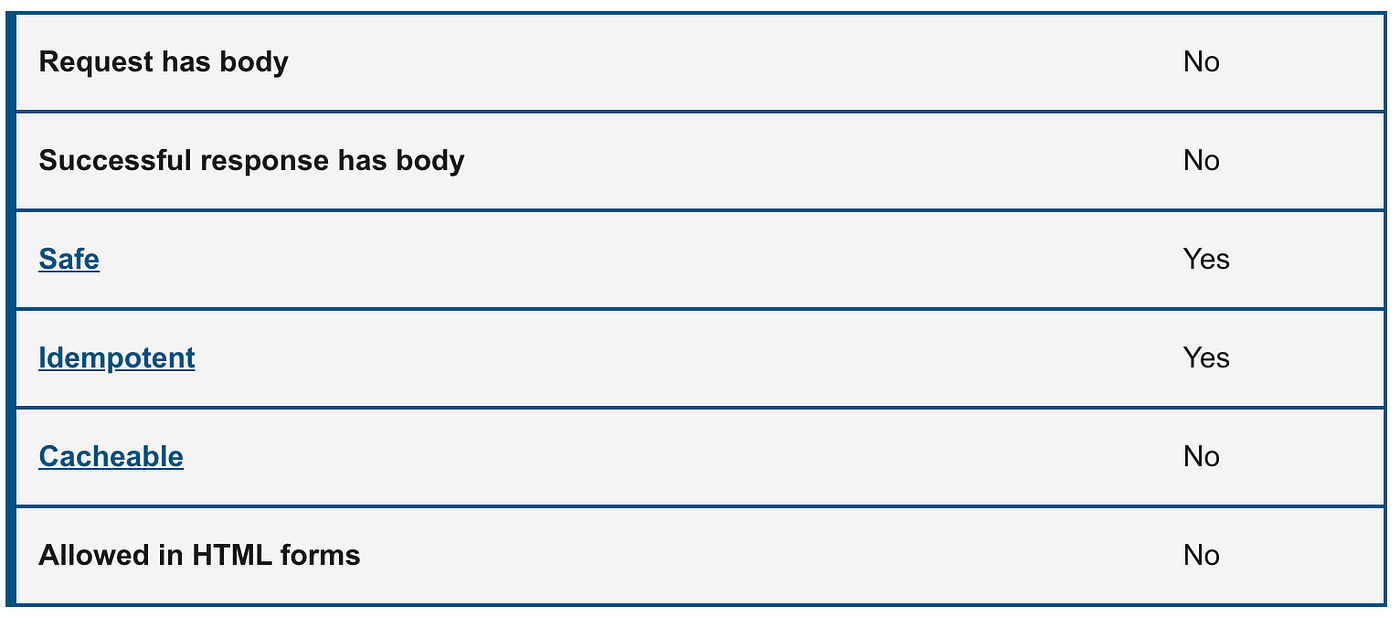
The following example shows the usage of the TRACE method:
TRACE / HTTP/1.1
Host: www.medium.com
User-Agent: Mozilla/4.0 (compatible; MSIE5.01; Windows NT)
The server response is sent back for the above client request.
HTTP/1.1 200 OK
Date: Mon, 23 Sept 2021 12:28:53 GMT
Server: Apache/2.2.14 (Win32)
Connection: close
Content-Type: message/http
Content-Length: 39
TRACE / HTTP/1.1
Host: www.medium.com
User-Agent: Mozilla/5.0 (Macintosh; Intel Mac OS X 10_15_7)Conclusion
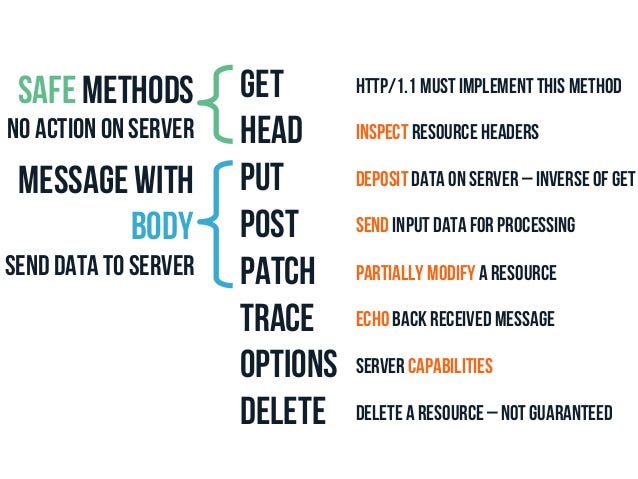
In this guide, we have looked at the eight main HTTP Request Methods. Each of them implements a different semantic, but some common features are shared by a group of them: e.g. a request method can be safe, idempotent, or cacheable.
Safe methods:
GET,HEAD,OPTIONS, TRACE
Idempotent methods:
GET,PUT,DELETE,HEAD,OPTIONS,TRACE
Cacheable methods:
GET, HEAD
A response to a POST or PATCH request can also be cached if freshness is indicated and the Content-Location header is set, but this is rarely implemented.
We have done a comparison of GET vs POST and PUT vs POST. With this knowledge, I hope you are able to use the HTTP methods constructively.
As always, thanks for reading. If you liked this post please share it and check out some of my other posts here on Medium.
More content at plainenglish.io
메타데이터
- post_id
- cced531a42b7
- slug
- http-request-methods-complete-guide-cced531a42b7
- url
- https://javascript.plainenglish.io/http-request-methods-complete-guide-cced531a42b7
- canonical_url
- https://javascript.plainenglish.io/http-request-methods-complete-guide-cced531a42b7
- author_url
- https://medium.com/@ayushv
- status
- ok
- fetched_at
- 2026-06-10 21:21:38