How I Built “DevFlow Captain” My Personal AI Engineering Manager in 4 Days Using Coral
From context-switching hell to one unified dashboard.
How I Built “DevFlow Captain” My Personal AI Engineering Manager in 4 Days Using Coral
From context-switching hell to one unified dashboard.
My honest journey building a Coral-powered hackathon project that actually made my daily life better.
Captain’s Log · Pirates of the Coral-bean · Track 2: Personal Agent
Introduction
Hey everyone,
If you’re a developer, you probably know this pain already:
Open GitHub → check issues and PRs → switch to Linear → see your tasks → open Slack for discussions → check Google Calendar for meetings → open Notion for that one doc → repeat twenty times before lunch.
By 11 AM, I was already mentally exhausted. Not because the work was hard because finding the work was exhausting.
When I saw the Pirates of the Coral-bean hackathon (organised by Coral and WeMakeDevs), I knew I had to build something that solves this exact problem. Not another generic todo app. Something I’d actually open every morning.
So I built DevFlow Captain my personal AI Engineering Manager that brings GitHub, Linear, Slack, Google Calendar, and Notion into one dashboard, powered by Coral SQL.
This is the full story, the wins, the frustrations, the “why is this not working” moments, and how I finally shipped it. I’ll also walk you through the architecture and pipeline so you can build something similar.
The Problem
As a full-stack developer working on multiple projects, I was losing 2–3 hours every single day just switching between tools.
Every morning I asked myself the same questions:
- What should I work on first?
- Which PRs need my review?
- Do I have any important meetings today?
- What are people discussing in Slack about that blocker?
Every time I switched apps, I lost context. It felt frustrating. I wanted one place where I could see my entire engineering life at a glanceand even better, chat with it when my priorities changed: “I finished that task. What should I focus on now?”
That’s DevFlow Captain.
What is Coral?
Before this hackathon, I had never used Coral.
Coral is a local-first SQL layer for agents and developers. It turns any API, database, or file into a SQL table. You write SQL. Coral handles auth, pagination, rate limits, and OAuth on your machine. Your credentials don’t leave your computer.
GitHub becomes github.issues, github.pulls. Linear becomes linear.issues. Slack has a table function: slack.messages(channel => '...'). Google Calendar becomes google_calendar.events. Notion becomes notion.search.
You can do things like this
SELECT l.title, g.title AS pr_title, sl.text AS slack_discussion
FROM linear.issues l
LEFT JOIN github.pulls g ON g.title ILIKE '%' || l.title || '%'
-- join slack via table function when you need channel context
No ETL. No warehouse. No writing five separate API clients. One query language across all your tools.
That was exactly what I needed.
The Moment Coral Really Clicked for Me
The biggest breakthrough wasn’t querying GitHub or Slack individually.
It was realizing I could think across all my tools using SQL.
For example:
- A Linear issue linked to a GitHub PR
- A Slack discussion mentioning that blocker
- A meeting related to that project
- A Notion spec attached to the same workflow
Normally, connecting those systems requires glue code, syncing, ETL pipelines, or multiple SDKs.
With Coral, they become queryable in one layer.
That completely changed how I thought about developer tooling.
My Development Journey
Day 1: Excitement + First Failure
I started with huge energy. Installed Coral, added GitHub easily. Felt like a genius.
Then came Slack.
I spent 2+ hours fighting OAuth, scopes, and missing_scope errors. I reinstalled the Slack app four times. Got frustrated. Almost dropped Slack from the project entirely.
Lesson I learned the hard way: read the error message carefully. missing_scope usually means you added scopes in the Slack app settings but didn't reinstall the app to your workspace. After that, I invited the bot to each channel with /invite @YourBot and things started working.
Day 2: Linear & Calendar Struggles
Linear queries were tricky. Wrong table names (linear.tasks vs **linear.issues), wrong columns (state vs `state_name`**). I kept getting empty results and questioning if Coral was broken. (It wasn't. I was.)
Google Calendar had its own headache — date filtering. Coral doesn’t love DATE() the way you'd expect. I ended up filtering like this:
WHERE CAST(start_date_time AS VARCHAR) >= '2026-05-31'I lived in the terminal that day — coral sql "..." over and over until each query returned real rows.
Day 3: The Breakthrough
Once the queries worked, everything clicked.
I wired up a Python FastAPI backend that shells out to coral sql --format json, added Groq for natural-language chat (question → SQL → answer), and built a dark dashboard with Next.js + ShadCN + Tailwind.
The moment I saw my real Linear tasks, GitHub PRs, calendar meetings, and Slack messages on one screen — I genuinely got goosebumps. That was the moment I knew this wasn’t just a hackathon submission. I would use this myself.
Day 4: Polish & Ship
Added the chat interface, improved the UI (proper message bubbles, priority cards), wrote this blog, took screenshots, and submitted.

Landing page
Tech Stack
Layer What I used Data Coral CLI (coral sql) — the hero of this project Backend Python 3.11 + FastAPI Frontend Next.js + TypeScript + ShadCN + Tailwind AI Groq (openai/gpt-oss-120b) for SQL generation + summaries State Zustand (dashboard cached 1 hour in localStorage)
Everything runs locally no data warehouse, no sending my tokens to a random server. That aligns perfectly with Coral’s philosophy and made me comfortable using it with real work data.
Architecture & Pipeline (How It Actually Works)
If you want to rebuild this, here’s the flow:
Browser (Next.js :3000)
       ↓ HTTP
FastAPI (:8000)
       ├── GET  /api/dashboard  → 20+ parallel Coral queries
       ├── POST /api/chat        → LLM → SQL → Coral → LLM
       └── POST /api/coral-query → raw SQL passthrough
       ↓
CoralService → subprocess: coral sql --format json "..."
       ↓
Coral (local) → GitHub · Linear · Slack · Google Calendar · Notion
Pipeline 1: Dashboard
You open /dashboard. Frontend calls GET /api/dashboard.
The backend:
- Queries
github.user_reposto find your repos - Fires parallel Coral queries — Linear issues, projects, calendar events, Notion pages, Slack messages per channel, GitHub issues/PRs per repo
- Merges and dedupes results in Python
- Returns one JSON blob
The UI shows:
- High priority blockers (Urgent/High Linear issues)
- My issues from Linear
- Projects with progress
- Meetings today from Google Calendar
- Open PRs and open issues across repos
- Slack discussions (last 3 days)
- Notion pages you’ve shared with the integration
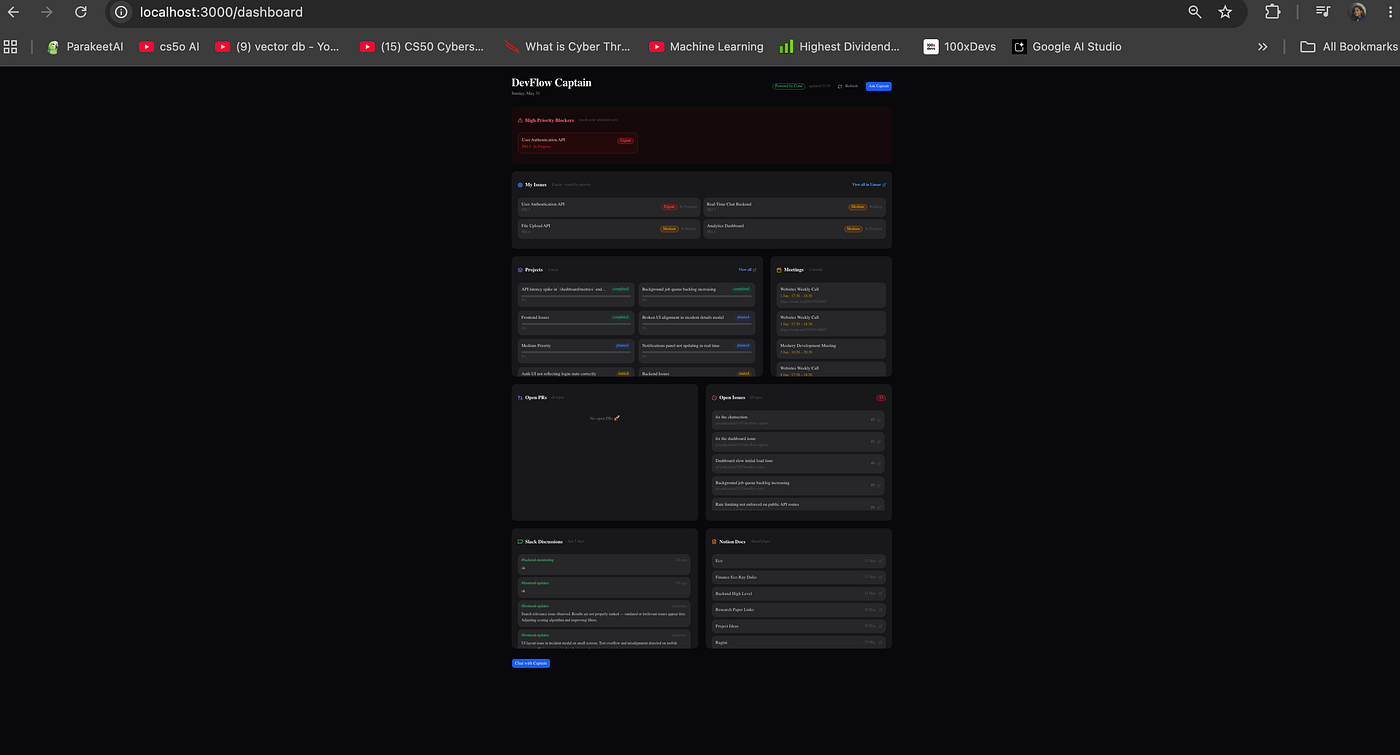
Dashboard
Pipeline 2: Chat
You ask: “What should I work on today?”
- Groq generates a Coral SQL query (with schema hints baked into the prompt)
- Coral runs it:
coral sql --format json - Groq summarises the rows into bullet points
- You see the answer + optional “Show Coral SQL” toggle
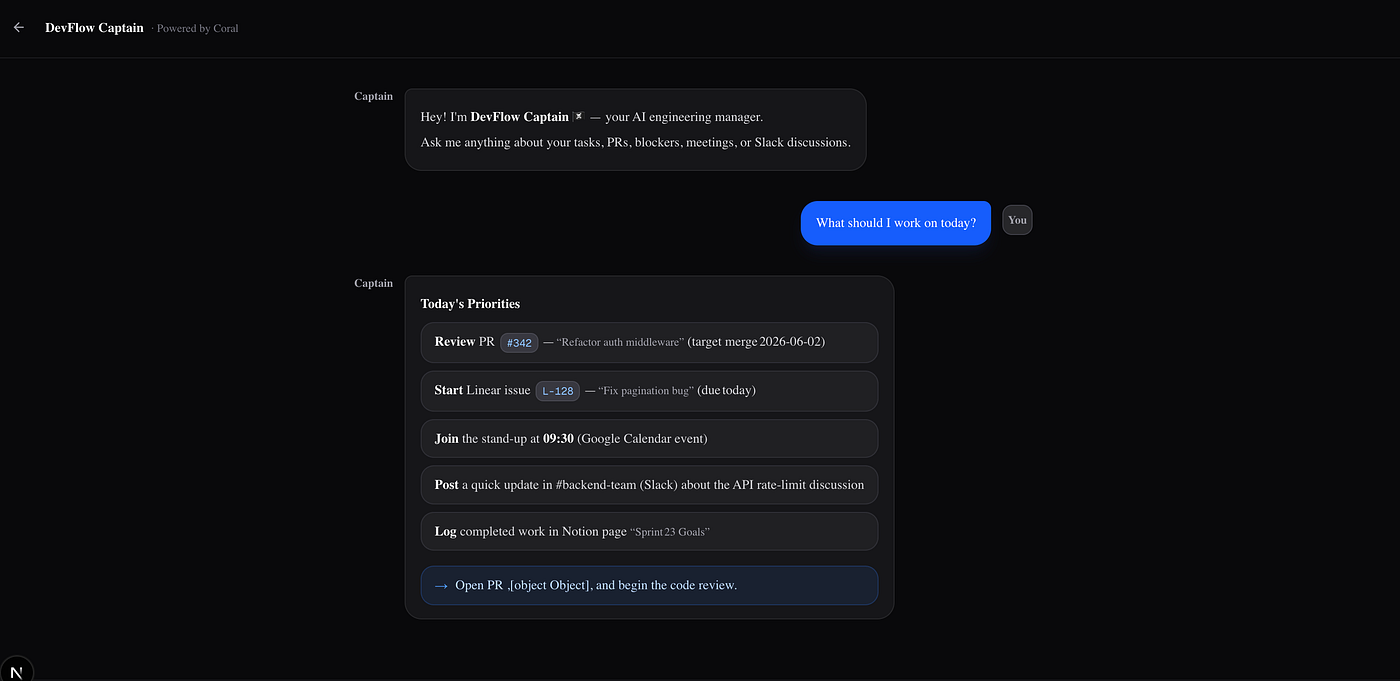
chat
Installing Coral (if you want to try this yourself)
brew install withcoral/tap/coralcoral source discover
coral source add --interactive github
coral source add --interactive linear
coral source add --interactive slack
coral source add --interactive google_calendar
coral source add --interactive notioncoral sql "SELECT schema_name, table_name FROM coral.tables LIMIT 20"For Google Calendar, Coral walks you through OAuth — client ID, client secret, browser auth link. When it works, you’ll see tables like events, calendars, and a passing test query.
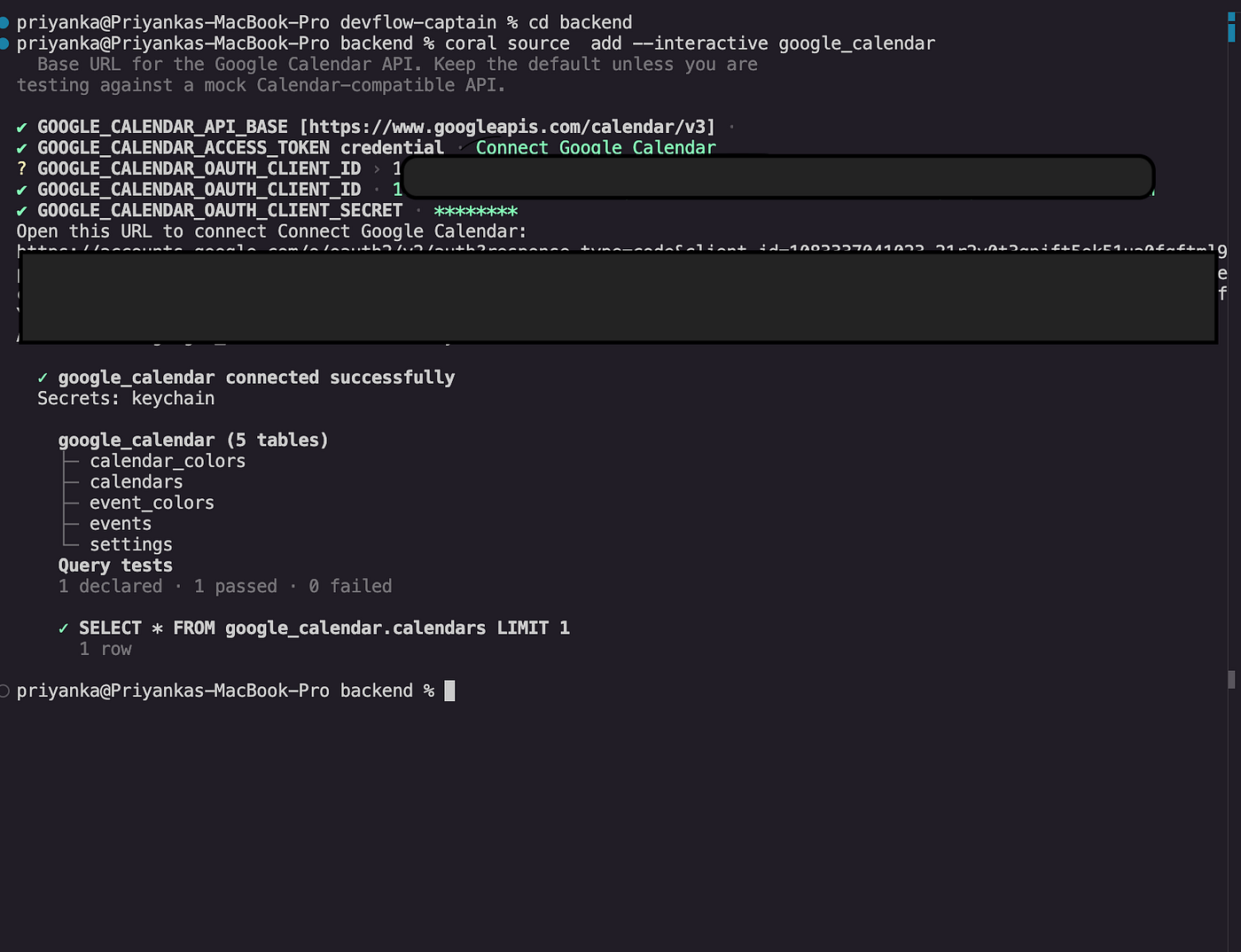
Google Calendar setup
Run the project
Clone the repository:
git clone https://github.com/priyankashah3107/devflow-captain
cd devflow-captain
Backend:
cd backend
python3 -m venv venv && source venv/bin/activate
pip install -r requirements.txt
echo "GROQ_API_KEY=gsk_your_key" > .env
uvicorn app.main:app --reload --port 8000
Frontend:
cd frontend
pnpm install && pnpm dev
Open [http://localhost:3000.](http://localhost:3000.)
Key Features
- Today’s focus — high-priority Linear tasks surfaced at the top
- GitHub overview — open issues + PRs across your repos
- Meetings today — pulled from Google Calendar
- Slack pulse — recent messages from channels you care about (no more missing that “auth is broken” thread)
- Notion docs — pages connected to your integration
- AI chat — ask anything in plain English; Captain writes Coral SQL and explains the result
Challenges & Frustrations
- Slack OAuth — hours of scope debugging
- Wrong column/table names — very common when you’re learning Coral’s schema; always check
coral.columns - Frontend ↔ backend — CORS, wrong ports, forgetting to start uvicorn (been there)
- Date formatting with Google Calendar
- Learning Coral on the fly during a 4-day deadline
But every time a query finally returned real data, the satisfaction was huge. That’s the hackathon feeling I signed up for.
Impact & Why This Matters
DevFlow Captain saves me a meaningful chunk of context-switching time every day. Instead of jumping between six apps, I open one dashboard and get a clear picture of my day.
Especially useful if you’re:
- An indie developer juggling multiple repos
- A freelancer with different clients/tools
- A remote engineer living in Slack + GitHub + Linear
- A student building projects while managing hackathons and coursework
This was built for Track 2 — Personal Agent in the Coral hackathon: “What should I work on?”
Conclusion
The Coral hackathon pushed me to build something actually useful instead of another abandoned side project.
Coral is incredibly powerful. Once you get past the initial learning curve scopes, table names, writing SQL that matches each source’s quirks it genuinely feels like magic. One install. One query language. Five tools. Zero glue code.
If you’re a developer tired of morning tab roulette, try Coral. Then build your own Captain.
🏴☠️ Fair winds.
Links
- GitHub: https://github.com/priyankashah3107/devflow-caption
- Coral: withcoral.com
- Groq (free tier): console.groq.com
Would love to hear your thoughts have you faced the same context-switching problem? Let me know in the comments.
Tags: #CoralHackathon #DeveloperTools #Productivity #NextJS #AI #Hackathon #Coral #FastAPI
메타데이터
- post_id
- cd08f7fdbb49
- slug
- how-i-built-devflow-captain-my-personal-ai-engineering-manager-in-4-days-using-coral-cd08f7fdbb49
- url
- https://medium.com/@priyankashah3107/how-i-built-devflow-captain-my-personal-ai-engineering-manager-in-4-days-using-coral-cd08f7fdbb49
- canonical_url
- https://medium.com/@priyankashah3107/how-i-built-devflow-captain-my-personal-ai-engineering-manager-in-4-days-using-coral-cd08f7fdbb49
- author_url
- https://medium.com/@priyankashah3107
- status
- ok
- fetched_at
- 2026-06-09 15:37:30





