An Adaptable Approach to Multi-Robot Navigation in ROS2: Utilizing Turtlebot3 and Nav2
🛠 Update Note — Multi-Robot Simulation Support (Jazzy Added)
An Adaptable Approach to Multi-Robot Navigation in ROS2: Utilizing Turtlebot3 and Nav2
🛠 Update Note — Multi-Robot Simulation Support (Jazzy Added)
This article was originally based on ROS 2 Foxy and Humble using the turtlebot3_multi_robot repo. The project has since moved to https://github.com/arshadlab/tb3_multi_robot, where the master branch now supports ROS 2 Jazzy with Gazebo Harmonic using a cleaner multi-robot setup. Foxy and Humble support remain available in their respective branches. For Jazzy, refer to the updated README on the master branch.
Original Article
In this tutorial, we’ll dive into the process of initiating multiple Turtlebot3 robots along with Nav2 stack within the Gazebo simulation environment. Each robot will have its own namespace, ensuring individual control and navigation using either RViz2 or command-line navigate_to_pose action.
The methodology employed here is both adaptable and scalable to accommodate any number of robots, limited by system resources. The sole aspect that needs adjustment to alter the robot count is the primary launch file, where the robot configurations are stipulated as list items.
To provide clarity, this tutorial assumes that you already have ROS2 Foxy (or a later version) installed, and set up the Turtlebot3 simulation package. If not, please refer to the official ROS2 and Turtlebot3 documentation to get started.
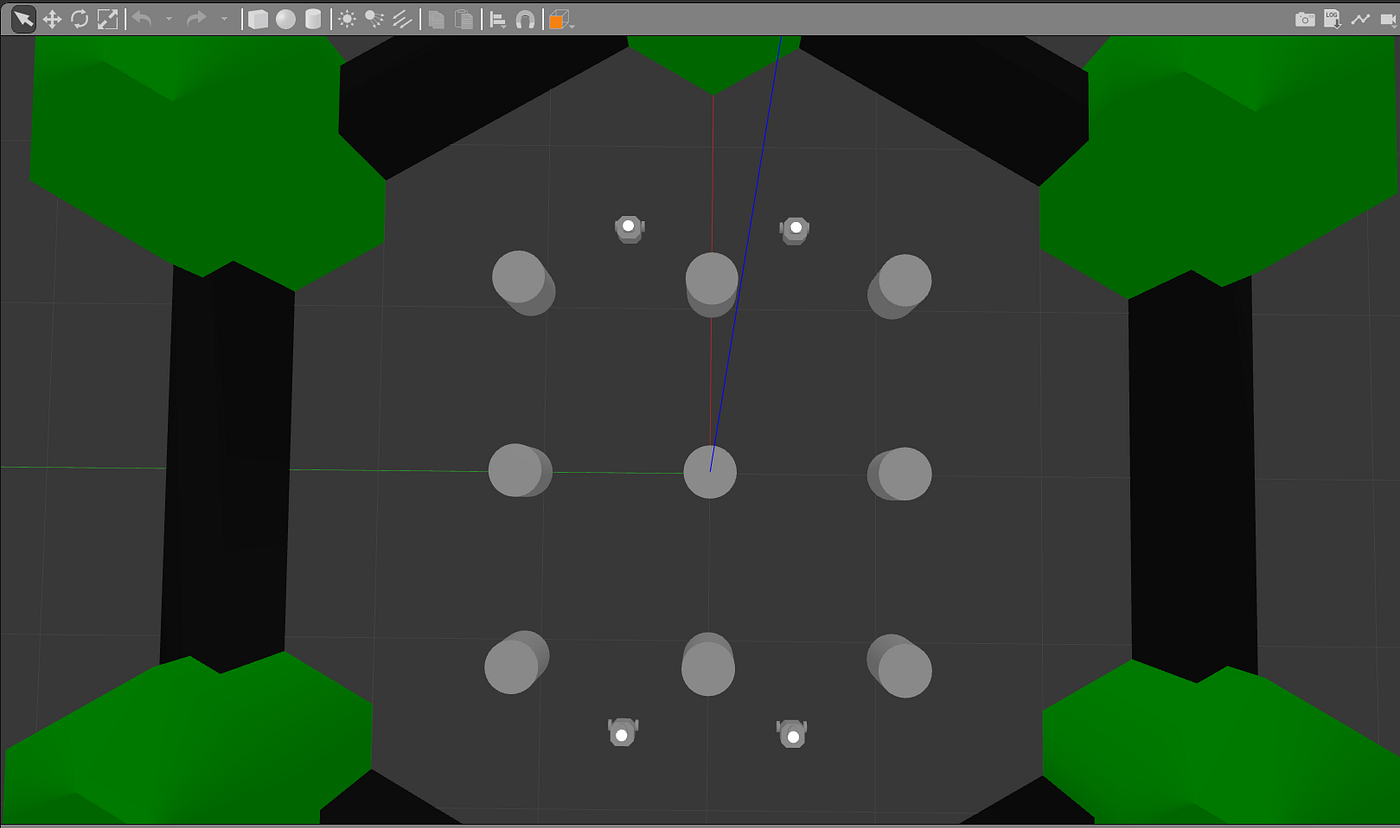
I have written an earlier article to show bare minimum multiple turtlebot3 setup for simple drive in gazebo. In this article we will enable Nav2 for turtlebot burger robots in a multi robot scenario. The launch script initiates the creation of four robots, with the provision to modify their count and placement directly within the code.
Prerequisites
Before proceeding, make sure you have the following prerequisites:
- ROS 2: The repo has been tested with Foxy and Humble. Any one of them must be installed on your system. For installation instructions for Foxy, you can visit the official ROS documentation.
- Gazebo Simulator: You will also need the Gazebo simulator installed on your computer. You can find installation guide online or on the Gazebo website.
- TurtleBot3 ROS 2 Packages: Finally, make sure to have the TurtleBot3 ROS 2 packages installed on your machine. Instructions for this can be found in the TurtleBot3 documentation.
To modify the TurtleBot3 models, it’s essential to have access to the source code. In addition, all required dependencies need to be installed to ensure smooth operations. This process can be simplified by using rosdep, a command-line tool from ROS that automatically installs dependencies, thereby preparing a ready-to-go environment.
The repositories turtlebot3_simulations and navigation2 have been updated with all the required changes. You just need to clone these repositories, build the workspace, and then execute the launch commnad.
Clone repo and install dependencies
Console
For ROS2 Foxy use foxy branch
mkdir -p robot_ws/src
cd robot_ws/src

# For foxy use foxy branch
git clone  https://github.com/arshadlab/tb3_multi_robot.git -b foxy

cd robot_ws
source /opt/ros/foxy/setup.bash
rosdep install --from-paths src -r -y
For ROS2 humble use humble branch
mkdir -p robot_ws/src
cd robot_ws/src

# For Humble use master branch
git clone  https://github.com/arshadlab/tb3_multi_robot.git -b humble

cd robot_ws
source /opt/ros/humble/setup.bash
rosdep install --from-paths src -r -y
The code in the “foxy” branch is compatible with ROS2 humble. In the humble branch, there is an updated launch file for bringing up nav2 with composite nodes. However, the creation of composite nodes is currently disabled due to an issue in the ROS2 humble implementation. This issue pertains to the propagation of namespace mapping to nodes (in composite container) with sub-namespaces, such as “/global_costmap/global_costmap”.
Setup Gazebo models
# Download gazebo base models for gazebo classic run
mkdir -p ~/.gazebo/models
git clone https://github.com/osrf/gazebo_models ~/.gazebo/models

# clone https://github.com/ROBOTIS-GIT/turtlebot3_simulations (branch according to ros distro) locally
# and copy turtlebot3_simulations/turtlebot3_gazebo/models/turtlebot3_world
# folder to ~/.gazebo/models/
Build and Run
To build and run the Gazebo environment, follow these steps:
- Navigate to the
robot_wsdirectory:cd robot_ws/ - Build the workspace:
colcon build --symlink-install - Source the setup file:
source ./install/setup.bash - Launch the simulation:
ros2 launch turtlebot3_multi_robot gazebo_multi_nav2_world.launch.py
cd robot_ws/
colcon build --symlink-install
source ./install/setup.bash
ros2 launch turtlebot3_multi_robot gazebo_multi_nav2_world.launch.py enable_drive:=True
Gazebo with four turtlebot3 robots
Rviz output

Rviz outputs of four robots
ros2 node list output
/gazebo
/map_server
/lifecycle_manager_map_server
/lifecycle_manager_map_server_service_client
/tb1/amcl
/tb1/amcl_rclcpp_node
/tb1/bt_navigator
/tb1/bt_navigator_rclcpp_node
/tb1/controller_server
/tb1/controller_server_rclcpp_node
/tb1/global_costmap/global_costmap
/tb1/global_costmap/global_costmap_rclcpp_node
/tb1/global_costmap_client
/tb1/lifecycle_manager_localization
/tb1/lifecycle_manager_localization_service_client
/tb1/lifecycle_manager_navigation
/tb1/lifecycle_manager_navigation_service_client
/tb1/local_costmap/local_costmap
/tb1/local_costmap/local_costmap_rclcpp_node
/tb1/local_costmap_client
/tb1/planner_server
/tb1/planner_server_rclcpp_node
/tb1/recoveries_server
/tb1/recoveries_server_rclcpp_node
/tb1/robot_state_publisher
/tb1/rviz2
/tb1/rviz2
/tb1/rviz2
/tb1/rviz2
/tb1/transform_listener_impl_558c16241c60
/tb1/transform_listener_impl_561b159d0760
/tb1/transform_listener_impl_563e7f1c4900
/tb1/transform_listener_impl_7f6108018330
/tb1/transform_listener_impl_7fcfd4020aa0
/tb1/turtlebot3_diff_drive
/tb1/turtlebot3_imu
/tb1/turtlebot3_joint_state
/tb1/turtlebot3_laserscan
/tb1/waypoint_follower
/tb1/waypoint_follower_rclcpp_node
/tb2/amcl
...
...
/tb4/transform_listener_impl_55cfbd5962d0
/tb4/transform_listener_impl_56079ee74620
/tb4/transform_listener_impl_563cf1d8b130
/tb4/transform_listener_impl_5641fe70f7a0
/tb4/transform_listener_impl_7f12041567b0
/tb4/turtlebot3_diff_drive
/tb4/turtlebot3_imu
/tb4/turtlebot3_joint_state
/tb4/turtlebot3_laserscan
/tb4/waypoint_follower
/tb4/waypoint_follower_rclcpp_node
As seen above, each robot has it’s own namespace.
Launch options
The default configuration of the system enables rviz, which results in the opening four rviz windows. However, the rviz launch can be disabled by utilizing the enable_rviz launch option. Similarly, the auto drive nodes are initially disabled but can be enabled by employing the enable_drive launch option.
ros2 launch turtlebot3_multi_robot gazebo_multi_nav2_world.launch.py enable_rviz:=False

ros2 launch turtlebot3_multi_robot gazebo_multi_nav2_world.launch.py enable_drive:=True
The launch command sets the initial pose using /initialpose topic. After which the user have the option to provide a goal using the Navigation2 Goal menu in rviz for that robot instance.

Robot navigation path in rviz

Robot moving in gazebo
Command line method
Setting initial pose via command line for tb1 robot
ros2 topic pub -1 --qos-reliability reliable /tb1/initialpose geometry_msgs/PoseWithCovarianceStamped "{header: {frame_id: map}, pose: {pose: {position: {x: -0.6, y: 0.0, z: 0.0}, orientation: {x: 0.0, y: 0.0, z: 1.01, w: 1.0}}, }}"Setting navigation goal via command line for tb1 robot
ros2 action send_goal /tb1/navigate_to_pose nav2_msgs/action/NavigateToPose "pose: {header: {frame_id: map}, pose: {position: {x: -3.2, y: 6.20, z: 0.0}, orientation:{x: 0.0, y: 0.0, z: 0, w: 1.0000000}}}"Summary of Changes:
Turtlebot3_simulations repo:
- A new launch file created (multi_nav_turtlebot3_world.launch.py). This file initiates the world environment and spawns robots and nav2 stack.
- The Turtlebot3 (Burger) model updated to handle tf remapping for diff drive. Additionally, namespaces tags within plugin tags are disabled.
- World file for spawning Turtlebots.
Navigation2 repo:
- Added scan topic mapping to navigation_launch.py in navigation2 repo
- Update rviz view file to remove / from topic names
- Disable groot monitoring in nav2_params.yaml
Under the hood
The explanation for change 1,2 and 3 is the same as given in previous article.
Robot Configuration
The arrangement of robots can be specified in a launch file. A potential future enhancement could involve retrieving the configurations from a file, such as json.
Names and poses for the robots
robots = [ {‘name’: ‘tb1’, ‘x_pose’: ‘-1.5’, ‘y_pose’: ‘-0.5’, ‘z_pose’: 0.01}, {‘name’: ‘tb2’, ‘x_pose’: ‘-1.5’, ‘y_pose’: ‘0.5’, ‘z_pose’: 0.01}, {‘name’: ‘tb3’, ‘x_pose’: ‘1.5’, ‘y_pose’: ‘-0.5’, ‘z_pose’: 0.01}, {‘name’: ‘tb4’, ‘x_pose’: ‘1.5’, ‘y_pose’: ‘0.5’, ‘z_pose’: 0.01},
…
…
]
Single map_server and global /map topic
To ensure a coherent system with a single map, the parent launch file instantiates a single map server instance. In the localization_launch.py file, the map server instantiation is suppressed using a newly added launch parameter. This arrangement aligns with the actual scenario, as there is only one map in the system. All nodes subscribe to global /map topic. nav2_params.yaml modified to include map_topic with ‘/’ (e.g /map) for amcl, global and local costmap nodes.
/tf and /tf_static per robot
This implementation adheres to the scheme of having each robot with its own tf tree published under its specific namespace (e.g., /tb1/tf) without the use of tf_prefix. Currently, the map server is created individually for each robot, but as a future enhancement, it can be created once for all the robots, optimizing resource utilization and improving efficiency.

tf tree for tb1 and tb2 robots
Scan topic mapping
A modification has been made to the navigation_launch.py script to incorporate scan topic remapping. This modification ensures that the global and local cost nodes, created under the robot namespace, can properly adjust and connect to the correct scan source that corresponds to the respective robot instance.
Updates to rviz view file
In order to use the same view configuration file for each robot-specific rviz instance, the topics mentioned in the rviz view file have been modified. The prefix “/” has been removed from these topics. This adjustment allows the subscribed topics to be associated with the target interface when rviz is launched with the robot’s namespace using “__ns:=<namespace>”. As a result, ROS2 will add the namespace as a prefix to the topic name, since the “/” prefix has been removed. This modification facilitates the utilization of the same view config file across different rviz instances representing robot.
rviz view can also be started from command line for a particular robot.
#Syntax:
#   rviz2 -d <rviz_view_file_path> --ros-args -r __node:=rviz2 -r __ns:=<namespace> -r /tf:=tf -r /tf_static:=tf_static -r /goal_pose:=goal_pose -r /clicked_point:=clicked_point -r /initialpose:=initialpose

#rvzi2 call for /tb1:
rviz2 -d ./src/navigation2/nav2_bringup/bringup/rviz/multi_nav2_default_view.rviz --ros-args -r __node:=rviz2 -r __ns:=/tb1 -r /tf:=tf -r /tf_static:=tf_static -r /goal_pose:=goal_pose -r /clicked_point:=clicked_point -r /initialpose:=initialpose
Disable Groot Monitoring
To avoid conflicts and ensure the successful operation of multiple nav2 stack instances, it is necessary to disable the groot monitoring feature in the nav2_param.xml file. Failing to do so would result in the subsequent instances encountering a port already in use by the first instance. Therefore, for each new nav2 behavior tree instance, either disable the groot monitoring or give a new port number to each nav2 stack initiation to prevent conflicts.
Conclusion
This tutorial can be consider as starting guide to setup multiple robot in Gazebo simulation environment. We explored step-by-step process of setting up and controlling multiple Turtlebot3 robots using the Navigation2 (Nav2) stack. With each robot assigned its own namespace, individual control and navigation can be achieved through RViz2 or the command-line interface. This tutorial enables users to initiate customizable multi-robot scenarios, implement scan topic remapping for proper connectivity, and optimize rviz view files for seamless configuration. By following these instructions, users can create and control multiple Turtlebot3 robots, opening up possibilities for multi-robot simulations and advancing robotics research.
메타데이터
- post_id
- cd24f96d19c6
- slug
- a-guide-to-multi-robot-navigation-utilizing-turtlebot3-and-nav2-cd24f96d19c6
- url
- https://medium.com/@arshad.mehmood/a-guide-to-multi-robot-navigation-utilizing-turtlebot3-and-nav2-cd24f96d19c6
- canonical_url
- https://medium.com/@arshad.mehmood/a-guide-to-multi-robot-navigation-utilizing-turtlebot3-and-nav2-cd24f96d19c6
- author_url
- https://medium.com/@arshad.mehmood
- status
- ok
- fetched_at
- 2026-06-20 20:29:01