One Terminal to Watch Them All: Inside herdr, the Open Source Multiplexer Built for the Agent Era
One Terminal to Watch Them All: Inside herdr, the Open Source Multiplexer Built for the Agent Era
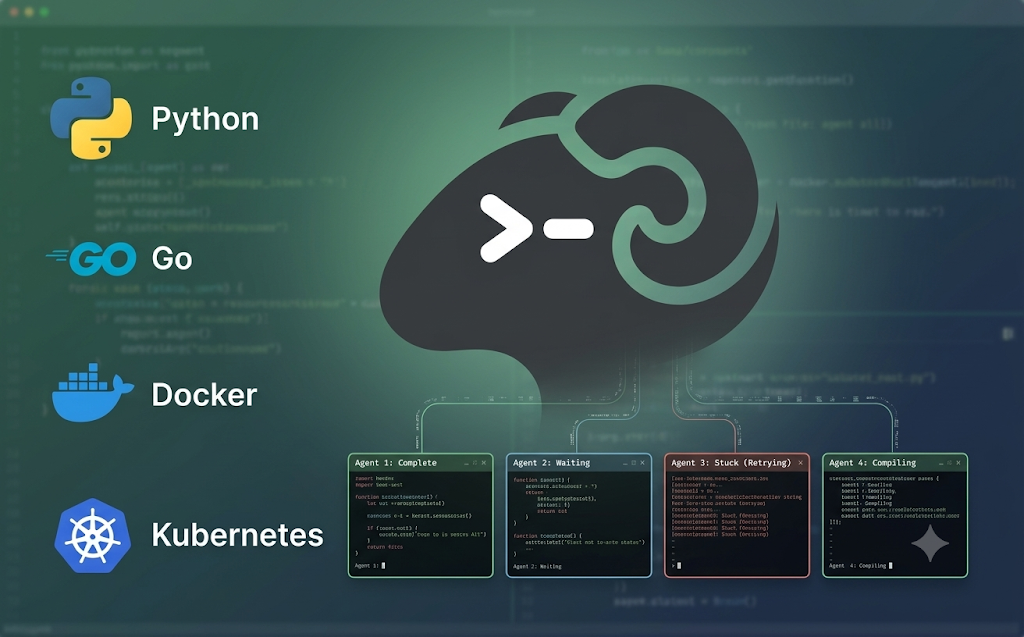
Running a single AI coding agent inside a single terminal window is a manageable, almost pleasant experience. Running ten of them at once, spread across different repositories, each moving at its own pace, quickly turns into something closer to air traffic control without a radar screen. One agent finished its task fifteen minutes ago and has been sitting idle ever since. Another is stuck waiting on a question nobody noticed. A third is still grinding through a long running task in a pane that scrolled out of view an hour ago.
An open source project called herdr was built specifically to solve this exact problem, giving every coding agent its own real terminal while surfacing the state of the entire fleet at a single glance, all from one lightweight binary rather than a heavyweight desktop application.
The Problem That Emerges Once Agents Multiply
A single terminal window scales perfectly well for a single task. The trouble starts the moment parallel agentic work becomes routine rather than exceptional, which is increasingly the normal way many developers now operate. Coding agents frequently need to wait for a decision, hit a permission prompt, or simply pause mid task waiting on some external condition to change, and none of that waiting announces itself loudly. Without some kind of unified view across every running session, the practical result is a developer manually clicking through a stack of terminal tabs or windows, trying to remember which pane belongs to which repository and whether it is actively doing something useful or has been quietly stalled for the last twenty minutes.
herdr addresses this directly by rolling up the state of every managed agent into a simple, immediately readable status: blocked, working, done, or idle. That alone removes the need to manually check on every pane individually, replacing it with a sidebar that answers the only question that actually matters at a glance, which agent currently needs attention.
What herdr Actually Is
At its technical core, herdr functions as a terminal multiplexer, a category of tool that lets multiple terminal sessions run inside a single window, organized into panes, tabs, and workspaces, and crucially, kept alive independently of whether a specific window happens to be open at any given moment. Anyone already familiar with tmux will recognize the underlying concept immediately, since herdr describes itself directly as that same idea, rebuilt specifically with autonomous coding agents in mind rather than ordinary shell sessions.
Every agent managed through herdr runs inside its own genuine terminal session rather than some visual approximation of one. This distinction matters more than it might initially seem. Many coding agents, and the tools they invoke, render fairly elaborate full screen text interfaces, and a wrapper application attempting to redraw or reinterpret that output visually often gets subtle details wrong. Because herdr gives each agent an actual terminal rather than an imitation of one, even complex, full screen text interfaces render exactly as intended.
Agents can run wherever they would normally run: directly on a local machine, on a remote server reached over SSH, or anywhere else a terminal session could exist. Panes can be organized into workspaces and tabs, arranged through clicking, dragging, and splitting, all supported natively with mouse interaction rather than requiring every action to be memorized as a keyboard shortcut.
Closing a laptop does not end any of the running agents. A background server keeps every pane and every agent alive independently of whether a client window is currently attached to it, meaning a session can be reattached later from an entirely different terminal, or even from a phone connecting over SSH, picking up exactly where things were left off.
Perhaps most notably given how much of the current agentic tooling landscape leans toward heavyweight desktop applications, herdr ships as a single local Rust binary weighing in at roughly ten megabytes. There is no graphical application to install, no Electron based wrapper consuming memory in the background, no macOS exclusive packaging, no account to register, and no telemetry collecting usage data in the background.
Comparing herdr to What Already Exists
Two broad categories of existing tools address adjacent parts of the same problem herdr is solving, and understanding where each one falls short helps explain why herdr was built the way it was.
Traditional terminal multiplexers such as tmux already provide persistent sessions, the ability to detach and reattach, remote operation over SSH, and flexible arrangement of panes, tabs, and workspaces. What they lack entirely is any awareness of what an agent running inside a given pane is actually doing. A plain terminal multiplexer has no built in concept of a pane being blocked, actively working, or finished, since that concept simply did not exist when these tools were originally designed. It is technically possible to bolt on some approximation of this awareness manually, wiring up bell characters or custom hooks specific to each individual agent harness, but that requires ongoing manual configuration for every tool involved, and even then produces no single, shared view across an entire fleet of agents running at once.
Graphical agent manager applications take the opposite approach, building agent awareness in as a first class feature, which genuinely represents useful, expected functionality at this point rather than a differentiator on its own. Where these applications fall short is everything surrounding that core feature. Many are closed source, often limited specifically to macOS, and function by redrawing terminal output inside their own custom application wrapper rather than presenting a genuine terminal session, which reintroduces exactly the kind of rendering inconsistency problem described earlier for anything running a complex, full screen text interface.
herdr positions itself as combining the strengths of both categories without inheriting either one’s weaknesses: the persistence, portability, and genuine terminal fidelity of a traditional multiplexer, combined with the agent state awareness that graphical managers provide, all delivered as a single binary that runs inside whatever terminal a developer already uses, reachable from anywhere an SSH connection can be established.
Getting herdr Installed
Installing herdr on Linux or macOS involves running a single install script directly from the project’s own domain:
curl -fsSL https://herdr.dev/install.sh | shA preview beta build for Windows is available through a similar approach using PowerShell:
powershell -ExecutionPolicy Bypass -c "irm https://herdr.dev/install.ps1 | iex"For anyone who prefers managing tools through an existing package manager rather than a standalone install script, herdr is also available through Homebrew, through mise, through Nix, or as a plain, stable binary downloaded directly from the project’s release page. Running herdr update upgrades an installation that was originally set up through the project’s own installer specifically, while installations managed through Homebrew, mise, or Nix instead get updated through whichever of those package managers was used to install it in the first place.
Starting a First Session
Getting a session running requires nothing more than running the command itself:
herdrThis either starts a new background server or attaches to one already running, opening a workspace ready for an agent to be launched directly inside a pane.
herdr is built to be fully mouse native, meaning clicking and dragging panes, tabs, and split borders handles most day to day navigation without needing to memorize any keyboard shortcuts at all. For anyone who prefers working from the keyboard, a single reserved prefix key, control plus b, keeps herdr’s own shortcuts from interfering with whatever shell or application happens to be running inside a given pane. Pressing that prefix, releasing it, and then pressing a specific action key triggers the corresponding command, so pressing control plus b followed by the letter c creates a new tab.
A handful of common actions follow this same prefix pattern. Pressing control plus b followed by shift and n creates a new workspace. Pressing control plus b followed by either v or the minus key splits the current pane. Pressing control plus b followed by w switches between existing workspaces. Pressing control plus b followed by q detaches from the current session entirely, leaving every agent running safely in the background, ready to be resumed later simply by running herdr again. Pressing control plus b followed by the question mark displays the complete list of available bindings directly inside the terminal itself.
Working With Remote Servers
One of the more distinctive capabilities herdr offers involves running on a remote server, such as a virtual private server, while still being controlled comfortably from a local terminal. Running herdr with the remote flag makes the local terminal act as a genuine client of that remote server rather than simply tunneling a raw terminal session through SSH.
herdr --remote workbox
herdr --remote ssh://you@yourserver:2222
This distinction solves a specific, previously annoying limitation that affects plain SSH combined with a traditional terminal multiplexer: pasting an image directly into an agent’s terminal session over a standard SSH plus tmux connection typically does not work correctly, whereas herdr’s dedicated remote client mode preserves that functionality, along with other client side conveniences that a raw terminal pass through connection would normally break.
Which Agents Work With herdr Today
herdr detects a wide range of existing coding agents automatically, combining process name matching with heuristics based on terminal output itself, requiring no manual configuration for most common tools to start reporting useful state information immediately.
Full detection across idle, working, and blocked states is already available for a long list of agents, including Claude Code, Codex, Droid, Amp, OpenCode, Grok CLI, Hermes Agent, Kilo Code CLI, Devin CLI, Cursor Agent, Antigravity CLI, Kimi Code CLI, GitHub Copilot CLI, and QoderCLI. A tool called Pi is supported for idle and working detection, with blocked state detection currently only partially implemented, while Kiro CLI is supported for idle and working detection without dedicated blocked state detection at all. Two additional tools, Gemini CLI and Cline, have been detected successfully but are not yet considered fully tested by the project.
Beyond this already substantial list, any other coding agent still works inside herdr regardless of whether dedicated detection exists for it specifically, since herdr functions as a genuine terminal multiplexer at its core; an unrecognized agent simply runs as an ordinary terminal session without the added semantic state labeling that supported agents receive. For tool authors interested in adding proper support for their own agent, custom integrations can report both labels and state directly through herdr’s socket API rather than waiting for upstream detection heuristics to catch up.
A smaller subset of agents also benefit from official, deeper integrations that add native session restore capability and, in some cases, report semantic state directly rather than relying purely on output pattern matching. These official integrations can be installed directly through herdr itself:
herdr integration install <agent>This installation path is currently available for Pi, Omp, Claude, Codex, Copilot, Devin, Droid, Kimi, OpenCode, Kilo, Hermes, QoderCLI, and Cursor.
Letting Agents Control herdr Directly
herdr’s usefulness extends beyond passively displaying agent state, since agents themselves can actively interact with it through a local Unix socket. Through this socket interface, an agent can create new workspaces, split or zoom existing panes, spawn additional helper processes, read terminal output directly, and subscribe to state change notifications rather than needing to repeatedly poll for updates.
This effectively allows an agent to orchestrate its own working environment programmatically, spinning up additional panes for subtasks or helper processes as needed, rather than being limited purely to whatever manual arrangement a human operator set up in advance.
A reusable skill package makes this integration straightforward to add into an existing agentic workflow:
npx skills add ogulcancelik/herdr --skill herdr -gBuilding herdr From Source
Developers interested in building herdr directly rather than using a prebuilt binary can do so with a standard Rust toolchain:
git clone https://github.com/ogulcancelik/herdr
cd herdr
cargo build --release
./target/release/herdr
The project also provides convenient task runner commands for common development workflows, including running the unit test suite and running a broader set of checks covering code formatting, tests, and general maintenance:
just test
just check
Why the Rust Foundation Matters Here
The choice to build herdr as a single, dependency free Rust binary is not an incidental implementation detail; it directly shapes the practical experience of using the tool. Because the entire application compiles down to one small, self contained executable, there is no runtime environment to install separately, no package manager dependencies to resolve, and no risk of version conflicts with other software already present on a system.
This also explains how herdr manages to stay around ten megabytes in size while still functioning as a full terminal multiplexer with agent awareness built in, standing in sharp contrast to the memory and disk footprint typically associated with Electron based desktop applications that bundle an entire embedded browser runtime just to render a user interface.
Rust’s performance characteristics also matter directly for the core task at hand: managing multiple live terminal sessions, tracking their output for state detection heuristics, and keeping everything responsive even as the number of simultaneously running agents grows. A tool meant to sit quietly in the background monitoring several active processes at once benefits considerably from a language built around predictable performance and low resource overhead.
Conclusion
herdr takes a well established idea, the terminal multiplexer, and updates it for a working style that increasingly involves several autonomous coding agents running at once rather than a single interactive shell session. By giving every agent a genuine terminal rather than an imitation of one, surfacing blocked, working, done, and idle states automatically without any configuration, keeping every session alive on a background server regardless of whether a client stays connected, and shipping as a single lightweight Rust binary with no graphical wrapper, no required account, and no telemetry, it addresses the exact pain point that emerges the moment parallel agentic work becomes routine rather than occasional.
For developers already comfortable working inside a terminal, it offers a natural, low overhead way to finally keep track of an entire fleet of agents at once, rather than losing track of which pane needs attention and which one finished its work twenty minutes ago.
The repository is available at: https://github.com/ogulcancelik/herdr
메타데이터
- post_id
- cd306b906ec4
- slug
- one-terminal-to-watch-them-all-inside-herdr-the-open-source-multiplexer-built-for-the-agent-era-cd306b906ec4
- url
- https://medium.com/open-intelligence/one-terminal-to-watch-them-all-inside-herdr-the-open-source-multiplexer-built-for-the-agent-era-cd306b906ec4
- canonical_url
- https://medium.com/open-intelligence/one-terminal-to-watch-them-all-inside-herdr-the-open-source-multiplexer-built-for-the-agent-era-cd306b906ec4
- author_url
- https://medium.com/@eng.fadishaar
- status
- ok
- fetched_at
- 2026-07-09 00:50:33