CORS Policy — Solve your Cross Origin issues — ERR_NETWORK, ERR_FAILED etc.
In every project, the first issue a full stack developer faces when integrating UI with backend.
CORS Policy — Solve your Cross Origin issues — ERR_NETWORK, ERR_FAILED etc.
In every project, the first issue a full stack developer faces when integrating UI with backend.
Photo by James Orr on Unsplash
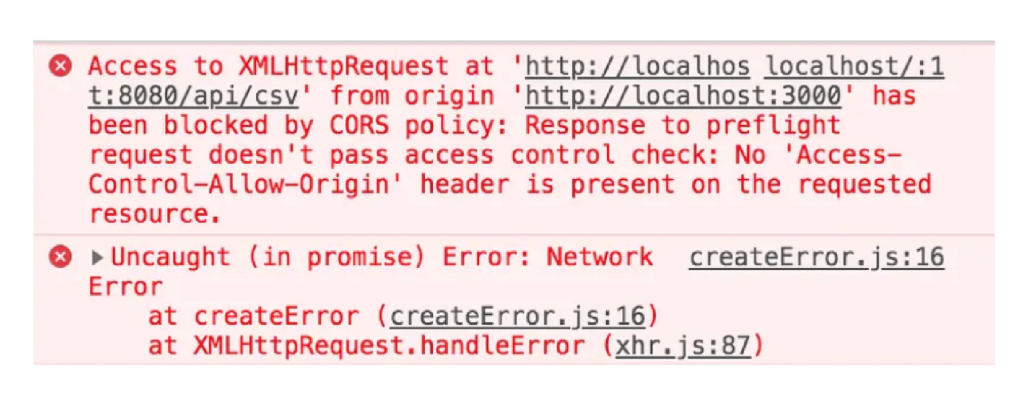
A CORS (Cross-Origin Resource Sharing) issue occurs when a web application running in one origin (domain, protocol, and port) tries to make a request to a server in a different origin.
Issue names can differ like CORS ERROR, ERR_NETWORK, No “Access-Control-Allow-Origin” header is present, ERR_FAILED etc.
CORS is a security feature implemented by browsers to prevent potentially malicious websites from making unauthorized requests to servers on behalf of users without their knowledge.
There are many ways to deal with this. We will see the solutions from simplest to best from backend to frontend.
Fix CORS issue from Backend(JAVA) —
1. Quick Fix (Security Impacted) —
Use the **@CrossOrigin** annotation directly on your REST controller or individual endpoints in a Spring Boot application to allow cross-origin requests from specific origins or from any origin.
Here’s how it works:
import org.springframework.web.bind.annotation.CrossOrigin;
import org.springframework.web.bind.annotation.GetMapping;
import org.springframework.web.bind.annotation.RequestMapping;
import org.springframework.web.bind.annotation.RestController;

@RestController
@RequestMapping("/api")
@CrossOrigin(origins = "*") // Allows all origins
public class MyController {

    @GetMapping("/data")
    public String getData() {
        return "Some data";
    }
}
Using @CrossOrigin(origins = "*") at the class or method level allows requests from any origin.
To restrict access to specific origins, replace "*" with the allowed origins, e.g., "http://localhost:8080".
2. Create Custom CORS Config in your WebSecurityConfig —
In your Spring Boot application, you can configure CORS at the global level or specific controller level.
Create a CorsConfiguration Bean:
Define a custom CORS configuration in a @Configuration class. This allows you to specify which origins, headers, and methods are allowed.
import org.springframework.context.annotation.Bean;
import org.springframework.context.annotation.Configuration;
import org.springframework.web.cors.CorsConfiguration;
import org.springframework.web.cors.UrlBasedCorsConfigurationSource;
import org.springframework.web.filter.CorsFilter;

@Configuration
public class CustomCorsConfig {

    @Bean
    public CorsFilter corsFilter() {
        CorsConfiguration config = new CorsConfiguration();
        config.addAllowedOrigin("http://localhost:3000"); // Replace with your UI origin
        config.addAllowedMethod("*"); // Allows all HTTP methods (GET, POST, PUT, DELETE, etc.)
        config.addAllowedHeader("*"); // Allows all headers
        config.setAllowCredentials(true); // Allows cookies or credentials to be sent

        UrlBasedCorsConfigurationSource source = new UrlBasedCorsConfigurationSource();
        source.registerCorsConfiguration("/**", config); // Apply CORS settings to all paths
        return new CorsFilter(source);
    }
}
If you have Spring Security enabled, you need to ensure that CORS configuration is applied before Spring Security filters it. Add .cors() to your WebSecurityConfigurerAdapter:
import org.springframework.context.annotation.Bean;
import org.springframework.context.annotation.Configuration;
import org.springframework.security.config.annotation.web.builders.HttpSecurity;
import org.springframework.security.config.annotation.web.configuration.EnableWebSecurity;
import org.springframework.security.config.annotation.web.configuration.WebSecurityConfigurerAdapter;
import org.springframework.web.cors.CorsConfiguration;
import org.springframework.web.cors.UrlBasedCorsConfigurationSource;
import org.springframework.web.filter.CorsFilter;

@Configuration
@EnableWebSecurity
public class WebSecurityConfig extends WebSecurityConfigurerAdapter {

    @Override
    protected void configure(HttpSecurity http) throws Exception {
        http.cors() // Enable CORS support in Spring Security
            .and()
            .csrf().disable() // Disable CSRF if not needed
            .authorizeRequests()
            .anyRequest().authenticated(); // Example for secure endpoints, customize as needed
    }

    @Bean
    public CorsFilter corsFilter() {
        CorsConfiguration config = new CorsConfiguration();
        config.addAllowedOrigin("http://localhost:3000"); // Allowed origin
        config.addAllowedMethod("*"); // Allow all HTTP methods
        config.addAllowedHeader("*"); // Allow all headers
        config.setAllowCredentials(true);

        UrlBasedCorsConfigurationSource source = new UrlBasedCorsConfigurationSource();
        source.registerCorsConfiguration("/**", config);
        return new CorsFilter(source);
    }
}
Fix CORS issue from Frontend (Angular/React) —
1. Use a Proxy in Development (Dev/Local Environment only)-
Edit the package.json file in your React project:
Add a "proxy" field to your package.json, pointing to your backend API server.
// package.json
{
  "name": "your-react-app",
  "version": "0.1.0",
  "private": true,
  "dependencies": {
    // your dependencies
  },
  "scripts": {
    // your scripts
  },
  "proxy": "http://your-api-server.com"
}
2. Use fetch or axios with credentials
If your API requires credentials (like cookies or authentication headers), you might need to explicitly allow them. Ensure you include { credentials: 'include' } in your fetch or axios request.
Example with fetch:
fetch("http://your-api-server.com/api/resource", {
  method: "GET",
  credentials: "include"
})
  .then(response => response.json())
  .then(data => console.log(data))
  .catch(error => console.error("Error:", error));
Example with axios:
(This has worked for me, u can also use this to set windows credentials.)
import axios from 'axios';

axios.get("http://your-api-server.com/api/resource", { withCredentials: true })
  .then(response => console.log(response.data))
  .catch(error => console.error("Error:", error));
Hope this helps somebody!! Please clap if it did :)
메타데이터
- post_id
- cd47e9529807
- slug
- cors-policy-solve-your-cross-origin-issues-err-network-err-failed-etc-cd47e9529807
- url
- https://medium.com/@ByteCodeBlogger/cors-policy-solve-your-cross-origin-issues-err-network-err-failed-etc-cd47e9529807
- canonical_url
- https://medium.com/@ByteCodeBlogger/cors-policy-solve-your-cross-origin-issues-err-network-err-failed-etc-cd47e9529807
- author_url
- https://medium.com/@ByteCodeBlogger
- status
- ok
- fetched_at
- 2026-07-13 11:18:52