Fabric Data Warehouse readable secondary
This is for anyone hitting concurrency limits in Fabric Warehouse, or wondering how far it can actually scale.
Fabric Data Warehouse readable secondary
This is for anyone hitting concurrency limits in Fabric Warehouse, or wondering how far it can actually scale.
Create Readable secondary code: fabric-toolbox/accelerators/mirror-lakehouse at main · microsoft/fabric-toolbox
Test client : MarkPryceMaherMSFT/sql-stress-test
I’ve had an idea for a while. I’ve been thinking it should be possible to scale out a Fabric Data Warehouse. In fact, I should be able to scale out ANY SQL Endpoint (Fabric Lakehouse or Fabric Mirrored Database…) infinitely*… (*until you run out of money).
OneLake Shortcuts are one of the best things about Fabric, and they’re the key to scaling out a Fabric Warehouse/Lakehouse/Mirrored Database.
And wouldn’t you know — it only bloody works!!!! It works so well I can show linear scaling.
I created a working POC (Proof of Concept). Now I’m working on is how to make it easier to use and implement (but that’s for another blog post).
So how does it work? It’s so simple you’ll kick yourself. (I may do another post on the detail if there’s enough interest.)
For Non-Experts (What’s Actually Going On?)
Think of a Fabric Data Warehouse like a single checkout in a supermarket.
It can only handle so many customers (queries) at once.
What we’re doing here is creating lots of extra checkouts — but they all point to the same stock room (the same data).
- The data lives in one place
- But we create multiple “read-only copies” (clones)
- Each one can handle its own queries
So instead of one busy queue, you now have lots of smaller queues running in parallel.
More lanes. Same data. Much faster overall.
(Can’t Fabric Data Warehouse already scale out infinitely already? Nothing cant actually scale infinitely, there will always be a bottleneck somewhere. The trick is to try and push scaling as hard as it will go, find the bottlenecks then address them)
How does it work?
It’s very simple:
- We don’t copy the data
- We use OneLake Shortcuts to point to it
- Then we recreate the SQL layer on top
Steps
-
Create a workspace (think of a workspace as a SQL Server) called
Clone1 -
Create a Lakehouse in workspace
Clone1calleddb1(the same name as the Data Warehouse—but it doesn’t need to be) -
Create table shortcuts to the warehouse for all the tables in the
dboschema -
Create schema shortcuts for the rest of the schemas
Now you have a lakehouse whose data will always stay in sync with the warehouse
-
Run MD Sync (this forces the SQL Analytics Endpoint to create all the tables)
-
Create a job to copy all the views/procs/functions from the warehouse to the new SQL Analytics Endpoint.
Now you have a clone of your warehouse (todo: move the permissions, apply RLS, DDM)
Now run step 6 many times a day. The data is always in sync, but we need to keep the SQL objects in sync.
That’s it…
So let’s see it work.
[embed]Creating a readable secondary of a Fabric Data Warehouse
We now have a clone (or a readable secondary).
We can repeat this process as many times as we like. In my case, I created 23 of them (I could have gone higher).
When I ran the test client, I could get 30 concurrent queries running on a single Fabric Data Warehouse.
That might not feel like a lot, but the query I used scanned 6 billion rows. It took about 2.4 seconds to execute on its own.
The code is here: MarkPryceMaherMSFT/sql-stress-test
Now scale that out:
[embed]730 concurrent queries!
730 concurrent queries, all executing across 23 Lakehouses in 23 Workspaces.
Where I cheated (and what needs improving)
Before we get too excited — here’s where I cheated, and where there’s room for improvement.
There’s no cheating on the performance or concurrency numbers though.
Things to improve:
- The cloning tool didn’t copy permissions (so I added these manually)
- I need to improve the scheduler that keeps the SQL objects up to date
- This should be turned into a separate workload
- The test client manually loops through connection strings for each workspace
Because of that, testing can currently only be done via the test client.
So I’m working on a TDS load-balancing proxy, so tools like Power BI can benefit.
Why this matters
I built this solution to test scale-out, but it could also be used to:
- Improve Power BI reports with lots of visuals
- Handle high concurrency workloads
- Act as part of a DR (disaster recovery) solution
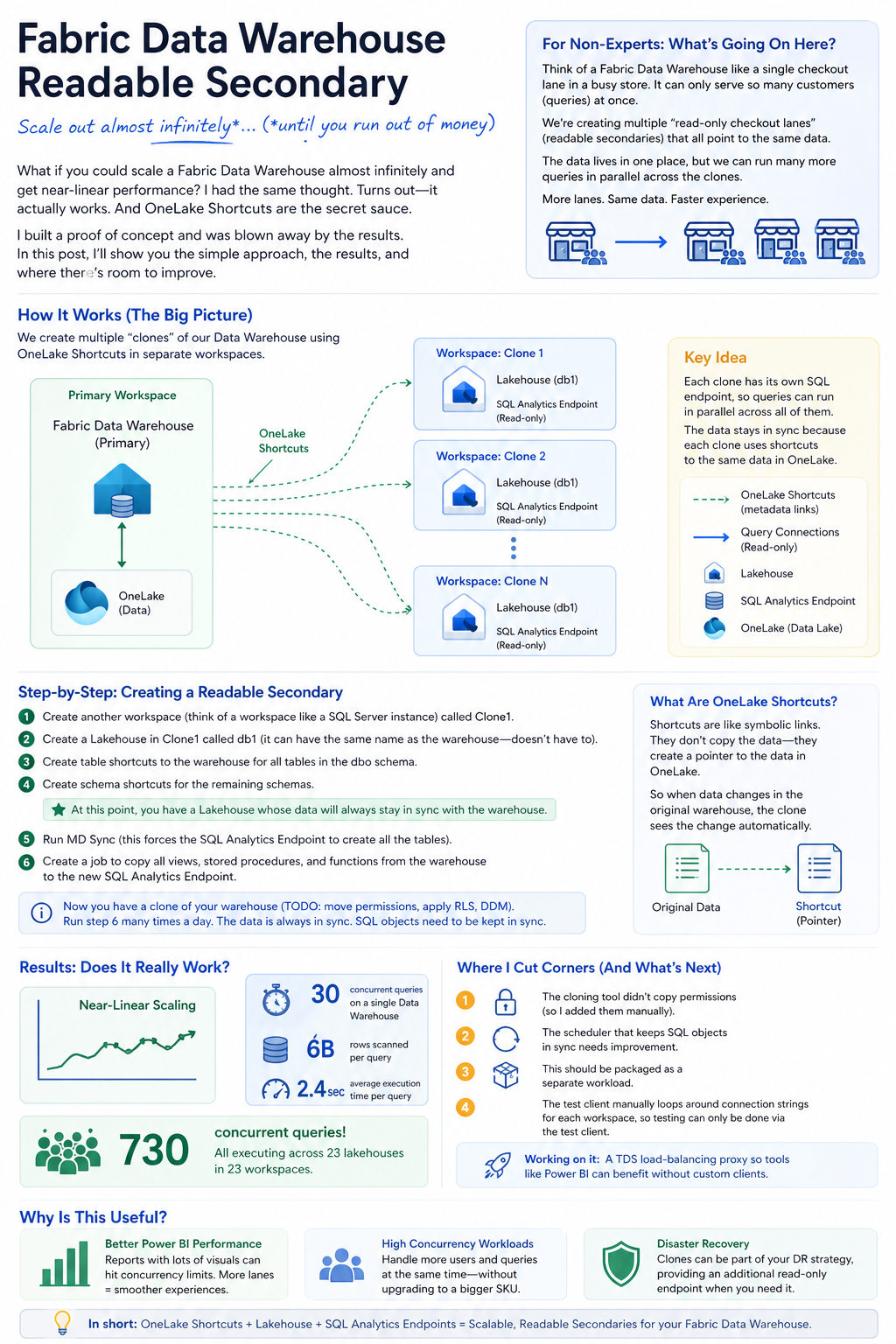
one pager
메타데이터
- post_id
- cd6239431d7a
- slug
- fabric-data-warehouse-readable-secondary-cd6239431d7a
- url
- https://medium.com/@sqltidy/fabric-data-warehouse-readable-secondary-cd6239431d7a
- canonical_url
- https://medium.com/@sqltidy/fabric-data-warehouse-readable-secondary-cd6239431d7a
- author_url
- https://medium.com/@sqltidy
- status
- ok
- fetched_at
- 2026-06-15 22:55:51