Mastering Temporal.io
Introduction
Mastering Temporal.io
Introduction
Building reliable distributed systems is hard. Really hard. Network failures, service crashes, partial completions, and the dreaded “where did my data go?” moments have plagued developers for decades.
Enter Temporal.io — an open-source workflow orchestration platform that treats your application logic as durable, fault-tolerant workflows. Think of it as a time-traveling execution engine that never forgets where it left off, even when things go wrong.
In this article, we’ll explore what makes Temporal special, how it works under the hood, and how you can set it up locally to start building bulletproof applications.
What Are Temporal Workflows?
A Temporal Workflow is a durable function that orchestrates business logic across services, tolerates failures, and maintains state automatically — without you writing complex recovery code.
The Magic of Durability
Imagine you’re orchestrating a payment flow:
- Validate the order
- Charge the credit card
- Update inventory
- Send confirmation email
What happens if your service crashes after step 2? In traditional systems, you’d need:
- Transaction management
- Dead letter queues
- Retry mechanisms
- State reconciliation jobs
With Temporal, you write your workflow as simple, sequential code. If a crash occurs, Temporal automatically replays the workflow from its event history, skipping already-completed steps and resuming exactly where it left off.
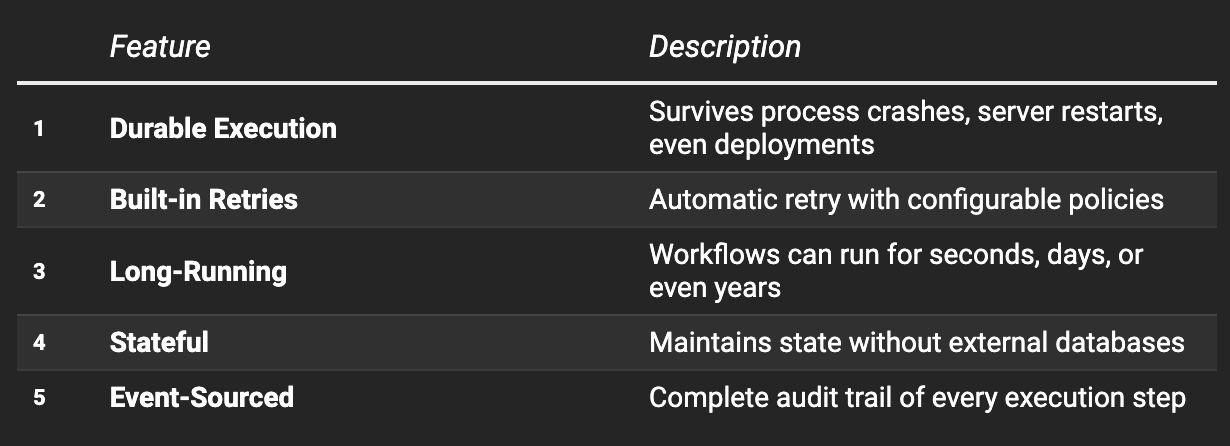
Key Characteristics
Temporal Server Architecture
Understanding how Temporal works internally helps you design better workflows and troubleshoot issues effectively.
The Four Core Services
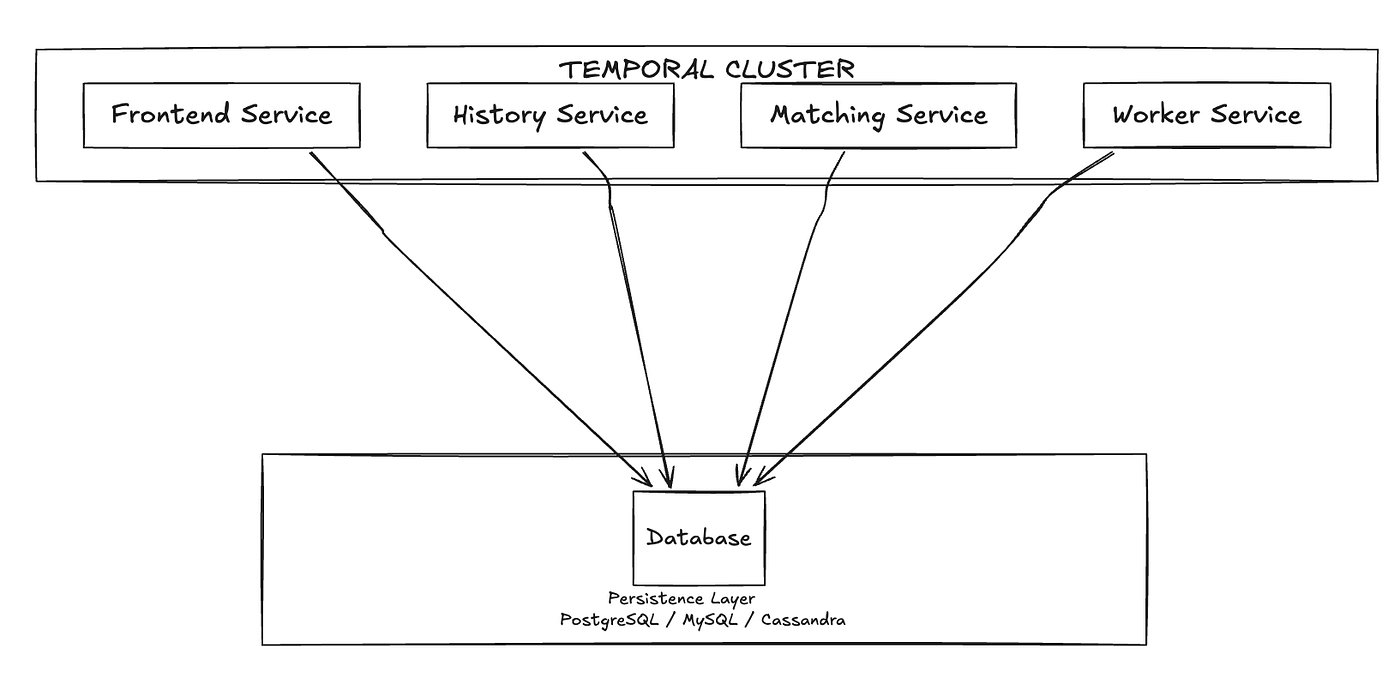
Temporal Server consists of four main components, typically deployed as separate services:
1. Frontend Service
The gateway to the Temporal cluster. All client requests (starting workflows, sending signals, queries) go through here.
- Handles authentication and authorization
- Rate limiting and request validation
- Routes requests to appropriate internal services
- Load balances across History Service instances
2. History Service
The brain of Temporal — manages workflow state and event history.
- Stores the complete event history of every workflow execution
- Handles workflow state transitions
- Manages timers and scheduled events
- Ensures exactly-once execution semantics
3. Matching Service
The dispatcher — connects workflows/activities with available workers.
- Manages Task Queues
- Matches pending tasks with polling workers
- Handles task dispatching and load distribution
- Supports sticky execution for workflow affinity
4. Worker Service (Internal)
Handles background operations within the cluster.
- Replication between data centers
- Archival of workflow histories
- Cross-cluster operations
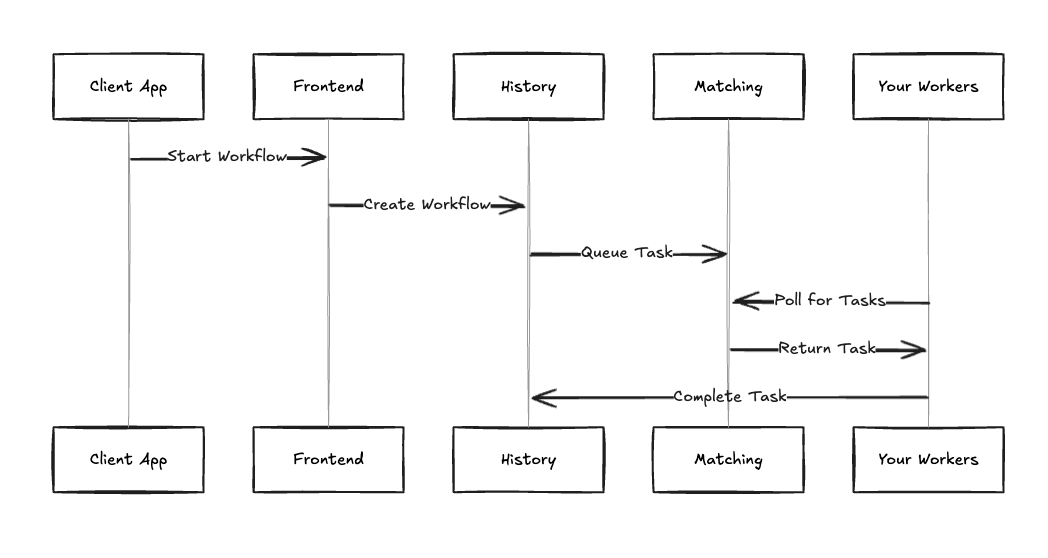
How They Communicate
Temporal Web UI
The Temporal Web UI is your window into workflow execution — a powerful dashboard for monitoring, debugging, and managing workflows.
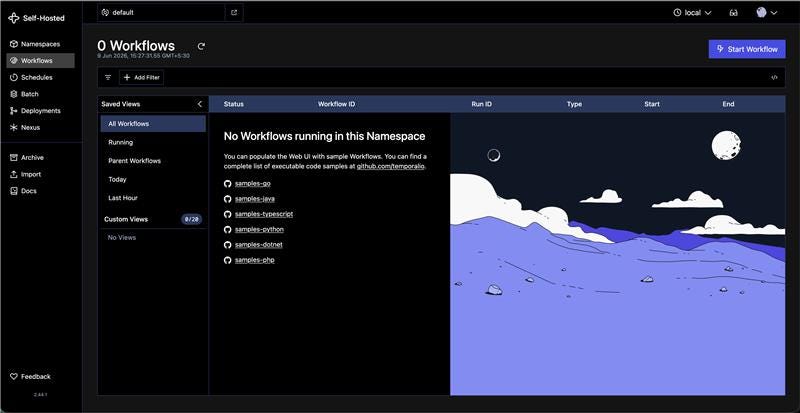
Key Features
- Workflow Visibility
- View all running, completed, and failed workflows
- Search by workflow ID, type, or status
- Filter by time range and namespace
- Execution Details
- Step-by-step timeline of workflow execution
- Input/output of each activity
- Error messages and stack traces
- Retry history and pending activities
- Event History Explorer
- Complete audit trail of every event
- JSON payloads for debugging
- Timer schedules and signal deliveries
- Workflow Operations
- Terminate stuck workflows
- Send signals to running workflows
- Reset workflows to a previous state
- Query workflow state
The Web UI eliminates the “black box” problem — you always know exactly what your workflows are doing.
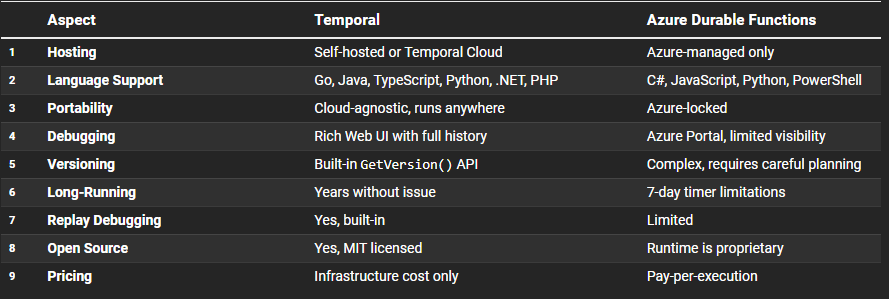
Temporal vs Azure Durable Functions
Both platforms solve workflow orchestration, but with fundamentally different approaches.
When to Choose Temporal
- Multi-cloud or hybrid deployments — No vendor lock-in
- Complex, long-running workflows — Days, weeks, or months
- Heavy debugging needs — Superior observability
- High-throughput scenarios — Better scalability control
- Team uses multiple languages — Polyglot support
When Azure Durable Functions Might Fit
- All-in on Azure ecosystem
- Simpler workflows with short durations
- Serverless preference — No infrastructure management
- Small team — Faster initial setup
Core Components Explained
1. Workflows
The orchestrators — define the business logic flow.
- Must be deterministic (same inputs = same outputs)
- Cannot perform I/O directly (no HTTP calls, no database access)
- Survive crashes through event replay
- Can run for extended periods (even years)
2. Activities
The workhorses — perform actual work with external systems.
- Execute HTTP calls, database operations, file I/O
- Automatically retried on failure
- Support heart beating for long operations
- Can timeout and be cancelled
3. Workers
The executors — processes that run your workflow and activity code.
- Poll Task Queues for work
- Execute workflow/activity code locally
- Report results back to Temporal Server
- Scale horizontally for throughput
4. Task Queues
The routing mechanism — connect workflows to workers.
- Named queues that workers poll
- Support sticky execution (workflow affinity)
- Enable worker specialization (GPU workers, region-specific)
5. Signals
External inputs to running workflows.
- Send data to a workflow at any point
- Trigger state changes or decisions
- Non-blocking (fire-and-forget)
6. Queries
Read workflow state without affecting execution.
- Synchronous request/response
- Perfect for UI status displays
- Cannot modify workflow state
7. Namespaces
Isolation boundaries for workflows.
- Separate environments (dev, staging, prod)
- Different retention policies
- Access control boundaries
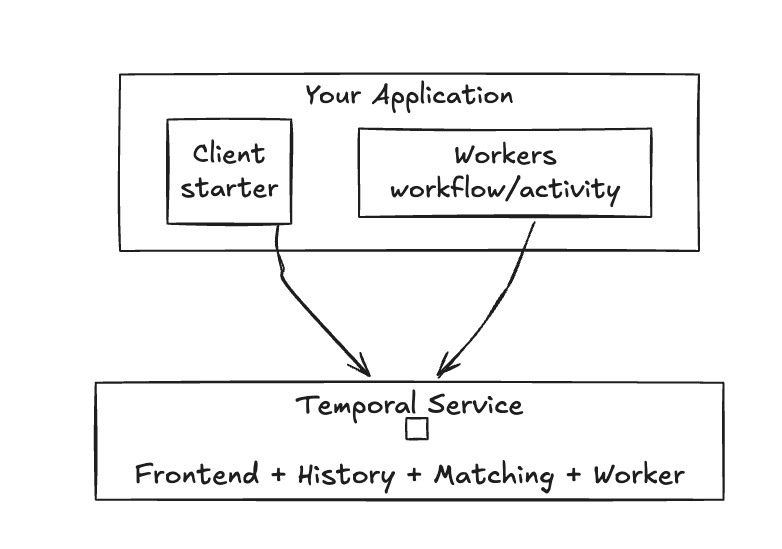
8. Temporal Service
The cluster itself — all four services working together.
Child Workflows
Child workflows are workflows started from within a parent workflow.
Why Use Child Workflows?
- Code Organization Break complex workflows into manageable, reusable pieces.
- Separate Failure Domains Child workflow failures can be handled independently.
- Different Retry Policies Each child can have its own timeout and retry configuration.
- Separate Event Histories Avoids bloating a single workflow’s history.
Parent-Child Relationships

Example Use Case
An Order Processing workflow might spawn child workflows for:
- Payment Processing (with financial-specific retries)
- Inventory Update (separate service domain)
- Notification Delivery (fire-and-forget pattern)
What is Nexus?
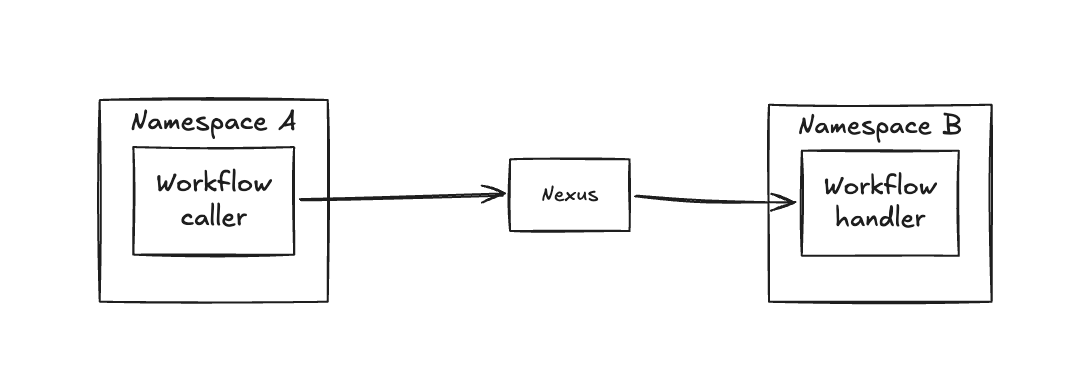
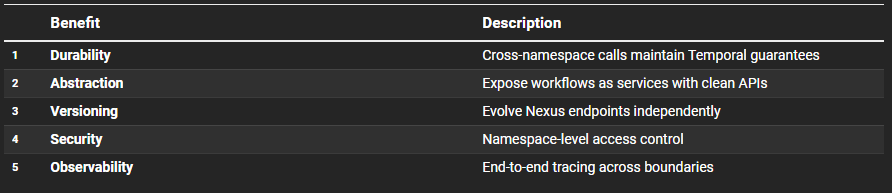
Nexus is Temporal’s solution for cross-namespace and cross-cluster workflow communication — think of it as an API layer for workflows.
The Problem Nexus Solves
In large organizations:
- Teams own different namespaces
- Services run in different clusters
- Workflows need to call workflows across boundaries
Traditional approaches (HTTP calls from activities) lose Temporal’s durability guarantees.
How Nexus Works
Key Benefits
Use Cases
- Multi-team architectures — Team A’s workflow calls Team B’s workflow
- Multi-region deployments — Cross-cluster workflow coordination
- Service boundaries — Clean API contracts between domains
- Migration patterns — Gradual namespace consolidation
Local Setup Guide
Let’s get Temporal running locally. I’ll show you two approaches for different needs.
Approach 1: Quick Start (CLI — No Database)
Best for: Learning, quick prototyping, simple testing
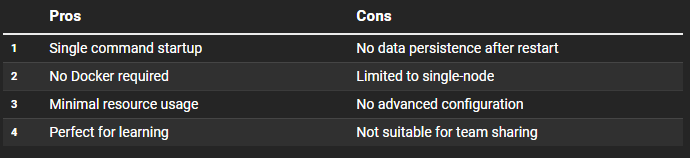
This approach runs Temporal entirely in-memory — fast to start, no persistence between restarts.
Step 1: Install Temporal CLI
macOS (Homebrew):
brew install temporalLinux/macOS (curl):
curl -sSf https://temporal.download/cli.sh | shWindows (scoop):
scoop install temporal-cliStep 2: Start the Development Server
temporal server start-devThat’s it! You now have:
- Temporal Server running on
localhost:7233 - Web UI available at
[http://localhost:8233](http://localhost:8233`)
Step 3: Verify Installation
Open [http://localhost:8233](http://localhost:8233`) in your browser. You should see the Temporal Web UI with the default namespace ready.
Pros & Cons
Approach 2: Docker Compose (With PostgreSQL)
Best for: Team development, persistent data, production-like environment
This approach runs each Temporal service in its own container with PostgreSQL for persistence.
Step 1: Clone the Docker Compose Repository
git clone https://github.com/temporalio/docker-compose.git
cd docker-compose
Step 2: Start with PostgreSQL
docker-compose -f docker-compose-postgres.yml up -dThis starts:
- PostgreSQL (port 5432) — Data persistence
- Temporal Server (port 7233) — All services
- Temporal Web UI (port 8080) — Dashboard
- Temporal Admin Tools — CLI utilities
Step 3: Verify Services
docker-compose -f docker-compose-postgres.yml psYou should see all containers running:
NAME                      STATUS
temporal-postgresql       Up
temporal                  Up
temporal-ui               Up
temporal-admin-tools      Up
Step 4: Access the Web UI
Open [http://localhost:8080](http://localhost:8080) for the Web UI.
Pros & Cons
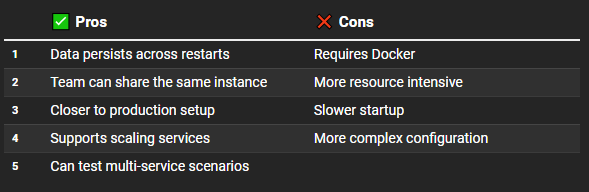
Which Approach Should You Choose?
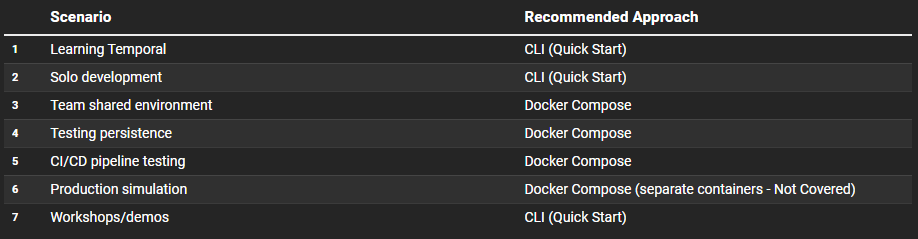
Note: This article does not cover a Docker Compose setup with separate containers, as including it here would add significant complexity. If you’d like a production-ready multi-container setup, let me know and I can publish a dedicated Part 2.
Quick Start: Running Your First Workflow
After setting up locally, run the official samples to verify everything works:
# Clone samples repository
git clone https://github.com/temporalio/samples-dotnet.git
cd samples-dotnet

# Run the ActivitySimple sample
cd src/ActivitySimple
dotnet run
You should see the workflow execute in the Web UI at [http://localhost:8233](http://localhost:8233).
Conclusion
Temporal.io represents a paradigm shift in building distributed systems. Instead of wrestling with failure handling, retry logic, and state management, you write straightforward business logic and let Temporal handle the complexity.
Key Takeaways
- Workflows are durable functions that survive failures
- Architecture is modular with Frontend, History, Matching, and Worker services
- Web UI provides full visibility into workflow execution
- vs Durable Functions — Temporal offers more portability and observability
- Core Components work together seamlessly
- Child Workflows enable modular, scalable workflow design
- Nexus solves cross-namespace/cluster communication
Next Steps
- Set up locally using the CLI or Docker Compose
- Run the samples to understand patterns
- Read the official docs at [docs.temporal.io]
The learning curve pays off quickly when you realize you’ll never write another retry loop or state recovery job again.
If you found this article helpful, give it a clap 👏 and follow for more distributed systems content!
메타데이터
- post_id
- cd8c8196d5cc
- slug
- mastering-temporal-io-cd8c8196d5cc
- url
- https://medium.com/@mahesh-more/mastering-temporal-io-cd8c8196d5cc
- canonical_url
- https://medium.com/@mahesh-more/mastering-temporal-io-cd8c8196d5cc
- author_url
- https://medium.com/@mahesh-more
- status
- ok
- fetched_at
- 2026-06-10 18:44:10