CLI and Chill: Deploy Production-Grade Apps on IBM Cloud in Minutes
Automate a multi-zone, load-balanced infrastructure with a single bash script
CLI and Chill: Deploy Production-Grade Apps on IBM Cloud in Minutes
Automate a multi-zone, load-balanced infrastructure with a single bash script
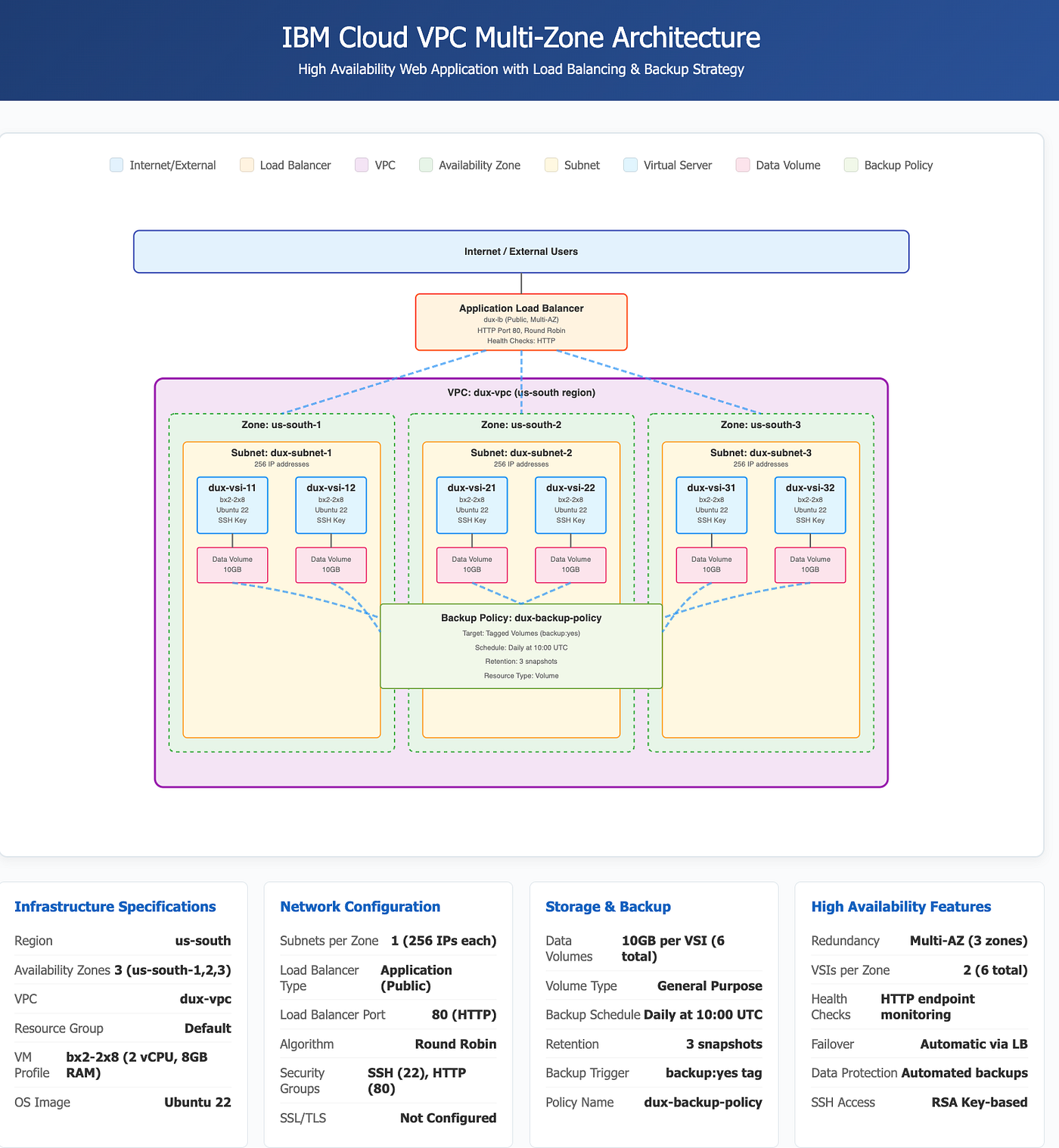
If you’ve ever clicked through a cloud console for 30 minutes just to set up a single server, you know the pain. Now imagine doing that for a production-ready, multi-zone application with load balancing and automated backups. Sounds like a full day’s work, right?
What if I told you it could be done with a single bash script in under 10 minutes?
Why CLI Over Console?
Graphical interfaces are great for exploring, but when you need to deploy infrastructure repeatedly and reliably, code wins every time. The IBM Cloud CLI gives you:
- Repeatability — Run the same script to get identical infrastructure
- Speed — Deploy in minutes instead of hours
- Version Control — Track infrastructure changes in Git
- Automation — Integrate with CI/CD pipelines
- No Dependencies — Just bash, no Terraform or Ansible needed
What We’re Building
This script deploys a real production-grade architecture:
- 1 VPC with proper networking
- 6 Virtual Servers (2 per availability zone across 3 zones)
- Application Load Balancer distributing traffic
- 6 Data Volumes (10GB each) with automated backups
- Security Groups with SSH and HTTP access
- Backup Policy (daily snapshots, 3-day retention)
All running on Ubuntu 22.04 with 2 vCPUs and 8GB RAM per instance.
The Architecture
Our multi-zone deployment looks like this:
Internet → Load Balancer → 6 VSIs (spread across 3 zones) → Data Volumes → Daily Backups
Why three zones? If an entire data center goes down, your app stays up. That’s real high availability.
Script Breakdown: The Key Parts
Let me walk you through the clever bits of this automation.
1. Idempotent Resource Creation
The script checks if resources exist before creating them:
VPC_ID=$(ibmcloud is vpcs --output JSON | jq -r ".[] | select(.name==\"$VPC_NAME\") | .id")
if [[ -z "$VPC_ID" ]]; then
  echo "🌉 Creating VPC..."
  VPC_ID=$(ibmcloud is vpc-create "$VPC_NAME" --output JSON | jq -r '.id')
fi
Why this matters: You can run the script multiple times without creating duplicates. Hit an error? Just rerun it. This is the foundation of reliable automation.
2. Multi-Zone Deployment
Using bash associative arrays for clean zone management:
declare -A ZONES=( ["1"]="us-south-1" ["2"]="us-south-2" ["3"]="us-south-3" )
declare -A SUBNETS=( ["1"]="dux-subnet-1" ["2"]="dux-subnet-2" ["3"]="dux-subnet-3" )
for Z in 1 2 3; do
INSTANCE1_ID=$(create_vsi "${VSIS1[$Z]}" "${ZONES[$Z]}" "$SUBNET_ID")
INSTANCE2_ID=$(create_vsi "${VSIS2[$Z]}" "${ZONES[$Z]}" "$SUBNET_ID")
doneThis creates 2 servers in each of the 3 zones. If one zone fails, the other two keep your app running.
3. Smart Backup Strategy
Here’s where it gets powerful:
# Tag each volume for backup
ibmcloud is volume-update "$VOL_ID" --tags "backup:yes"
# Create backup policy that targets tagged volumes
ibmcloud is backup-policy-create --name "$BP_NAME" \
--match-tags "backup:yes" \
--match-resource-type volume# Daily backups at 10 UTC, keep 3 snapshots
ibmcloud is backup-policy-plan-create "$BP_ID" \
--cron-spec "0 10 * * *" \
--delete-over-count 3The beauty: Tag any volume with backup:yes and it's automatically backed up daily. No manual configuration needed.
4. Load Balancer Setup
The load balancer ties everything together:
# Create load balancer across all three subnets
ibmcloud is load-balancer-create "$LB_NAME" public \
  --subnet "${SUBNET_IDS[1]}" \
  --subnet "${SUBNET_IDS[2]}" \
  --subnet "${SUBNET_IDS[3]}"
# Create backend pool with health checks
ibmcloud is load-balancer-pool-create "$POOL_NAME" "$LB_ID" \
round_robin http 20 2 5 http# Add all 6 VSIs to the pool
for VSI in all_instances; do
ibmcloud is load-balancer-pool-member-create "$LB_ID" "$POOL_ID" \
80 "${PRIVATE_IPS[$VSI]}"
doneTraffic hits the load balancer, which distributes it across all 6 servers. If a server fails a health check, traffic automatically routes around it.
The Power of jq
Throughout the script, jq transforms JSON output into usable variables:
# Get VPC ID from JSON
VPC_ID=$(ibmcloud is vpcs --output JSON | jq -r ".[] | select(.name==\"$VPC_NAME\") | .id")
# Find Ubuntu image
IMAGE_ID=$(ibmcloud is images --output JSON | jq -r ".[] | select(.name|test(\"ubuntu-22\")) | .id")Learning jq is essential for CLI automation. It's your JSON Swiss Army knife.
Running the Script
Prerequisites:
# Install IBM Cloud CLI
curl -fsSL https://clis.cloud.ibm.com/install/linux | sh
# Install VPC plugin
ibmcloud plugin install vpc-infrastructure
# Login
ibmcloud login --apikey YOUR_API_KEY
Then just run:
export IC_API_KEY="your-api-key"
chmod +x deploy-dux.sh
./deploy-dux.sh
Watch the friendly emoji output as your infrastructure comes to life:
- 🌉 Creating VPC…
- 💻 Creating VSI dux-vsi-11…
- ⚖️ Creating Load Balancer…
- ✅ Multi-zone Deployment Complete!
In about 10 minutes, you’ll get a URL to access your load-balanced application.
Is This Production-Ready?
Let’s check the boxes:
✅ High Availability — Multi-zone deployment ✅ Disaster Recovery — Automated daily backups ✅ Security — SSH restricted to your IP, security groups configured ✅ Scalability — Add more zones/instances by editing arrays ✅ Observability — Load balancer health checks ✅ Infrastructure as Code — Everything version-controlled
For a true production setup, you’d want to add:
- HTTPS with SSL certificates
- Monitoring and alerting
- Auto-scaling instance groups
- Secrets management (not environment variables)
- Network ACLs for additional security
- Bastion host for SSH access
But as a foundation? This is solid.
Use Cases
This architecture pattern works great for:
- Web Applications — PHP, Node.js, Python apps
- API Services — RESTful or GraphQL backends
- E-commerce Sites — Can’t afford downtime
- Development Environments — Quick realistic setups
- Demo Systems — Impress clients with fast deploys
Key Takeaways
- CLI beats console for automation — Scripts are repeatable, consoles are not
- Idempotency is crucial — Always check before creating resources
- Multi-zone = real HA — Zone failures won’t take you down
- Tag-based policies scale — One backup policy for all volumes
- jq is your friend — Master JSON processing for CLI work
The Bottom Line
You don’t need complex tools to build serious infrastructure. With bash, the IBM Cloud CLI, and some smart scripting patterns, you can deploy production-grade systems in minutes.
The best part? Everything is transparent. No framework magic, no hidden state files, no DSL to learn. Just clear, understandable automation that you can debug, modify, and own.
Sometimes the simplest tools are the most powerful. So grab your terminal, load up this script, and CLI and chill. ☁️
Resources
메타데이터
- post_id
- cdd0f84b4d75
- slug
- cli-and-chill-deploy-production-grade-apps-on-ibm-cloud-in-minutes-cdd0f84b4d75
- url
- https://medium.com/@sreekarbv/cli-and-chill-deploy-production-grade-apps-on-ibm-cloud-in-minutes-cdd0f84b4d75
- canonical_url
- https://medium.com/@sreekarbv/cli-and-chill-deploy-production-grade-apps-on-ibm-cloud-in-minutes-cdd0f84b4d75
- author_url
- https://medium.com/@sreekarbv
- status
- ok
- fetched_at
- 2026-06-14 11:28:49