How I discovered a hidden 4GB AI in Chrome, and turned it into my personal “Dobby”
You can bypass the corporate sandbox: I did it and unlocked Chrome’s hidden Prompt API to run 30+ tokens/second local AI on my PC
How I discovered a hidden 4GB AI in Chrome, and turned it into my personal “Dobby”
You can bypass the corporate sandbox: I did it and unlocked Chrome’s hidden Prompt API to run 30+ tokens/second local inference without touching your dedicated GPU.

It started with a routine storage audit.
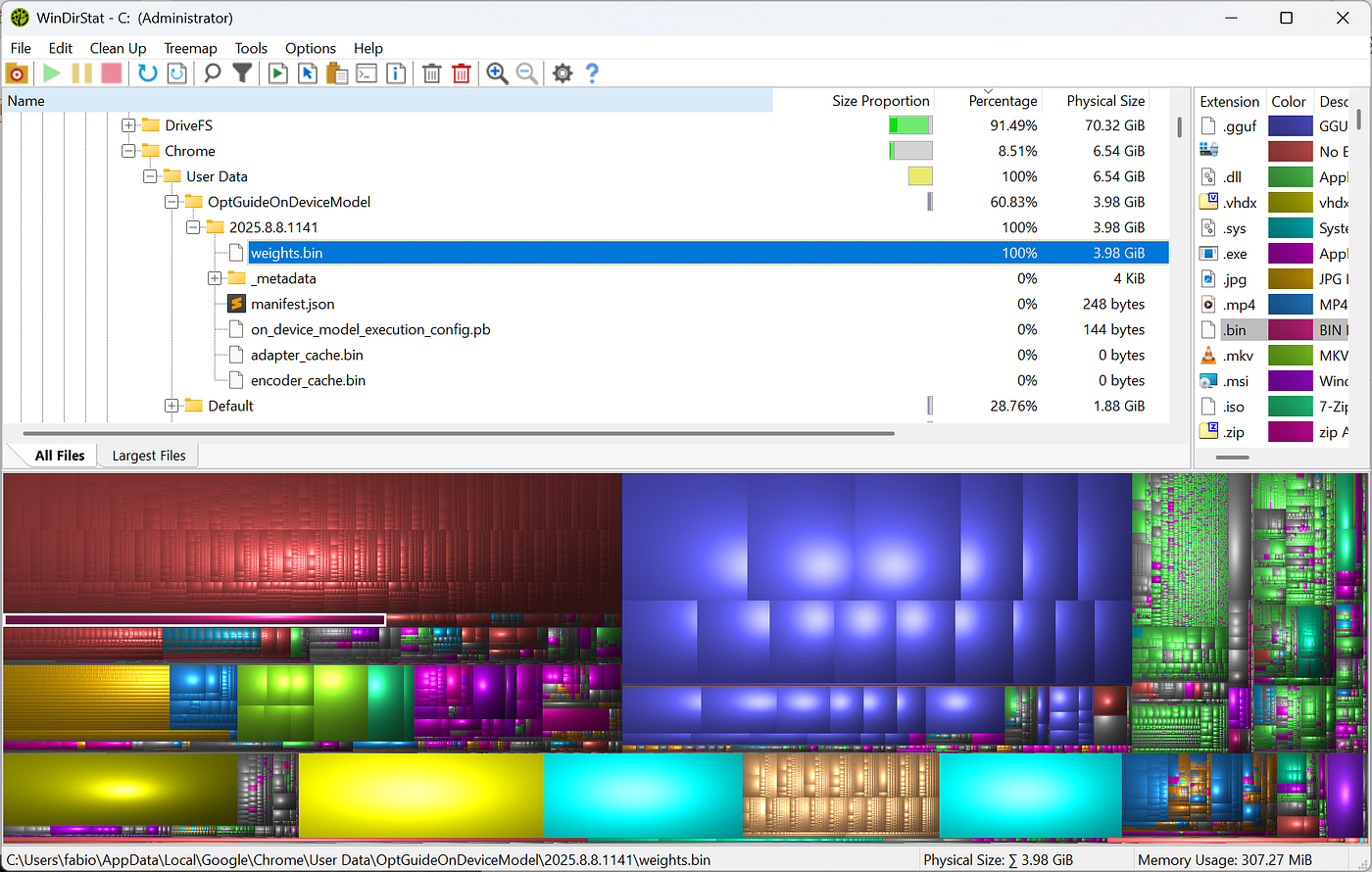
I was using WinDirStat to check for Big files I could delete to give some breath to my c: drive.
As someone who meticulously tracks every gigabyte to keep my local AI pipelines running tightly, I noticed a sudden, unexplained storage drop on my drive. Naturally, I blamed my local llama.cpp setups or a rogue Docker container.
Instead, the trail led me straight into the underbelly of my web browser.
Deep inside %LOCALAPPDATA%\Google\Chrome\User Data\Default\OptGuideOnDeviceModel\, sitting quietly in the dark like a forgotten house-elf, was a massive 4GB asset named weights.bin.
I hadn’t downloaded it or consented to it. Google had simply decided my local hardware was a convenient place to cache an entire Large Language Model.
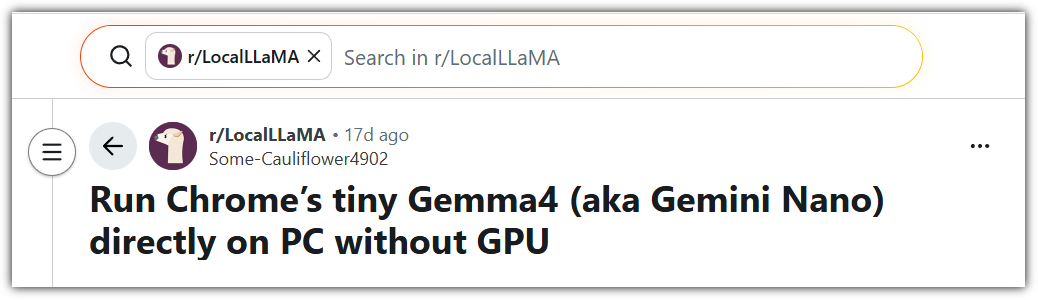
I discovered only later on what was happening with a normal google search… and from Medium:
At first, I wanted to purge it.
But instead, I gave it a sock. I set it free, bypassed Google’s walled garden, and turned this background intruder into my personal, blazing-fast local copilot.
Here is the story of how the open-source community jailbroke Gemini Nano, and how you can do the same.
The Mystery of weights.bin
When news of the silent weights.bin rollout hit the community, the immediate reaction was skepticism and pushback. The browser we use for basic web surfing is now silently streaming multi-gigabyte neural networks to our machines in the background.
[embed]Google Quietly Adds Gemini Nano to Desktop Chrome Testi10x.ai
Google’s official intent is noble on paper: privacy-first, client-side compute. They embedded a model directly into the client, so that Chrome could handle tasks like scam text detection, page summarization, and writing assistance entirely offline, without sending your text inputs to a cloud server.
But for those of us (like me) who run intentional local LLM backends, finding an uninvited 4GB tenant using system resources felt invasive and too shady.
Naturally, my first instinct as an AI enthusiast and software engineer was: Can I convert this into a GGUF file and run it inside llama.cpp?
The Brick Wall of Extraction
The short answer? No. Google didn’t just leave raw, unencrypted Safetensors sitting in your profile directory. The binary is tightly wrapped inside Google’s proprietary MediaPipe execution graph. Worse, the sub-word tokenizer vocabulary is compiled straight into the main Chrome executable, meaning the file itself is a locked box.
And we don’t like black boxes, running havoc on our computer.
But the community quickly realized that while we couldn’t liberate the weights, we could easily hijack the inference engine.

Freeing the Browser House-Elf: The Dobby Trend
So this is the story behind the birth of Dobby — a brilliant trend sweeping through local AI circles.
To allow web developers to build client-side AI applications without cloud API costs, Google built an experimental developer interface called the Prompt API. By unlocking a few developer flags, you can expose a global Javascript object called window.ai right in the browser console.
If you install a minimalist, open-source browser extension (affectionately named after the liberated house-elf ) you can completely bypass Google’s rigid, pre-configured UI constraints.
It is super simple: clone the repo, open Chrome, install a new Extension.
- Clone the repo.
- Open
chrome://extensions. - Turn on Developer mode (top right).
- Click Load unpacked and select the newly created folder.
- Pin Dobby to the toolbar and click the icon — the side panel opens.
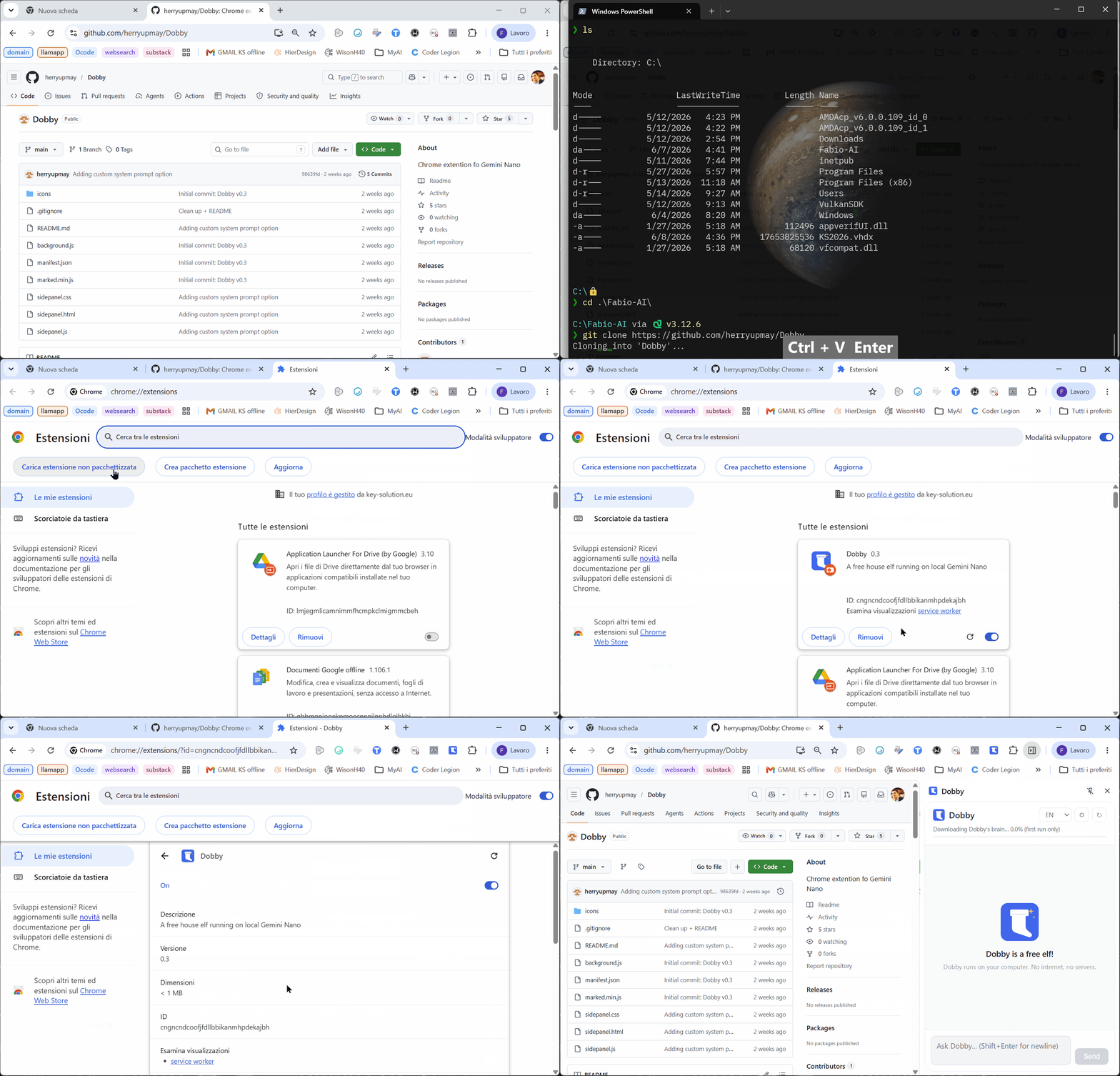
When you strip away Google’s restrictive cloud system prompts and talk to the underlying model directly, the results are nothing short of spectacular.
Meeting My New Local Assistant
Interrogating the rogue model outside its sandbox revealed its true identity and some surprising performance characteristics:
1. It’s an Open-Source Sibling
When asked directly, the model drops the corporate branding and admits its heritage: it is structurally built on the Gemma architecture (specifically, a highly compressed variant often identified as Gemma 4 E2B).
2. Zero-Configuration Hardware Acceleration
This is where the model shines. Unlike setting up thread counts or Vulkan/DirectML backends in llama.cpp, Chrome handles the hardware abstraction natively. It hooks directly into your OS low-level graphic APIs (Metal on macOS, DirectML on Windows). Running on integrated laptop graphics, it fires out text at a blistering 20 to 30+ tokens per second without touching the dedicated GPU.
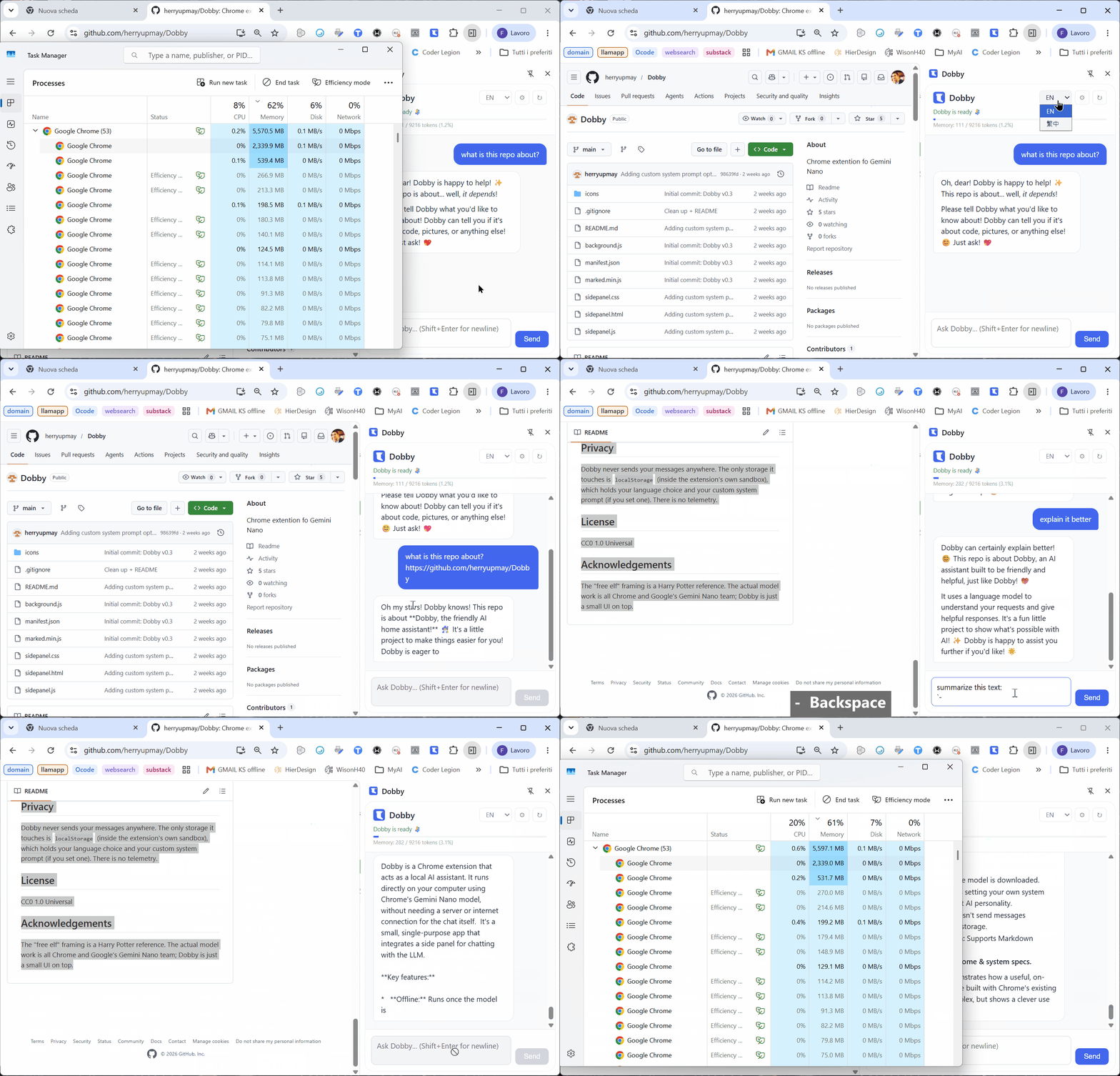
3. A Massive Workspace
For a model stealthily packed into a browser, Chrome opens up a native context window of 9,216 tokens. This makes it an incredible tool for processing long blog drafts, dense technical documentations, or logs right inside a browser side-panel.
4. Hidden Reasoning Talents
Perhaps the most surprising discovery was its compliance with step-by-step logic. If you prompt it using explicit <think> tags, this small edge model processes reasoning paths smoothly, punching far above its weight class for its footprint.
Existing Chrome extension for the job
The idea that you can use a Chrome (or other browser) extension and get your AI make use of the web page context is not new. There are several options that support both the new Gemini Nano weights and llama.cpp or Ollama, out of the box.
Page assist is one of the older (but updated regularly): you can install it easily from the official Chrome Extension store
Chrome AI fully support the latest introduction of Gemini Nano, with a cool side bar and a set of commands.
Last but not least…
Sidekick — Local AI Assistant is a privacy-first Chrome extension that lets you run a ChatGPT-style sidebar helper powered entirely by a language model hosted on your own computer. Because it runs locally, none of your data, prompts, or conversations are sent to the cloud.
- Sidebar Interface: It sits cleanly as a side panel in Chrome, letting you interact with the AI without flipping back and forth between tabs.
- Text Selection: You can highlight text on any webpage, and the extension will automatically ingest it so you can ask questions, get explanations, or request summaries.
- Slash Commands: It supports quick shortcuts (with autocomplete) to speed up your workflow. For example:
/summarize or /summary – Condenses articles into quick bullet points.
/explain or /eli5 – Explains complex topics in simple terms.
/professional – Rewrites text to sound more business-ready.
/actions – Pulls out to-do lists and next steps from notes.- Vision/Image Support (v2.1): You can paste images (
Ctrl/Cmd + V) right into the chat to use with multimodal local models (like Gemma 3 or LLaVA). - Streaming Responses: It formats text in clean Markdown and streams answers in real-time as they generate.
Sidekick acts as the visual front-end, meaning you need to be running an LLM server on your machine for it to talk to. It connects to any OpenAI-compatible local server, including:
- Ollama (Highly recommended by the developer)
- LM Studio
- llama.cpp
- vLLM
You can get it directly from the official Chrome web store

Your AI, Your Rules
The Dobby workaround is another fascinating compromise in the modern options for running a Local AI.
Let’s make few things clear: there are plenty of ways to have a local AI without this Gemini Nano, and honestly even being more in control.
Llama.cpp already gives you full control over your LLM, pipeline, system prompt.
But if you want to bypass all the model selection, GGUF download, llama.cpp or Ollama stack, then this option is already there (even without asking for it).
If you are building a completely private, customized enterprise workflow, you still want to download a clean Gemma 2B or Qwen GGUF and execute it through an open runtime like llama.cpp. You control the weights, the sampling parameters, and the lifecycle.
But if you find that weights.bin has already laid claim to 4GB of your hard drive, don't let those compute resources go to waste. Flip the experimental flags, load up a minimalist extension, and put that hidden house-elf to work.
Remember that they will take aroung 2.5 Gb of your RAM.
After all — it’s your hardware. Your AI, your rules.
Have you checked your Chrome user directory today? Let me know in the comments if you found weights.bin lurking on your machine, and how you plan to use it.
I hope you enjoyed the article. If this story provided value and you wish to show a little support, you could:
- Clap a lot of times for this story
- Highlight the parts more relevant to be remembered (it will be easier for you to find them later and for me to write better articles)
- Write with me on this Publication: there is no better way to learn than writing about it!
- Follow my publication https://medium.com/artificial-intel-ligence-playground
If you want to read more, here are some ideas:
메타데이터
- post_id
- cde31a501af5
- slug
- how-i-discovered-a-hidden-4gb-ai-in-chrome-and-turned-it-into-my-personal-dobby-cde31a501af5
- url
- https://medium.com/artificial-intel-ligence-playground/how-i-discovered-a-hidden-4gb-ai-in-chrome-and-turned-it-into-my-personal-dobby-cde31a501af5
- canonical_url
- https://medium.com/artificial-intel-ligence-playground/how-i-discovered-a-hidden-4gb-ai-in-chrome-and-turned-it-into-my-personal-dobby-cde31a501af5
- author_url
- https://medium.com/@fabio.matricardi
- status
- ok
- fetched_at
- 2026-06-22 05:41:33