Managing and Extending Storage on Oracle Linux Using LVM (OCI Practical Guide)
🔹 Introduction
Managing and Extending Storage on Oracle Linux Using LVM (OCI Practical Guide)
🔹 Introduction
In real-world environments, running out of disk space is not just a small issue — it can directly impact applications, logging, and even cause downtime.
I’ve seen situations where application logs suddenly filled up the disk, and traditional partitioning made it difficult to extend storage quickly. In such cases, we need a solution that is flexible, scalable, and does not require downtime.
That’s where LVM (Logical Volume Manager) becomes very useful.
If you are working on Oracle Cloud Infrastructure with Oracle Linux, LVM allows you to:
- Extend storage easily
- Combine multiple disks
- Manage space dynamically
👉 In this article, I’ll walk you through a simple, practical approach to configuring LVM and extending storage using an OCI block volume.
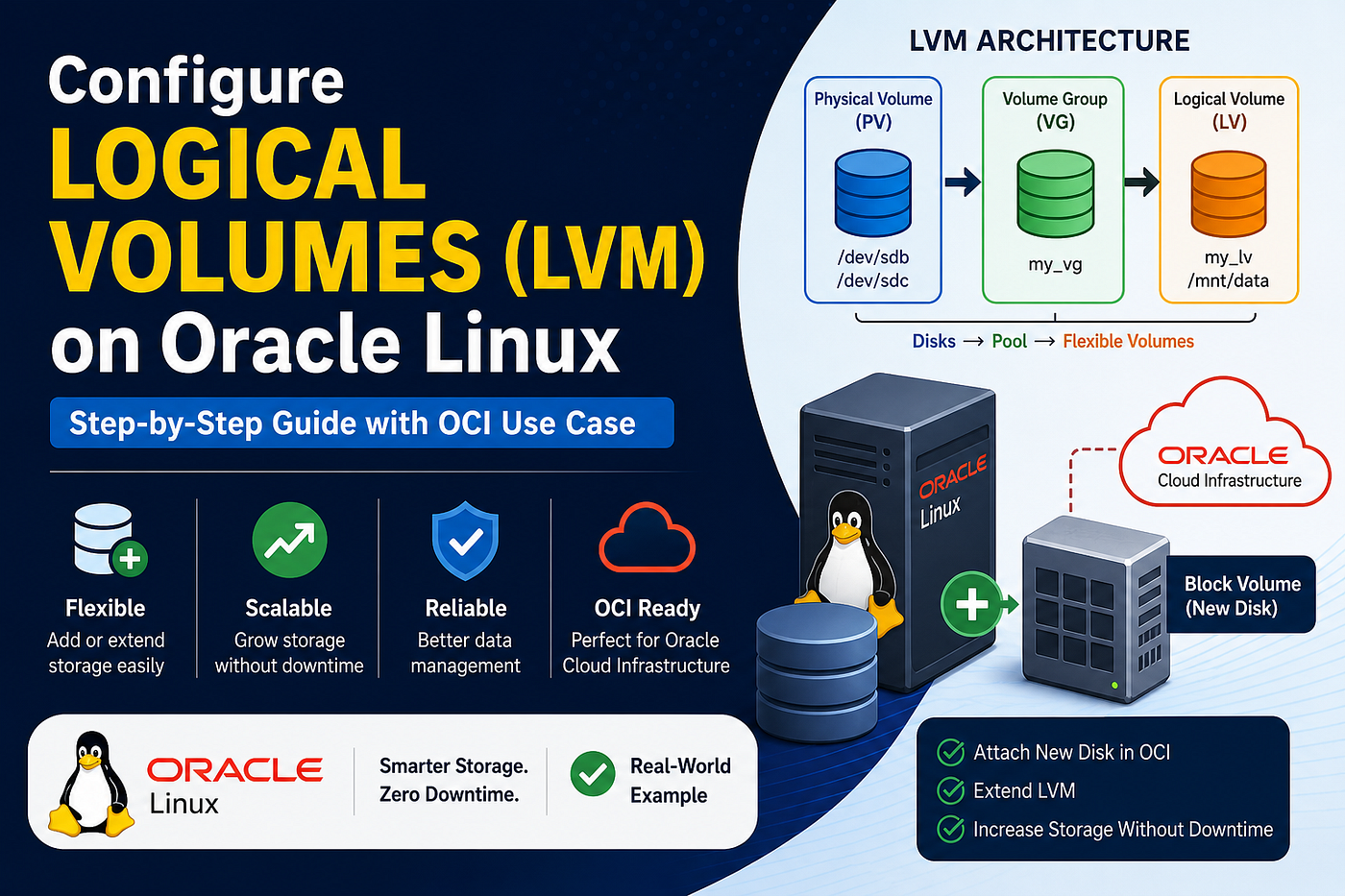
🧠 What is LVM (in simple words)
Think of LVM like this:
- Disk (PV) → Raw storage
- VG (Volume Group) → Storage pool
- LV (Logical Volume) → Usable partition
👉 Simple idea:
Combine disks → Create a pool → Use space as needed

⚙️ Prerequisites
- Oracle Linux server
- One extra disk (block volume in OCI)
- Root or sudo access
☁️ Real-World Scenario
In one of my environments, an application server started throwing errors because the /var filesystem was full due to log growth.
Instead of rebuilding the server or resizing partitions (which would require downtime), I:
- Attached a new block volume in OCI
- Added it to the existing LVM
- Extended the logical volume
👉 The entire process was completed without downtime, and the application continued running smoothly.
This is where LVM becomes a must-have skill for system administrators.
🔍 Step 1: Check the New Disk
Run:
lsblkYou will see something like:
sdb 50G
👉 This is your new disk.
🧱 Step 2: Create Physical Volume
sudo pvcreate -v /dev/sd{b,c}
Check:
pvs
📦 Step 3: Create Volume Group
sudo vgcreate -v myvolg /dev/sd{b,c}
Check:
vgs👉 Now your storage pool is ready.

💽 Step 4: Create Logical Volume
sudo lvcreate -v -L 5G -n myvol myvolgWhere:
-L: Total size of the RAID array.-n: Name of the RAID array.
👉 You created a 20GB usable partition

Verify LV creation.
sudo lvdisplay myvolg
🧾 Step 5: Format and Mount
mkfs.xfs /dev/my_vg/my_lv
mkdir /mnt/data
mount /dev/my_vg/my_lv /mnt/data
Make it permanent:
echo '/dev/my_vg/my_lv /mnt/data xfs defaults 0 0' >> /etc/fstab
☁️ Real Scenario (Very Important)
👉 Situation: In production environments, running out of disk space can impact applications and cause downtime. Traditional partitioning makes resizing difficult, but LVM provides a flexible solution.
👉 What you do in OCI:
- Attach a new block volume
- Extend your LVM
No downtime. No stress.
➕ Step 6: Add New Disk to LVM
pvcreate /dev/sdc
vgextend my_vg /dev/sdc
📈 Step 7: Extend Logical Volume
lvextend -L +20G /dev/my_vg/my_lv🔄 Step 8: Resize Filesystem
For XFS:
xfs_growfs /mnt/daFor EXT4:
resize2fs /dev/my_vg/my_lv👉 Done. Your storage increased without downtime.

🛠️ Troubleshooting (Practical Issues)
🔸 Disk not visible
lsblk
fdisk -l
🔸 Volume extended but size not updated
👉 You missed filesystem resize
- XFS:
xfs_growfs /mnt/data- EXT4:
resize2fs /dev/my_vg/my_lv🔸 VG not extending
pvs
vgs
👉 Check if disk is properly added.
🔸 Wrong filesystem command
- XFS →
xfs_growfs - EXT4 →
resize2fs
💡 Expert Tips
- Always check disk usage:
df -h- Use
lsblkto understand disk structure clearly - Prefer XFS filesystem in Oracle Linux
- Always take backup before resizing
✅ Best Practices
- Use clear naming (
app_vg,data_lv) - Monitor disk usage regularly
- Plan storage before production deployment
- Avoid mixing too many disks without documentation
🎯 Conclusion
LVM is not just a feature — it’s a powerful tool that makes storage management simple and flexible, especially in cloud environments.
In OCI, where scaling is common, LVM helps you:
- Expand storage without downtime
- Handle unexpected disk growth
- Manage resources efficiently
From my experience, using LVM in production environments saves time and avoids critical issues during disk space shortages.
👉 If you are working with Oracle Linux, learning LVM is not optional — it’s essential.
🔥 My Tip (Personal)
In real projects, I always use LVM when:
- Working with databases
- Handling growing logs
- Managing application storage
Because resizing later becomes very simple and stress-free.
메타데이터
- post_id
- cdf033c4ec64
- slug
- configuring-logical-volumes-lvm-on-oracle-linux-in-oci-step-by-step-guide-cdf033c4ec64
- url
- https://medium.com/@mrevanth123/configuring-logical-volumes-lvm-on-oracle-linux-in-oci-step-by-step-guide-cdf033c4ec64
- canonical_url
- https://medium.com/@mrevanth123/configuring-logical-volumes-lvm-on-oracle-linux-in-oci-step-by-step-guide-cdf033c4ec64
- author_url
- https://medium.com/@mrevanth123
- status
- ok
- fetched_at
- 2026-06-12 07:40:50