Recovering Deleted Logs and Files After a Cybersecurity Incident
How to Preserve Original Storage, Reconstruct Deleted Data, and Avoid Destroying Digital Evidence
Recovering Deleted Logs and Files After a Cybersecurity Incident
How to Preserve Original Storage, Reconstruct Deleted Data, and Avoid Destroying Digital Evidence
A cybersecurity incident rarely affects only the files immediately visible to users. An attacker may delete security logs, remove configuration files, encrypt virtual disks, damage databases, erase snapshots, or destroy documents to interrupt operations and conceal activity. Even when the affected server, workstation, NAS, or storage array still powers on, information needed to understand the incident may no longer appear in its normal location.

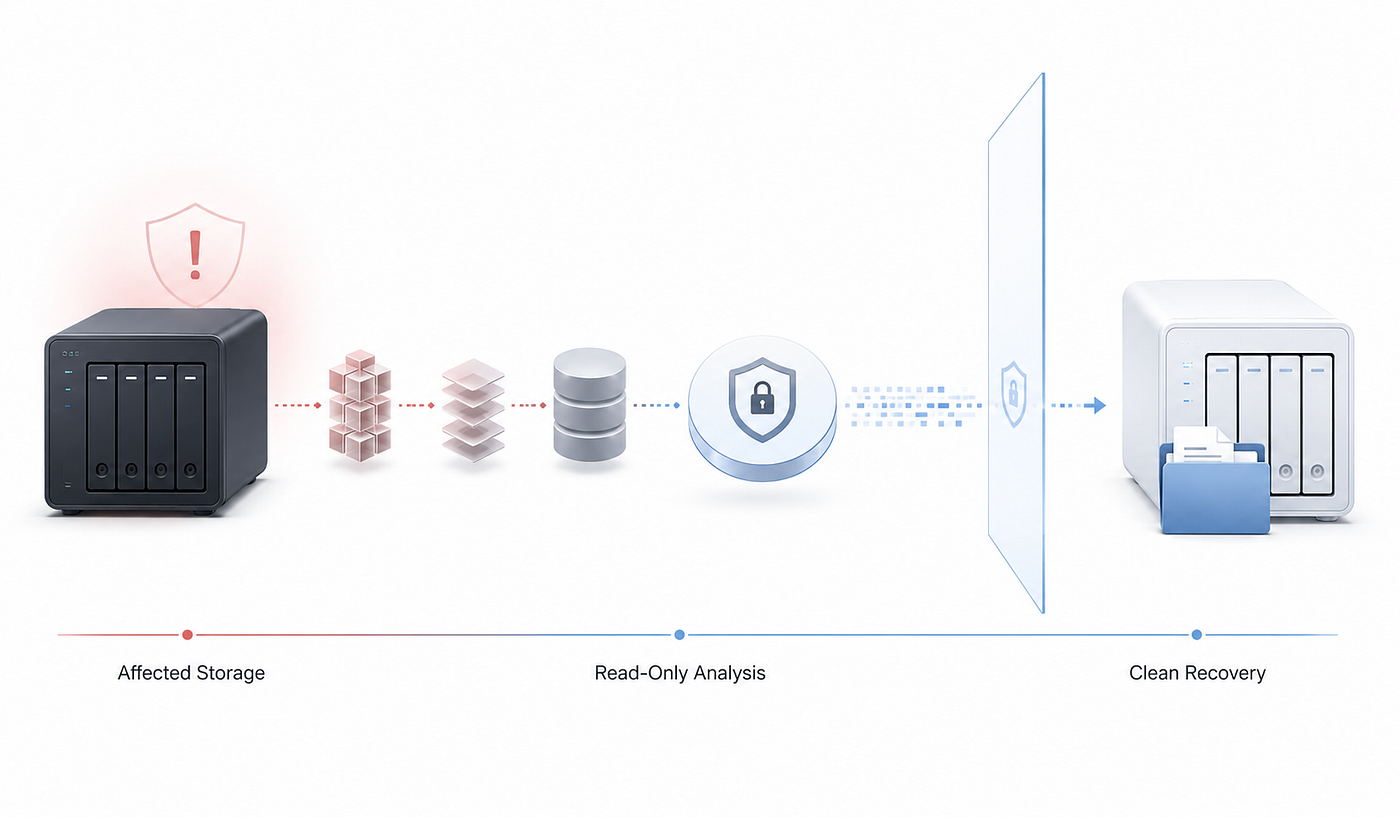
A safe recovery workflow preserves the original storage before reconstructing deleted logs, virtual disks, databases, and user files
Deleted or inaccessible data may still exist somewhere in the storage stack. Directory entries can disappear while file content remains in unallocated space. A database may no longer open even though many of its pages are intact. A virtual machine may fail to boot while its virtual disk still contains recoverable files. A RAID controller may stop assembling an array even though data remains distributed across the member disks.
Recovery after a security incident must therefore be handled differently from ordinary file recovery. The priority is not simply to return documents to production. The original storage may contain timestamps, deleted records, filesystem metadata, transaction history, or remnants of attacker activity. Every write can change what remains available for analysis. A rebuild, repair, reinstall, or uncontrolled recovery attempt may solve one operational problem while permanently destroying evidence of another.
NIST treats incident response as a coordinated process involving incident handlers, technology professionals, administrators, legal specialists, management, and external parties. Incident handlers may need to collect and analyze evidence, limit damage, determine root causes, and restore operations. Storage recovery can support this process, but it should not operate independently from it.
This article explains how deleted logs and files may be recovered after a cybersecurity incident, what information may still be present, and why preservation must come before repair. It focuses on storage systems, filesystems, RAID and NAS environments, virtual disks, databases, and user data. It does not replace a formal digital-forensics investigation, malware analysis, legal advice, or the work of an incident-response team.
Why Logs and Files Disappear
Data can disappear for several reasons during an incident. An attacker may clear logs to reduce visibility into authentication events, process execution, remote access, privilege changes, or administrative commands. Malware may delete temporary tools after execution. Ransomware may encrypt documents, application data, backup catalogs, virtual machines, and databases. Destructive attacks may overwrite filesystems, partition tables, boot structures, RAID metadata, or entire disk regions.
Not every loss is intentional. Systems can also damage data while responding to the attack. Abrupt shutdowns may interrupt database writes or filesystem transactions. Security software may quarantine files. Administrators working under pressure may reset a NAS, reinstall an operating system, initialize a disk, rebuild a degraded array, or restore a backup over the affected volume. Such actions may be understandable operationally, but they change the storage state and may reduce recoverability.
The distinction matters because different forms of loss require different methods. A deleted log is not the same as a log overwritten with zeros. An encrypted virtual disk is not the same as a deleted one. A damaged database is not the same as a securely erased database. A missing RAID volume may result from controller failure, deleted configuration metadata, changed disk order, damaged members, or encryption at another layer.
Before recovery begins, the team should identify what is missing, which layers are affected, and what activity occurred afterward. Subsequent writes can be as important as the original deletion.
Preservation Comes Before Recovery
The first objective is to prevent unnecessary change. That does not mean every affected computer should always be powered off immediately. Live systems may contain volatile evidence in memory, active network connections, running processes, encryption keys, or other information that disappears after shutdown. Decisions about isolation, shutdown, memory acquisition, and live collection should be made by qualified incident responders.
CISA specifically warns that disconnecting or powering down an infected system can affect ransomware artifacts and evidence stored in volatile memory. The correct action depends on the nature of the incident, the affected infrastructure, and the evidence that still needs to be collected.
Once relevant live evidence has been addressed, storage preservation becomes critical. Affected disks, RAID members, virtual disks, and snapshots should be protected from further writes. Where possible, investigators should create bit-for-bit images and conduct analysis on verified copies. Hash values, acquisition times, device identifiers, disk order, connection details, and handling actions should be recorded.
NIST describes bit-stream imaging as creating a bit-for-bit copy that includes allocated files, free space, and slack space. Its guidance recommends analyzing copied media rather than modifying the original when evidence, file times, or repeatability may be important. It also recommends documenting the acquisition procedure and relevant device information.
Many ordinary administrative actions write automatically. Booting an operating system can update journals, caches, indexes, temporary files, logs, and access timestamps. Mounting a filesystem read-write may replay its journal. Connecting disks to a NAS or RAID controller may update metadata. Repair utilities can modify allocation structures. Installing recovery software on the source disk may overwrite blocks containing deleted data.
Hardware or software write blockers may help prevent unintended changes during acquisition. NIST recommends using appropriate write-blocking methods and verifying copied data through message digests when file integrity matters.
A safe working principle is simple: use the original storage only to create a protected source or image, then perform reconstruction and recovery on copies. When full imaging is impractical because of capacity or business-continuity constraints, use the most controlled read-only workflow available and document the limitation.
What Deletion Really Means
Deletion is usually a metadata operation before it becomes physical erasure. In many filesystems, deleting a file removes or changes the records that connect its name and directory to the blocks containing its data. Those blocks are marked as available for reuse. Until they are overwritten, some or all of the original content may remain recoverable.
NIST notes that deleting a file typically changes the filesystem records that point to it rather than immediately erasing the file content. The operating system may then treat its former blocks as free space and overwrite them at any time. Deleted files, previous versions, free space, and slack space may consequently contain useful residual data.
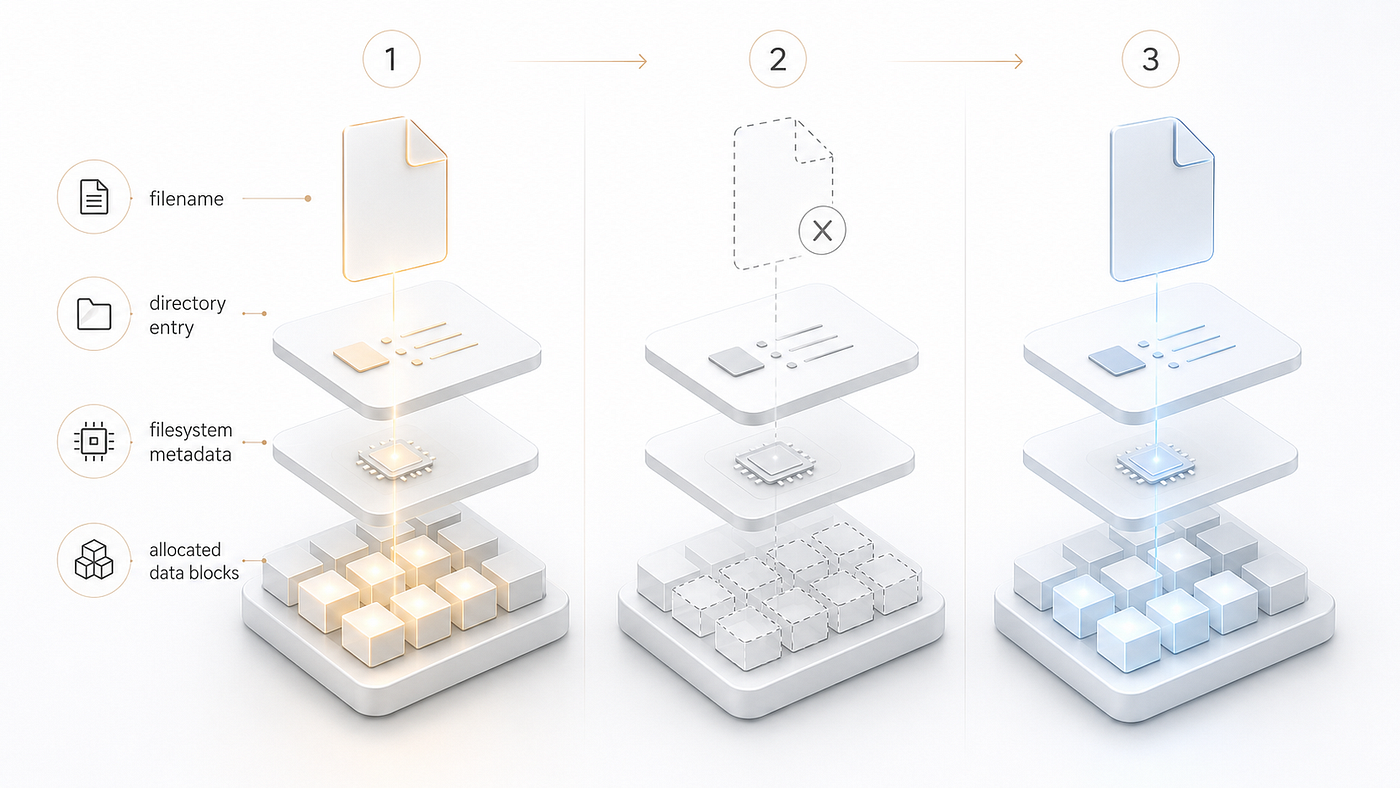
Deletion may remove filesystem references before the underlying blocks are overwritten, reused, or released through TRIM.
Recoverability also depends heavily on the storage technology. On a conventional hard disk, released sectors may retain previous content until new data is written over them. On solid-state storage, TRIM or UNMAP operations can inform the device that certain logical blocks are no longer required. The controller may subsequently erase or recycle the underlying flash pages through garbage collection. A recovery application may then receive zeros or no usable previous content from those regions.
RAID, thin provisioning, snapshots, deduplication, encryption, and virtual storage add further complexity. A guest operating system may delete a file inside a virtual disk stored on a thin-provisioned datastore. That datastore may pass discard operations to lower layers. The NAS may store the datastore on RAID, while snapshots are managed by a separate volume layer. The deletion visible inside the guest does not reveal which physical blocks still exist or whether an earlier snapshot retains them.
For this reason, the statement that deleted files can always be recovered is technically irresponsible. Recovery is possible only when useful content or metadata remains accessible and can be interpreted correctly.
Reconstructing the Storage Stack
Modern storage is rarely a simple relationship between one disk and one filesystem. A typical environment may contain physical disks, RAID, a storage pool, logical volumes, encryption, a filesystem, snapshots, virtual disks, and application-level formats. Damage at any layer can make the layers above it inaccessible.
Consider a virtualized server stored on a NAS. Four physical disks form a RAID array. The array contains a storage pool and logical volume. A filesystem stores a virtual-machine disk, and the virtual machine contains another partition table, filesystem, database, and application logs. Recovering one deleted log may require correct interpretation of every layer.
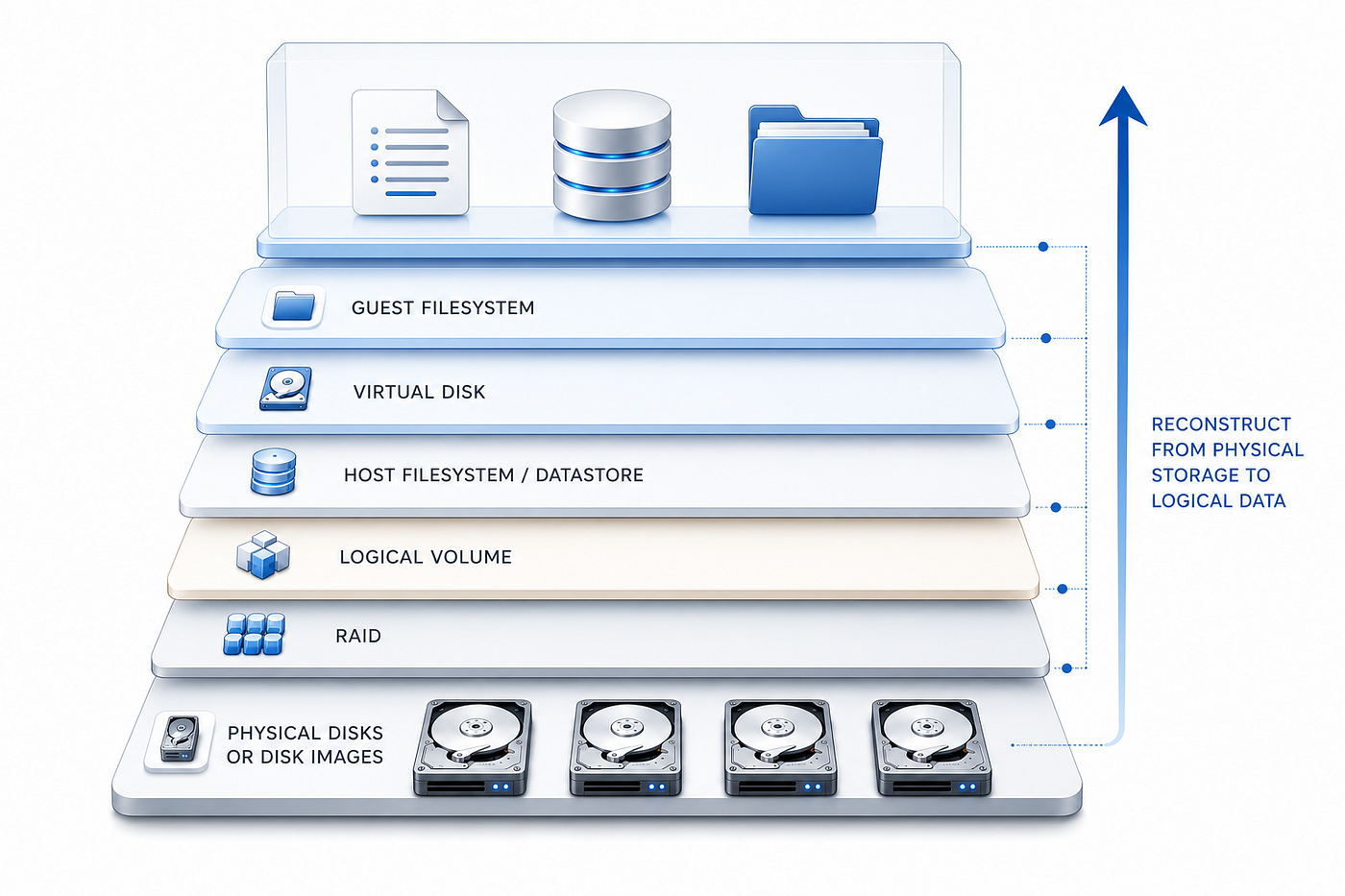
Recovering one deleted log may require reconstruction of every underlying layer, from physical disks and RAID to virtual storage and guest filesystems
If the NAS no longer assembles the RAID, scanning individual disks for log signatures is usually inadequate. File fragments may be striped across several members. Parity may be needed to reconstruct missing blocks. Disk order, stripe size, offsets, parity rotation, nested arrays, or vendor-specific metadata may need to be identified before the filesystem becomes coherent.
Locating a virtual-disk file is also not the end of the process. It may be sparse, segmented, snapshot-based, or linked to a parent disk. It can contain another damaged filesystem. A sound recovery process therefore reconstructs the storage stack from the physical or image layer upward instead of treating RAID recovery, virtual-disk recovery, filesystem analysis, and file recovery as separate tasks.
Recovering Deleted Logs
Logs may record authentication, service activity, remote sessions, process execution, scheduled tasks, application errors, security alerts, and system changes. They are also unusually vulnerable because they are frequently rotated, compressed, overwritten, truncated, or retained for short periods.
Recovery should begin by searching for alternative copies, not only the original path. A deleted local log may still exist in:
- centralized log-management platforms;
- rotated or compressed archives;
- backup repositories;
- filesystem snapshots;
- virtual-machine snapshots;
- application support bundles;
- temporary directories;
- secondary servers or replicas;
- exported diagnostic packages.
NIST recommends maintaining a log-management infrastructure capable of generating, transmitting, storing, analyzing, and protecting log data. Centralized logging and separate copies can help preserve records even when the original system is damaged or compromised.
If no intact copy exists, filesystem analysis may recover the deleted record, filename, timestamps, allocation information, or content blocks. Results may be complete, partial, or fragmented. Because logs are often continuously appended, different regions may have different outcomes: one section can remain intact while another has been overwritten.
Recovered logs must be interpreted cautiously. A timestamp may represent creation, modification, metadata change, snapshot time, or recovery context rather than the exact time of an attacker action. System clocks may have been incorrect or manipulated. A fragment found by pattern search may lack the surrounding record boundaries needed for reliable interpretation.
The recovery specialist’s role is to extract and preserve what remains. Correlation and evidentiary interpretation belong to the incident-response or forensic team.
Recovering Configuration Files
Configuration files may reveal service settings, access-control rules, storage mappings, scheduled tasks, database connections, virtual-machine definitions, and logging policies. Because an attacker may modify rather than delete them, recovery should include previous versions, temporary copies, editor backups, snapshots, package-manager records, and deployment artifacts.
Comparing the current file with an earlier recovered version may show changes that are not obvious from the live system. An altered logging destination, disabled audit setting, new service entry, changed storage path, or modified access rule may be technically significant even when the file itself was never deleted.
When a server or NAS no longer starts, several related configurations may be involved. Recover them to separate storage and compare versions before returning anything to production. Restoring only one file can create a configuration that never previously existed and may make the system less stable.
Treat recovered configuration data as sensitive. It may contain credentials, API tokens, private keys, internal addresses, connection strings, account names, or personal information.
Recovering Virtual Disks and Virtual Machines
Virtual infrastructure concentrates large amounts of evidence and business data into a relatively small set of files. A virtual machine may include virtual disks, configuration files, memory-state files, snapshots, change-tracking data, logs, and metadata.
After an attack, the management interface may show a machine as missing or unbootable even though its underlying files remain. Conversely, the configuration may survive while the virtual disk has been encrypted, deleted, partially overwritten, or detached from inventory.
Common recovery scenarios include:
- The VM registration was deleted, but the underlying files remain.
- The configuration was damaged, but the virtual disk is readable.
- The virtual disk was deleted, but filesystem records or blocks remain.
- Snapshot relationships were broken.
- The datastore, storage pool, or RAID layer is damaged.
- Files inside the guest operating system were deleted.
- The virtual disk itself was encrypted by ransomware.
Each case requires a different response. Simply registering and starting the machine is not always safe. Booting a recovered guest can modify system logs, journals, application databases, caches, temporary files, and timestamps.
A safer method is often to copy or reconstruct the virtual disk, mount the copy in a controlled environment, and extract relevant information without booting the original guest. A separate working copy can later be started when operational testing is necessary.
Snapshot chains require particular care. A child disk may contain only changes relative to a parent. Treating it as a complete standalone disk can produce corruption or an outdated view. Recovery must account for base disks, delta files, descriptors, snapshot order, and dependencies between components.
Recovering Databases and Transaction Data
Database recovery is not equivalent to recovering an ordinary document. A database may consist of primary data files, secondary files, transaction logs, write-ahead logs, temporary files, indexes, journals, and configuration data. These components may represent different points in time and depend on one another for consistency.
A recovered database file can be structurally present but logically inconsistent. Pages may be missing, partially overwritten, encrypted, or drawn from different snapshots. Opening the only recovered copy in the production database engine may trigger repairs, upgrades, journal replay, or other changes that complicate later analysis.
Recover all related components to separate storage, preserve the first recovered copies, and allow a qualified database specialist to work on duplicates. Transaction logs and journals may contain information not visible in the current database state, including changes made shortly before the incident.
Signature carving is particularly limited here. Recognizing isolated database pages does not automatically restore tables, relationships, indexes, transaction order, or valid records. Filesystem metadata, page identifiers, allocation maps, journal sequences, and platform-specific recovery methods may all be necessary.
The result should therefore distinguish between recovering a database file and restoring a transactionally consistent database. They are not the same achievement.
Recovering Deleted User Documents
User documents are often the most visible loss after ransomware, account compromise, or malicious deletion. They may include office files, PDFs, archives, images, source code, design projects, mail containers, accounting files, and proprietary application formats.
The preferred source is an intact, isolated backup or pre-incident snapshot. When neither exists, filesystem reconstruction may restore filenames, directories, timestamps, and relationships. Signature carving is a secondary method and often loses names, paths, metadata, and fragmented content.
Encrypted and deleted files require different analysis. In-place encryption may overwrite the original data. Ransomware that creates an encrypted copy and then deletes the source may leave remnants in unallocated space, snapshots, backups, temporary files, synchronization caches, or application autosave locations. The exact behavior depends on the specific incident and the subsequent activity of the affected system.
Recovered documents should be examined in a controlled environment because they may contain malicious macros, embedded scripts, exploit content, or files deliberately created by the attacker. Restoration should not automatically return every recovered item to production.
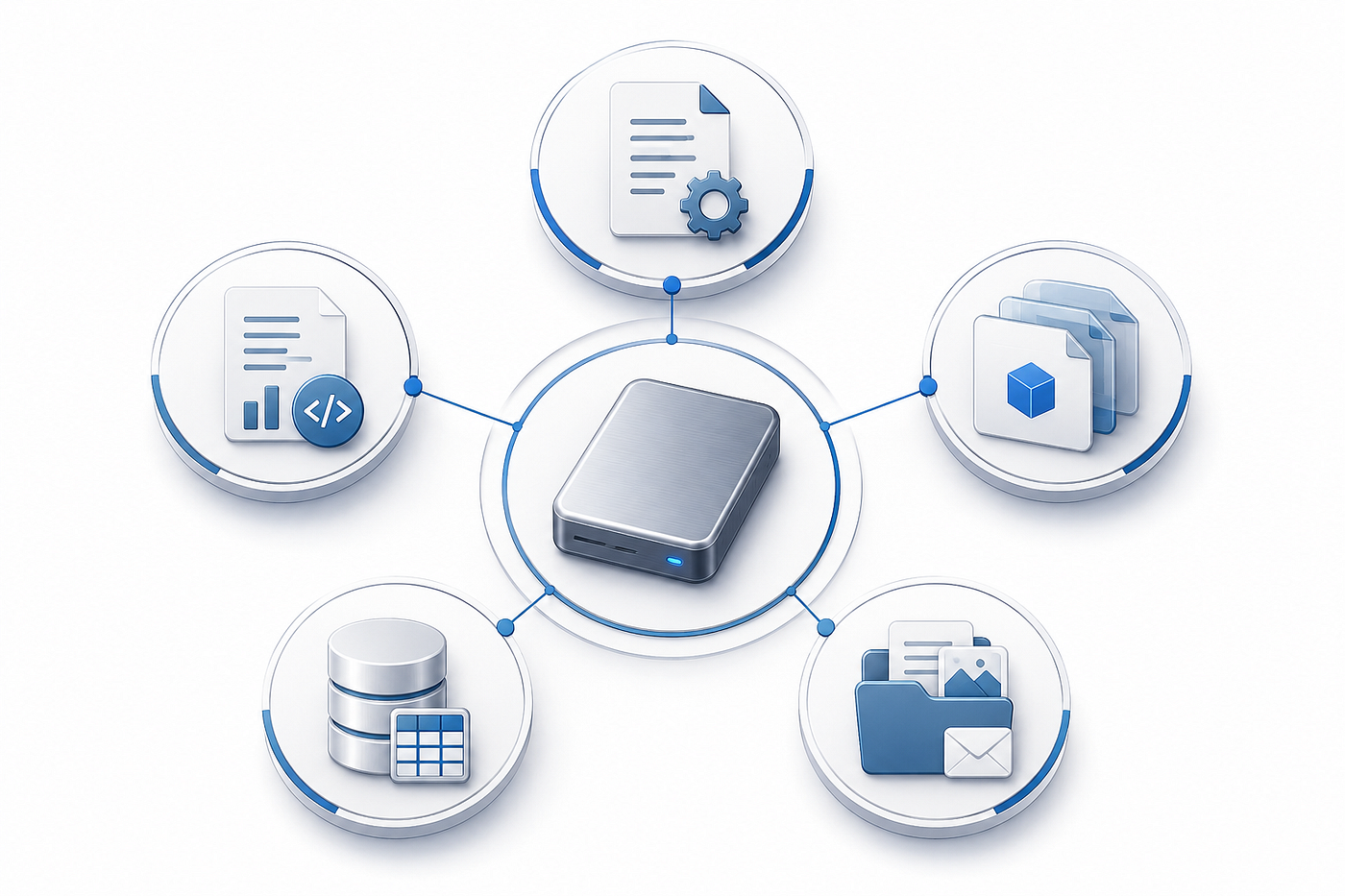
A preserved storage image may contain more than user documents, including deleted logs, configurations, virtual disks, database components, and filesystem metadata
Filesystem Reconstruction Versus File Carving
A strong recovery process begins with structural analysis. The goal is to reconstruct the filesystem’s own records: directories, file entries, allocation maps, extents, timestamps, attributes, links, and relationships. When this information survives, it provides context that raw content cannot.
File carving searches storage for recognizable signatures or internal patterns. It is useful when filesystem metadata has been destroyed, but it has limitations. Many files lack unique signatures. Fragmented files may not occupy consecutive blocks. Common byte patterns can create false positives. Names and directory paths are normally absent.
These limitations are important during incident response. A carved log fragment without a path or reliable timestamp may still be useful, but it is not equivalent to an intact file recovered with metadata. A carved database page may contain records but lack the structures needed to establish its position. A virtual-disk fragment may be recognizable but unusable without its remaining extents.
The strongest approach combines storage-layer reconstruction, structural filesystem analysis, format-aware validation, and carving where appropriate. Recovery results should identify which method produced each item and what metadata survived.
RAID and NAS Recovery After an Incident
RAID protects availability against certain disk failures. It does not prevent malicious deletion, ransomware encryption, credential misuse, application-level corruption, or filesystem damage. Every physical disk may remain healthy while the data distributed across the array is encrypted or deleted.
After an incident, administrators may see a degraded array, an inaccessible volume, or a NAS asking to initialize storage. This does not automatically mean the RAID should be rebuilt.
A rebuild is a write-intensive repair operation. It processes member disks according to the configuration currently accepted by the controller. If the disk order, RAID level, stripe size, parity layout, offset, or selected replacement disk is wrong, the operation may overwrite valid information.
Initialization can be equally dangerous because it writes new storage metadata. Filesystem repair may remove damaged records or rebuild structures according to its own consistency rules. These operations are intended to return storage to service, not to preserve everything that existed before the incident.
A safer recovery process reads surviving metadata, identifies the member disks and array parameters, and reconstructs the RAID virtually without modifying the source. The resulting virtual array can then be analyzed for logical volumes, encryption, filesystems, snapshots, virtual disks, databases, logs, and user files.
This is where storage-recovery software such as Magic RAID Recovery fits into the broader response process. Its role is not to identify the attacker, reverse-engineer malware, or replace forensic examination. Its role is to work with disks or disk images, reconstruct storage layers in a controlled manner, and recover accessible data to separate media.
When evidence preservation, insurance claims, disciplinary action, regulatory review, or legal use may be involved, the workflow should be directed and documented by qualified forensic and legal personnel.
Common Mistakes That Destroy Recoverable Data
Rebuilding RAID immediately A rebuild is a repair operation, not a diagnostic operation. It writes data and parity according to the configuration assumed by the controller. If that assumption is wrong, valid content may be damaged.
Initializing disks or storage pools Initialization writes new metadata and may overwrite partition, volume, RAID, or filesystem information needed for reconstruction.
Repairing the only copy Filesystem repair tools prioritize consistency and mountability. They may remove damaged records, rewrite metadata, or discard structures that recovery software could otherwise analyze.
Installing recovery software on the source Installation writes program files, logs, caches, updates, and temporary data. These writes may reuse blocks belonging to deleted files.
Restoring a backup over the source A backup can restore operations, but writing it over the original destroys the incident state. Restore to clean replacement storage instead.
Booting a recovered virtual machine prematurely Booting updates logs, journals, service state, databases, caches, and timestamps. Examine or clone the virtual disk before starting it.
Saving recovered files to the affected volume Recovery itself produces writes. Saving the results to the same filesystem can overwrite additional deleted data before it has been recovered.
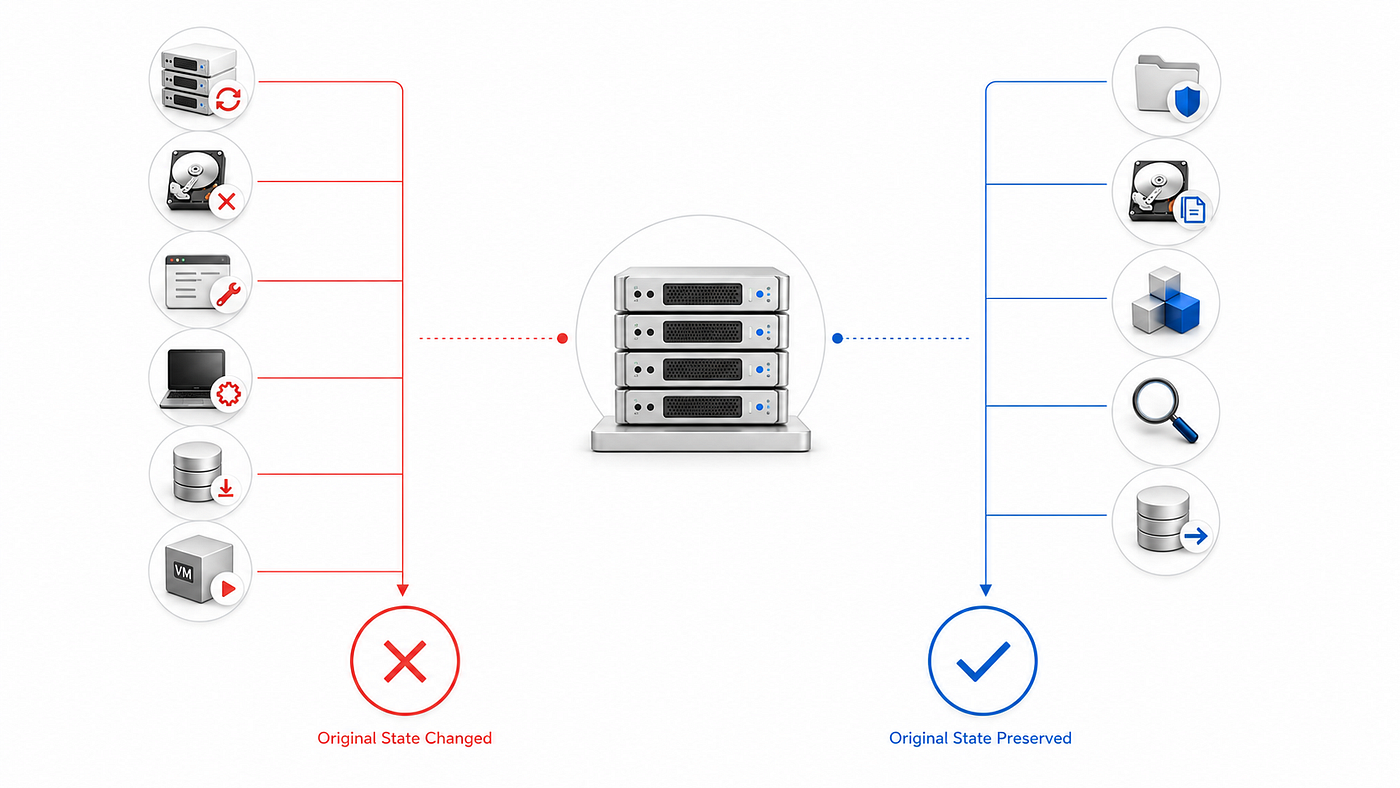
Rebuilding, initializing, repairing, or writing to the affected storage may destroy recoverable data; analysis should be performed on protected copies whenever possible
A Practical Recovery Workflow
1. Coordinate with Incident Response Determine whether volatile evidence must be collected and which containment actions have priority. Storage recovery should not interfere with live-response requirements.
2. Document the Environment Record device models, serial numbers, disk positions, cable connections, RAID status, controller details, NAS alerts, visible volumes, encryption state, system time, and every action already taken.
3. Preserve Source Media Use write protection where appropriate. Create verified disk or volume images. Retain untouched originals and record hashes, imaging methods, acquisition times, and handling information.
4. Reconstruct Storage Layers Identify partitions, RAID parameters, logical volumes, encryption, filesystems, snapshots, and virtual-disk relationships. Do not write reconstructed metadata to the source.
5. Search for Intact Alternative Copies Check centralized logs, backups, replicas, snapshots, archives, application exports, cloud platforms, secondary nodes, and diagnostic packages before relying on undelete methods.
6. Recover Files and Metadata Use structural filesystem reconstruction first, then format-aware scanning and carving where required. Preserve paths, timestamps, attributes, and recovery-method information whenever possible.
7. Validate and Classify the Results Separate complete files, partial files, carved fragments, corrupted items, encrypted items, and files recovered without metadata. Databases, virtual machines, and security logs should be validated by specialists familiar with those formats.
8. Export to Controlled Storage Write recovered data only to separate media. Restrict access, scan potentially dangerous files, preserve the first recovered copies, and create working duplicates for analysis.
Recovery Is Not Attribution
Storage recovery may reveal deleted files, missing logs, previous configurations, damaged virtual disks, or database content. It can help responders reconstruct a timeline or understand what changed. But it does not by itself establish who performed an action, whether an account was controlled by an attacker, or whether a file is admissible as evidence.
Attribution requires correlation across endpoint telemetry, identity systems, network records, cloud logs, memory captures, malware analysis, access records, and organizational context. Legal proceedings may also require documented chain of custody, validated methods, repeatability, expert interpretation, and jurisdiction-specific procedures.
NIST’s guidance on forensic techniques is expressly intended to support incident response and IT troubleshooting rather than serve as an all-inclusive forensic procedure or legal advice. It also recommends consulting management and legal counsel about the applicable laws and regulations.
The responsible claim is narrower but important: storage recovery can preserve and restore information that might otherwise be unavailable to an investigation. It supports incident response; it does not replace it.
Improving Recoverability Before the Next Incident
Important logs should be centralized, protected from unauthorized modification, and retained according to operational, security, and regulatory needs. They should not exist only on the system that produces them.
Backups should include configurations, virtual-machine metadata, databases, transaction logs, encryption information, and recovery documentation — not only user documents. At least one copy should be isolated from ordinary administrative credentials and from systems that ransomware can reach.
Snapshots must be understood and tested rather than assumed to be equivalent to offline backups. A snapshot stored in the same administrative domain may be deleted or encrypted during the same incident. Snapshot chains may also depend on metadata or parent components that must remain consistent.
Storage teams should document RAID layouts, disk positions, encryption keys, volume structures, hypervisor storage, and database dependencies. Incident-response plans should define who may shut down systems, acquire images, engage external specialists, restore services, and preserve evidence.
Regular recovery exercises reveal unusable backups, undocumented encryption keys, incomplete configuration archives, and broken snapshot chains before an emergency occurs. The test should confirm not only that files can be copied, but that complete services, databases, virtual machines, and storage structures can be reconstructed safely.
FAQ
Can deleted logs be recovered after a cybersecurity incident?
Sometimes. Deleted logs may remain recoverable if their filesystem records or underlying data blocks have not been overwritten, trimmed, securely erased, or encrypted beyond access. Recovery depends on the storage medium, filesystem, logging method, subsequent system activity, and the way the files were deleted.
What should be done first after discovering deleted files or logs?
The affected system should be preserved before recovery begins. Coordinate with the incident-response team, avoid unnecessary writes, document the current state, and create verified disk images or protected working copies whenever possible. Live evidence may need to be collected before a system is powered down.
Should RAID be rebuilt before attempting data recovery?
Not automatically. A RAID rebuild writes data and parity according to the configuration accepted by the controller. If the disk order, RAID level, stripe size, offsets, or selected member disks are incorrect, the rebuild may overwrite recoverable information. Virtual reconstruction on disk images is generally safer.
Can recovery software be installed on the affected system?
It should not be installed on the affected storage. Installation creates files, logs, caches, and temporary data that may overwrite blocks belonging to deleted files. Recovery software should run from another system, and recovered data should be saved to separate storage.
Can deleted files be recovered from an SSD after TRIM?
Recovery may be limited or impossible after TRIM. TRIM tells the SSD that specific logical blocks are no longer required, and the controller may erase or recycle the corresponding flash pages. The result depends on the SSD, controller, operating system, filesystem, and how much time and activity followed the deletion.
Can virtual machines and databases be recovered after an attack?
They may be recoverable, but they require more than ordinary file recovery. Virtual machines may depend on base disks, snapshots, delta files, configuration files, and datastore metadata. Databases may require data files, transaction logs, journals, and consistent recovery points. All components should be recovered to separate storage and examined on copies.
Is recovering deleted data the same as conducting digital forensics?
No. Data recovery focuses on restoring accessible content and reconstructing storage structures. Digital forensics also addresses evidence collection, validation, interpretation, timelines, chain of custody, attribution, and legal requirements. Recovery can support an investigation, but it does not replace forensic analysis.
Can recovered files prove who carried out the attack?
Not by themselves. A recovered file or log may help reconstruct events, but attribution normally requires correlation with endpoint telemetry, network records, identity systems, cloud logs, memory captures, malware analysis, and organizational context.
Where should recovered files be saved?
Recovered data should always be exported to separate, clean storage. Saving files back to the affected disk, RAID, NAS, datastore, or virtual disk can overwrite additional deleted information and alter the original incident state.
Are snapshots sufficient protection against ransomware?
Not always. Snapshots stored in the same administrative environment may be deleted, encrypted, or damaged during the same incident. They are useful recovery sources, but they should be combined with tested, isolated, or immutable backups.
Conclusion
Recovering deleted logs and files after a cybersecurity incident is not a routine undelete task. Missing information may be distributed across physical disks, RAID, logical volumes, encryption, filesystems, snapshots, virtual disks, databases, and application formats. A single symptom — such as a missing log, an unbootable virtual machine, or an inaccessible NAS — may originate from damage at another layer.
The most important principle is preservation before repair. Avoid unnecessary writes, coordinate with incident responders, create protected images or working copies, and recover data only to separate storage. Reconstruct the storage architecture before searching blindly for files. Prefer filesystem and metadata analysis over signature carving alone, and document the limitations of every recovered item.
Deleted data may remain recoverable when its content or metadata has not been overwritten, trimmed, securely erased, or rendered inaccessible by encryption. No outcome should be assumed in advance. It depends on the storage medium, filesystem, RAID and snapshot behavior, the nature of the attack, and everything the system did afterward.
Handled correctly, storage recovery can restore more than business documents. It can recover logs, configurations, virtual disks, transaction data, and other technical artifacts that help an organization understand the incident and rebuild safely.
Handled carelessly, the recovery attempt itself can become the final event that destroys them.
메타데이터
- post_id
- cdf68d6a532c
- slug
- recovering-deleted-logs-and-files-after-a-cybersecurity-incident-cdf68d6a532c
- url
- https://medium.com/@eis_datarecovery/recovering-deleted-logs-and-files-after-a-cybersecurity-incident-cdf68d6a532c
- canonical_url
- https://medium.com/@eis_datarecovery/recovering-deleted-logs-and-files-after-a-cybersecurity-incident-cdf68d6a532c
- author_url
- https://medium.com/@eis_datarecovery
- status
- ok
- fetched_at
- 2026-07-25 20:51:28