psql
psql is the interactive command-line terminal for PostgreSQL, used to interact with the database, execute SQL queries, and manage database…
psql
psql is the interactive command-line terminal for PostgreSQL, used to interact with the database, execute SQL queries, and manage database tasks. It comes as default CLI when we install Postgres.

if you get this, it means either postgres is not installed or not added to PATH.
what the heck is PATH?
PATH is an environment variable in operating system. It tells “When I type a command in terminal, where should I look for that program?”. so, basically we need to tell your terminal where to find the program you are tryin to run. For example: If your psql is installed at Folder :
C:\Program Files\PostgreSQL\16\bin\psql.exeWhen you type: psql in the terminal, Windows searches in folders listed inside the PATH variable. If it finds, it runs the program else, If that folder is NOT in PATH, it says psql is not recognized.

This usually happens because:
- Wrong password
- User doesn’t exist
- Authentication method mismatch
psql commands:
- psql without any argument
psqlWhen you run psql without any arguments, it attempts to connect to a PostgreSQL database using the same username as your current operating system user. If the user doesn’t exist in your database then you will get this error.
password authentication failed for user "username"- Log in as the default ‘postgres’ user
By default, PostgreSQL creates a superuser named **postgres** during installation. To login as a default user use this command.
sudo -u postgres psql- Login with a specific user to postgres.
psql -U postgres -W Log in to the specific database as the superuser:
sudo -u postgres psql -d database_nameNOTE:
sudo is a command used to run programs as another user (in this case, the postgres user). By default, sudo verifies the identity of the current user before granting elevated privileges.

Why this is happening:
rupeshis not a default PostgreSQL user: It is your Linux system account.- The Password Prompt: The prompt
[sudo] password for rupesh:is asking for your Linux login password, not a database password.
- List all the User
\du
\du+ - Create New User
CREATE USER user_name WITH PASSWORD 'user_password';- Create New Database
CREATE DATABASE database_name;- List all databases
\l or \list or \l+- Connect to a specific database
\c database_name- List all the tables
\dt
\dt+
\d- See the owner of the database
\l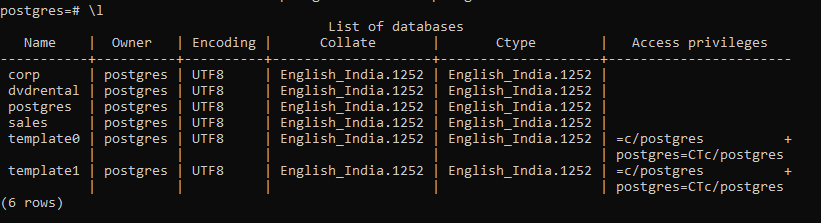
Who is the “Default Owner” of database in Postgres?
- The standard superuser: By default, the postgres user is the primary owner of the entire system and all initial databases (like
postgresandtemplate1). - The Creator: When you create a new database, the user who executes the
CREATE DATABASEcommand becomes the default owner of that specific database.
Why Ownership Matters?
Starting with PostgreSQL 15, the database_owner(or a superuser) is the only one who has permission to create objects in the public schema by default.
- Check the currently connected database and user with port.
\conninfoYou are connected to database “database01” as user “postgres” via socket in “/var/run/postgresql” at port “5432”.
By default, the psql prompt often shows the current user and database in the format user=> or user=# (where # indicates superuser status).

abroad_flow being the databse and # being the super user.
- Switch to different user
\c - username         # switch user while staying in the same database
\c database_name user # switch both database and user- Grant Full permission to a specific user on public schema
psycopg.errors.InsufficientPrivilege: permission denied for schema publicIt means that user doesn’t have permission to use the public schema. so, we grant permission this way.
First connect to the database that needs the permission. Then grant permission to the specific user on public schema.
\c your_database_nameGRANT ALL ON SCHEMA public TO user_name;This PostgreSQL command grants the user user_name full permissions (usage and create) on the public schema, allowing them to create, alter, or drop objects within it. This solves "permission denied" errors when accessing the schema.
- Change the ownership of the public schema.
This command changes the ownership of the public schema in a PostgreSQL database to the user (role) named abroadflow_mul
ALTER SCHEMA public OWNER TO user_name;Error? : ERROR: must be owner of schema public. Reason : Only a Superuser (like
postgres) can transfer ownership. To alter ownership we need to switch to superuser.
create a postgresql user using shell command
sudo -u postgres createuser -P rupesh
# run the postgres command-line utility (createuser) as default postgres user
connect to psql as the postgres superuser
sudo -u postgres psqlcreate database as default user with ownership to different user.
CREATE DATABASE abroadflow_mul OWNER abroadflow_mul;메타데이터
- post_id
- ce2f7f7c12ed
- slug
- psql-ce2f7f7c12ed
- url
- https://medium.com/@21bcs11201/psql-ce2f7f7c12ed
- canonical_url
- https://medium.com/@21bcs11201/psql-ce2f7f7c12ed
- author_url
- https://medium.com/@21bcs11201
- status
- ok
- fetched_at
- 2026-06-20 20:29:01