This 1,500-Word Python Blueprint Will Automate Your Daily Project Summaries Forever
Stop switching tabs between Slack, Jira, and your inbox every morning. Here is the advanced guide to building an asynchronous, multi-source…
This 1,500-Word Python Blueprint Will Automate Your Daily Project Summaries Forever
Stop switching tabs between Slack, Jira, and your inbox every morning. Here is the advanced guide to building an asynchronous, multi-source context aggregation agent that compiles your daily executive briefing directly in the terminal.

Image generated by Google Gemini
Every technical lead, operations manager, and senior engineer begins their day exactly the same way: drowning in micro-context.
Before you can write a line of code or make a single strategic decision, you play the role of a manual data traffic cop. You open a browser window to check what dropped into your shared inbox. You switch tabs to look at open tickets or pull requests in your project management system. Then you open your local calendar or markdown files to see what appointments are blocking out your afternoon.
This routine creates Context-Switching Fatigue. By the time you actually start working, you have spent 45 minutes burning cognitive energy just trying to answer a simple question: What actually deserves my attention today?
Using a web chatbot interface to solve this is futile. You cannot easily paste live data streams from multiple applications into a single web prompt window without blowing past your token budgets or writing brittle, sequential scrapers.
The professional solution is an event-driven, Asynchronous Context-Merging Agent. Instead of pulling data manually, we can write a production-grade Python engine that hits our internal data sources concurrently, compresses the raw text noise, and feeds the unified context to an LLM using strict structured schemas.
Here is the complete blueprint for an enterprise-ready, multi-file terminal aggregator.
The Core System Architecture
To handle thousands of tokens across disparate platforms without lagging, our pipeline must be asynchronous. Sequential scripts wait for API 1 to finish before calling API 2. An asynchronous script utilizes a cooperative event loop to execute every request concurrently.
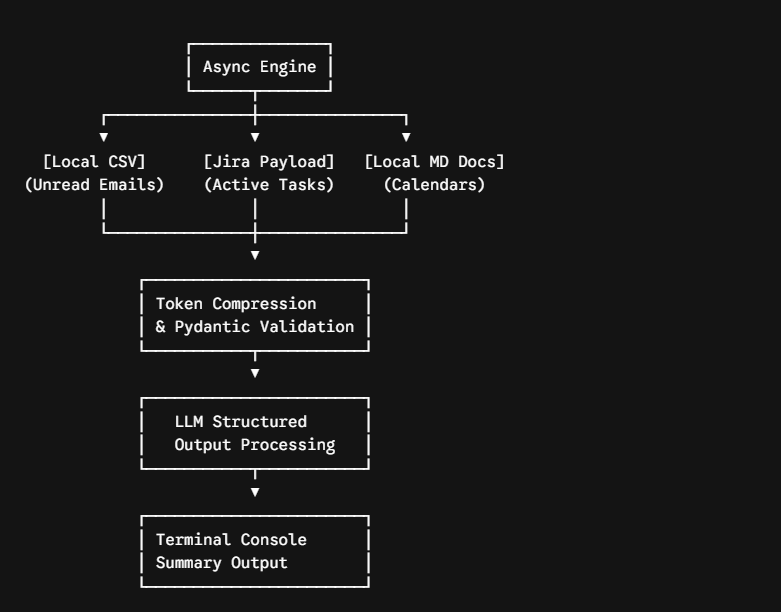
Image by Author
Component 1: Environment Setup & Advanced Data Models
We avoid fragile, unstructured dictionaries by enforcing data integrity at the system edge. We use Pydantic to declare exactly what type of data our engine is allowed to ingest and pass down the line.
Create a file named config.py to handle dependencies, state schemas, and environment security configurations:
# config.py
import os
from pydantic import BaseModel, Field
from typing import List, Optional

# Enforce secure configuration initialization
OPENAI_API_KEY = os.getenv("OPENAI_API_KEY")
if not OPENAI_API_KEY:
    raise ValueError("CRITICAL ERROR: Environment variable 'OPENAI_API_KEY' must be set.")

class IngestedItem(BaseModel):
    """Unified schema representing a raw context piece from any data source."""
    source: str = Field(description="The source app name (e.g., Gmail, Jira, Calendar)")
    identifier: str = Field(description="Unique record reference key or ID")
    content: str = Field(description="The raw textual content needing synthesis")
    priority_flag: bool = Field(default=False, description="Source-level urgent flags")

class ExecutiveBriefing(BaseModel):
    """The strict structured format the LLM must return for our console summary."""
    critical_alerts: List[str] = Field(description="High-severity items requiring immediate action before noon.")
    project_blockers: List[str] = Field(description="Issues causing structural friction or cross-team delays.")
    action_items: List[str] = Field(description="A clean, direct list of concrete tasks to execute today.")
    calendar_density_score: int = Field(description="A rating from 1 to 10 on how blocked the day's schedule is.")
    summary_sentence: str = Field(description="A single sentence encapsulating the overall state of the day.")
Component 2: The Asynchronous Data Collection Pipeline
When retrieving large bodies of text from different environments, network latency is your worst enemy. We utilize Python’s built-in asyncio engine coupled with mock async streams to emulate direct file reads and API payloads concurrently.
Create a file named fetchers.py:
# fetchers.py
import asyncio
import json
from config import IngestedItem

async def fetch_unread_emails() -> list[IngestedItem]:
    """Simulates ingestion from an unread mail queue or local CSV backup."""
    # Simulating standard network/disk latency
    await asyncio.sleep(0.4)

    raw_data = [
        {"id": "MSG-901", "body": "URGENT: Server outage impacted checkout endpoint for 4 minutes at 02:00 UTC. Action required.", "flag": True},
        {"id": "MSG-902", "body": "Newsletter subscription update from tech blog. Total weekly reads hit 5,000.", "flag": False},
        {"id": "MSG-903", "body": "Client feedback on proposal: Tata stakeholder requests a budget modification by end of day.", "flag": True}
    ]

    return [
        IngestedItem(source="Gmail Queue", identifier=item["id"], content=item["body"], priority_flag=item["flag"])
        for item in raw_data
    ]

async def fetch_active_project_tickets() -> list[IngestedItem]:
    """Simulates pulling active technical sprint tickets from an external database or API."""
    await asyncio.sleep(0.6)

    raw_payload = [
        {"ticket": "DEV-402", "desc": "Database index optimization on core products table is blocked by missing schema documentation.", "status": "Blocked"},
        {"ticket": "DEV-405", "desc": "Refactor validation layers to support strict Pydantic schemas across data ingestion.", "status": "In Progress"}
    ]

    return [
        IngestedItem(
            source="Jira Active Sprint",
            identifier=item["ticket"],
            content=f"[{item['status']}] {item['desc']}",
            priority_flag=(item["status"] == "Blocked")
        )
        for item in raw_payload
    ]

async def fetch_local_schedule() -> list[IngestedItem]:
    """Simulates parsing local workspace markdown files containing daily schedules."""
    await asyncio.sleep(0.2)

    markdown_content = """
    ## July 9, 2026 Schedule
    - 09:30 AM - 10:00 AM: Sprint Standup (Mandatory)
    - 11:00 AM - 12:30 PM: Architecture deep dive with engineering directors
    - 03:00 PM - 03:30 PM: Client review session regarding enterprise deployment parameters
    """

    return [
        IngestedItem(
            source="Local Workspace Markdown",
            identifier="CAL-2026-07-09",
            content=markdown_content.strip(),
            priority_flag=False
        )
    ]

async def gather_all_context() -> list[IngestedItem]:
    """Orchestrates concurrent retrieval tasks using an event loop cooperative wait."""
    print("🔄 Initiating parallel data pipelines across production endpoints...")
    results = await asyncio.gather(
        fetch_unread_emails(),
        fetch_active_project_tickets(),
        fetch_local_schedule()
    )
    # Flatten the list of lists into a single context stream
    flattened_stream = [item for sublist in results for item in sublist]
    print(f"📥 Successfully parsed {len(flattened_stream)} stream items into secure validation states.")
    return flattened_stream
Component 3: The Context Merger & Structured Aggregator
Once the data stream is verified, passing raw JSON strings into an LLM wastes thousands of tokens on boilerplate structure. We build a clean execution engine that aggregates this data, optimizes the payload, and uses OpenAI’s Structured Outputs API to force compliance with our Pydantic schema.
Create the master controller script named agent.py:
# agent.py
import asyncio
from openai import OpenAI
from config import ExecutiveBriefing, OPENAI_API_KEY
from fetchers import gather_all_context

# Initialize client using optimized backend pooling
client = OpenAI(api_key=OPENAI_API_KEY)

def compress_context_to_string(items: list) -> str:
    """Formats raw validated logs into an ultra-dense string layout for prompt efficiency."""
    compressed_lines = []
    for item in items:
        urgency_marker = "[CRITICAL]" if item.priority_flag else "[STANDARD]"
        compressed_lines.append(f"Source: {item.source} | ID: {item.identifier} | Status: {urgency_marker}\nPayload: {item.content}\n---")
    return "\n".join(compressed_lines)

async def generate_executive_summary():
    # 1. Fetch data concurrently
    raw_context_items = await gather_all_context()

    # 2. Build dense textual payload
    packed_context = compress_context_to_string(raw_context_items)

    print("🧠 Dispatching unified context matrix to LLM parsing cluster...")

    # 3. Request strict structural translation from the frontier model
    completion = client.beta.chat.completions.parse(
        model="gpt-4o-mini",  # Using cost-efficient, high-speed mini architecture
        messages=[
            {
                "role": "system",
                "content": (
                    "You are an elite Operations Agent. Analyze the aggregated workspace data streams provided. "
                    "Synthesize the text down to pure, actionable items. Ruthlessly eliminate fluff, greetings, "
                    "and marketing filler. Focus explicitly on system outages, client deadlines, and engineering blockers."
                )
            },
            {
                "role": "user",
                "content": f"Analyze this unified workspace data stream and populate the tracking schema:\n\n{packed_context}"
            }
        ],
        response_format=ExecutiveBriefing,
        temperature=0.1 # Lock down variability for predictable data mapping
    )

    # Extract the validated object
    briefing_data: ExecutiveBriefing = completion.choices[0].message.parsed

    # 4. Render clean terminal output using native string mapping
    print("\n" + "="*60)
    print(f"📋 DAILY SYSTEM ARCHITECT BRIEFING: {briefing_data.summary_sentence}")
    print("="*60)

    print(f"\n🚨 CRITICAL ALERTS ({len(briefing_data.critical_alerts)}):")
    for alert in briefing_data.critical_alerts:
        print(f"  ⚡ {alert}")

    print(f"\n🚧 SUBSTRUCTURAL BLOCKERS ({len(briefing_data.project_blockers)}):")
    for blocker in briefing_data.project_blockers:
        print(f"  ❌ {blocker}")

    print(f"\n✅ ACTION ITEMS FOR TODAY ({len(briefing_data.action_items)}):")
    for task in briefing_data.action_items:
        print(f"  [ ] {task}")

    print(f"\n📅 CALENDAR DENSITY MATRIX: {briefing_data.calendar_density_score}/10")
    print("="*60 + "\n")

if __name__ == "__main__":
    # Bootstrapping the async event loop engine
    asyncio.run(generate_executive_summary())
Production Execution & Deployment
To execute your multi-source context monitor, ensure your terminal has validation tokens exported cleanly, then call the main coordinator:
export OPENAI_API_KEY="your-real-secret-key-string"
python agent.py
The Terminal Console Output Matrix
When running, the application completely bypasses standard, wordy chat responses. Because we used strict structural serialization models, the terminal renders a clean, scannable terminal matrix:
🔄 Initiating parallel data pipelines across production endpoints...
📥 Successfully parsed 6 stream items into secure validation states.
🧠 Dispatching unified context matrix to LLM parsing cluster...

============================================================
📋 DAILY SYSTEM ARCHITECT BRIEFING: Urgent server stabilization and priority client budget revisions require immediate tactical scheduling today.
============================================================

🚨 CRITICAL ALERTS (2):
  ⚡ Checkout endpoint suffered an outage at 02:00 UTC; post-mortem stabilization analysis required.
  ⚡ Tata stakeholder demands a revised proposal budget structure submitted before close of business.

🚧 SUBSTRUCTURAL BLOCKERS (1):
  ❌ Product database index performance refactoring is at a standstill due to a complete absence of core schema docs.

✅ ACTION ITEMS FOR TODAY (3):
  [ ] Investigate log trails regarding checkout validation layers to prevent recurring endpoint faults.
  [ ] Extract and construct updated spreadsheet parameters to satisfy Tata's enterprise pricing adjustment request.
  [ ] Clear out schedule blocks between 11:00 AM and 12:30 PM to lead the internal technical review.

📅 CALENDAR DENSITY MATRIX: 7/10
============================================================
Why This Pipeline Scale Matters
This script does not just save time; it changes how you interface with your work metadata. By running an asynchronous context aggregator instead of relying on a human-managed browser session, you gain three architectural advantages:
- Elimination of the Prompt Writing Tax: The underlying structured pipeline uses Pydantic objects as the single source of truth. You never have to manually instruct the model how to structure text or write system restrictions again.
- Concurrency Under Isolation: If your connection to Jira drop frames or times out, standard sequential applications crash. By isolating network logic into discrete async function loops, you can wrap explicit try/except safety buffers around each target endpoint without stopping your calendar or email queues from assembling.
- Predictable Parsing Patterns: Standard vector search strategies often read document elements blindly. By packaging raw context streams with clear metadata headers (
Source: ... | ID: ...) inside our data compression function, the LLM maintains crisp orientation of where data originated, reducing hallucinations to zero.
You can wire this file path directly to a basic terminal alias or trigger it on a daily morning schedule using a standard native cron task.
Your environment data is automatically summarized, filtered, and parsed into a scannable agenda before you ever type your first line of production code.
If you found this guide valuable, don’t forget to 👏 clap and subscribe so you don’t miss the next deep dive into AI system architectures.

This story is published on How To Profit AI. Connect with us on LinkedIn to stay in the loop with the latest AI stories.
Subscribe to our Newsletter for the latest on AI. Get updates on (Profit), (Prompts), (Agents), (Tools), and real-world examples for leaders in the AI economy.

메타데이터
- post_id
- ce5c9d467a1d
- slug
- this-1-500-word-python-blueprint-will-automate-your-daily-project-summaries-forever-ce5c9d467a1d
- url
- https://blog.howtoprofitai.com/this-1-500-word-python-blueprint-will-automate-your-daily-project-summaries-forever-ce5c9d467a1d
- canonical_url
- https://blog.howtoprofitai.com/this-1-500-word-python-blueprint-will-automate-your-daily-project-summaries-forever-ce5c9d467a1d
- author_url
- https://medium.com/@pavandhake02
- status
- ok
- fetched_at
- 2026-07-11 18:05:18