Beginner Guide of NestJS, Prisma ORM , PostgreSQL, Docker
Step 1: Prerequisites
Beginner Guide of NestJS, Prisma ORM , PostgreSQL, Docker

Step 1: Prerequisites
Make sure you have Node.js, Docker installed on your system.
Step 2: Nestjs Set Up
Nest JS
NestJS is a modern Node.js framework for building efficient, scalable server-side applications, leveraging TypeScript and a modular architecture inspired by Angular.
SET UP NEST JS PROJECT FOR SIMPLE SIGN IN API
# Install Nest CLI globally
npm install -g @nestjs/cli
# Create a new NestJS project
nest new login-api
cd login
Step 3: Install Dependencies
# Install Prisma globally
npm install -g prisma

# Install Prisma CLI locally
npm install @prisma/cli

# Install Prisma ORM
npm install @prisma/client
Step 4: Initialise Prisma
Prisma ORM is a next-generation ORM that can be used to query a database in NestJS apps.
# Initialize Prisma
npx prisma init
Step 5: Migration Set Up
npx prisma migrate dev --name useraddedMigrations provide a way to incrementally update the database schema to keep it in sync with the application’s data model while preserving existing data in the database
Step 6: Set up PostgreSQL Database with Docker
Install Docker Docker is a set of platform as a service products that use OS-level virtualization to deliver software in packages called containers.

Make file docker-compose.yml and place this piece of code here for Database Configration
version: '3.8'
services:
  dev-db:
    image: postgres:15
    ports:
      - 5436:5432
    environment:
      POSTGRES_USER: postgres
      POSTGRES_PASSWORD: 1122
      POSTGRES_DB: bumou
    networks:
      - netwokname
networks:
  netwokname:
# PLACE THIS IN PACKAGE.JSON FILES
"db:dev:up": "docker compose up dev-db -d",
# COMMAND
npm run db:dev:upStep 6: Set up PostgreSQL Database Configuration
Update prisma/schema.prisma with your PostgreSQL database configuration.

UNDERSTAND NESTJS ARCHITECTURE
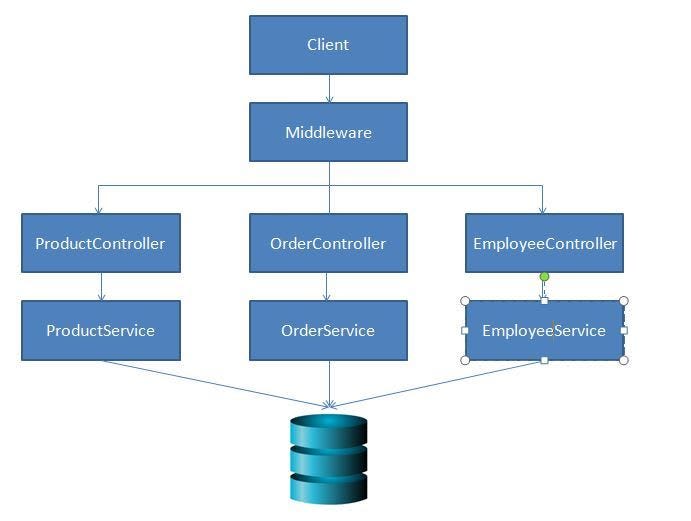
NESTJS ARCHITECTURE
Step 7: Create User Module
nest generate module user
nest generate service user
nest generate controller user
Module
Create an User Module” to encapsulate all features related to authentication. This module will import necessary dependencies and declare controllers and providers (services).

import { Module } from '@nestjs/common';
import { UserService } from './user.service';
import { UserController } from './user.controller';

@Module({
  providers: [UserService],
  controllers: [UserController]
})
export class UserModule {}
Controller
Create Controller: In the “User Controller,” define routes for signing in. define routes for creating, updating, deleting. Use decorators like “@Get,” “@Post,” “@Put,” and “@Delete” to specify the HTTP methods and paths.

import { Controller, Post, Body } from '@nestjs/common';
import { UserService } from './user.service';

interface CreateUserDto {
    email: string;
    password: string;
}

@Controller('user')
export class UserController {
    constructor(private readonly userService: UserService) { }

    @Post("signin")
    async signIn(@Body() createUserDto: CreateUserDto) {
        const { email, password } = createUserDto;
        console.log(`USER EMAIL IS ${email} and USER PASSWORD IS ${password}`);
        // return createUserDto;
        return this.userService.signIn(email, password);
    }
}
Service
This service can interact with a database to store and retrieve task . Inject this service into the “User Controller” to handle business logic.

// This file used to create logic and send back to the controller
import { Injectable } from '@nestjs/common';
import { PrismaClient } from '@prisma/client';

@Injectable()
export class UserService {

    private readonly prisma: PrismaClient;

    constructor() {
        this.prisma = new PrismaClient();
    }

    async signIn(email: string, password: string): Promise<void> {
        try {
            await this.prisma.user.create({
                data: {
                    email,
                    password,
                },
            });
        } catch (error) {
            console.error('Error signing in:', error);
            throw new Error(`Error signing in: ${error.message}`);
        }
    }
}
Step 8: Testing API
Now Hit This simple Sign In API for storing record in Database Place this URL as a End Point in Your Front End Project

Step 9: Testing Record Save in Database
#for check DB STUDIO
npx prisma studio
NestJS is a powerful framework that combines the strengths of Node. js, Express, and TypeScript.
메타데이터
- post_id
- ce6deaecd3e7
- slug
- beginner-guide-of-nestjs-prisma-orm-postgresql-docker-ce6deaecd3e7
- url
- https://medium.com/@FatimaGohar45/beginner-guide-of-nestjs-prisma-orm-postgresql-docker-ce6deaecd3e7
- canonical_url
- https://medium.com/@FatimaGohar45/beginner-guide-of-nestjs-prisma-orm-postgresql-docker-ce6deaecd3e7
- author_url
- https://medium.com/@FatimaGohar45
- status
- ok
- fetched_at
- 2026-09-19 03:49:38

